Cloudflare’s network now supports redirecting verified AI training crawlers to canonical URLs when they request deprecated or duplicate pages. When enabled via AI Crawl Control > Quick Actions, AI training crawlers that request a page with a canonical tag pointing elsewhere receive a 301 redirect to the canonical version. Humans, search engine crawlers, and AI Search agents continue to see the original page normally.
This feature leverages your existing <link rel="canonical"> tags. No additional configuration required beyond enabling the toggle. Available on Pro, Business, and Enterprise plans at no additional cost.
Cloudflare’s network now supports redirecting verified AI training crawlers to canonical URLs when they request deprecated or duplicate pages. When enabled via AI Crawl Control > Quick Actions, AI training crawlers that request a page with a canonical tag pointing elsewhere receive a 301 redirect to the canonical version. Humans, search engine crawlers, and AI Search agents continue to see the original page normally.
This feature leverages your existing <link rel="canonical"> tags. No additional configuration required beyond enabling the toggle. Available on Pro, Business, and Enterprise plans at no additional cost.
Cloudflare’s network now supports redirecting verified AI training crawlers to canonical URLs when they request deprecated or duplicate pages. When enabled via AI Crawl Control > Quick Actions, AI training crawlers that request a page with a canonical tag pointing elsewhere receive a 301 redirect to the canonical version. Humans, search engine crawlers, and AI Search agents continue to see the original page normally.
This feature leverages your existing <link rel="canonical"> tags. No additional configuration required beyond enabling the toggle. Available on Pro, Business, and Enterprise plans at no additional cost.
AI Crawl Control now includes new tools to help you prepare your site for the agentic Internet—a web where AI agents are first-class citizens that discover and interact with content differently than human visitors.
Content Format insights
The Metrics tab now includes a Content Format chart showing what content types AI systems request versus what your origin serves. Understanding these patterns helps you optimize content delivery for both human and agent consumption.
Directives tab (formerly Robots.txt)
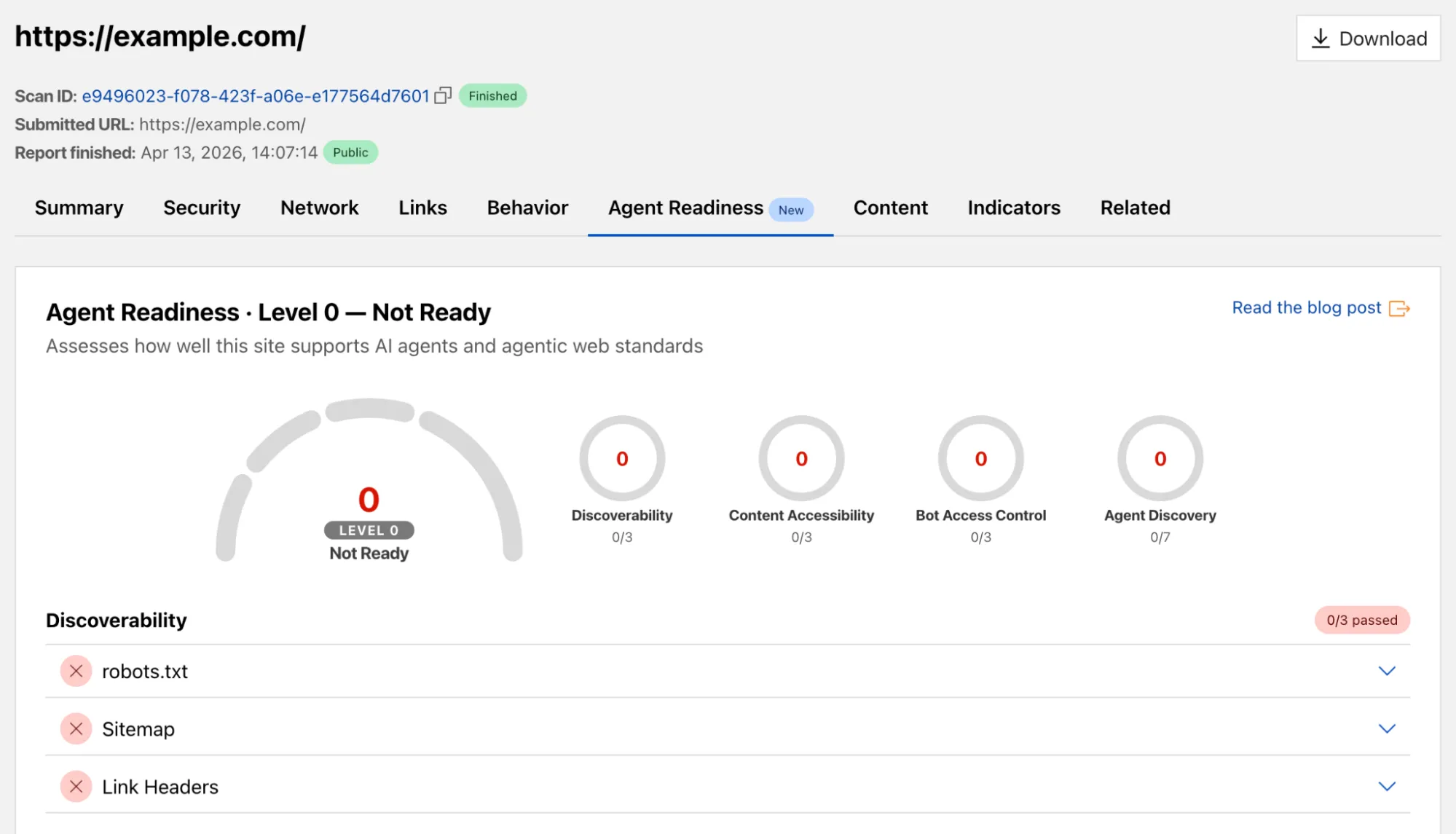
The Robots.txt tab has been renamed to Directives and now includes a link to check your site’s Agent Readiness score.
AI Crawl Control now includes new tools to help you prepare your site for the agentic Internet—a web where AI agents are first-class citizens that discover and interact with content differently than human visitors.
Content Format insights
The Metrics tab now includes a Content Format chart showing what content types AI systems request versus what your origin serves. Understanding these patterns helps you optimize content delivery for both human and agent consumption.
Directives tab (formerly Robots.txt)
The Robots.txt tab has been renamed to Directives and now includes a link to check your site’s Agent Readiness score.
AI Crawl Control now includes new tools to help you prepare your site for the agentic Internet—a web where AI agents are first-class citizens that discover and interact with content differently than human visitors.
Content Format insights
The Metrics tab now includes a Content Format chart showing what content types AI systems request versus what your origin serves. Understanding these patterns helps you optimize content delivery for both human and agent consumption.
Directives tab (formerly Robots.txt)
The Robots.txt tab has been renamed to Directives and now includes a link to check your site’s Agent Readiness score.
Radar adds three new features to the AI Insights page, expanding visibility into how AI bots, crawlers, and agents interact with the web.
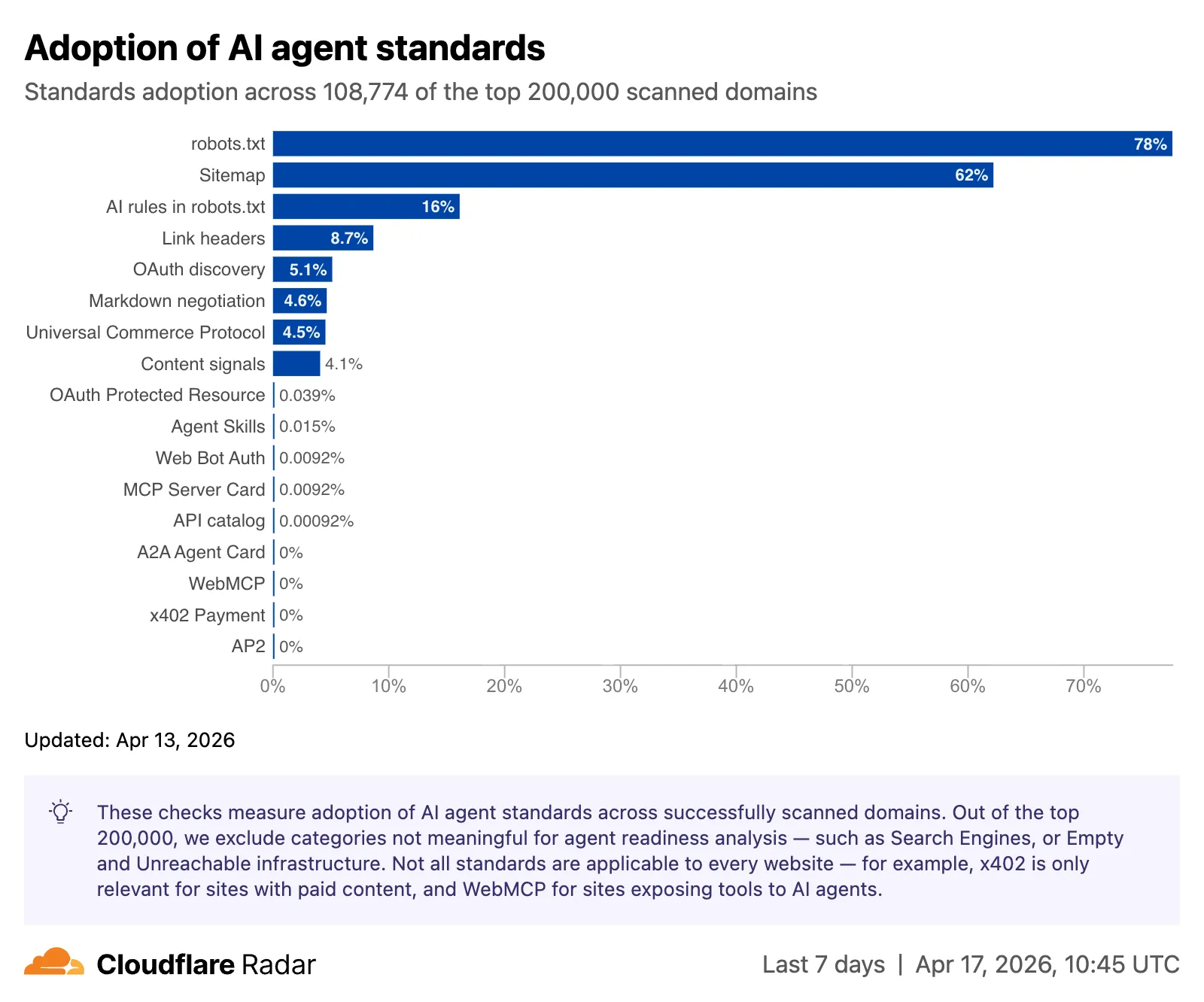
Adoption of AI agent standards
The AI Insights page now includes an adoption of AI agent standards widget that tracks how websites adopt agent-facing standards. The data is filterable by domain category and updated weekly on Mondays.
This data is also available through the Agent Readiness API reference.
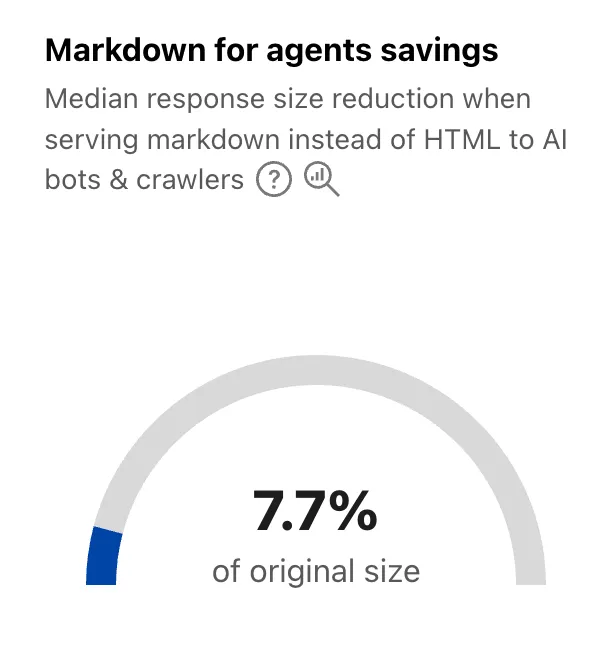
A new savings gauge shows the median response-size reduction when serving Markdown instead of HTML to AI bots and crawlers. This highlights the bandwidth and token savings that Markdown for Agents provides.
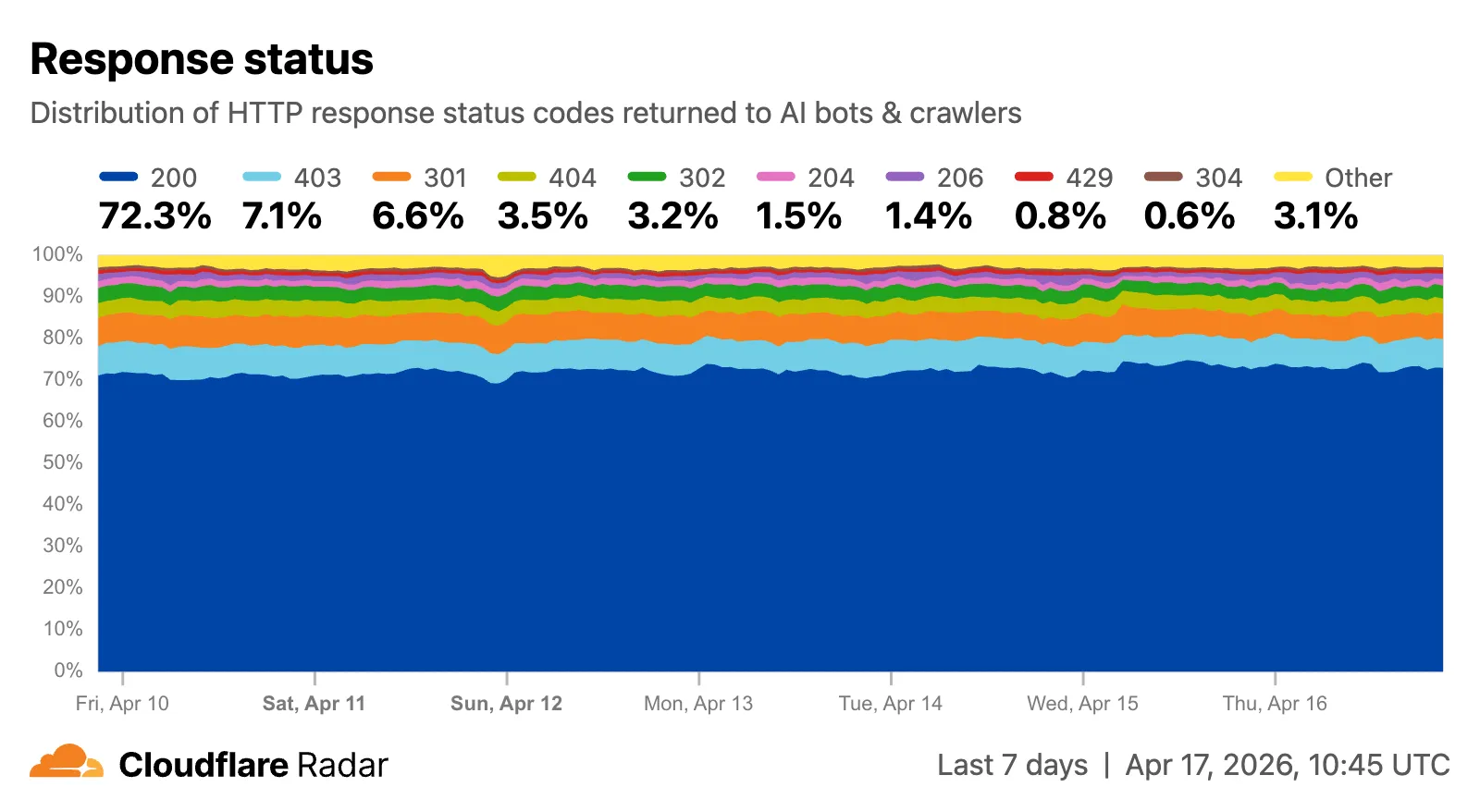
The new response status widget displays the distribution of HTTP response status codes returned to AI bots and crawlers. Results are groupable by individual status code (200, 403, 404) or by category (2xx, 3xx, 4xx, 5xx).
The same widget is available on each verified bot’s detail page (only available for AI bots), for example Google.
Radar adds three new features to the AI Insights page, expanding visibility into how AI bots, crawlers, and agents interact with the web.
Adoption of AI agent standards
The AI Insights page now includes an adoption of AI agent standards widget that tracks how websites adopt agent-facing standards. The data is filterable by domain category and updated weekly on Mondays.
This data is also available through the Agent Readiness API reference.
A new savings gauge shows the median response-size reduction when serving Markdown instead of HTML to AI bots and crawlers. This highlights the bandwidth and token savings that Markdown for Agents provides.
The new response status widget displays the distribution of HTTP response status codes returned to AI bots and crawlers. Results are groupable by individual status code (200, 403, 404) or by category (2xx, 3xx, 4xx, 5xx).
The same widget is available on each verified bot’s detail page (only available for AI bots), for example Google.
Radar adds three new features to the AI Insights page, expanding visibility into how AI bots, crawlers, and agents interact with the web.
Adoption of AI agent standards
The AI Insights page now includes an adoption of AI agent standards widget that tracks how websites adopt agent-facing standards. The data is filterable by domain category and updated weekly on Mondays.
This data is also available through the Agent Readiness API reference.
A new savings gauge shows the median response-size reduction when serving Markdown instead of HTML to AI bots and crawlers. This highlights the bandwidth and token savings that Markdown for Agents provides.
The new response status widget displays the distribution of HTTP response status codes returned to AI bots and crawlers. Results are groupable by individual status code (200, 403, 404) or by category (2xx, 3xx, 4xx, 5xx).
The same widget is available on each verified bot’s detail page (only available for AI bots), for example Google.
AI Search now supports hybrid search and relevance boosting, giving you more control over how results are found and ranked.
Hybrid search
Hybrid search combines vector (semantic) search with BM25 keyword search in a single query. Vector search finds chunks with similar meaning, even when the exact words differ. Keyword search matches chunks that contain your query terms exactly. When you enable hybrid search, both run in parallel and the results are fused into a single ranked list.
You can configure the tokenizer (porter for natural language, trigram for code), keyword match mode (and for precision, or for recall), and fusion method (rrf or max) per instance:
Relevance boosting lets you nudge search rankings based on document metadata. For example, you can prioritize recent documents by boosting on timestamp, or surface high-priority content by boosting on a custom metadata field like priority.
Configure up to 3 boost fields per instance or override them per request: