Author: guillaume

  • Cloudflare One Client – Cloudflare One Client for Linux (version 2026.3.846.0)

    A new GA release for the Linux Cloudflare One Client is now available on the stable releases downloads page.

    This release contains minor fixes and improvements.

    The next stable release for Linux will introduce the new Cloudflare One Client UI, providing a cleaner and more intuitive design as well as easier access to common actions and information.

    Changes and improvements

    • Empty MDM files are now rejected instead of being incorrectly accepted as a single MDM config.
    • Fixed an issue in local proxy mode where the client could become unresponsive due to upstream connection timeouts.
    • Fixed an issue where the emergency disconnect status of a prior organization persisted after a switch to a different organization.
    • Consumer-only CLI commands are now clearly distinguished from Zero Trust commands.
    • Added detailed QUIC connection metrics to diagnostic logs for better troubleshooting.
    • Added monitoring for tunnel statistics collection timeouts.
    • Switched tunnel congestion control algorithm for local proxy mode to Cubic for improved reliability across platforms.
    • Fixed initiating managed network detections checks when no network is available, which caused device profile flapping.
  • Cloudflare One Client – Cloudflare One Client for Linux (version 2026.3.846.0)

    A new GA release for the Linux Cloudflare One Client is now available on the stable releases downloads page.

    This release contains minor fixes and improvements.

    The next stable release for Linux will introduce the new Cloudflare One Client UI, providing a cleaner and more intuitive design as well as easier access to common actions and information.

    Changes and improvements

    • Empty MDM files are now rejected instead of being incorrectly accepted as a single MDM config.
    • Fixed an issue in local proxy mode where the client could become unresponsive due to upstream connection timeouts.
    • Fixed an issue where the emergency disconnect status of a prior organization persisted after a switch to a different organization.
    • Consumer-only CLI commands are now clearly distinguished from Zero Trust commands.
    • Added detailed QUIC connection metrics to diagnostic logs for better troubleshooting.
    • Added monitoring for tunnel statistics collection timeouts.
    • Switched tunnel congestion control algorithm for local proxy mode to Cubic for improved reliability across platforms.
    • Fixed initiating managed network detections checks when no network is available, which caused device profile flapping.
  • Cloudflare One Client – Cloudflare One Client for Linux (version 2026.3.846.0)

    A new GA release for the Linux Cloudflare One Client is now available on the stable releases downloads page.

    This release contains minor fixes and improvements.

    The next stable release for Linux will introduce the new Cloudflare One Client UI, providing a cleaner and more intuitive design as well as easier access to common actions and information.

    Changes and improvements

    • Empty MDM files are now rejected instead of being incorrectly accepted as a single MDM config.
    • Fixed an issue in local proxy mode where the client could become unresponsive due to upstream connection timeouts.
    • Fixed an issue where the emergency disconnect status of a prior organization persisted after a switch to a different organization.
    • Consumer-only CLI commands are now clearly distinguished from Zero Trust commands.
    • Added detailed QUIC connection metrics to diagnostic logs for better troubleshooting.
    • Added monitoring for tunnel statistics collection timeouts.
    • Switched tunnel congestion control algorithm for local proxy mode to Cubic for improved reliability across platforms.
    • Fixed initiating managed network detections checks when no network is available, which caused device profile flapping.
  • Cloudflare One Client – Cloudflare One Client for Linux (version 2026.3.846.0)

    A new GA release for the Linux Cloudflare One Client is now available on the stable releases downloads page.

    This release contains minor fixes and improvements.

    The next stable release for Linux will introduce the new Cloudflare One Client UI, providing a cleaner and more intuitive design as well as easier access to common actions and information.

    Changes and improvements

    • Empty MDM files are now rejected instead of being incorrectly accepted as a single MDM config.
    • Fixed an issue in local proxy mode where the client could become unresponsive due to upstream connection timeouts.
    • Fixed an issue where the emergency disconnect status of a prior organization persisted after a switch to a different organization.
    • Consumer-only CLI commands are now clearly distinguished from Zero Trust commands.
    • Added detailed QUIC connection metrics to diagnostic logs for better troubleshooting.
    • Added monitoring for tunnel statistics collection timeouts.
    • Switched tunnel congestion control algorithm for local proxy mode to Cubic for improved reliability across platforms.
    • Fixed initiating managed network detections checks when no network is available, which caused device profile flapping.
  • Cloudflare One Client – Cloudflare One Client for Linux (version 2026.3.846.0)

    A new GA release for the Linux Cloudflare One Client is now available on the stable releases downloads page.

    This release contains minor fixes and improvements.

    The next stable release for Linux will introduce the new Cloudflare One Client UI, providing a cleaner and more intuitive design as well as easier access to common actions and information.

    Changes and improvements

    • Empty MDM files are now rejected instead of being incorrectly accepted as a single MDM config.
    • Fixed an issue in local proxy mode where the client could become unresponsive due to upstream connection timeouts.
    • Fixed an issue where the emergency disconnect status of a prior organization persisted after a switch to a different organization.
    • Consumer-only CLI commands are now clearly distinguished from Zero Trust commands.
    • Added detailed QUIC connection metrics to diagnostic logs for better troubleshooting.
    • Added monitoring for tunnel statistics collection timeouts.
    • Switched tunnel congestion control algorithm for local proxy mode to Cubic for improved reliability across platforms.
    • Fixed initiating managed network detections checks when no network is available, which caused device profile flapping.
  • AI Gateway – Automatically retry on upstream provider failures on AI Gateway

    AI Gateway now supports automatic retries at the gateway level. When an upstream provider returns an error, your gateway retries the request based on the retry policy you configure, without requiring any client-side changes.

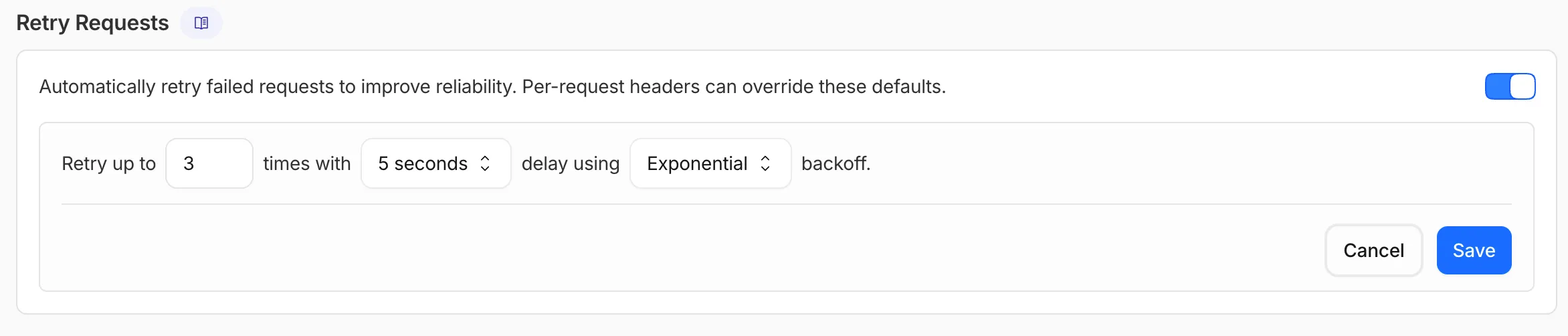
    You can configure the retry count (up to 5 attempts), the delay between retries (from 100ms to 5 seconds), and the backoff strategy (Constant, Linear, or Exponential). These defaults apply to all requests through the gateway, and per-request headers can override them.

    Retry Requests settings in the AI Gateway dashboard

    This is particularly useful when you do not control the client making the request and cannot implement retry logic on the caller side. For more complex failover scenarios — such as failing across different providers — use Dynamic Routing.

    For more information, refer to Manage gateways.

  • AI Gateway – Automatically retry on upstream provider failures on AI Gateway

    AI Gateway now supports automatic retries at the gateway level. When an upstream provider returns an error, your gateway retries the request based on the retry policy you configure, without requiring any client-side changes.

    You can configure the retry count (up to 5 attempts), the delay between retries (from 100ms to 5 seconds), and the backoff strategy (Constant, Linear, or Exponential). These defaults apply to all requests through the gateway, and per-request headers can override them.

    Retry Requests settings in the AI Gateway dashboard

    This is particularly useful when you do not control the client making the request and cannot implement retry logic on the caller side. For more complex failover scenarios — such as failing across different providers — use Dynamic Routing.

    For more information, refer to Manage gateways.

  • AI Gateway – Automatically retry on upstream provider failures on AI Gateway

    AI Gateway now supports automatic retries at the gateway level. When an upstream provider returns an error, your gateway retries the request based on the retry policy you configure, without requiring any client-side changes.

    You can configure the retry count (up to 5 attempts), the delay between retries (from 100ms to 5 seconds), and the backoff strategy (Constant, Linear, or Exponential). These defaults apply to all requests through the gateway, and per-request headers can override them.

    Retry Requests settings in the AI Gateway dashboard

    This is particularly useful when you do not control the client making the request and cannot implement retry logic on the caller side. For more complex failover scenarios — such as failing across different providers — use Dynamic Routing.

    For more information, refer to Manage gateways.

  • AI Gateway – Automatically retry on upstream provider failures on AI Gateway

    AI Gateway now supports automatic retries at the gateway level. When an upstream provider returns an error, your gateway retries the request based on the retry policy you configure, without requiring any client-side changes.

    You can configure the retry count (up to 5 attempts), the delay between retries (from 100ms to 5 seconds), and the backoff strategy (Constant, Linear, or Exponential). These defaults apply to all requests through the gateway, and per-request headers can override them.

    Retry Requests settings in the AI Gateway dashboard

    This is particularly useful when you do not control the client making the request and cannot implement retry logic on the caller side. For more complex failover scenarios — such as failing across different providers — use Dynamic Routing.

    For more information, refer to Manage gateways.

  • AI Gateway – Automatically retry on upstream provider failures on AI Gateway

    AI Gateway now supports automatic retries at the gateway level. When an upstream provider returns an error, your gateway retries the request based on the retry policy you configure, without requiring any client-side changes.

    You can configure the retry count (up to 5 attempts), the delay between retries (from 100ms to 5 seconds), and the backoff strategy (Constant, Linear, or Exponential). These defaults apply to all requests through the gateway, and per-request headers can override them.

    Retry Requests settings in the AI Gateway dashboard

    This is particularly useful when you do not control the client making the request and cannot implement retry logic on the caller side. For more complex failover scenarios — such as failing across different providers — use Dynamic Routing.

    For more information, refer to Manage gateways.