Author: guillaume

  • Containers – Easily connect Containers and Sandboxes to Workers

    Containers and Sandboxes now support connecting directly to Workers over HTTP. This allows you to call Workers
    functions and bindings, like KV or R2, from within the container at specific hostnames.

    Run Worker code

    Define an outbound handler to capture any HTTP request or use outboundByHost to capture requests to individual hostnames and IPs.

    export class MyApp extends Sandbox {}
    MyApp.outbound = async (request, env, ctx) => {
    // you can run arbitrary functions defined in your Worker on any HTTP request
    return await someWorkersFunction(request.body);
    };
    MyApp.outboundByHost = {
    "my.worker": async (request, env, ctx) => {
    return await anotherFunction(request.body);
    },
    };

    In this example, requests from the container to http://my.worker will run the function defined within outboundByHost,
    and any other HTTP requests will run the outbound handler. These handlers run entirely inside the Workers runtime,
    outside of the container sandbox.

    Access Workers bindings

    Each handler has access to env, so it can call any binding set in Wrangler config.
    Code inside the container makes a standard HTTP request to that hostname and the outbound Worker translates it into a binding call.

    export class MyApp extends Sandbox {}
    MyApp.outboundByHost = {
    "my.kv": async (request, env, ctx) => {
    const key = new URL(request.url).pathname.slice(1);
    const value = await env.KV.get(key);
    return new Response(value ?? "", { status: value ? 200 : 404 });
    },
    "my.r2": async (request, env, ctx) => {
    const key = new URL(request.url).pathname.slice(1);
    const object = await env.BUCKET.get(key);
    return new Response(object?.body ?? "", { status: object ? 200 : 404 });
    },
    };

    Now, from inside the container sandbox, curl http://my.kv/some-key will access Workers KV and curl http://my.r2/some-object will access R2.

    Access Durable Object state

    Use ctx.containerId to reference the container’s automatically provisioned Durable Object.

    export class MyContainer extends Container {}
    MyContainer.outboundByHost = {
    "get-state.do": async (request, env, ctx) => {
    const id = env.MY_CONTAINER.idFromString(ctx.containerId);
    const stub = env.MY_CONTAINER.get(id);
    return stub.getStateForKey(request.body);
    },
    };

    This provides an easy way to associate state with any container instance, and includes a built-in SQLite database.

    Get Started Today

    Upgrade to @cloudflare/containers version 0.2.0 or later, or @cloudflare/sandbox version 0.8.0 or later to use outbound Workers.

    Refer to Containers outbound traffic and Sandboxes outbound traffic for more details and examples.
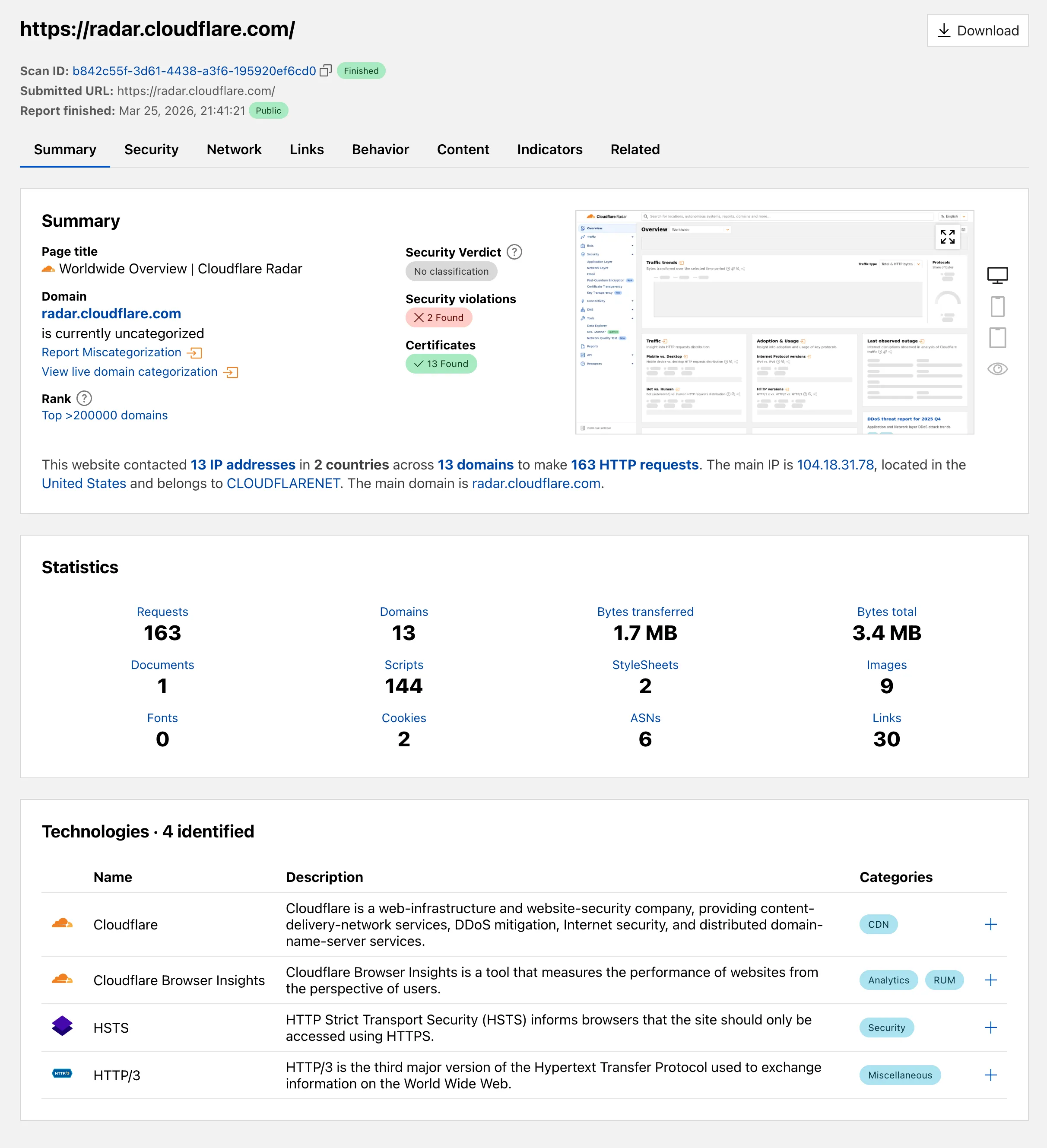
  • Radar – URL Scanner improvements on Cloudflare Radar

    Radar ships several improvements to the URL Scanner that make scan reports more informative and easier to share:

    • Live screenshots — the summary card now includes an option to capture a live screenshot of the scanned URL on demand using the Browser Rendering API.
    • Save as PDF — a new button generates a print-optimized document aggregating all tab contents (Summary, Security, Network, Behavior, and Indicators) into a single file.
    • Download as JSON — raw scan data is available as a JSON download for programmatic use.
    • Redesigned summary layout — page information and security details are now displayed side by side with the screenshot, with a layout that adapts to narrower viewports.
    • File downloads — downloads are separated into a dedicated card with expandable rows showing each file’s source URL and SHA256 hash.
    • Detailed IP address data — the Network tab now includes additional detail per IP address observed during the scan.

    Screenshot of the redesigned URL Scanner summary on Radar

    Explore these improvements on the Cloudflare Radar URL Scanner.

  • Containers – Easily connect Containers and Sandboxes to Workers

    Containers and Sandboxes now support connecting directly to Workers over HTTP. This allows you to call Workers
    functions and bindings, like KV or R2, from within the container at specific hostnames.

    Run Worker code

    Define an outbound handler to capture any HTTP request or use outboundByHost to capture requests to individual hostnames and IPs.

    export class MyApp extends Sandbox {}
    MyApp.outbound = async (request, env, ctx) => {
    // you can run arbitrary functions defined in your Worker on any HTTP request
    return await someWorkersFunction(request.body);
    };
    MyApp.outboundByHost = {
    "my.worker": async (request, env, ctx) => {
    return await anotherFunction(request.body);
    },
    };

    In this example, requests from the container to http://my.worker will run the function defined within outboundByHost,
    and any other HTTP requests will run the outbound handler. These handlers run entirely inside the Workers runtime,
    outside of the container sandbox.

    Access Workers bindings

    Each handler has access to env, so it can call any binding set in Wrangler config.
    Code inside the container makes a standard HTTP request to that hostname and the outbound Worker translates it into a binding call.

    export class MyApp extends Sandbox {}
    MyApp.outboundByHost = {
    "my.kv": async (request, env, ctx) => {
    const key = new URL(request.url).pathname.slice(1);
    const value = await env.KV.get(key);
    return new Response(value ?? "", { status: value ? 200 : 404 });
    },
    "my.r2": async (request, env, ctx) => {
    const key = new URL(request.url).pathname.slice(1);
    const object = await env.BUCKET.get(key);
    return new Response(object?.body ?? "", { status: object ? 200 : 404 });
    },
    };

    Now, from inside the container sandbox, curl http://my.kv/some-key will access Workers KV and curl http://my.r2/some-object will access R2.

    Access Durable Object state

    Use ctx.containerId to reference the container’s automatically provisioned Durable Object.

    export class MyContainer extends Container {}
    MyContainer.outboundByHost = {
    "get-state.do": async (request, env, ctx) => {
    const id = env.MY_CONTAINER.idFromString(ctx.containerId);
    const stub = env.MY_CONTAINER.get(id);
    return stub.getStateForKey(request.body);
    },
    };

    This provides an easy way to associate state with any container instance, and includes a built-in SQLite database.

    Get Started Today

    Upgrade to @cloudflare/containers version 0.2.0 or later, or @cloudflare/sandbox version 0.8.0 or later to use outbound Workers.

    Refer to Containers outbound traffic and Sandboxes outbound traffic for more details and examples.

  • Containers – Easily connect Containers and Sandboxes to Workers

    Containers and Sandboxes now support connecting directly to Workers over HTTP. This allows you to call Workers
    functions and bindings, like KV or R2, from within the container at specific hostnames.

    Run Worker code

    Define an outbound handler to capture any HTTP request or use outboundByHost to capture requests to individual hostnames and IPs.

    export class MyApp extends Sandbox {}
    MyApp.outbound = async (request, env, ctx) => {
    // you can run arbitrary functions defined in your Worker on any HTTP request
    return await someWorkersFunction(request.body);
    };
    MyApp.outboundByHost = {
    "my.worker": async (request, env, ctx) => {
    return await anotherFunction(request.body);
    },
    };

    In this example, requests from the container to http://my.worker will run the function defined within outboundByHost,
    and any other HTTP requests will run the outbound handler. These handlers run entirely inside the Workers runtime,
    outside of the container sandbox.

    Access Workers bindings

    Each handler has access to env, so it can call any binding set in Wrangler config.
    Code inside the container makes a standard HTTP request to that hostname and the outbound Worker translates it into a binding call.

    export class MyApp extends Sandbox {}
    MyApp.outboundByHost = {
    "my.kv": async (request, env, ctx) => {
    const key = new URL(request.url).pathname.slice(1);
    const value = await env.KV.get(key);
    return new Response(value ?? "", { status: value ? 200 : 404 });
    },
    "my.r2": async (request, env, ctx) => {
    const key = new URL(request.url).pathname.slice(1);
    const object = await env.BUCKET.get(key);
    return new Response(object?.body ?? "", { status: object ? 200 : 404 });
    },
    };

    Now, from inside the container sandbox, curl http://my.kv/some-key will access Workers KV and curl http://my.r2/some-object will access R2.

    Access Durable Object state

    Use ctx.containerId to reference the container’s automatically provisioned Durable Object.

    export class MyContainer extends Container {}
    MyContainer.outboundByHost = {
    "get-state.do": async (request, env, ctx) => {
    const id = env.MY_CONTAINER.idFromString(ctx.containerId);
    const stub = env.MY_CONTAINER.get(id);
    return stub.getStateForKey(request.body);
    },
    };

    This provides an easy way to associate state with any container instance, and includes a built-in SQLite database.

    Get Started Today

    Upgrade to @cloudflare/containers version 0.2.0 or later, or @cloudflare/sandbox version 0.8.0 or later to use outbound Workers.

    Refer to Containers outbound traffic and Sandboxes outbound traffic for more details and examples.

  • Radar – URL Scanner improvements on Cloudflare Radar

    Radar ships several improvements to the URL Scanner that make scan reports more informative and easier to share:

    • Live screenshots — the summary card now includes an option to capture a live screenshot of the scanned URL on demand using the Browser Rendering API.
    • Save as PDF — a new button generates a print-optimized document aggregating all tab contents (Summary, Security, Network, Behavior, and Indicators) into a single file.
    • Download as JSON — raw scan data is available as a JSON download for programmatic use.
    • Redesigned summary layout — page information and security details are now displayed side by side with the screenshot, with a layout that adapts to narrower viewports.
    • File downloads — downloads are separated into a dedicated card with expandable rows showing each file’s source URL and SHA256 hash.
    • Detailed IP address data — the Network tab now includes additional detail per IP address observed during the scan.

    Screenshot of the redesigned URL Scanner summary on Radar

    Explore these improvements on the Cloudflare Radar URL Scanner.

  • Containers – Easily connect Containers and Sandboxes to Workers

    Containers and Sandboxes now support connecting directly to Workers over HTTP. This allows you to call Workers
    functions and bindings, like KV or R2, from within the container at specific hostnames.

    Run Worker code

    Define an outbound handler to capture any HTTP request or use outboundByHost to capture requests to individual hostnames and IPs.

    export class MyApp extends Sandbox {}
    MyApp.outbound = async (request, env, ctx) => {
    // you can run arbitrary functions defined in your Worker on any HTTP request
    return await someWorkersFunction(request.body);
    };
    MyApp.outboundByHost = {
    "my.worker": async (request, env, ctx) => {
    return await anotherFunction(request.body);
    },
    };

    In this example, requests from the container to http://my.worker will run the function defined within outboundByHost,
    and any other HTTP requests will run the outbound handler. These handlers run entirely inside the Workers runtime,
    outside of the container sandbox.

    Access Workers bindings

    Each handler has access to env, so it can call any binding set in Wrangler config.
    Code inside the container makes a standard HTTP request to that hostname and the outbound Worker translates it into a binding call.

    export class MyApp extends Sandbox {}
    MyApp.outboundByHost = {
    "my.kv": async (request, env, ctx) => {
    const key = new URL(request.url).pathname.slice(1);
    const value = await env.KV.get(key);
    return new Response(value ?? "", { status: value ? 200 : 404 });
    },
    "my.r2": async (request, env, ctx) => {
    const key = new URL(request.url).pathname.slice(1);
    const object = await env.BUCKET.get(key);
    return new Response(object?.body ?? "", { status: object ? 200 : 404 });
    },
    };

    Now, from inside the container sandbox, curl http://my.kv/some-key will access Workers KV and curl http://my.r2/some-object will access R2.

    Access Durable Object state

    Use ctx.containerId to reference the container’s automatically provisioned Durable Object.

    export class MyContainer extends Container {}
    MyContainer.outboundByHost = {
    "get-state.do": async (request, env, ctx) => {
    const id = env.MY_CONTAINER.idFromString(ctx.containerId);
    const stub = env.MY_CONTAINER.get(id);
    return stub.getStateForKey(request.body);
    },
    };

    This provides an easy way to associate state with any container instance, and includes a built-in SQLite database.

    Get Started Today

    Upgrade to @cloudflare/containers version 0.2.0 or later, or @cloudflare/sandbox version 0.8.0 or later to use outbound Workers.

    Refer to Containers outbound traffic and Sandboxes outbound traffic for more details and examples.

  • Workers – Declare required secrets in your Wrangler configuration

    The new secrets configuration property lets you declare the secret names your Worker requires in your Wrangler configuration file. Required secrets are validated during local development and deploy, and used as the source of truth for type generation.

    • wrangler.jsonc

      {
      "secrets": {
      "required": ["API_KEY", "DB_PASSWORD"],
      },
      }
    • wrangler.toml

      [secrets]
      required = [ "API_KEY", "DB_PASSWORD" ]

    Local development

    When secrets is defined, wrangler dev and vite dev load only the keys listed in secrets.required from .dev.vars or .env/process.env. Additional keys in those files are excluded. If any required secrets are missing, a warning is logged listing the missing names.

    Type generation

    wrangler types generates typed bindings from secrets.required instead of inferring names from .dev.vars or .env. This lets you run type generation in CI or other environments where those files are not present. Per-environment secrets are supported — the aggregated Env type marks secrets that only appear in some environments as optional.

    Deploy

    wrangler deploy and wrangler versions upload validate that all secrets in secrets.required are configured on the Worker before the operation succeeds. If any required secrets are missing, the command fails with an error listing which secrets need to be set.

    For more information, refer to the secrets configuration property reference.

  • Containers – Use Docker Hub images with Containers

    Containers now support Docker Hub images. You can use a fully qualified Docker Hub image reference in your Wrangler configuration instead of first pushing the image to Cloudflare Registry.

    • wrangler.jsonc

      {
      "containers": [
      {
      // Example: docker.io/cloudflare/sandbox:0.7.18
      "image": "docker.io/<NAMESPACE>/<REPOSITORY>:<TAG>",
      },
      ],
      }
    • wrangler.toml

      [[containers]]
      image = "docker.io/<NAMESPACE>/<REPOSITORY>:<TAG>"

    Containers also support private Docker Hub images. To configure credentials, refer to Use private Docker Hub images.

    For more information, refer to Image management.

  • AI Crawl Control – Advanced WAF customization for AI Crawl Control blocks

    AI Crawl Control now supports extending the underlying WAF rule with custom modifications. Any changes you make directly in the WAF custom rules editor — such as adding path-based exceptions, extra user agents, or additional expression clauses — are preserved when you update crawler actions in AI Crawl Control.

    If the WAF rule expression has been modified in a way AI Crawl Control cannot parse, a warning banner appears on the Crawlers page with a link to view the rule directly in WAF.

    For more information, refer to WAF rule management.

  • Cache – Cache Response Rules

    You can now control how Cloudflare handles origin responses without changing your origin. Cache Response Rules let you modify Cache-Control directives, manage cache tags, and strip headers like Set-Cookie from origin responses before they reach Cloudflare’s cache. Whether traffic is cached or passed through dynamically, these rules give you control over origin response behavior that was previously out of reach.

    What changed

    Cache Rules previously only operated on request attributes. Cache Response Rules introduce a new response phase that evaluates origin responses and lets you act on them before caching. You can now:

    • Modify Cache-Control directives: Set or remove individual directives like no-store, no-cache, max-age, s-maxage, stale-while-revalidate, immutable, and more. For example, remove a no-cache directive your origin sends so Cloudflare can cache the asset, or set an s-maxage to control how long Cloudflare stores it.
    • Set a different browser Cache-Control: Send a different Cache-Control header downstream to browsers and other clients than what Cloudflare uses internally, giving you independent control over edge and browser caching strategies.
    • Manage cache tags: Add, set, or remove cache tags on responses, including converting tags from another CDN’s header format into Cloudflare’s Cache-Tag header. This is especially useful if you are migrating from a CDN that uses a different tag header or delimiter.
    • Strip headers that block caching: Remove Set-Cookie, ETag, or Last-Modified headers from origin responses before caching, so responses that would otherwise be treated as uncacheable can be stored and served from cache.

    Benefits

    • No origin changes required: Fix caching behavior entirely from Cloudflare, even when your origin configuration is locked down or managed by a different team.
    • Simpler CDN migration: Match caching behavior from other CDN providers without rewriting your origin. Translate cache tag formats and override directives that do not align with Cloudflare’s defaults.
    • Native support, fewer workarounds: Functionality that previously required workarounds is now built into Cache Rules with full Tiered Cache compatibility.
    • Fine-grained control: Use expressions to match on request and response attributes, then apply precise cache settings per rule. Rules are stackable and composable with existing Cache Rules.

    Get started

    Configure Cache Response Rules in the Cloudflare dashboard under Caching > Cache Rules, or via the Rulesets API. For more details, refer to the Cache Rules documentation.