Author: guillaume

  • Radar – Content Type Dimension for AI Bots in Cloudflare Radar

    Radar now includes content type insights for AI bot and crawler traffic. The new content_type dimension and filter shows the distribution of content types returned to AI crawlers, grouped by MIME type category.

    The content type dimension and filter are available via the following API endpoints:

    Content type categories:

    • HTML – Web pages (text/html)
    • Images – All image formats (image/*)
    • JSON – JSON data and API responses (application/json, *+json)
    • JavaScript – Scripts (application/javascript, text/javascript)
    • CSS – Stylesheets (text/css)
    • Plain Text – Unformatted text (text/plain)
    • Fonts – Web fonts (font/*, application/font-*)
    • XML – XML documents and feeds (text/xml, application/xml, application/rss+xml, application/atom+xml)
    • YAML – Configuration files (text/yaml, application/yaml)
    • Video – Video content and streaming (video/*, application/ogg, *mpegurl)
    • Audio – Audio content (audio/*)
    • Markdown – Markdown documents (text/markdown)
    • Documents – PDFs, Office documents, ePub, CSV (application/pdf, application/msword, text/csv)
    • Binary – Executables, archives, WebAssembly (application/octet-stream, application/zip, application/wasm)
    • Serialization – Binary API formats (application/protobuf, application/grpc, application/msgpack)
    • Other – All other content types

    Additionally, individual bot information pages now display content type distribution for AI crawlers that exist in both the Verified Bots and AI Bots datasets.
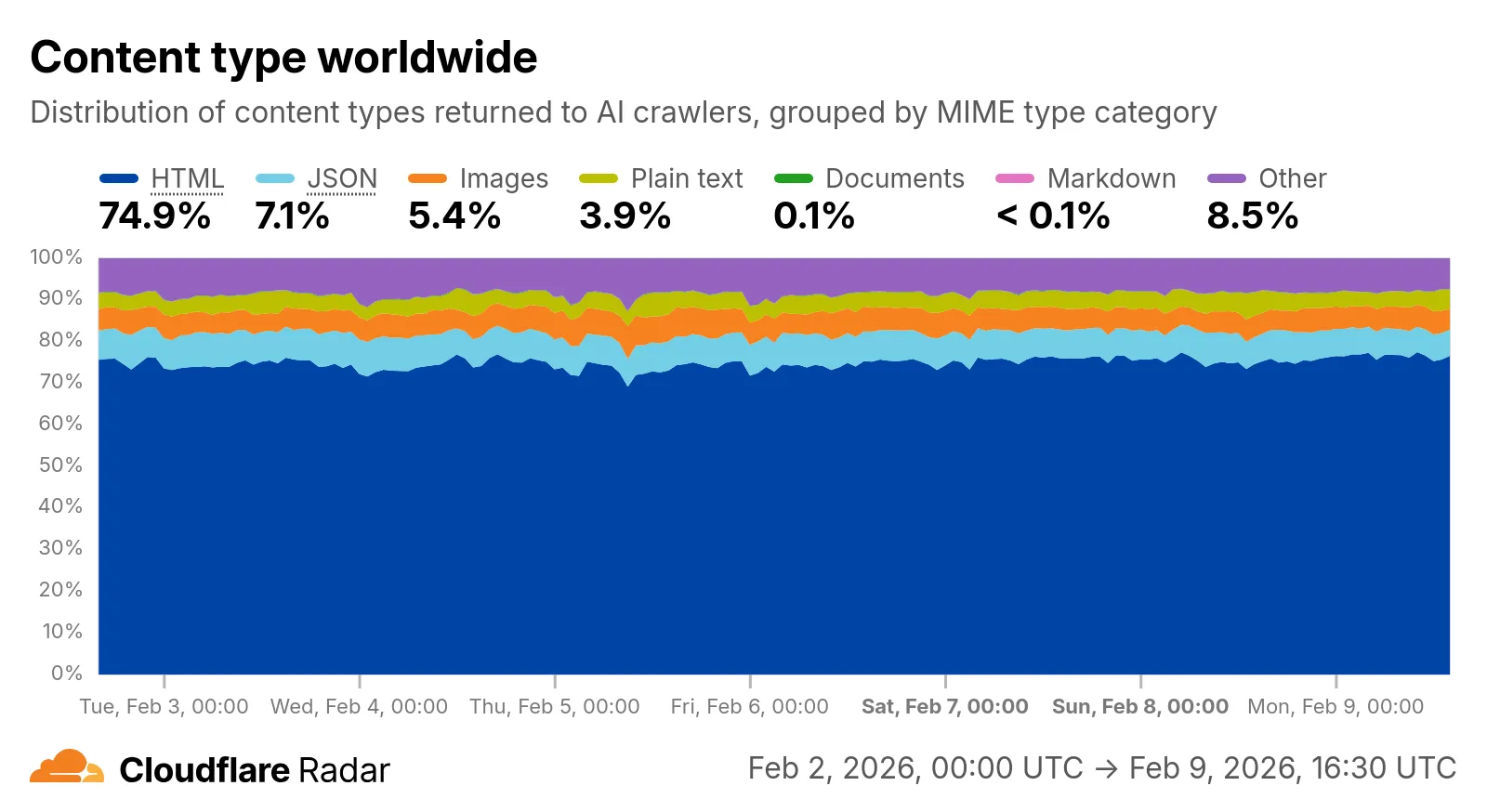
    Screenshot of the Content Type Distribution chart on the AI Insights page

    Check out the AI Insights page to explore the data.

  • Cloudflare Fundamentals – Introducing Markdown for Agents

    Cloudflare’s network now supports real-time content conversion at the source, for enabled zones using content negotiation headers. When AI systems request pages from any website that uses Cloudflare and has Markdown for Agents enabled, they can express the preference for text/markdown in the request: our network will automatically and efficiently convert the HTML to markdown, when possible, on the fly.

    Here is a curl example with the Accept negotiation header requesting this page from our developer documentation:

    curl https://developers.cloudflare.com/fundamentals/reference/markdown-for-agents/
    -H "Accept: text/markdown"

    The response to this request is now formatted in markdown:

    HTTP/2 200
    date: Wed, 11 Feb 2026 11:44:48 GMT
    content-type: text/markdown; charset=utf-8
    content-length: 2899
    vary: accept
    x-markdown-tokens: 725
    content-signal: ai-train=yes, search=yes, ai-input=yes
    ---
    title: Markdown for Agents · Cloudflare Agents docs
    ---
    ## What is Markdown for Agents
    Markdown has quickly become the lingua franca for agents and AI systems
    as a whole. The format’s explicit structure makes it ideal for AI processing,
    ultimately resulting in better results while minimizing token waste.
    ...

    Refer to our developer documentation and our blog announcement for more details.

  • Radar – Content Type Dimension for AI Bots in Cloudflare Radar

    Radar now includes content type insights for AI bot and crawler traffic. The new content_type dimension and filter shows the distribution of content types returned to AI crawlers, grouped by MIME type category.

    The content type dimension and filter are available via the following API endpoints:

    Content type categories:

    • HTML – Web pages (text/html)
    • Images – All image formats (image/*)
    • JSON – JSON data and API responses (application/json, *+json)
    • JavaScript – Scripts (application/javascript, text/javascript)
    • CSS – Stylesheets (text/css)
    • Plain Text – Unformatted text (text/plain)
    • Fonts – Web fonts (font/*, application/font-*)
    • XML – XML documents and feeds (text/xml, application/xml, application/rss+xml, application/atom+xml)
    • YAML – Configuration files (text/yaml, application/yaml)
    • Video – Video content and streaming (video/*, application/ogg, *mpegurl)
    • Audio – Audio content (audio/*)
    • Markdown – Markdown documents (text/markdown)
    • Documents – PDFs, Office documents, ePub, CSV (application/pdf, application/msword, text/csv)
    • Binary – Executables, archives, WebAssembly (application/octet-stream, application/zip, application/wasm)
    • Serialization – Binary API formats (application/protobuf, application/grpc, application/msgpack)
    • Other – All other content types

    Additionally, individual bot information pages now display content type distribution for AI crawlers that exist in both the Verified Bots and AI Bots datasets.

    Screenshot of the Content Type Distribution chart on the AI Insights page

    Check out the AI Insights page to explore the data.

  • Radar – Content Type Dimension for AI Bots in Cloudflare Radar

    Radar now includes content type insights for AI bot and crawler traffic. The new content_type dimension and filter shows the distribution of content types returned to AI crawlers, grouped by MIME type category.

    The content type dimension and filter are available via the following API endpoints:

    Content type categories:

    • HTML – Web pages (text/html)
    • Images – All image formats (image/*)
    • JSON – JSON data and API responses (application/json, *+json)
    • JavaScript – Scripts (application/javascript, text/javascript)
    • CSS – Stylesheets (text/css)
    • Plain Text – Unformatted text (text/plain)
    • Fonts – Web fonts (font/*, application/font-*)
    • XML – XML documents and feeds (text/xml, application/xml, application/rss+xml, application/atom+xml)
    • YAML – Configuration files (text/yaml, application/yaml)
    • Video – Video content and streaming (video/*, application/ogg, *mpegurl)
    • Audio – Audio content (audio/*)
    • Markdown – Markdown documents (text/markdown)
    • Documents – PDFs, Office documents, ePub, CSV (application/pdf, application/msword, text/csv)
    • Binary – Executables, archives, WebAssembly (application/octet-stream, application/zip, application/wasm)
    • Serialization – Binary API formats (application/protobuf, application/grpc, application/msgpack)
    • Other – All other content types

    Additionally, individual bot information pages now display content type distribution for AI crawlers that exist in both the Verified Bots and AI Bots datasets.

    Screenshot of the Content Type Distribution chart on the AI Insights page

    Check out the AI Insights page to explore the data.

  • Cloudflare Fundamentals – Introducing Markdown for Agents

    Cloudflare’s network now supports real-time content conversion at the source, for enabled zones using content negotiation headers. When AI systems request pages from any website that uses Cloudflare and has Markdown for Agents enabled, they can express the preference for text/markdown in the request: our network will automatically and efficiently convert the HTML to markdown, when possible, on the fly.

    Here is a curl example with the Accept negotiation header requesting this page from our developer documentation:

    curl https://developers.cloudflare.com/fundamentals/reference/markdown-for-agents/
    -H "Accept: text/markdown"

    The response to this request is now formatted in markdown:

    HTTP/2 200
    date: Wed, 11 Feb 2026 11:44:48 GMT
    content-type: text/markdown; charset=utf-8
    content-length: 2899
    vary: accept
    x-markdown-tokens: 725
    content-signal: ai-train=yes, search=yes, ai-input=yes
    ---
    title: Markdown for Agents · Cloudflare Agents docs
    ---
    ## What is Markdown for Agents
    Markdown has quickly become the lingua franca for agents and AI systems
    as a whole. The format’s explicit structure makes it ideal for AI processing,
    ultimately resulting in better results while minimizing token waste.
    ...

    Refer to our developer documentation and our blog announcement for more details.

  • Cloudflare Fundamentals – Introducing Markdown for Agents

    Cloudflare’s network now supports real-time content conversion at the source, for enabled zones using content negotiation headers. When AI systems request pages from any website that uses Cloudflare and has Markdown for Agents enabled, they can express the preference for text/markdown in the request: our network will automatically and efficiently convert the HTML to markdown, when possible, on the fly.

    Here is a curl example with the Accept negotiation header requesting this page from our developer documentation:

    curl https://developers.cloudflare.com/fundamentals/reference/markdown-for-agents/
    -H "Accept: text/markdown"

    The response to this request is now formatted in markdown:

    HTTP/2 200
    date: Wed, 11 Feb 2026 11:44:48 GMT
    content-type: text/markdown; charset=utf-8
    content-length: 2899
    vary: accept
    x-markdown-tokens: 725
    content-signal: ai-train=yes, search=yes, ai-input=yes
    ---
    title: Markdown for Agents · Cloudflare Agents docs
    ---
    ## What is Markdown for Agents
    Markdown has quickly become the lingua franca for agents and AI systems
    as a whole. The format’s explicit structure makes it ideal for AI processing,
    ultimately resulting in better results while minimizing token waste.
    ...

    Refer to our developer documentation and our blog announcement for more details.

  • Workers – Improved React Server Components support in the Cloudflare Vite plugin

    The Cloudflare Vite plugin now integrates seamlessly @vitejs/plugin-rsc, the official Vite plugin for React Server Components.

    A childEnvironments option has been added to the plugin config to enable using multiple environments within a single Worker.
    The parent environment can then import modules from a child environment in order to access a separate module graph.
    For a typical RSC use case, the plugin might be configured as in the following example:

    export default defineConfig({
    plugins: [
    cloudflare({
    viteEnvironment: {
    name: "rsc",
    childEnvironments: ["ssr"],
    },
    }),
    ],
    });

    @vitejs/plugin-rsc provides the lower level functionality that frameworks, such as React Router, build upon.
    The GitHub repository includes a basic Cloudflare example.

  • WAF – WAF Release – 2026-02-10

    This week’s release changes the rule action from BLOCK to Disabled for Anomaly:Header:User-Agent – Fake Google Bot.

    Ruleset Rule ID Legacy Rule ID Description Previous Action New Action Comments
    Cloudflare Managed Ruleset ce11be543594412bb4bb92516aa0bef8 N/A Anomaly:Header:User-Agent – Fake Google Bot Enabled Disabled We are changing the action for this rule from BLOCK to Disabled
  • Agents – Interactive browser terminals in Sandboxes

    The Sandbox SDK now supports PTY (pseudo-terminal) passthrough, enabling browser-based terminal UIs to connect to sandbox shells via WebSocket.

    sandbox.terminal(request)

    The new terminal() method proxies a WebSocket upgrade to the container’s PTY endpoint, with output buffering for replay on reconnect.

    • JavaScript

      // Worker: proxy WebSocket to container terminal
      return sandbox.terminal(request, { cols: 80, rows: 24 });
    • TypeScript

      // Worker: proxy WebSocket to container terminal
      return sandbox.terminal(request, { cols: 80, rows: 24 });

    Multiple terminals per sandbox

    Each session can have its own terminal with an isolated working directory and environment, so users can run separate shells side-by-side in the same container.

    • JavaScript

      // Multiple isolated terminals in the same sandbox
      const dev = await sandbox.getSession("dev");
      return dev.terminal(request);
    • TypeScript

      // Multiple isolated terminals in the same sandbox
      const dev = await sandbox.getSession("dev");
      return dev.terminal(request);

    xterm.js addon

    The new @cloudflare/sandbox/xterm export provides a SandboxAddon for xterm.js with automatic reconnection (exponential backoff + jitter), buffered output replay, and resize forwarding.

    • JavaScript

      import { SandboxAddon } from "@cloudflare/sandbox/xterm";
      const addon = new SandboxAddon({
      getWebSocketUrl: ({ sandboxId, origin }) =>
      `${origin}/ws/terminal?id=${sandboxId}`,
      onStateChange: (state, error) => updateUI(state),
      });
      terminal.loadAddon(addon);
      addon.connect({ sandboxId: "my-sandbox" });
    • TypeScript

      import { SandboxAddon } from "@cloudflare/sandbox/xterm";
      const addon = new SandboxAddon({
      getWebSocketUrl: ({ sandboxId, origin }) =>
      `${origin}/ws/terminal?id=${sandboxId}`,
      onStateChange: (state, error) => updateUI(state),
      });
      terminal.loadAddon(addon);
      addon.connect({ sandboxId: "my-sandbox" });

    Upgrade

    To update to the latest version:

    npm i @cloudflare/sandbox@latest
  • AI Search – AI Search now with more granular controls over indexing

    Get your content updates into AI Search faster and avoid a full rescan when you do not need it.

    Reindex individual files without a full sync

    Updated a file or need to retry one that errored? When you know exactly which file changed, you can now reindex it directly instead of rescanning your entire data source.

    Go to Overview > Indexed Items and select the sync icon next to any file to reindex it immediately.

    Sync individual files from Indexed Items

    Crawl only the sitemap you need

    By default, AI Search crawls all sitemaps listed in your robots.txt, up to the maximum files per index limit. If your site has multiple sitemaps but you only want to index a specific set, you can now specify a single sitemap URL to limit what the crawler visits.

    For example, if your robots.txt lists both blog-sitemap.xml and docs-sitemap.xml, you can specify just https://example.com/docs-sitemap.xml to index only your documentation.

    Configure your selection anytime in Settings > Parsing options > Specific sitemaps, then trigger a sync to apply the changes.

    Specify a sitemap in Parsinh options

    Learn more about indexing controls and website crawling configuration.