Author: guillaume

  • Cloudflare One Client – Cloudflare One Client for macOS (version 2026.5.1155.1)

    A new Beta release for the macOS Cloudflare One Client is now available on the beta releases downloads page.

    This release introduces the new Cloudflare One Client UI for macOS! You can expect a cleaner and more intuitive design as well as easier access to common actions and information. Here are some of the many things we have found our users appreciate:

    • Right click context menu to access the most common client actions quickly
    • Built-in captive portal login experience

    Additional Changes and improvements

    • The client now applies DNS search suffixes configured in your device profile / network policy. Administrators can push a list of DNS search domains that the client appends to single-label queries, alongside any system-configured suffixes. See DNS search suffixes for details.
    • Administrators can now control which virtual networks (VNETs) are available to which users via WARP device profile settings in the Zero Trust dashboard. Previously, every VNET in the organization was visible to every device; you can now scope the VNET picker per profile so users only see the networks relevant to them. See VNET availability for details.
    • Added a local-file signal source for Emergency Disconnect. In addition to the existing HTTPS polling mechanism, administrators can now configure WARP to monitor for a file on disk; the presence of the file triggers an emergency disconnect even if both Cloudflare and your own infrastructure are unreachable. Either signal being asserted triggers disconnect; both must be cleared for normal operation to resume.
    • Added new warp-cli debug commands for interactive connection diagnosis. See Extra debug logging for details.
    • The local DNS proxy now supports DNSSEC passthrough. DNSSEC-signed responses are forwarded to the application intact (including DO/AD bits and RRSIG records), so applications that validate DNSSEC locally — including resolvers and the dig/drill tooling — work correctly through the client.
    • Added a new MDM format for organization-wide settings, including a cleaner way to configure the compliance environment (e.g. FedRAMP). The previous per-configuration approach still works, but the new format is now recommended. See the updated Cloudflare One MDM documentation for details.
    • Client Certificate device-posture checks now support template variables (e.g. ${serial_number}, ${device_uuid}) in the Subject Alternative Name field, matching what the documentation has always claimed. Previously only the Common Name field accepted variables, which broke posture rules that pinned identity to a SAN entry.
    • Fixed the in-client captive-portal browser rendering a blank “Success” page on some airline Wi-Fi networks (United inflight Wi-Fi was the reported case). The browser now reliably loads the airline’s real portal page so users can complete sign-in from inside the client instead of having to open a separate browser.
    • Fixed an issue in proxy mode where hostnames containing underscores (e.g. ai_app.com) were rejected, breaking apps that depend on such hostnames (notably ChatGPT sandbox apps). The local proxy now accepts underscore-containing hostnames in CONNECT requests.

    Known issues

    • Registration may hang at “Checking your organization configuration” due to IPC errors. A system reboot should resolve the error, allowing registration to proceed.
    • Split tunnel list configuration is not available in the new UI. Management of split tunnel entries is currently only possible via warp-cli tunnel ip and warp-cli tunnel host. UI support will be added in a future release.
  • Cloudflare One Client – Cloudflare One Client for Windows (version 2026.5.1155.1)

    A new Beta release for the Windows Cloudflare One Client is now available on the beta releases downloads page.

    This release introduces the new Cloudflare One Client UI for Windows! You can expect a cleaner and more intuitive design as well as easier access to common actions and information. Here are some of the many things we have found our users appreciate:

    • Right click context menu to access the most common client actions quickly
    • Built-in captive portal login experience

    Additional Changes and improvements

    • The client now applies DNS search suffixes configured in your device profile / network policy. Administrators can push a list of DNS search domains that the client appends to single-label queries, alongside any system-configured suffixes. See DNS search suffixes for details.
    • Administrators can now control which virtual networks (VNETs) are available to which users via WARP device profile settings in the Zero Trust dashboard. Previously, every VNET in the organization was visible to every device; you can now scope the VNET picker per profile so users only see the networks relevant to them. See VNET availability for details.
    • Added mandatory authentication. When enabled via MDM, the Cloudflare One Client blocks all Internet traffic from the moment the machine boots until the user authenticates, closing the visibility gap on newly deployed devices and during re-authentication. See the announcement blog and documentation for details.
    • Added a local-file signal source for Emergency Disconnect. In addition to the existing HTTPS polling mechanism, administrators can now configure WARP to monitor for a file on disk; the presence of the file triggers an emergency disconnect even if both Cloudflare and your own infrastructure are unreachable. Either signal being asserted triggers disconnect; both must be cleared for normal operation to resume.
    • Added new warp-cli debug commands for interactive connection diagnosis. See Extra debug logging for details.
    • The local DNS proxy now supports DNSSEC passthrough. DNSSEC-signed responses are forwarded to the application intact (including DO/AD bits and RRSIG records), so applications that validate DNSSEC locally — including resolvers and the dig/drill tooling — work correctly through the client.
    • Added a new MDM format for organization-wide settings, including a cleaner way to configure the compliance environment (e.g. FedRAMP). The previous per-configuration approach still works, but the new format is now recommended. See the updated Cloudflare One MDM documentation for details.
    • Client Certificate device-posture checks now support template variables (e.g. ${serial_number}, ${device_uuid}) in the Subject Alternative Name field, matching what the documentation has always claimed. Previously only the Common Name field accepted variables, which broke posture rules that pinned identity to a SAN entry.
    • The UseWebView2 registry value (HKLMSOFTWARECloudflareCloudflareWARPUseWebView2 = y) is once again honored by the new GUI for authentication, so administrators who prefer the embedded WebView2 browser for sign-in can opt back in. This setting was effectively ignored in the previous release; the default browser was always used. This key is now also honored for re-authentications.
    • Fixed a crash in the authentication browser when navigating to a site that prompts for browser permissions (microphone, camera, notifications, etc.). The same fix had previously landed for the captive-portal browser; this extends it to the auth browser.
    • Fixed an issue in proxy mode where hostnames containing underscores (e.g. ai_app.com) were rejected, breaking apps that depend on such hostnames (notably ChatGPT sandbox apps). The local proxy now accepts underscore-containing hostnames in CONNECT requests.

    Known issues

    • An error indicating that Microsoft Edge can’t read and write to its data directory may be displayed during captive portal login; this error is benign and can be dismissed.
    • Registration may hang at “Checking your organization configuration” due to IPC errors. A system reboot should resolve the error, allowing registration to proceed.
    • Split tunnel list configuration is not available in the new UI. Management of Split Tunnel entries is currently only possible via warp-cli tunnel ip and warp-cli tunnel host. UI support will be added in a future release.
    • Windows ARM may prompt the user to close running applications while trying to install this version. Simply click “Ok” with the default highlighted option.
    • DNS resolution may be broken when the following conditions are all true:
      • The client is in Secure Web Gateway without DNS filtering (tunnel-only) mode.
      • A custom DNS server address is configured on the primary network adapter.
      • The custom DNS server address on the primary network adapter is changed while the client is connected.
        To work around this issue, please reconnect the client by selecting “disconnect” and then “connect” in the client user interface.
  • Cloudflare One Client – Cloudflare One Client for Windows (version 2026.5.1155.1)

    A new Beta release for the Windows Cloudflare One Client is now available on the beta releases downloads page.

    This release introduces the new Cloudflare One Client UI for Windows! You can expect a cleaner and more intuitive design as well as easier access to common actions and information. Here are some of the many things we have found our users appreciate:

    • Right click context menu to access the most common client actions quickly
    • Built-in captive portal login experience

    Additional Changes and improvements

    • The client now applies DNS search suffixes configured in your device profile / network policy. Administrators can push a list of DNS search domains that the client appends to single-label queries, alongside any system-configured suffixes. See DNS search suffixes for details.
    • Administrators can now control which virtual networks (VNETs) are available to which users via WARP device profile settings in the Zero Trust dashboard. Previously, every VNET in the organization was visible to every device; you can now scope the VNET picker per profile so users only see the networks relevant to them. See VNET availability for details.
    • Added mandatory authentication. When enabled via MDM, the Cloudflare One Client blocks all Internet traffic from the moment the machine boots until the user authenticates, closing the visibility gap on newly deployed devices and during re-authentication. See the announcement blog and documentation for details.
    • Added a local-file signal source for Emergency Disconnect. In addition to the existing HTTPS polling mechanism, administrators can now configure WARP to monitor for a file on disk; the presence of the file triggers an emergency disconnect even if both Cloudflare and your own infrastructure are unreachable. Either signal being asserted triggers disconnect; both must be cleared for normal operation to resume.
    • Added new warp-cli debug commands for interactive connection diagnosis. See Extra debug logging for details.
    • The local DNS proxy now supports DNSSEC passthrough. DNSSEC-signed responses are forwarded to the application intact (including DO/AD bits and RRSIG records), so applications that validate DNSSEC locally — including resolvers and the dig/drill tooling — work correctly through the client.
    • Added a new MDM format for organization-wide settings, including a cleaner way to configure the compliance environment (e.g. FedRAMP). The previous per-configuration approach still works, but the new format is now recommended. See the updated Cloudflare One MDM documentation for details.
    • Client Certificate device-posture checks now support template variables (e.g. ${serial_number}, ${device_uuid}) in the Subject Alternative Name field, matching what the documentation has always claimed. Previously only the Common Name field accepted variables, which broke posture rules that pinned identity to a SAN entry.
    • The UseWebView2 registry value (HKLMSOFTWARECloudflareCloudflareWARPUseWebView2 = y) is once again honored by the new GUI for authentication, so administrators who prefer the embedded WebView2 browser for sign-in can opt back in. This setting was effectively ignored in the previous release; the default browser was always used. This key is now also honored for re-authentications.
    • Fixed a crash in the authentication browser when navigating to a site that prompts for browser permissions (microphone, camera, notifications, etc.). The same fix had previously landed for the captive-portal browser; this extends it to the auth browser.
    • Fixed an issue in proxy mode where hostnames containing underscores (e.g. ai_app.com) were rejected, breaking apps that depend on such hostnames (notably ChatGPT sandbox apps). The local proxy now accepts underscore-containing hostnames in CONNECT requests.

    Known issues

    • Registration authentication for devices via the integrated WebView2 browser is unavailable in this version as a temporary measure. As a result, the client will utilize the default browser on the device to complete the authentication process.
    • An error indicating that Microsoft Edge can’t read and write to its data directory may be displayed during captive portal login; this error is benign and can be dismissed.
    • Registration may hang at “Checking your organization configuration” due to IPC errors. A system reboot should resolve the error, allowing registration to proceed.
    • Split tunnel list configuration is not available in the new UI. Management of Split Tunnel entries is currently only possible via warp-cli tunnel ip and warp-cli tunnel host. UI support will be added in a future release.
    • Windows ARM may prompt the user to close running applications while trying to install this version. Simply click “Ok” with the default highlighted option.
    • DNS resolution may be broken when the following conditions are all true:
      • The client is in Secure Web Gateway without DNS filtering (tunnel-only) mode.
      • A custom DNS server address is configured on the primary network adapter.
      • The custom DNS server address on the primary network adapter is changed while the client is connected.
        To work around this issue, please reconnect the client by selecting “disconnect” and then “connect” in the client user interface.
  • Cloudflare One Client – Cloudflare One Client for Windows (version 2026.5.1155.1)

    A new Beta release for the Windows Cloudflare One Client is now available on the beta releases downloads page.

    This release introduces the new Cloudflare One Client UI for Windows! You can expect a cleaner and more intuitive design as well as easier access to common actions and information. Here are some of the many things we have found our users appreciate:

    • Right click context menu to access the most common client actions quickly
    • Built-in captive portal login experience

    Additional Changes and improvements

    • The client now applies DNS search suffixes configured in your device profile / network policy. Administrators can push a list of DNS search domains that the client appends to single-label queries, alongside any system-configured suffixes. See DNS search suffixes for details.
    • Administrators can now control which virtual networks (VNETs) are available to which users via WARP device profile settings in the Zero Trust dashboard. Previously, every VNET in the organization was visible to every device; you can now scope the VNET picker per profile so users only see the networks relevant to them. See VNET availability for details.
    • Added mandatory authentication. When enabled via MDM, the Cloudflare One Client blocks all Internet traffic from the moment the machine boots until the user authenticates, closing the visibility gap on newly deployed devices and during re-authentication. See the announcement blog and documentation for details.
    • Added a local-file signal source for Emergency Disconnect. In addition to the existing HTTPS polling mechanism, administrators can now configure WARP to monitor for a file on disk; the presence of the file triggers an emergency disconnect even if both Cloudflare and your own infrastructure are unreachable. Either signal being asserted triggers disconnect; both must be cleared for normal operation to resume.
    • Added new warp-cli debug commands for interactive connection diagnosis. See Extra debug logging for details.
    • The local DNS proxy now supports DNSSEC passthrough. DNSSEC-signed responses are forwarded to the application intact (including DO/AD bits and RRSIG records), so applications that validate DNSSEC locally — including resolvers and the dig/drill tooling — work correctly through the client.
    • Added a new MDM format for organization-wide settings, including a cleaner way to configure the compliance environment (e.g. FedRAMP). The previous per-configuration approach still works, but the new format is now recommended. See the updated Cloudflare One MDM documentation for details.
    • Client Certificate device-posture checks now support template variables (e.g. ${serial_number}, ${device_uuid}) in the Subject Alternative Name field, matching what the documentation has always claimed. Previously only the Common Name field accepted variables, which broke posture rules that pinned identity to a SAN entry.
    • The UseWebView2 registry value (HKLMSOFTWARECloudflareCloudflareWARPUseWebView2 = y) is once again honored by the new GUI for authentication, so administrators who prefer the embedded WebView2 browser for sign-in can opt back in. This setting was effectively ignored in the previous release; the default browser was always used. This key is now also honored for re-authentications.
    • Fixed a crash in the authentication browser when navigating to a site that prompts for browser permissions (microphone, camera, notifications, etc.). The same fix had previously landed for the captive-portal browser; this extends it to the auth browser.
    • Fixed an issue in proxy mode where hostnames containing underscores (e.g. ai_app.com) were rejected, breaking apps that depend on such hostnames (notably ChatGPT sandbox apps). The local proxy now accepts underscore-containing hostnames in CONNECT requests.

    Known issues

    • Registration authentication for devices via the integrated WebView2 browser is unavailable in this version as a temporary measure. As a result, the client will utilize the default browser on the device to complete the authentication process.
    • An error indicating that Microsoft Edge can’t read and write to its data directory may be displayed during captive portal login; this error is benign and can be dismissed.
    • Registration may hang at “Checking your organization configuration” due to IPC errors. A system reboot should resolve the error, allowing registration to proceed.
    • Split tunnel list configuration is not available in the new UI. Management of Split Tunnel entries is currently only possible via warp-cli tunnel ip and warp-cli tunnel host. UI support will be added in a future release.
    • Windows ARM may prompt the user to close running applications while trying to install this version. Simply click “Ok” with the default highlighted option.
    • DNS resolution may be broken when the following conditions are all true:
      • The client is in Secure Web Gateway without DNS filtering (tunnel-only) mode.
      • A custom DNS server address is configured on the primary network adapter.
      • The custom DNS server address on the primary network adapter is changed while the client is connected.
        To work around this issue, please reconnect the client by selecting “disconnect” and then “connect” in the client user interface.
  • Cloudflare One Client – Cloudflare One Client for Windows (version 2026.5.1155.1)

    A new Beta release for the Windows Cloudflare One Client is now available on the beta releases downloads page.

    This release introduces the new Cloudflare One Client UI for Windows! You can expect a cleaner and more intuitive design as well as easier access to common actions and information. Here are some of the many things we have found our users appreciate:

    • Right click context menu to access the most common client actions quickly
    • Built-in captive portal login experience

    Additional Changes and improvements

    • The client now applies DNS search suffixes configured in your device profile / network policy. Administrators can push a list of DNS search domains that the client appends to single-label queries, alongside any system-configured suffixes. See DNS search suffixes for details.
    • Administrators can now control which virtual networks (VNETs) are available to which users via WARP device profile settings in the Zero Trust dashboard. Previously, every VNET in the organization was visible to every device; you can now scope the VNET picker per profile so users only see the networks relevant to them. See VNET availability for details.
    • Added mandatory authentication. When enabled via MDM, the Cloudflare One Client blocks all Internet traffic from the moment the machine boots until the user authenticates, closing the visibility gap on newly deployed devices and during re-authentication. See the announcement blog and documentation for details.
    • Added a local-file signal source for Emergency Disconnect. In addition to the existing HTTPS polling mechanism, administrators can now configure WARP to monitor for a file on disk; the presence of the file triggers an emergency disconnect even if both Cloudflare and your own infrastructure are unreachable. Either signal being asserted triggers disconnect; both must be cleared for normal operation to resume.
    • Added new warp-cli debug commands for interactive connection diagnosis. See Extra debug logging for details.
    • The local DNS proxy now supports DNSSEC passthrough. DNSSEC-signed responses are forwarded to the application intact (including DO/AD bits and RRSIG records), so applications that validate DNSSEC locally — including resolvers and the dig/drill tooling — work correctly through the client.
    • Added a new MDM format for organization-wide settings, including a cleaner way to configure the compliance environment (e.g. FedRAMP). The previous per-configuration approach still works, but the new format is now recommended. See the updated Cloudflare One MDM documentation for details.
    • Client Certificate device-posture checks now support template variables (e.g. ${serial_number}, ${device_uuid}) in the Subject Alternative Name field, matching what the documentation has always claimed. Previously only the Common Name field accepted variables, which broke posture rules that pinned identity to a SAN entry.
    • The UseWebView2 registry value (HKLMSOFTWARECloudflareCloudflareWARPUseWebView2 = y) is once again honored by the new GUI for authentication, so administrators who prefer the embedded WebView2 browser for sign-in can opt back in. This setting was effectively ignored in the previous release; the default browser was always used. This key is now also honored for re-authentications.
    • Fixed a crash in the authentication browser when navigating to a site that prompts for browser permissions (microphone, camera, notifications, etc.). The same fix had previously landed for the captive-portal browser; this extends it to the auth browser.
    • Fixed an issue in proxy mode where hostnames containing underscores (e.g. ai_app.com) were rejected, breaking apps that depend on such hostnames (notably ChatGPT sandbox apps). The local proxy now accepts underscore-containing hostnames in CONNECT requests.

    Known issues

    • Registration authentication for devices via the integrated WebView2 browser is unavailable in this version as a temporary measure. As a result, the client will utilize the default browser on the device to complete the authentication process.
    • An error indicating that Microsoft Edge can’t read and write to its data directory may be displayed during captive portal login; this error is benign and can be dismissed.
    • Registration may hang at “Checking your organization configuration” due to IPC errors. A system reboot should resolve the error, allowing registration to proceed.
    • Split tunnel list configuration is not available in the new UI. Management of Split Tunnel entries is currently only possible via warp-cli tunnel ip and warp-cli tunnel host. UI support will be added in a future release.
    • Windows ARM may prompt the user to close running applications while trying to install this version. Simply click “Ok” with the default highlighted option.
    • DNS resolution may be broken when the following conditions are all true:
      • The client is in Secure Web Gateway without DNS filtering (tunnel-only) mode.
      • A custom DNS server address is configured on the primary network adapter.
      • The custom DNS server address on the primary network adapter is changed while the client is connected.
        To work around this issue, please reconnect the client by selecting “disconnect” and then “connect” in the client user interface.
  • Cloudflare One Client – Cloudflare One Client for Windows (version 2026.5.1155.1)

    A new Beta release for the Windows Cloudflare One Client is now available on the beta releases downloads page.

    This release introduces the new Cloudflare One Client UI for Windows! You can expect a cleaner and more intuitive design as well as easier access to common actions and information. Here are some of the many things we have found our users appreciate:

    • Right click context menu to access the most common client actions quickly
    • Built-in captive portal login experience

    Additional Changes and improvements

    • The client now applies DNS search suffixes configured in your device profile / network policy. Administrators can push a list of DNS search domains that the client appends to single-label queries, alongside any system-configured suffixes. See DNS search suffixes for details.
    • Administrators can now control which virtual networks (VNETs) are available to which users via WARP device profile settings in the Zero Trust dashboard. Previously, every VNET in the organization was visible to every device; you can now scope the VNET picker per profile so users only see the networks relevant to them. See VNET availability for details.
    • Added mandatory authentication. When enabled via MDM, the Cloudflare One Client blocks all Internet traffic from the moment the machine boots until the user authenticates, closing the visibility gap on newly deployed devices and during re-authentication. See the announcement blog and documentation for details.
    • Added a local-file signal source for Emergency Disconnect. In addition to the existing HTTPS polling mechanism, administrators can now configure WARP to monitor for a file on disk; the presence of the file triggers an emergency disconnect even if both Cloudflare and your own infrastructure are unreachable. Either signal being asserted triggers disconnect; both must be cleared for normal operation to resume.
    • Added new warp-cli debug commands for interactive connection diagnosis. See Extra debug logging for details.
    • The local DNS proxy now supports DNSSEC passthrough. DNSSEC-signed responses are forwarded to the application intact (including DO/AD bits and RRSIG records), so applications that validate DNSSEC locally — including resolvers and the dig/drill tooling — work correctly through the client.
    • Added a new MDM format for organization-wide settings, including a cleaner way to configure the compliance environment (e.g. FedRAMP). The previous per-configuration approach still works, but the new format is now recommended. See the updated Cloudflare One MDM documentation for details.
    • Client Certificate device-posture checks now support template variables (e.g. ${serial_number}, ${device_uuid}) in the Subject Alternative Name field, matching what the documentation has always claimed. Previously only the Common Name field accepted variables, which broke posture rules that pinned identity to a SAN entry.
    • The UseWebView2 registry value (HKLMSOFTWARECloudflareCloudflareWARPUseWebView2 = y) is once again honored by the new GUI for authentication, so administrators who prefer the embedded WebView2 browser for sign-in can opt back in. This setting was effectively ignored in the previous release; the default browser was always used. This key is now also honored for re-authentications.
    • Fixed a crash in the authentication browser when navigating to a site that prompts for browser permissions (microphone, camera, notifications, etc.). The same fix had previously landed for the captive-portal browser; this extends it to the auth browser.
    • Fixed an issue in proxy mode where hostnames containing underscores (e.g. ai_app.com) were rejected, breaking apps that depend on such hostnames (notably ChatGPT sandbox apps). The local proxy now accepts underscore-containing hostnames in CONNECT requests.

    Known issues

    • Registration authentication for devices via the integrated WebView2 browser is unavailable in this version as a temporary measure. As a result, the client will utilize the default browser on the device to complete the authentication process.
    • An error indicating that Microsoft Edge can’t read and write to its data directory may be displayed during captive portal login; this error is benign and can be dismissed.
    • Registration may hang at “Checking your organization configuration” due to IPC errors. A system reboot should resolve the error, allowing registration to proceed.
    • Split tunnel list configuration is not available in the new UI. Management of Split Tunnel entries is currently only possible via warp-cli tunnel ip and warp-cli tunnel host. UI support will be added in a future release.
    • Windows ARM may prompt the user to close running applications while trying to install this version. Simply click “Ok” with the default highlighted option.
    • DNS resolution may be broken when the following conditions are all true:
      • The client is in Secure Web Gateway without DNS filtering (tunnel-only) mode.
      • A custom DNS server address is configured on the primary network adapter.
      • The custom DNS server address on the primary network adapter is changed while the client is connected.
        To work around this issue, please reconnect the client by selecting “disconnect” and then “connect” in the client user interface.
  • Agents – Share sandbox previews through Cloudflare Tunnel

    Sandboxes can expose a service running inside the container on a public preview URL through the sandbox.tunnels namespace. The SDK uses cloudflared inside the sandbox so you can share a running service without configuring exposePort() or a custom domain.

    By default, sandbox.tunnels.get(port) creates a quick tunnel on a zero-config *.trycloudflare.com URL — no Cloudflare account, DNS record, or custom domain required. This is perfect for quick development and for .workers.dev deployments.

    • JavaScript

      import { getSandbox } from "@cloudflare/sandbox";
      const sandbox = getSandbox(env.Sandbox, "my-sandbox");
      await sandbox.startProcess("python -m http.server 8080");
      const tunnel = await sandbox.tunnels.get(8080);
      console.log(tunnel.url); // → https://random-words-here.trycloudflare.com
    • TypeScript

      import { getSandbox } from "@cloudflare/sandbox";
      const sandbox = getSandbox(env.Sandbox, "my-sandbox");
      await sandbox.startProcess("python -m http.server 8080");
      const tunnel = await sandbox.tunnels.get(8080);
      console.log(tunnel.url); // → https://random-words-here.trycloudflare.com

    Named tunnels

    For more control you can create a named tunnel through sandbox.tunnels.get(port, { name }). A named tunnel binds a hostname (<name>.<your-zone>) backed by a Cloudflare Tunnel and a CNAME record on your zone resulting in something like https://my-app-preview.example.com.

    Unlike quick tunnels, which generate a new random URL each time, a named tunnel produces a persistent URL that survives container restarts. This makes named tunnels suitable for production use cases where you want control over the tunnel and it’s origin.

    • JavaScript

      const tunnel = await sandbox.tunnels.get(8080, { name: "my-app-preview" });
      console.log(tunnel.url); // → https://my-app-preview.example.com
    • TypeScript

      const tunnel = await sandbox.tunnels.get(8080, { name: "my-app-preview" });
      console.log(tunnel.url); // → https://my-app-preview.example.com

    Calling sandbox.destroy() tears down the Cloudflare Tunnel and the associated DNS record alongside the container, so you do not leave dangling tunnels or records behind.

    Upgrade

    To update to the latest version:

    npm i @cloudflare/sandbox@latest
    yarn add @cloudflare/sandbox@latest
    pnpm add @cloudflare/sandbox@latest
    bun add @cloudflare/sandbox@latest

    For full API details, refer to the Sandbox tunnels reference.

  • Logs – Updated fields across multiple Logpush datasets in Cloudflare Logs

    Cloudflare has updated Logpush datasets:

    Updated fields in existing datasets

    • DEX Device State Events (added): DeviceRegistrationProfileID.
    • Gateway HTTP (added): AddedHeaders, DeletedHeaders, and SetHeaders.
    • HTTP requests (added): MatchedRules.

    For the complete field definitions for each dataset, refer to Logpush datasets.

  • Radar – TLS bug detection in the Cloudflare Radar post-quantum checker

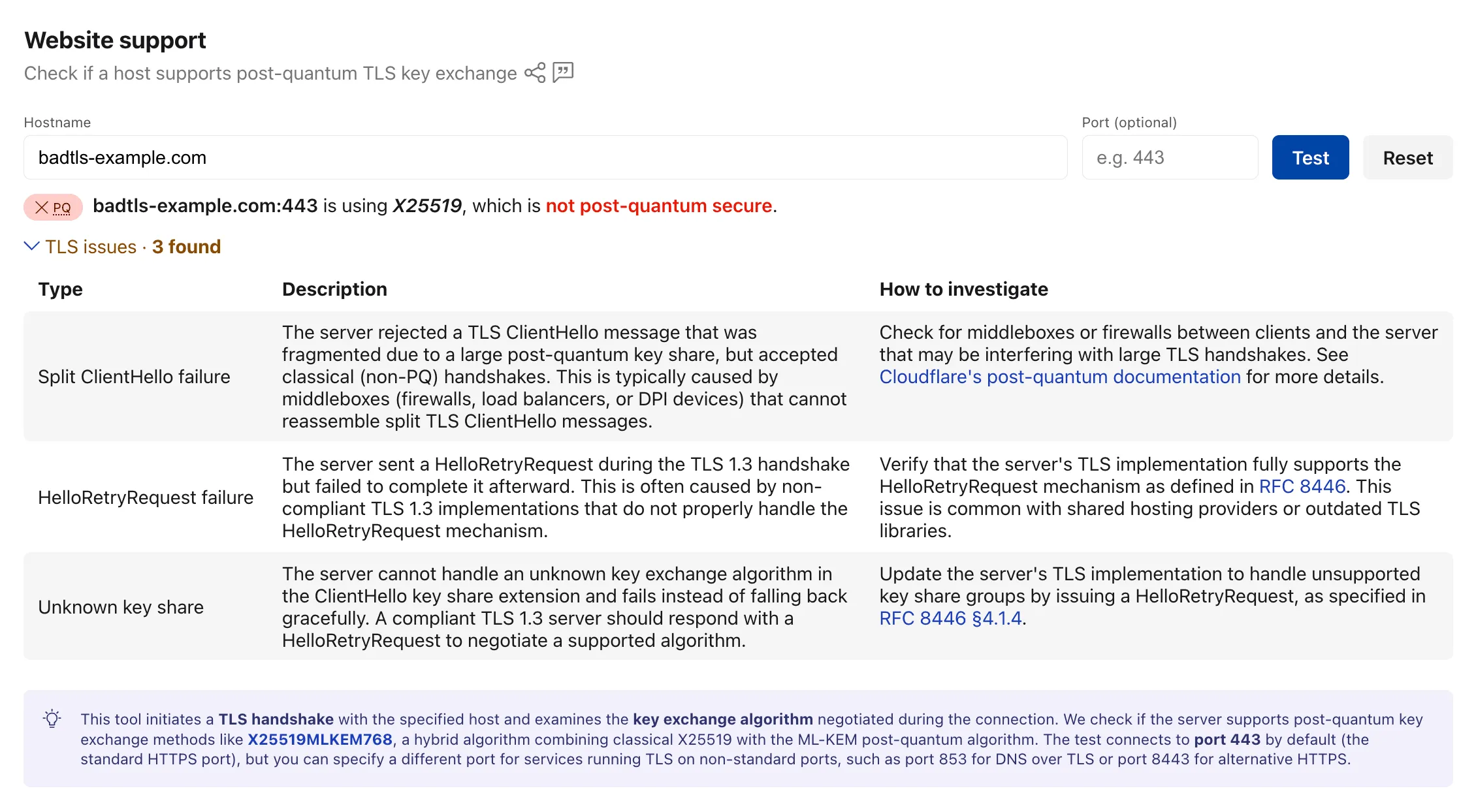
    The Radar post-quantum TLS support checker now also reports TLS bugs detected during the handshake test. When a scanned host exhibits compatibility issues, the results include details on the specific bugs detected, along with guidance on how to investigate and remediate each issue. The bugs section only appears for hosts where issues are found.

    The following TLS bugs are detected:

    • Split ClientHello — The connection fails with a fragmented post-quantum ClientHello but succeeds with classical handshakes. Typically caused by middleboxes or firewalls that cannot reassemble split TLS messages.
    • HRR Failure — The server sends a HelloRetryRequest but fails to complete the handshake afterward.
    • Unknown Keyshare — The server cannot handle unknown key exchange algorithms and fails instead of responding with a HelloRetryRequest as required by the TLS 1.3 specification.

    TLS bug detection results in the Radar post-quantum checker

    Bug detection data is available through the existing /post_quantum/tls/support endpoint.

    Visit the Post-Quantum Encryption page to test a host.

  • Radar – TLS bug detection in the Cloudflare Radar post-quantum checker

    The Radar post-quantum TLS support checker now also reports TLS bugs detected during the handshake test. When a scanned host exhibits compatibility issues, the results include details on the specific bugs detected, along with guidance on how to investigate and remediate each issue. The bugs section only appears for hosts where issues are found.

    The following TLS bugs are detected:

    • Split ClientHello — The connection fails with a fragmented post-quantum ClientHello but succeeds with classical handshakes. Typically caused by middleboxes or firewalls that cannot reassemble split TLS messages.
    • HRR Failure — The server sends a HelloRetryRequest but fails to complete the handshake afterward.
    • Unknown Keyshare — The server cannot handle unknown key exchange algorithms and fails instead of responding with a HelloRetryRequest as required by the TLS 1.3 specification.

    TLS bug detection results in the Radar post-quantum checker

    Bug detection data is available through the existing /post_quantum/tls/support endpoint.

    Visit the Post-Quantum Encryption page to test a host.