Author: guillaume

  • Cloudflare Tunnel – Verify WARP Connector connectivity with a simple ping

    We have made it easier to validate connectivity when deploying WARP Connector as part of your software-defined private network.

    You can now ping the WARP Connector host directly on its LAN IP address immediately after installation. This provides a fast, familiar way to confirm that the Connector is online and reachable within your network before testing access to downstream services.

    Starting with version 2025.10.186.0, WARP Connector responds to traffic addressed to its own LAN IP, giving you immediate visibility into Connector reachability.

    Learn more about deploying WARP Connector and building private network connectivity with Cloudflare One.

  • Magic Transit, Magic Firewall, Magic WAN, Magic Network Monitoring – Network Services Navigation Update

    The Network Services menu structure in Cloudflare’s dashboard has been updated to reflect solutions and capabilities instead of product names. This will make it easier for you to find what you need and better reflects how our services work together.

    Your existing configurations will remain the same, and you will have access to all of the same features and functionality.

    The changes visible in your dashboard may vary based on the products you use. Overall, changes relate to Magic Transit, Magic WAN, and Magic Firewall.

    Summary of changes:

    • A new ‘Overview’ page provides access to the most common tasks across Magic Transit and Magic WAN.
    • Product names have been removed from top-level navigation.
    • Magic Transit and Magic WAN configuration is now organized under ‘Routes’ and ‘Connectors’. For example, you will find IP Prefixes under ‘Routes’, and your GRE/IPsec Tunnels under ‘Connectors.’
    • Magic Firewall policies are now called ‘Firewall Policies.’
    • Magic WAN Connectors and Connector On-Ramps are now referenced in the dashboard as ‘Appliances’ and ‘Appliance profiles.’ They can be found under ‘Connectors > Appliances.’
    • Network analytics, network health, and real-time analytics are now available under ‘Insights.’
    • Packet Captures are found under ‘Insights > Diagnostics.’
    • You can manage your Sites from ‘Insights > Network health.
    • You can find Magic Network Monitoring under ‘Insights > Network flow.’

    If you would like to provide feedback, please use the form in the email sent on January 7th, 2026, titled ‘[FYI] Upcoming Network Services Dashboard Navigation Update.’
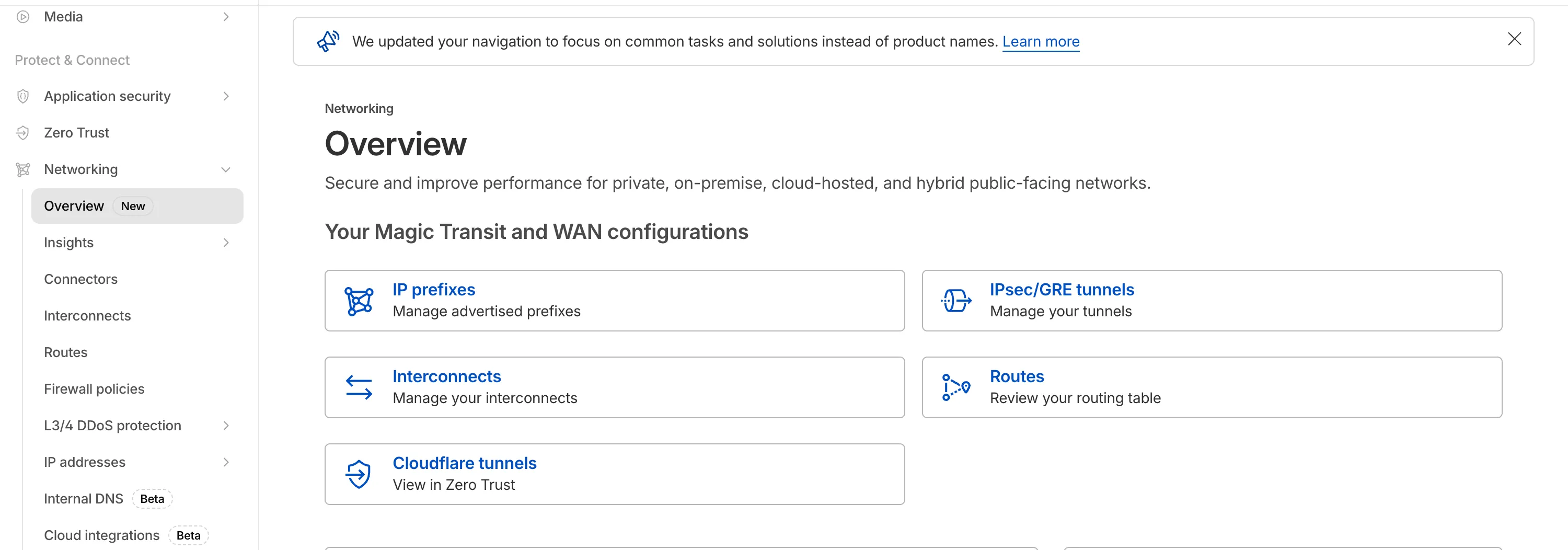
    Networking Navigation

  • Cloudflare Tunnel – Verify WARP Connector connectivity with a simple ping

    We have made it easier to validate connectivity when deploying WARP Connector as part of your software-defined private network.

    You can now ping the WARP Connector host directly on its LAN IP address immediately after installation. This provides a fast, familiar way to confirm that the Connector is online and reachable within your network before testing access to downstream services.

    Starting with version 2025.10.186.0, WARP Connector responds to traffic addressed to its own LAN IP, giving you immediate visibility into Connector reachability.

    Learn more about deploying WARP Connector and building private network connectivity with Cloudflare One.

  • Cloudflare Tunnel – Verify WARP Connector connectivity with a simple ping

    We have made it easier to validate connectivity when deploying WARP Connector as part of your software-defined private network.

    You can now ping the WARP Connector host directly on its LAN IP address immediately after installation. This provides a fast, familiar way to confirm that the Connector is online and reachable within your network before testing access to downstream services.

    Starting with version 2025.10.186.0, WARP Connector responds to traffic addressed to its own LAN IP, giving you immediate visibility into Connector reachability.

    Learn more about deploying WARP Connector and building private network connectivity with Cloudflare One.

  • Magic Transit, Magic Firewall, Magic WAN, Magic Network Monitoring – Network Services Navigation Update

    The Network Services menu structure in Cloudflare’s dashboard has been updated to reflect solutions and capabilities instead of product names. This will make it easier for you to find what you need and better reflects how our services work together.

    Your existing configurations will remain the same, and you will have access to all of the same features and functionality.

    The changes visible in your dashboard may vary based on the products you use. Overall, changes relate to Magic Transit, Magic WAN, and Magic Firewall.

    Summary of changes:

    • A new ‘Overview’ page provides access to the most common tasks across Magic Transit and Magic WAN.
    • Product names have been removed from top-level navigation.
    • Magic Transit and Magic WAN configuration is now organized under ‘Routes’ and ‘Connectors’. For example, you will find IP Prefixes under ‘Routes’, and your GRE/IPsec Tunnels under ‘Connectors.’
    • Magic Firewall policies are now called ‘Firewall Policies.’
    • Magic WAN Connectors and Connector On-Ramps are now referenced in the dashboard as ‘Appliances’ and ‘Appliance profiles.’ They can be found under ‘Connectors > Appliances.’
    • Network analytics, network health, and real-time analytics are now available under ‘Insights.’
    • Packet Captures are found under ‘Insights > Diagnostics.’
    • You can manage your Sites from ‘Insights > Network health.
    • You can find Magic Network Monitoring under ‘Insights > Network flow.’

    If you would like to provide feedback, please use the form in the email sent on January 7th, 2026, titled ‘[FYI] Upcoming Network Services Dashboard Navigation Update.’

    Networking Navigation

  • Cloudflare Tunnel – Verify WARP Connector connectivity with a simple ping

    We have made it easier to validate connectivity when deploying WARP Connector as part of your software-defined private network.

    You can now ping the WARP Connector host directly on its LAN IP address immediately after installation. This provides a fast, familiar way to confirm that the Connector is online and reachable within your network before testing access to downstream services.

    Starting with version 2025.10.186.0, WARP Connector responds to traffic addressed to its own LAN IP, giving you immediate visibility into Connector reachability.

    Learn more about deploying WARP Connector and building private network connectivity with Cloudflare One.

  • Magic Transit, Magic Firewall, Magic WAN, Magic Network Monitoring – Network Services Navigation Update

    The Network Services menu structure in Cloudflare’s dashboard has been updated to reflect solutions and capabilities instead of product names. This will make it easier for you to find what you need and better reflects how our services work together.

    Your existing configurations will remain the same, and you will have access to all of the same features and functionality.

    The changes visible in your dashboard may vary based on the products you use. Overall, changes relate to Magic Transit, Magic WAN, and Magic Firewall.

    Summary of changes:

    • A new ‘Overview’ page provides access to the most common tasks across Magic Transit and Magic WAN.
    • Product names have been removed from top-level navigation.
    • Magic Transit and Magic WAN configuration is now organized under ‘Routes’ and ‘Connectors’. For example, you will find IP Prefixes under ‘Routes’, and your GRE/IPsec Tunnels under ‘Connectors.’
    • Magic Firewall policies are now called ‘Firewall Policies.’
    • Magic WAN Connectors and Connector On-Ramps are now referenced in the dashboard as ‘Appliances’ and ‘Appliance profiles.’ They can be found under ‘Connectors > Appliances.’
    • Network analytics, network health, and real-time analytics are now available under ‘Insights.’
    • Packet Captures are found under ‘Insights > Diagnostics.’
    • You can manage your Sites from ‘Insights > Network health.
    • You can find Magic Network Monitoring under ‘Insights > Network flow.’

    If you would like to provide feedback, please use the form in the email sent on January 7th, 2026, titled ‘[FYI] Upcoming Network Services Dashboard Navigation Update.’

    Networking Navigation

  • Magic Transit, Magic Firewall, Magic WAN, Magic Network Monitoring – Network Services Navigation Update

    The Network Services menu structure in Cloudflare’s dashboard has been updated to reflect solutions and capabilities instead of product names. This will make it easier for you to find what you need and better reflects how our services work together.

    Your existing configurations will remain the same, and you will have access to all of the same features and functionality.

    The changes visible in your dashboard may vary based on the products you use. Overall, changes relate to Magic Transit, Magic WAN, and Magic Firewall.

    Summary of changes:

    • A new ‘Overview’ page provides access to the most common tasks across Magic Transit and Magic WAN.
    • Product names have been removed from top-level navigation.
    • Magic Transit and Magic WAN configuration is now organized under ‘Routes’ and ‘Connectors’. For example, you will find IP Prefixes under ‘Routes’, and your GRE/IPsec Tunnels under ‘Connectors.’
    • Magic Firewall policies are now called ‘Firewall Policies.’
    • Magic WAN Connectors and Connector On-Ramps are now referenced in the dashboard as ‘Appliances’ and ‘Appliance profiles.’ They can be found under ‘Connectors > Appliances.’
    • Network analytics, network health, and real-time analytics are now available under ‘Insights.’
    • Packet Captures are found under ‘Insights > Diagnostics.’
    • You can manage your Sites from ‘Insights > Network health.
    • You can find Magic Network Monitoring under ‘Insights > Network flow.’

    If you would like to provide feedback, please use the form in the email sent on January 7th, 2026, titled ‘[FYI] Upcoming Network Services Dashboard Navigation Update.’

    Networking Navigation

  • Security Center – URL Scanner now supports PDF report downloads

    We have expanded the reporting capabilities of the Cloudflare URL Scanner. In addition to existing JSON and HAR exports, users can now generate and download a PDF report directly from the Cloudflare dashboard.
    This update streamlines how security analysts can share findings with stakeholders who may not have access to the Cloudflare dashboard or specialized tools to parse JSON and HAR files.

    Key Benefits:

    • Consolidate scan results, including screenshots, security signatures, and metadata, into a single, portable document
    • Easily share professional-grade summaries with non-technical stakeholders or legal teams for faster incident response

    What’s new:

    • PDF Export Button: A new download option is available in the URL Scanner results page within the Cloudflare dashboard
    • Unified Documentation: Access all scan details—from high-level summaries to specific security flags—in one offline-friendly file

    To get started with the URL Scanner and explore our reporting capabilities, visit the URL Scanner API documentation.


  • Zero Trust WARP Client – WARP client for Windows (version 2025.10.186.0)

    A new GA release for the Windows WARP client is now available on the stable releases downloads page.

    This release contains minor fixes, improvements, and new features. New features include the ability to manage WARP client connectivity for all devices in your fleet using an external signal, and a new WARP client device posture check for Antivirus.

    Changes and improvements

    • Added a new feature to manage WARP client connectivity for all devices using an external signal. This feature allows administrators to send a global signal from an on-premises HTTPS endpoint that force disconnects or reconnects all WARP clients in an account based on configuration set on the endpoint.
    • Fixed an issue that caused occasional audio degradation and increased CPU usage on Windows by optimizing route configurations for large domain-based split tunnel rules.
    • The Local Domain Fallback feature has been fixed for devices running WARP client version 2025.4.929.0 and newer. Previously, these devices could experience failures with Local Domain Fallback unless a fallback server was explicitly configured. This configuration is no longer a requirement for the feature to function correctly.
    • Proxy mode now supports transparent HTTP proxying in addition to CONNECT-based proxying.
    • Fixed an issue where sending large messages to the daemon by Inter-Process Communication (IPC) could cause the daemon to fail and result in service interruptions.
    • Added support for a new WARP client device posture check for Antivirus. The check confirms the presence of an antivirus program on a Windows device with the option to check if the antivirus is up to date.

    Known issues

    • For Windows 11 24H2 users, Microsoft has confirmed a regression that may lead to performance issues like mouse lag, audio cracking, or other slowdowns. Cloudflare recommends users experiencing these issues upgrade to a minimum Windows 11 24H2 KB5062553 or higher for resolution.

    • Devices with KB5055523 installed may receive a warning about Win32/ClickFix.ABA being present in the installer. To resolve this false positive, update Microsoft Security Intelligence to version 1.429.19.0 or later.

    • DNS resolution may be broken when the following conditions are all true:

      • WARP is in Secure Web Gateway without DNS filtering (tunnel-only) mode.
      • A custom DNS server address is configured on the primary network adapter.
      • The custom DNS server address on the primary network adapter is changed while WARP is connected.

      To work around this issue, reconnect the WARP client by toggling off and back on.