Author: guillaume

  • Workers, Queues – Get notified when your Workers builds succeed or fail

    You can now receive notifications when your Workers’ builds start, succeed, fail, or get cancelled using Event Subscriptions.

    Workers Builds publishes events to a Queue that your Worker can read messages from, and then send notifications wherever you need — Slack, Discord, email, or any webhook endpoint.

    You can deploy this Worker to your own Cloudflare account to send build notifications to Slack:

    Deploy to Cloudflare

    The template includes:

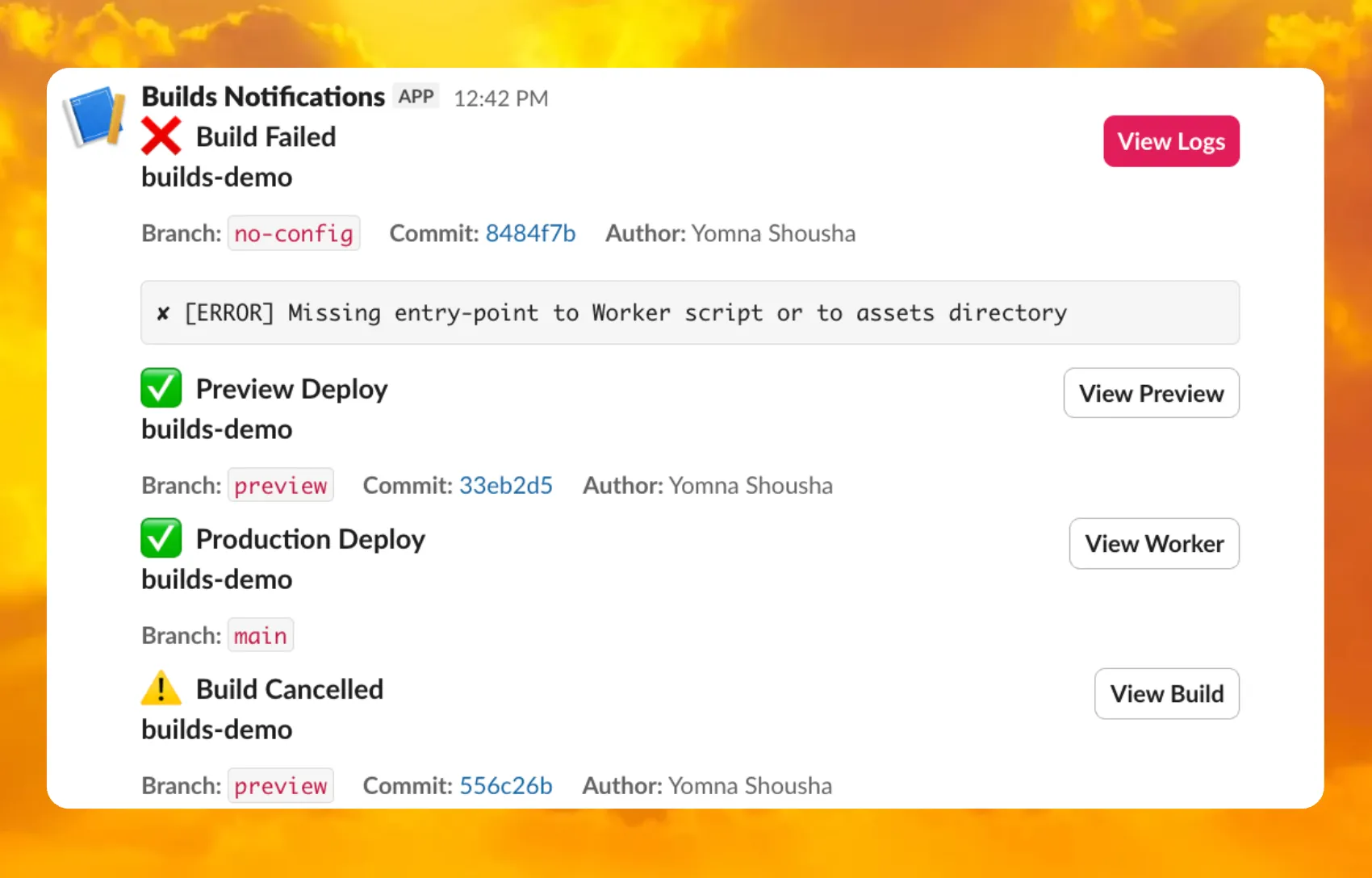
    • Build status with Preview/Live URLs for successful deployments
    • Inline error messages for failed builds
    • Branch, commit hash, and author name

    Slack notifications showing build events

    For setup instructions, refer to the template README or the Event Subscriptions documentation.

  • Workers, Queues – Get notified when your Workers builds succeed or fail

    You can now receive notifications when your Workers’ builds start, succeed, fail, or get cancelled using Event Subscriptions.

    Workers Builds publishes events to a Queue that your Worker can read messages from, and then send notifications wherever you need — Slack, Discord, email, or any webhook endpoint.

    You can deploy this Worker to your own Cloudflare account to send build notifications to Slack:

    Deploy to Cloudflare

    The template includes:

    • Build status with Preview/Live URLs for successful deployments
    • Inline error messages for failed builds
    • Branch, commit hash, and author name

    Slack notifications showing build events

    For setup instructions, refer to the template README or the Event Subscriptions documentation.

  • Workers Analytics Engine, Workers – Workers Analytics Engine SQL now supports filtering using HAVING and LIKE

    You can now use the HAVING clause and LIKE pattern matching operators in Workers Analytics Engine.

    Workers Analytics Engine allows you to ingest and store high-cardinality data at scale and query your data through a simple SQL API.

    Filtering using HAVING

    The HAVING clause complements the WHERE clause by enabling you to filter groups based on aggregate values. While WHERE filters rows before aggregation, HAVING filters groups after aggregation is complete.

    You can use HAVING to filter groups where the average exceeds a threshold:

    SELECT
    blob1 AS probe_name,
    avg(double1) AS average_temp
    FROM temperature_readings
    GROUP BY probe_name
    HAVING average_temp > 10

    You can also filter groups based on aggregates such as the number of items in the group:

    SELECT
    blob1 AS probe_name,
    count() AS num_readings
    FROM temperature_readings
    GROUP BY probe_name
    HAVING num_readings > 100

    Pattern matching using LIKE

    The new pattern matching operators enable you to search for strings that match specific patterns using wildcard characters:

    • LIKE – case-sensitive pattern matching
    • NOT LIKE – case-sensitive pattern exclusion
    • ILIKE – case-insensitive pattern matching
    • NOT ILIKE – case-insensitive pattern exclusion

    Pattern matching supports two wildcard characters: % (matches zero or more characters) and _ (matches exactly one character).

    You can match strings starting with a prefix:

    SELECT *
    FROM logs
    WHERE blob1 LIKE 'error%'

    You can also match file extensions (case-insensitive):

    SELECT *
    FROM requests
    WHERE blob2 ILIKE '%.jpg'

    Another example is excluding strings containing specific text:

    SELECT *
    FROM events
    WHERE blob3 NOT ILIKE '%debug%'

    Ready to get started?

    Learn more about the HAVING clause or pattern matching operators in the Workers Analytics Engine SQL reference documentation.

  • Durable Objects, Workers – Billing for SQLite Storage

    Storage billing for SQLite-backed Durable Objects will be enabled in January 2026, with a target date of January 7, 2026 (no earlier).

    To view your SQLite storage usage, go to the Durable Objects page

    Go to Durable Objects

    If you do not want to incur costs, please take action such as optimizing queries or deleting unnecessary stored data in order to reduce your SQLite storage usage ahead of the January 7th target. Only usage on and after the billing target date will incur charges.

    Developers on the Workers Paid plan with Durable Object’s SQLite storage usage beyond included limits will incur charges according to SQLite storage pricing announced in September 2024 with the public beta. Developers on the Workers Free plan will not be charged.

    Compute billing for SQLite-backed Durable Objects has been enabled since the initial public beta. SQLite-backed Durable Objects currently incur charges for requests and duration, and no changes are being made to compute billing.

    For more information about SQLite storage pricing and limits, refer to the Durable Objects pricing documentation.

  • Containers – Custom container instance types now available for all users

    Custom instance types are now enabled for all Cloudflare Containers users. You can now specify specific vCPU, memory, and disk amounts, rather than being limited to pre-defined instance types. Previously, only select Enterprise customers were able to customize their instance type.

    To use a custom instance type, specify the instance_type property as an object with vcpu, memory_mib, and disk_mb fields in your Wrangler configuration:

    [[containers]]
    image = "./Dockerfile"
    instance_type = { vcpu = 2, memory_mib = 6144, disk_mb = 12000 }

    Individual limits for custom instance types are based on the standard-4 instance type (4 vCPU, 12 GiB memory, 20 GB disk). You must allocate at least 1 vCPU for custom instance types. For workloads requiring less than 1 vCPU, use the predefined instance types like lite or basic.

    See the limits documentation for the full list of constraints on custom instance types.
    See the getting started guide to deploy your first Container,

  • Agents, Workers – Agents SDK v0.3.0, workers-ai-provider v3.0.0, and ai-gateway-provider v3.0.0 with AI SDK v6 support

    We’ve shipped a new release for the Agents SDK v0.3.0 bringing full compatibility with AI SDK v6 and introducing the unified tool pattern, dynamic tool approval, and enhanced React hooks with improved tool handling.

    This release includes improved streaming and tool support, dynamic tool approval (for “human in the loop” systems), enhanced React hooks with onToolCall callback, improved error handling for streaming responses, and seamless migration from v5 patterns.

    This makes it ideal for building production AI chat interfaces with Cloudflare Workers AI models, agent workflows, human-in-the-loop systems, or any application requiring reliable tool execution and approval workflows.

    Additionally, we’ve updated workers-ai-provider v3.0.0, the official provider for Cloudflare Workers AI models, and ai-gateway-provider v3.0.0, the provider for Cloudflare AI Gateway, to be compatible with AI SDK v6.

    Agents SDK v0.3.0

    Unified Tool Pattern

    AI SDK v6 introduces a unified tool pattern where all tools are defined on the server using the tool() function. This replaces the previous client-side AITool pattern.

    Server-Side Tool Definition

    import { tool } from "ai";
    import { z } from "zod";
    // Server: Define ALL tools on the server
    const tools = {
    // Server-executed tool
    getWeather: tool({
    description: "Get weather for a city",
    inputSchema: z.object({ city: z.string() }),
    execute: async ({ city }) => fetchWeather(city)
    }),
    // Client-executed tool (no execute = client handles via onToolCall)
    getLocation: tool({
    description: "Get user location from browser",
    inputSchema: z.object({})
    // No execute function
    }),
    // Tool requiring approval (dynamic based on input)
    processPayment: tool({
    description: "Process a payment",
    inputSchema: z.object({ amount: z.number() }),
    needsApproval: async ({ amount }) => amount > 100,
    execute: async ({ amount }) => charge(amount)
    })
    };

    Client-Side Tool Handling

    // Client: Handle client-side tools via onToolCall callback
    import { useAgentChat } from "agents/ai-react";
    const { messages, sendMessage, addToolOutput } = useAgentChat({
    agent,
    onToolCall: async ({ toolCall, addToolOutput }) => {
    if (toolCall.toolName === "getLocation") {
    const position = await new Promise((resolve, reject) => {
    navigator.geolocation.getCurrentPosition(resolve, reject);
    });
    addToolOutput({
    toolCallId: toolCall.toolCallId,
    output: {
    lat: position.coords.latitude,
    lng: position.coords.longitude
    }
    });
    }
    }
    });

    Key benefits of the unified tool pattern:

    • Server-defined tools: All tools are defined in one place on the server
    • Dynamic approval: Use needsApproval to conditionally require user confirmation
    • Cleaner client code: Use onToolCall callback instead of managing tool configs
    • Type safety: Full TypeScript support with proper tool typing

    useAgentChat(options)

    Creates a new chat interface with enhanced v6 capabilities.

    // Basic chat setup with onToolCall
    const { messages, sendMessage, addToolOutput } = useAgentChat({
    agent,
    onToolCall: async ({ toolCall, addToolOutput }) => {
    // Handle client-side tool execution
    await addToolOutput({
    toolCallId: toolCall.toolCallId,
    output: { result: "success" }
    });
    }
    });

    Dynamic Tool Approval

    Use needsApproval on server tools to conditionally require user confirmation:

    const paymentTool = tool({
    description: "Process a payment",
    inputSchema: z.object({
    amount: z.number(),
    recipient: z.string()
    }),
    needsApproval: async ({ amount }) => amount > 1000,
    execute: async ({ amount, recipient }) => {
    return await processPayment(amount, recipient);
    }
    });

    Tool Confirmation Detection

    The isToolUIPart and getToolName functions now check both static and dynamic tool parts:

    import { isToolUIPart, getToolName } from "ai";
    const pendingToolCallConfirmation = messages.some((m) =>
    m.parts?.some(
    (part) => isToolUIPart(part) && part.state === "input-available",
    ),
    );
    // Handle tool confirmation
    if (pendingToolCallConfirmation) {
    await addToolOutput({
    toolCallId: part.toolCallId,
    output: "User approved the action"
    });
    }

    If you need the v5 behavior (static-only checks), use the new functions:

    import { isStaticToolUIPart, getStaticToolName } from "ai";

    convertToModelMessages() is now async

    The convertToModelMessages() function is now asynchronous. Update all calls to await the result:

    import { convertToModelMessages } from "ai";
    const result = streamText({
    messages: await convertToModelMessages(this.messages),
    model: openai("gpt-4o")
    });

    ModelMessage type

    The CoreMessage type has been removed. Use ModelMessage instead:

    import { convertToModelMessages, type ModelMessage } from "ai";
    const modelMessages: ModelMessage[] = await convertToModelMessages(messages);

    generateObject mode option removed

    The mode option for generateObject has been removed:

    // Before (v5)
    const result = await generateObject({
    mode: "json",
    model,
    schema,
    prompt
    });
    // After (v6)
    const result = await generateObject({
    model,
    schema,
    prompt
    });

    Structured Output with generateText

    While generateObject and streamObject are still functional, the recommended approach is to use generateText/streamText with the Output.object() helper:

    import { generateText, Output, stepCountIs } from "ai";
    const { output } = await generateText({
    model: openai("gpt-4"),
    output: Output.object({
    schema: z.object({ name: z.string() })
    }),
    stopWhen: stepCountIs(2),
    prompt: "Generate a name"
    });

    Note: When using structured output with generateText, you must configure multiple steps with stopWhen because generating the structured output is itself a step.

    workers-ai-provider v3.0.0

    Seamless integration with Cloudflare Workers AI models through the updated workers-ai-provider v3.0.0 with AI SDK v6 support.

    Model Setup with Workers AI

    Use Cloudflare Workers AI models directly in your agent workflows:

    import { createWorkersAI } from "workers-ai-provider";
    import { useAgentChat } from "agents/ai-react";
    // Create Workers AI model (v3.0.0 - enhanced v6 internals)
    const model = createWorkersAI({
    binding: env.AI,
    })("@cf/meta/llama-3.2-3b-instruct");

    Enhanced File and Image Support

    Workers AI models now support v6 file handling with automatic conversion:

    // Send images and files to Workers AI models
    sendMessage({
    role: "user",
    parts: [
    { type: "text", text: "Analyze this image:" },
    {
    type: "file",
    data: imageBuffer,
    mediaType: "image/jpeg",
    },
    ],
    });
    // Workers AI provider automatically converts to proper format

    Streaming with Workers AI

    Enhanced streaming support with automatic warning detection:

    // Streaming with Workers AI models
    const result = await streamText({
    model: createWorkersAI({ binding: env.AI })("@cf/meta/llama-3.2-3b-instruct"),
    messages: await convertToModelMessages(messages),
    onChunk: (chunk) => {
    // Enhanced streaming with warning handling
    console.log(chunk);
    },
    });

    ai-gateway-provider v3.0.0

    The ai-gateway-provider v3.0.0 now supports AI SDK v6, enabling you to use Cloudflare AI Gateway with multiple AI providers including Anthropic, Azure, AWS Bedrock, Google Vertex, and Perplexity.

    AI Gateway Setup

    Use Cloudflare AI Gateway to add analytics, caching, and rate limiting to your AI applications:

    import { createAIGateway } from "ai-gateway-provider";
    // Create AI Gateway provider (v3.0.0 - enhanced v6 internals)
    const model = createAIGateway({
    gatewayUrl: "https://gateway.ai.cloudflare.com/v1/your-account-id/gateway",
    headers: {
    "Authorization": `Bearer ${env.AI_GATEWAY_TOKEN}`
    }
    })({
    provider: "openai",
    model: "gpt-4o"
    });

    Migration from v5

    Deprecated APIs

    The following APIs are deprecated in favor of the unified tool pattern:

    Deprecated Replacement
    AITool type Use AI SDK’s tool() function on server
    extractClientToolSchemas() Define tools on server, no client schemas needed
    createToolsFromClientSchemas() Define tools on server with tool()
    toolsRequiringConfirmation option Use needsApproval on server tools
    experimental_automaticToolResolution Use onToolCall callback
    tools option in useAgentChat Use onToolCall for client-side execution
    addToolResult() Use addToolOutput()

    Breaking Changes Summary

    1. Unified Tool Pattern: All tools must be defined on the server using tool()
    2. convertToModelMessages() is async: Add await to all calls
    3. CoreMessage removed: Use ModelMessage instead
    4. generateObject mode removed: Remove mode option
    5. isToolUIPart behavior changed: Now checks both static and dynamic tool parts

    Installation

    Update your dependencies to use the latest versions:

    npm install agents@^0.3.0 workers-ai-provider@^3.0.0 ai-gateway-provider@^3.0.0 ai@^6.0.0 @ai-sdk/react@^3.0.0 @ai-sdk/openai@^3.0.0

    Resources

    Feedback Welcome

    We’d love your feedback! We’re particularly interested in feedback on:

    • Migration experience – How smooth was the upgrade from v5 to v6?
    • Unified tool pattern – How does the new server-defined tool pattern work for you?
    • Dynamic tool approval – Does the needsApproval feature meet your needs?
    • AI Gateway integration – How well does the new provider work with your setup?
  • Agents, Workers – Agents SDK v0.3.0, workers-ai-provider v3.0.0, and ai-gateway-provider v3.0.0 with AI SDK v6 support

    We’ve shipped a new release for the Agents SDK v0.3.0 bringing full compatibility with AI SDK v6 and introducing the unified tool pattern, dynamic tool approval, and enhanced React hooks with improved tool handling.

    This release includes improved streaming and tool support, dynamic tool approval (for “human in the loop” systems), enhanced React hooks with onToolCall callback, improved error handling for streaming responses, and seamless migration from v5 patterns.

    This makes it ideal for building production AI chat interfaces with Cloudflare Workers AI models, agent workflows, human-in-the-loop systems, or any application requiring reliable tool execution and approval workflows.

    Additionally, we’ve updated workers-ai-provider v3.0.0, the official provider for Cloudflare Workers AI models, and ai-gateway-provider v3.0.0, the provider for Cloudflare AI Gateway, to be compatible with AI SDK v6.

    Agents SDK v0.3.0

    Unified Tool Pattern

    AI SDK v6 introduces a unified tool pattern where all tools are defined on the server using the tool() function. This replaces the previous client-side AITool pattern.

    Server-Side Tool Definition

    import { tool } from "ai";
    import { z } from "zod";
    // Server: Define ALL tools on the server
    const tools = {
    // Server-executed tool
    getWeather: tool({
    description: "Get weather for a city",
    inputSchema: z.object({ city: z.string() }),
    execute: async ({ city }) => fetchWeather(city)
    }),
    // Client-executed tool (no execute = client handles via onToolCall)
    getLocation: tool({
    description: "Get user location from browser",
    inputSchema: z.object({})
    // No execute function
    }),
    // Tool requiring approval (dynamic based on input)
    processPayment: tool({
    description: "Process a payment",
    inputSchema: z.object({ amount: z.number() }),
    needsApproval: async ({ amount }) => amount > 100,
    execute: async ({ amount }) => charge(amount)
    })
    };

    Client-Side Tool Handling

    // Client: Handle client-side tools via onToolCall callback
    import { useAgentChat } from "agents/ai-react";
    const { messages, sendMessage, addToolOutput } = useAgentChat({
    agent,
    onToolCall: async ({ toolCall, addToolOutput }) => {
    if (toolCall.toolName === "getLocation") {
    const position = await new Promise((resolve, reject) => {
    navigator.geolocation.getCurrentPosition(resolve, reject);
    });
    addToolOutput({
    toolCallId: toolCall.toolCallId,
    output: {
    lat: position.coords.latitude,
    lng: position.coords.longitude
    }
    });
    }
    }
    });

    Key benefits of the unified tool pattern:

    • Server-defined tools: All tools are defined in one place on the server
    • Dynamic approval: Use needsApproval to conditionally require user confirmation
    • Cleaner client code: Use onToolCall callback instead of managing tool configs
    • Type safety: Full TypeScript support with proper tool typing

    useAgentChat(options)

    Creates a new chat interface with enhanced v6 capabilities.

    // Basic chat setup with onToolCall
    const { messages, sendMessage, addToolOutput } = useAgentChat({
    agent,
    onToolCall: async ({ toolCall, addToolOutput }) => {
    // Handle client-side tool execution
    await addToolOutput({
    toolCallId: toolCall.toolCallId,
    output: { result: "success" }
    });
    }
    });

    Dynamic Tool Approval

    Use needsApproval on server tools to conditionally require user confirmation:

    const paymentTool = tool({
    description: "Process a payment",
    inputSchema: z.object({
    amount: z.number(),
    recipient: z.string()
    }),
    needsApproval: async ({ amount }) => amount > 1000,
    execute: async ({ amount, recipient }) => {
    return await processPayment(amount, recipient);
    }
    });

    Tool Confirmation Detection

    The isToolUIPart and getToolName functions now check both static and dynamic tool parts:

    import { isToolUIPart, getToolName } from "ai";
    const pendingToolCallConfirmation = messages.some((m) =>
    m.parts?.some(
    (part) => isToolUIPart(part) && part.state === "input-available",
    ),
    );
    // Handle tool confirmation
    if (pendingToolCallConfirmation) {
    await addToolOutput({
    toolCallId: part.toolCallId,
    output: "User approved the action"
    });
    }

    If you need the v5 behavior (static-only checks), use the new functions:

    import { isStaticToolUIPart, getStaticToolName } from "ai";

    convertToModelMessages() is now async

    The convertToModelMessages() function is now asynchronous. Update all calls to await the result:

    import { convertToModelMessages } from "ai";
    const result = streamText({
    messages: await convertToModelMessages(this.messages),
    model: openai("gpt-4o")
    });

    ModelMessage type

    The CoreMessage type has been removed. Use ModelMessage instead:

    import { convertToModelMessages, type ModelMessage } from "ai";
    const modelMessages: ModelMessage[] = await convertToModelMessages(messages);

    generateObject mode option removed

    The mode option for generateObject has been removed:

    // Before (v5)
    const result = await generateObject({
    mode: "json",
    model,
    schema,
    prompt
    });
    // After (v6)
    const result = await generateObject({
    model,
    schema,
    prompt
    });

    Structured Output with generateText

    While generateObject and streamObject are still functional, the recommended approach is to use generateText/streamText with the Output.object() helper:

    import { generateText, Output, stepCountIs } from "ai";
    const { output } = await generateText({
    model: openai("gpt-4"),
    output: Output.object({
    schema: z.object({ name: z.string() })
    }),
    stopWhen: stepCountIs(2),
    prompt: "Generate a name"
    });

    Note: When using structured output with generateText, you must configure multiple steps with stopWhen because generating the structured output is itself a step.

    workers-ai-provider v3.0.0

    Seamless integration with Cloudflare Workers AI models through the updated workers-ai-provider v3.0.0 with AI SDK v6 support.

    Model Setup with Workers AI

    Use Cloudflare Workers AI models directly in your agent workflows:

    import { createWorkersAI } from "workers-ai-provider";
    import { useAgentChat } from "agents/ai-react";
    // Create Workers AI model (v3.0.0 - enhanced v6 internals)
    const model = createWorkersAI({
    binding: env.AI,
    })("@cf/meta/llama-3.2-3b-instruct");

    Enhanced File and Image Support

    Workers AI models now support v6 file handling with automatic conversion:

    // Send images and files to Workers AI models
    sendMessage({
    role: "user",
    parts: [
    { type: "text", text: "Analyze this image:" },
    {
    type: "file",
    data: imageBuffer,
    mediaType: "image/jpeg",
    },
    ],
    });
    // Workers AI provider automatically converts to proper format

    Streaming with Workers AI

    Enhanced streaming support with automatic warning detection:

    // Streaming with Workers AI models
    const result = await streamText({
    model: createWorkersAI({ binding: env.AI })("@cf/meta/llama-3.2-3b-instruct"),
    messages: await convertToModelMessages(messages),
    onChunk: (chunk) => {
    // Enhanced streaming with warning handling
    console.log(chunk);
    },
    });

    ai-gateway-provider v3.0.0

    The ai-gateway-provider v3.0.0 now supports AI SDK v6, enabling you to use Cloudflare AI Gateway with multiple AI providers including Anthropic, Azure, AWS Bedrock, Google Vertex, and Perplexity.

    AI Gateway Setup

    Use Cloudflare AI Gateway to add analytics, caching, and rate limiting to your AI applications:

    import { createAIGateway } from "ai-gateway-provider";
    // Create AI Gateway provider (v3.0.0 - enhanced v6 internals)
    const model = createAIGateway({
    gatewayUrl: "https://gateway.ai.cloudflare.com/v1/your-account-id/gateway",
    headers: {
    "Authorization": `Bearer ${env.AI_GATEWAY_TOKEN}`
    }
    })({
    provider: "openai",
    model: "gpt-4o"
    });

    Migration from v5

    Deprecated APIs

    The following APIs are deprecated in favor of the unified tool pattern:

    Deprecated Replacement
    AITool type Use AI SDK’s tool() function on server
    extractClientToolSchemas() Define tools on server, no client schemas needed
    createToolsFromClientSchemas() Define tools on server with tool()
    toolsRequiringConfirmation option Use needsApproval on server tools
    experimental_automaticToolResolution Use onToolCall callback
    tools option in useAgentChat Use onToolCall for client-side execution
    addToolResult() Use addToolOutput()

    Breaking Changes Summary

    1. Unified Tool Pattern: All tools must be defined on the server using tool()
    2. convertToModelMessages() is async: Add await to all calls
    3. CoreMessage removed: Use ModelMessage instead
    4. generateObject mode removed: Remove mode option
    5. isToolUIPart behavior changed: Now checks both static and dynamic tool parts

    Installation

    Update your dependencies to use the latest versions:

    npm install agents@^0.3.0 workers-ai-provider@^3.0.0 ai-gateway-provider@^3.0.0 ai@^6.0.0 @ai-sdk/react@^3.0.0 @ai-sdk/openai@^3.0.0

    Resources

    Feedback Welcome

    We’d love your feedback! We’re particularly interested in feedback on:

    • Migration experience – How smooth was the upgrade from v5 to v6?
    • Unified tool pattern – How does the new server-defined tool pattern work for you?
    • Dynamic tool approval – Does the needsApproval feature meet your needs?
    • AI Gateway integration – How well does the new provider work with your setup?
  • Agents, Workers – Agents SDK v0.3.0, workers-ai-provider v3.0.0, and ai-gateway-provider v3.0.0 with AI SDK v6 support

    We’ve shipped a new release for the Agents SDK v0.3.0 bringing full compatibility with AI SDK v6 and introducing the unified tool pattern, dynamic tool approval, and enhanced React hooks with improved tool handling.

    This release includes improved streaming and tool support, dynamic tool approval (for “human in the loop” systems), enhanced React hooks with onToolCall callback, improved error handling for streaming responses, and seamless migration from v5 patterns.

    This makes it ideal for building production AI chat interfaces with Cloudflare Workers AI models, agent workflows, human-in-the-loop systems, or any application requiring reliable tool execution and approval workflows.

    Additionally, we’ve updated workers-ai-provider v3.0.0, the official provider for Cloudflare Workers AI models, and ai-gateway-provider v3.0.0, the provider for Cloudflare AI Gateway, to be compatible with AI SDK v6.

    Agents SDK v0.3.0

    Unified Tool Pattern

    AI SDK v6 introduces a unified tool pattern where all tools are defined on the server using the tool() function. This replaces the previous client-side AITool pattern.

    Server-Side Tool Definition

    import { tool } from "ai";
    import { z } from "zod";
    // Server: Define ALL tools on the server
    const tools = {
    // Server-executed tool
    getWeather: tool({
    description: "Get weather for a city",
    inputSchema: z.object({ city: z.string() }),
    execute: async ({ city }) => fetchWeather(city)
    }),
    // Client-executed tool (no execute = client handles via onToolCall)
    getLocation: tool({
    description: "Get user location from browser",
    inputSchema: z.object({})
    // No execute function
    }),
    // Tool requiring approval (dynamic based on input)
    processPayment: tool({
    description: "Process a payment",
    inputSchema: z.object({ amount: z.number() }),
    needsApproval: async ({ amount }) => amount > 100,
    execute: async ({ amount }) => charge(amount)
    })
    };

    Client-Side Tool Handling

    // Client: Handle client-side tools via onToolCall callback
    import { useAgentChat } from "agents/ai-react";
    const { messages, sendMessage, addToolOutput } = useAgentChat({
    agent,
    onToolCall: async ({ toolCall, addToolOutput }) => {
    if (toolCall.toolName === "getLocation") {
    const position = await new Promise((resolve, reject) => {
    navigator.geolocation.getCurrentPosition(resolve, reject);
    });
    addToolOutput({
    toolCallId: toolCall.toolCallId,
    output: {
    lat: position.coords.latitude,
    lng: position.coords.longitude
    }
    });
    }
    }
    });

    Key benefits of the unified tool pattern:

    • Server-defined tools: All tools are defined in one place on the server
    • Dynamic approval: Use needsApproval to conditionally require user confirmation
    • Cleaner client code: Use onToolCall callback instead of managing tool configs
    • Type safety: Full TypeScript support with proper tool typing

    useAgentChat(options)

    Creates a new chat interface with enhanced v6 capabilities.

    // Basic chat setup with onToolCall
    const { messages, sendMessage, addToolOutput } = useAgentChat({
    agent,
    onToolCall: async ({ toolCall, addToolOutput }) => {
    // Handle client-side tool execution
    await addToolOutput({
    toolCallId: toolCall.toolCallId,
    output: { result: "success" }
    });
    }
    });

    Dynamic Tool Approval

    Use needsApproval on server tools to conditionally require user confirmation:

    const paymentTool = tool({
    description: "Process a payment",
    inputSchema: z.object({
    amount: z.number(),
    recipient: z.string()
    }),
    needsApproval: async ({ amount }) => amount > 1000,
    execute: async ({ amount, recipient }) => {
    return await processPayment(amount, recipient);
    }
    });

    Tool Confirmation Detection

    The isToolUIPart and getToolName functions now check both static and dynamic tool parts:

    import { isToolUIPart, getToolName } from "ai";
    const pendingToolCallConfirmation = messages.some((m) =>
    m.parts?.some(
    (part) => isToolUIPart(part) && part.state === "input-available",
    ),
    );
    // Handle tool confirmation
    if (pendingToolCallConfirmation) {
    await addToolOutput({
    toolCallId: part.toolCallId,
    output: "User approved the action"
    });
    }

    If you need the v5 behavior (static-only checks), use the new functions:

    import { isStaticToolUIPart, getStaticToolName } from "ai";

    convertToModelMessages() is now async

    The convertToModelMessages() function is now asynchronous. Update all calls to await the result:

    import { convertToModelMessages } from "ai";
    const result = streamText({
    messages: await convertToModelMessages(this.messages),
    model: openai("gpt-4o")
    });

    ModelMessage type

    The CoreMessage type has been removed. Use ModelMessage instead:

    import { convertToModelMessages, type ModelMessage } from "ai";
    const modelMessages: ModelMessage[] = await convertToModelMessages(messages);

    generateObject mode option removed

    The mode option for generateObject has been removed:

    // Before (v5)
    const result = await generateObject({
    mode: "json",
    model,
    schema,
    prompt
    });
    // After (v6)
    const result = await generateObject({
    model,
    schema,
    prompt
    });

    Structured Output with generateText

    While generateObject and streamObject are still functional, the recommended approach is to use generateText/streamText with the Output.object() helper:

    import { generateText, Output, stepCountIs } from "ai";
    const { output } = await generateText({
    model: openai("gpt-4"),
    output: Output.object({
    schema: z.object({ name: z.string() })
    }),
    stopWhen: stepCountIs(2),
    prompt: "Generate a name"
    });

    Note: When using structured output with generateText, you must configure multiple steps with stopWhen because generating the structured output is itself a step.

    workers-ai-provider v3.0.0

    Seamless integration with Cloudflare Workers AI models through the updated workers-ai-provider v3.0.0 with AI SDK v6 support.

    Model Setup with Workers AI

    Use Cloudflare Workers AI models directly in your agent workflows:

    import { createWorkersAI } from "workers-ai-provider";
    import { useAgentChat } from "agents/ai-react";
    // Create Workers AI model (v3.0.0 - enhanced v6 internals)
    const model = createWorkersAI({
    binding: env.AI,
    })("@cf/meta/llama-3.2-3b-instruct");

    Enhanced File and Image Support

    Workers AI models now support v6 file handling with automatic conversion:

    // Send images and files to Workers AI models
    sendMessage({
    role: "user",
    parts: [
    { type: "text", text: "Analyze this image:" },
    {
    type: "file",
    data: imageBuffer,
    mediaType: "image/jpeg",
    },
    ],
    });
    // Workers AI provider automatically converts to proper format

    Streaming with Workers AI

    Enhanced streaming support with automatic warning detection:

    // Streaming with Workers AI models
    const result = await streamText({
    model: createWorkersAI({ binding: env.AI })("@cf/meta/llama-3.2-3b-instruct"),
    messages: await convertToModelMessages(messages),
    onChunk: (chunk) => {
    // Enhanced streaming with warning handling
    console.log(chunk);
    },
    });

    ai-gateway-provider v3.0.0

    The ai-gateway-provider v3.0.0 now supports AI SDK v6, enabling you to use Cloudflare AI Gateway with multiple AI providers including Anthropic, Azure, AWS Bedrock, Google Vertex, and Perplexity.

    AI Gateway Setup

    Use Cloudflare AI Gateway to add analytics, caching, and rate limiting to your AI applications:

    import { createAIGateway } from "ai-gateway-provider";
    // Create AI Gateway provider (v3.0.0 - enhanced v6 internals)
    const model = createAIGateway({
    gatewayUrl: "https://gateway.ai.cloudflare.com/v1/your-account-id/gateway",
    headers: {
    "Authorization": `Bearer ${env.AI_GATEWAY_TOKEN}`
    }
    })({
    provider: "openai",
    model: "gpt-4o"
    });

    Migration from v5

    Deprecated APIs

    The following APIs are deprecated in favor of the unified tool pattern:

    Deprecated Replacement
    AITool type Use AI SDK’s tool() function on server
    extractClientToolSchemas() Define tools on server, no client schemas needed
    createToolsFromClientSchemas() Define tools on server with tool()
    toolsRequiringConfirmation option Use needsApproval on server tools
    experimental_automaticToolResolution Use onToolCall callback
    tools option in useAgentChat Use onToolCall for client-side execution
    addToolResult() Use addToolOutput()

    Breaking Changes Summary

    1. Unified Tool Pattern: All tools must be defined on the server using tool()
    2. convertToModelMessages() is async: Add await to all calls
    3. CoreMessage removed: Use ModelMessage instead
    4. generateObject mode removed: Remove mode option
    5. isToolUIPart behavior changed: Now checks both static and dynamic tool parts

    Installation

    Update your dependencies to use the latest versions:

    npm install agents@^0.3.0 workers-ai-provider@^3.0.0 ai-gateway-provider@^3.0.0 ai@^6.0.0 @ai-sdk/react@^3.0.0 @ai-sdk/openai@^3.0.0

    Resources

    Feedback Welcome

    We’d love your feedback! We’re particularly interested in feedback on:

    • Migration experience – How smooth was the upgrade from v5 to v6?
    • Unified tool pattern – How does the new server-defined tool pattern work for you?
    • Dynamic tool approval – Does the needsApproval feature meet your needs?
    • AI Gateway integration – How well does the new provider work with your setup?
  • Agents, Workers – Agents SDK v0.3.0, workers-ai-provider v3.0.0, and ai-gateway-provider v3.0.0 with AI SDK v6 support

    We’ve shipped a new release for the Agents SDK v0.3.0 bringing full compatibility with AI SDK v6 and introducing the unified tool pattern, dynamic tool approval, and enhanced React hooks with improved tool handling.

    This release includes improved streaming and tool support, dynamic tool approval (for “human in the loop” systems), enhanced React hooks with onToolCall callback, improved error handling for streaming responses, and seamless migration from v5 patterns.

    This makes it ideal for building production AI chat interfaces with Cloudflare Workers AI models, agent workflows, human-in-the-loop systems, or any application requiring reliable tool execution and approval workflows.

    Additionally, we’ve updated workers-ai-provider v3.0.0, the official provider for Cloudflare Workers AI models, and ai-gateway-provider v3.0.0, the provider for Cloudflare AI Gateway, to be compatible with AI SDK v6.

    Agents SDK v0.3.0

    Unified Tool Pattern

    AI SDK v6 introduces a unified tool pattern where all tools are defined on the server using the tool() function. This replaces the previous client-side AITool pattern.

    Server-Side Tool Definition

    import { tool } from "ai";
    import { z } from "zod";
    // Server: Define ALL tools on the server
    const tools = {
    // Server-executed tool
    getWeather: tool({
    description: "Get weather for a city",
    inputSchema: z.object({ city: z.string() }),
    execute: async ({ city }) => fetchWeather(city)
    }),
    // Client-executed tool (no execute = client handles via onToolCall)
    getLocation: tool({
    description: "Get user location from browser",
    inputSchema: z.object({})
    // No execute function
    }),
    // Tool requiring approval (dynamic based on input)
    processPayment: tool({
    description: "Process a payment",
    inputSchema: z.object({ amount: z.number() }),
    needsApproval: async ({ amount }) => amount > 100,
    execute: async ({ amount }) => charge(amount)
    })
    };

    Client-Side Tool Handling

    // Client: Handle client-side tools via onToolCall callback
    import { useAgentChat } from "agents/ai-react";
    const { messages, sendMessage, addToolOutput } = useAgentChat({
    agent,
    onToolCall: async ({ toolCall, addToolOutput }) => {
    if (toolCall.toolName === "getLocation") {
    const position = await new Promise((resolve, reject) => {
    navigator.geolocation.getCurrentPosition(resolve, reject);
    });
    addToolOutput({
    toolCallId: toolCall.toolCallId,
    output: {
    lat: position.coords.latitude,
    lng: position.coords.longitude
    }
    });
    }
    }
    });

    Key benefits of the unified tool pattern:

    • Server-defined tools: All tools are defined in one place on the server
    • Dynamic approval: Use needsApproval to conditionally require user confirmation
    • Cleaner client code: Use onToolCall callback instead of managing tool configs
    • Type safety: Full TypeScript support with proper tool typing

    useAgentChat(options)

    Creates a new chat interface with enhanced v6 capabilities.

    // Basic chat setup with onToolCall
    const { messages, sendMessage, addToolOutput } = useAgentChat({
    agent,
    onToolCall: async ({ toolCall, addToolOutput }) => {
    // Handle client-side tool execution
    await addToolOutput({
    toolCallId: toolCall.toolCallId,
    output: { result: "success" }
    });
    }
    });

    Dynamic Tool Approval

    Use needsApproval on server tools to conditionally require user confirmation:

    const paymentTool = tool({
    description: "Process a payment",
    inputSchema: z.object({
    amount: z.number(),
    recipient: z.string()
    }),
    needsApproval: async ({ amount }) => amount > 1000,
    execute: async ({ amount, recipient }) => {
    return await processPayment(amount, recipient);
    }
    });

    Tool Confirmation Detection

    The isToolUIPart and getToolName functions now check both static and dynamic tool parts:

    import { isToolUIPart, getToolName } from "ai";
    const pendingToolCallConfirmation = messages.some((m) =>
    m.parts?.some(
    (part) => isToolUIPart(part) && part.state === "input-available",
    ),
    );
    // Handle tool confirmation
    if (pendingToolCallConfirmation) {
    await addToolOutput({
    toolCallId: part.toolCallId,
    output: "User approved the action"
    });
    }

    If you need the v5 behavior (static-only checks), use the new functions:

    import { isStaticToolUIPart, getStaticToolName } from "ai";

    convertToModelMessages() is now async

    The convertToModelMessages() function is now asynchronous. Update all calls to await the result:

    import { convertToModelMessages } from "ai";
    const result = streamText({
    messages: await convertToModelMessages(this.messages),
    model: openai("gpt-4o")
    });

    ModelMessage type

    The CoreMessage type has been removed. Use ModelMessage instead:

    import { convertToModelMessages, type ModelMessage } from "ai";
    const modelMessages: ModelMessage[] = await convertToModelMessages(messages);

    generateObject mode option removed

    The mode option for generateObject has been removed:

    // Before (v5)
    const result = await generateObject({
    mode: "json",
    model,
    schema,
    prompt
    });
    // After (v6)
    const result = await generateObject({
    model,
    schema,
    prompt
    });

    Structured Output with generateText

    While generateObject and streamObject are still functional, the recommended approach is to use generateText/streamText with the Output.object() helper:

    import { generateText, Output, stepCountIs } from "ai";
    const { output } = await generateText({
    model: openai("gpt-4"),
    output: Output.object({
    schema: z.object({ name: z.string() })
    }),
    stopWhen: stepCountIs(2),
    prompt: "Generate a name"
    });

    Note: When using structured output with generateText, you must configure multiple steps with stopWhen because generating the structured output is itself a step.

    workers-ai-provider v3.0.0

    Seamless integration with Cloudflare Workers AI models through the updated workers-ai-provider v3.0.0 with AI SDK v6 support.

    Model Setup with Workers AI

    Use Cloudflare Workers AI models directly in your agent workflows:

    import { createWorkersAI } from "workers-ai-provider";
    import { useAgentChat } from "agents/ai-react";
    // Create Workers AI model (v3.0.0 - enhanced v6 internals)
    const model = createWorkersAI({
    binding: env.AI,
    })("@cf/meta/llama-3.2-3b-instruct");

    Enhanced File and Image Support

    Workers AI models now support v6 file handling with automatic conversion:

    // Send images and files to Workers AI models
    sendMessage({
    role: "user",
    parts: [
    { type: "text", text: "Analyze this image:" },
    {
    type: "file",
    data: imageBuffer,
    mediaType: "image/jpeg",
    },
    ],
    });
    // Workers AI provider automatically converts to proper format

    Streaming with Workers AI

    Enhanced streaming support with automatic warning detection:

    // Streaming with Workers AI models
    const result = await streamText({
    model: createWorkersAI({ binding: env.AI })("@cf/meta/llama-3.2-3b-instruct"),
    messages: await convertToModelMessages(messages),
    onChunk: (chunk) => {
    // Enhanced streaming with warning handling
    console.log(chunk);
    },
    });

    ai-gateway-provider v3.0.0

    The ai-gateway-provider v3.0.0 now supports AI SDK v6, enabling you to use Cloudflare AI Gateway with multiple AI providers including Anthropic, Azure, AWS Bedrock, Google Vertex, and Perplexity.

    AI Gateway Setup

    Use Cloudflare AI Gateway to add analytics, caching, and rate limiting to your AI applications:

    import { createAIGateway } from "ai-gateway-provider";
    // Create AI Gateway provider (v3.0.0 - enhanced v6 internals)
    const model = createAIGateway({
    gatewayUrl: "https://gateway.ai.cloudflare.com/v1/your-account-id/gateway",
    headers: {
    "Authorization": `Bearer ${env.AI_GATEWAY_TOKEN}`
    }
    })({
    provider: "openai",
    model: "gpt-4o"
    });

    Migration from v5

    Deprecated APIs

    The following APIs are deprecated in favor of the unified tool pattern:

    Deprecated Replacement
    AITool type Use AI SDK’s tool() function on server
    extractClientToolSchemas() Define tools on server, no client schemas needed
    createToolsFromClientSchemas() Define tools on server with tool()
    toolsRequiringConfirmation option Use needsApproval on server tools
    experimental_automaticToolResolution Use onToolCall callback
    tools option in useAgentChat Use onToolCall for client-side execution
    addToolResult() Use addToolOutput()

    Breaking Changes Summary

    1. Unified Tool Pattern: All tools must be defined on the server using tool()
    2. convertToModelMessages() is async: Add await to all calls
    3. CoreMessage removed: Use ModelMessage instead
    4. generateObject mode removed: Remove mode option
    5. isToolUIPart behavior changed: Now checks both static and dynamic tool parts

    Installation

    Update your dependencies to use the latest versions:

    npm install agents@^0.3.0 workers-ai-provider@^3.0.0 ai-gateway-provider@^3.0.0 ai@^6.0.0 @ai-sdk/react@^3.0.0 @ai-sdk/openai@^3.0.0

    Resources

    Feedback Welcome

    We’d love your feedback! We’re particularly interested in feedback on:

    • Migration experience – How smooth was the upgrade from v5 to v6?
    • Unified tool pattern – How does the new server-defined tool pattern work for you?
    • Dynamic tool approval – Does the needsApproval feature meet your needs?
    • AI Gateway integration – How well does the new provider work with your setup?
  • Agents, Workers – Agents SDK v0.3.0, workers-ai-provider v3.0.0, and ai-gateway-provider v3.0.0 with AI SDK v6 support

    We’ve shipped a new release for the Agents SDK v0.3.0 bringing full compatibility with AI SDK v6 and introducing the unified tool pattern, dynamic tool approval, and enhanced React hooks with improved tool handling.

    This release includes improved streaming and tool support, dynamic tool approval (for “human in the loop” systems), enhanced React hooks with onToolCall callback, improved error handling for streaming responses, and seamless migration from v5 patterns.

    This makes it ideal for building production AI chat interfaces with Cloudflare Workers AI models, agent workflows, human-in-the-loop systems, or any application requiring reliable tool execution and approval workflows.

    Additionally, we’ve updated workers-ai-provider v3.0.0, the official provider for Cloudflare Workers AI models, and ai-gateway-provider v3.0.0, the provider for Cloudflare AI Gateway, to be compatible with AI SDK v6.

    Agents SDK v0.3.0

    Unified Tool Pattern

    AI SDK v6 introduces a unified tool pattern where all tools are defined on the server using the tool() function. This replaces the previous client-side AITool pattern.

    Server-Side Tool Definition

    import { tool } from "ai";
    import { z } from "zod";
    // Server: Define ALL tools on the server
    const tools = {
    // Server-executed tool
    getWeather: tool({
    description: "Get weather for a city",
    inputSchema: z.object({ city: z.string() }),
    execute: async ({ city }) => fetchWeather(city)
    }),
    // Client-executed tool (no execute = client handles via onToolCall)
    getLocation: tool({
    description: "Get user location from browser",
    inputSchema: z.object({})
    // No execute function
    }),
    // Tool requiring approval (dynamic based on input)
    processPayment: tool({
    description: "Process a payment",
    inputSchema: z.object({ amount: z.number() }),
    needsApproval: async ({ amount }) => amount > 100,
    execute: async ({ amount }) => charge(amount)
    })
    };

    Client-Side Tool Handling

    // Client: Handle client-side tools via onToolCall callback
    import { useAgentChat } from "agents/ai-react";
    const { messages, sendMessage, addToolOutput } = useAgentChat({
    agent,
    onToolCall: async ({ toolCall, addToolOutput }) => {
    if (toolCall.toolName === "getLocation") {
    const position = await new Promise((resolve, reject) => {
    navigator.geolocation.getCurrentPosition(resolve, reject);
    });
    addToolOutput({
    toolCallId: toolCall.toolCallId,
    output: {
    lat: position.coords.latitude,
    lng: position.coords.longitude
    }
    });
    }
    }
    });

    Key benefits of the unified tool pattern:

    • Server-defined tools: All tools are defined in one place on the server
    • Dynamic approval: Use needsApproval to conditionally require user confirmation
    • Cleaner client code: Use onToolCall callback instead of managing tool configs
    • Type safety: Full TypeScript support with proper tool typing

    useAgentChat(options)

    Creates a new chat interface with enhanced v6 capabilities.

    // Basic chat setup with onToolCall
    const { messages, sendMessage, addToolOutput } = useAgentChat({
    agent,
    onToolCall: async ({ toolCall, addToolOutput }) => {
    // Handle client-side tool execution
    await addToolOutput({
    toolCallId: toolCall.toolCallId,
    output: { result: "success" }
    });
    }
    });

    Dynamic Tool Approval

    Use needsApproval on server tools to conditionally require user confirmation:

    const paymentTool = tool({
    description: "Process a payment",
    inputSchema: z.object({
    amount: z.number(),
    recipient: z.string()
    }),
    needsApproval: async ({ amount }) => amount > 1000,
    execute: async ({ amount, recipient }) => {
    return await processPayment(amount, recipient);
    }
    });

    Tool Confirmation Detection

    The isToolUIPart and getToolName functions now check both static and dynamic tool parts:

    import { isToolUIPart, getToolName } from "ai";
    const pendingToolCallConfirmation = messages.some((m) =>
    m.parts?.some(
    (part) => isToolUIPart(part) && part.state === "input-available",
    ),
    );
    // Handle tool confirmation
    if (pendingToolCallConfirmation) {
    await addToolOutput({
    toolCallId: part.toolCallId,
    output: "User approved the action"
    });
    }

    If you need the v5 behavior (static-only checks), use the new functions:

    import { isStaticToolUIPart, getStaticToolName } from "ai";

    convertToModelMessages() is now async

    The convertToModelMessages() function is now asynchronous. Update all calls to await the result:

    import { convertToModelMessages } from "ai";
    const result = streamText({
    messages: await convertToModelMessages(this.messages),
    model: openai("gpt-4o")
    });

    ModelMessage type

    The CoreMessage type has been removed. Use ModelMessage instead:

    import { convertToModelMessages, type ModelMessage } from "ai";
    const modelMessages: ModelMessage[] = await convertToModelMessages(messages);

    generateObject mode option removed

    The mode option for generateObject has been removed:

    // Before (v5)
    const result = await generateObject({
    mode: "json",
    model,
    schema,
    prompt
    });
    // After (v6)
    const result = await generateObject({
    model,
    schema,
    prompt
    });

    Structured Output with generateText

    While generateObject and streamObject are still functional, the recommended approach is to use generateText/streamText with the Output.object() helper:

    import { generateText, Output, stepCountIs } from "ai";
    const { output } = await generateText({
    model: openai("gpt-4"),
    output: Output.object({
    schema: z.object({ name: z.string() })
    }),
    stopWhen: stepCountIs(2),
    prompt: "Generate a name"
    });

    Note: When using structured output with generateText, you must configure multiple steps with stopWhen because generating the structured output is itself a step.

    workers-ai-provider v3.0.0

    Seamless integration with Cloudflare Workers AI models through the updated workers-ai-provider v3.0.0 with AI SDK v6 support.

    Model Setup with Workers AI

    Use Cloudflare Workers AI models directly in your agent workflows:

    import { createWorkersAI } from "workers-ai-provider";
    import { useAgentChat } from "agents/ai-react";
    // Create Workers AI model (v3.0.0 - enhanced v6 internals)
    const model = createWorkersAI({
    binding: env.AI,
    })("@cf/meta/llama-3.2-3b-instruct");

    Enhanced File and Image Support

    Workers AI models now support v6 file handling with automatic conversion:

    // Send images and files to Workers AI models
    sendMessage({
    role: "user",
    parts: [
    { type: "text", text: "Analyze this image:" },
    {
    type: "file",
    data: imageBuffer,
    mediaType: "image/jpeg",
    },
    ],
    });
    // Workers AI provider automatically converts to proper format

    Streaming with Workers AI

    Enhanced streaming support with automatic warning detection:

    // Streaming with Workers AI models
    const result = await streamText({
    model: createWorkersAI({ binding: env.AI })("@cf/meta/llama-3.2-3b-instruct"),
    messages: await convertToModelMessages(messages),
    onChunk: (chunk) => {
    // Enhanced streaming with warning handling
    console.log(chunk);
    },
    });

    ai-gateway-provider v3.0.0

    The ai-gateway-provider v3.0.0 now supports AI SDK v6, enabling you to use Cloudflare AI Gateway with multiple AI providers including Anthropic, Azure, AWS Bedrock, Google Vertex, and Perplexity.

    AI Gateway Setup

    Use Cloudflare AI Gateway to add analytics, caching, and rate limiting to your AI applications:

    import { createAIGateway } from "ai-gateway-provider";
    // Create AI Gateway provider (v3.0.0 - enhanced v6 internals)
    const model = createAIGateway({
    gatewayUrl: "https://gateway.ai.cloudflare.com/v1/your-account-id/gateway",
    headers: {
    "Authorization": `Bearer ${env.AI_GATEWAY_TOKEN}`
    }
    })({
    provider: "openai",
    model: "gpt-4o"
    });

    Migration from v5

    Deprecated APIs

    The following APIs are deprecated in favor of the unified tool pattern:

    Deprecated Replacement
    AITool type Use AI SDK’s tool() function on server
    extractClientToolSchemas() Define tools on server, no client schemas needed
    createToolsFromClientSchemas() Define tools on server with tool()
    toolsRequiringConfirmation option Use needsApproval on server tools
    experimental_automaticToolResolution Use onToolCall callback
    tools option in useAgentChat Use onToolCall for client-side execution
    addToolResult() Use addToolOutput()

    Breaking Changes Summary

    1. Unified Tool Pattern: All tools must be defined on the server using tool()
    2. convertToModelMessages() is async: Add await to all calls
    3. CoreMessage removed: Use ModelMessage instead
    4. generateObject mode removed: Remove mode option
    5. isToolUIPart behavior changed: Now checks both static and dynamic tool parts

    Installation

    Update your dependencies to use the latest versions:

    npm install agents@^0.3.0 workers-ai-provider@^3.0.0 ai-gateway-provider@^3.0.0 ai@^6.0.0 @ai-sdk/react@^3.0.0 @ai-sdk/openai@^3.0.0

    Resources

    Feedback Welcome

    We’d love your feedback! We’re particularly interested in feedback on:

    • Migration experience – How smooth was the upgrade from v5 to v6?
    • Unified tool pattern – How does the new server-defined tool pattern work for you?
    • Dynamic tool approval – Does the needsApproval feature meet your needs?
    • AI Gateway integration – How well does the new provider work with your setup?