Category: Uncategorized

  • Workers – Relaxed simultaneous connection limiting for Workers

    The simultaneous open connections limit has been relaxed. Previously, each Worker invocation was limited to six open connections at a time for the entire lifetime of each connection, including while reading the response body. Now, a connection is freed as soon as response headers arrive, so the six-connection limit only constrains how many connections can be in the initial “waiting for headers” phase simultaneously.

    Before: New connections are blocked until an earlier connection fully completes
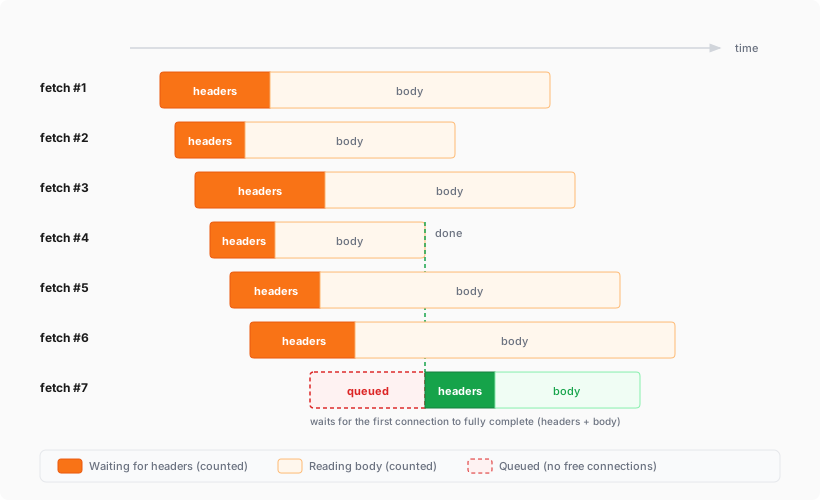
    A 7th fetch is queued until an earlier connection fully completes, including reading its entire response body

    After: New connections can start as soon as response headers arrive
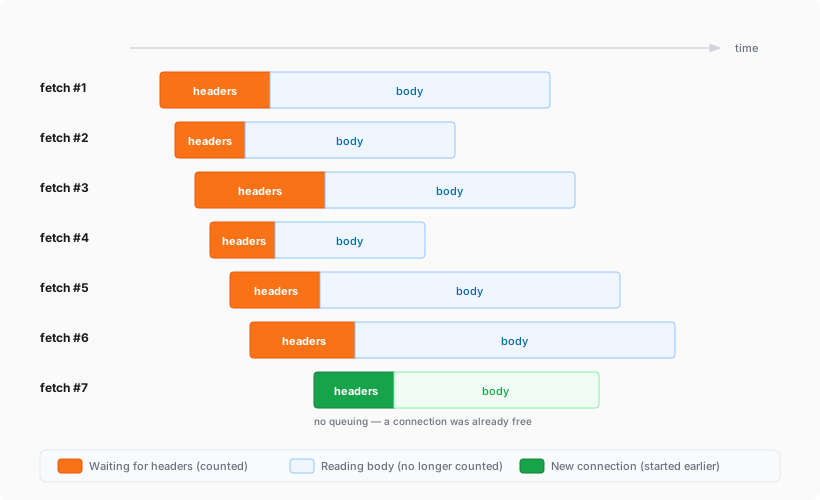
    A 7th fetch starts as soon as any earlier connection receives its response headers

    This means Workers can now have many more connections open at the same time without queueing, as long as no more than six are waiting for their initial response. This eliminates the Response closed due to connection limit exception that could previously occur when the runtime canceled stalled connections to prevent deadlocks.

    Previously, the runtime used a deadlock avoidance algorithm that watched each open connection for I/O activity. If all six connections appeared idle — even momentarily — the runtime would cancel the least-recently-used connection to make room for new requests. In practice, this heuristic was fragile. For example, when a response used Content-Encoding: gzip, the runtime’s internal decompression created brief gaps between read and write operations. During these gaps, the connection appeared stalled despite being actively read by the Worker. If multiple connections hit these gaps at the same time, the runtime could spuriously cancel a connection that was working correctly. By only counting connections during the waiting-for-headers phase — where the runtime is fully in control and there is no ambiguity about whether the connection is active — this class of bug is eliminated entirely.

    Before: Connections could be canceled during brief internal pauses
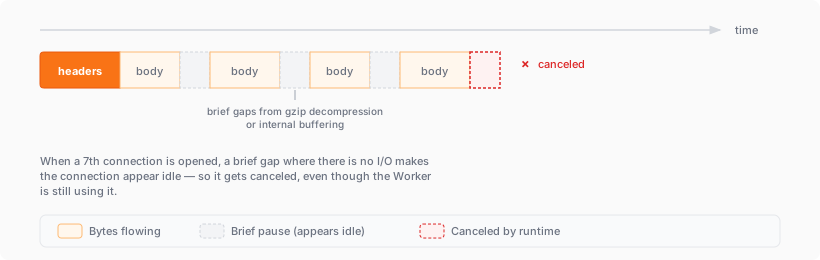
    A connection with gaps from gzip decompression appears idle and is canceled by the runtime

    After: Connections complete normally regardless of internal pauses
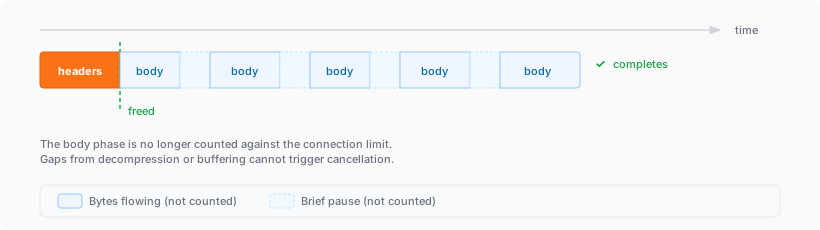
    The same connection completes normally because the body phase is no longer counted against the limit

  • Security Center – Real-time alerts and daily digests for Threat Events

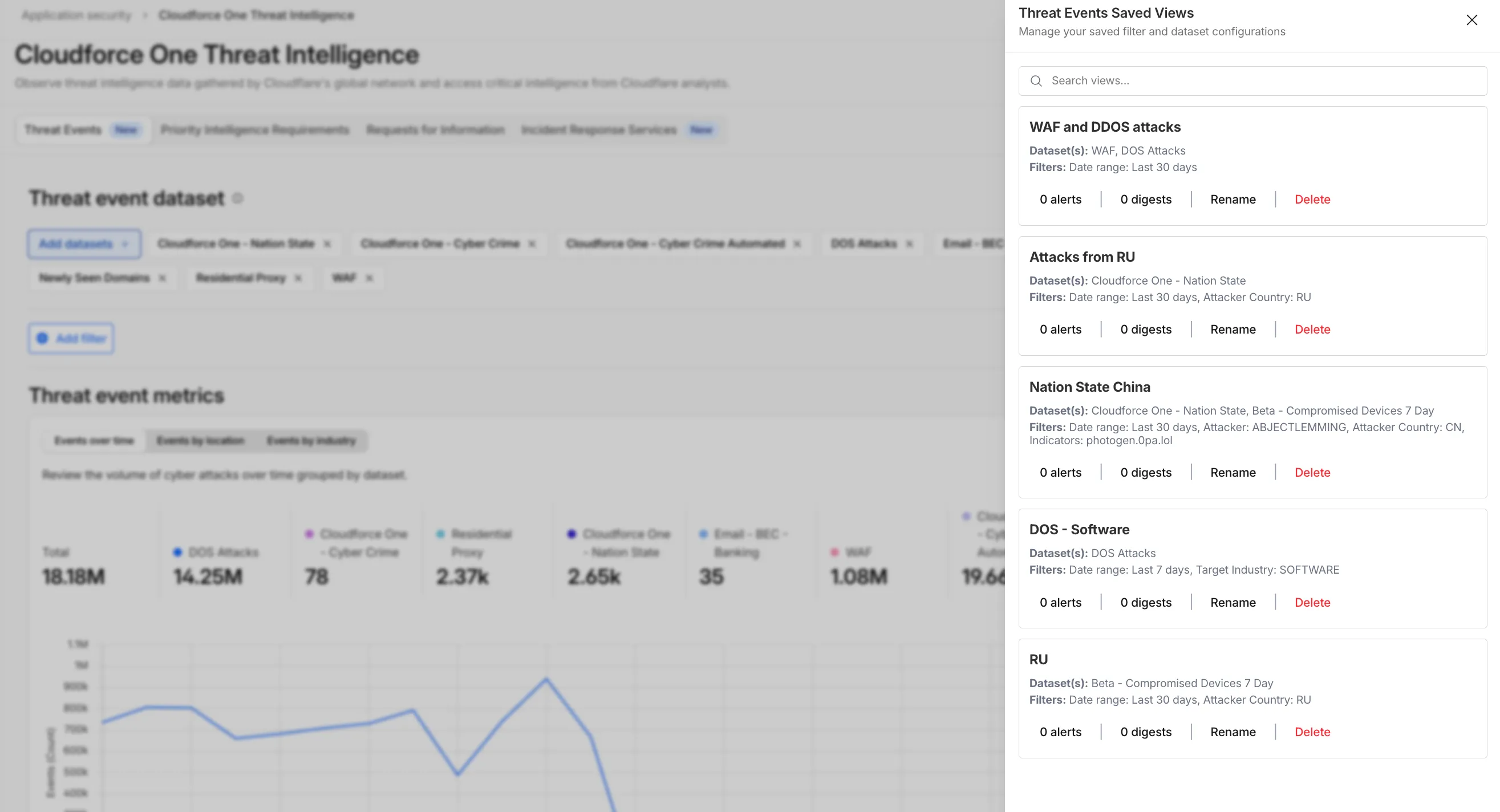
    You can now automate your threat monitoring by setting up custom alerts in your saved views. Instead of manually checking the dashboard for updates, you can subscribe to notifications that trigger whenever new data matches your specific filter sets, like new activity associated to a particular threat actor or spikes in activity within your industry.

    Stay ahead of emerging threats

    By linking your saved views to the Cloudflare Notifications Center, you can ensure the right information reaches your team at the right time.

    • Immediate Alerts: receive real-time notifications the moment a critical event is detected that matches your saved criteria. This is essential for high-priority monitoring, such as tracking active campaigns from specific APT groups.

    • Daily Digests: opt for a summarized report delivered once a day. This is ideal for maintaining situational awareness of broader trends, like regional activity shifts or industry-wide threat landscapes, without cluttering your inbox.

    Threat Events notifications

    How to get started

    To set up an alert, go to Application Security > Threat Intelligence > Threat Events. From there:

    1. Choose your datasets and apply your desired filters and select Save View (or select an existing one).
    2. Open the Manage Saved Views menu.
    3. Select Add Alert next to your chosen view to configure your notification preferences in the Cloudflare dashboard.

    For more technical details on configuring notifications, refer to the Threat Events documentation.

  • AI Search – Website Source CSS content selectors for precise content extraction in AI Search

    AI Search now supports CSS content selectors for website data sources. You can now define which parts of a crawled page are extracted and indexed by specifying CSS selectors paired with URL glob patterns.

    Content selectors solve the problem of indexing only relevant content while ignoring navigation, sidebars, footers, and other boilerplate. When a page URL matches a glob pattern, only elements matching the corresponding CSS selector are extracted and converted to Markdown for indexing.

    Configure content selectors via the dashboard or API:

    curl "https://api.cloudflare.com/client/v4/accounts/{account_id}/ai-search/instances"
    -H "Authorization: Bearer {api_token}"
    -H "Content-Type: application/json"
    -d '{
    "id": "my-ai-search",
    "source": "https://example.com",
    "type": "web-crawler",
    "source_params": {
    "web_crawler": {
    "parse_options": {
    "content_selector": [
    {
    "path": "**/blog/**",
    "selector": "article .post-body"
    }
    ]
    }
    }
    }
    }'

    Selectors are evaluated in order, and the first matching pattern wins. You can define up to 10 content selector entries per instance.

    For configuration details and examples, refer to the content selectors documentation.

  • AI Search – New Workers AI models for text generation and embedding in AI Search

    AI Search now supports four additional Workers AI models across text generation and embedding.

    Text generation

    Model Context window (tokens)
    @cf/zai-org/glm-4.7-flash 131,072
    @cf/qwen/qwen3-30b-a3b-fp8 32,000

    GLM-4.7-Flash is a lightweight model from Zhipu AI with a 131,072 token context window, suitable for long-document summarization and retrieval tasks. Qwen3-30B-A3B is a mixture-of-experts model from Alibaba that activates only 3 billion parameters per forward pass, keeping inference fast while maintaining strong response quality.

    Embedding

    Model Vector dims Input tokens Metric
    @cf/qwen/qwen3-embedding-0.6b 1,024 4,096 cosine
    @cf/google/embeddinggemma-300m 768 512 cosine

    Qwen3-Embedding-0.6B supports up to 4,096 input tokens, making it a good fit for indexing longer text chunks. EmbeddingGemma-300M from Google produces 768-dimension vectors and is optimized for low-latency embedding workloads.

    All four models are available without additional provider keys since they run on Workers AI. Select them when creating or updating an AI Search instance in the dashboard or through the API.

    For the full list of supported models, refer to Supported models.

  • Risk Score – User risk scoring for high risk browsing activity

    Cloudflare One’s User Risk Scoring now incorporates direct signals from Gateway DNS traffic patterns. This update allows security teams to automatically elevate a user’s risk score when they visit high-risk or malicious domains, providing a more holistic view of internal threats.

    Why this matters

    Browsing activity is a primary indicator of potential compromise. By tying Gateway DNS logs to specific users, administrators can now flag individuals interacting with:

    • Security threats: Domains associated with malware, phishing, or command-and-control (C2) centers.
    • High-risk content: Categories such as questionable content or violence that may violate corporate compliance.

    Even if a Gateway policy is set to Block the traffic, the interaction is still captured as a “hit” to ensure the user’s risk profile reflects the attempted activity.

    New risk behaviors

    Two new behaviors are now available in the dashboard:

    • Suspicious Security Domain Visited: Triggers when a user visits a domain in the security threats or security risk categories.
    • High risk domain visited: Triggers when a user visits domains categorized as questionable content, violence, or CIPA.

    To learn more and get started, refer to the User Risk Scoring documentation.

  • Security Center – Real-time alerts and daily digests for Threat Events

    You can now automate your threat monitoring by setting up custom alerts in your saved views. Instead of manually checking the dashboard for updates, you can subscribe to notifications that trigger whenever new data matches your specific filter sets, like new activity associated to a particular threat actor or spikes in activity within your industry.

    Stay ahead of emerging threats

    By linking your saved views to the Cloudflare Notifications Center, you can ensure the right information reaches your team at the right time.

    • Immediate Alerts: receive real-time notifications the moment a critical event is detected that matches your saved criteria. This is essential for high-priority monitoring, such as tracking active campaigns from specific APT groups.

    • Daily Digests: opt for a summarized report delivered once a day. This is ideal for maintaining situational awareness of broader trends, like regional activity shifts or industry-wide threat landscapes, without cluttering your inbox.

    Threat Events notifications

    How to get started

    To set up an alert, go to Application Security > Threat Intelligence > Threat Events. From there:

    1. Choose your datasets and apply your desired filters and select Save View (or select an existing one).
    2. Open the Manage Saved Views menu.
    3. Select Add Alert next to your chosen view to configure your notification preferences in the Cloudflare dashboard.

    For more technical details on configuring notifications, refer to the Threat Events documentation.

  • Support – Redesigned Support Portal for faster, personalized help

    Redesigned “Get Help” Portal for faster, personalized help

    Cloudflare has officially launched a redesigned “Get Help” Support Portal to eliminate friction and get you to a resolution faster. Previously, navigating support meant clicking through multiple tiles, categorizing your own technical issues across 50+ conditional fields, and translating your problem into Cloudflare’s internal taxonomy.

    The new experience replaces that complexity with a personalized front door built around your specific account plan. Whether you are under a DDoS attack or have a simple billing question, the portal now presents a single, clean page that surfaces the direct paths available to you — such as “Ask AI”, “Chat with a human”, or “Community” — without the manual triage.

    What’s New

    • One Page, Clear Choices: No more navigating a grid of overlapping categories. The portal now uses action cards tailored to your plan (Free, Pro, Business, or Enterprise), ensuring you only see the support channels you can actually use.
    • A Radically Simpler Support Form: We’ve reduced the ticket submission process from four+ screens and 50+ fields to a single screen with five critical inputs. You describe the issue in your own words, and our backend handles the categorization.
    • AI-Driven Triage: Using Cloudflare Workers AI and Vectorize, the portal now automatically generates case subjects and predicts product categories.

    Moving complexity to the backend

    Behind the scenes, we’ve moved the complexity from the user to our own developer stack. When you describe an issue, we use semantic embeddings to capture intent rather than just keywords.

    By leveraging case-based reasoning, our system compares your request against millions of resolved cases to route your inquiry to the specialist best equipped to help. This ensures that while the front-end experience is simpler for you, the back-end routing is more accurate than ever.

    To learn more, refer to the Support documentation or select Get Help directly in the Cloudflare Dashboard.

  • WAF – WAF Release – 2026-04-07

    This week’s release introduces new detections for a critical Remote Code Execution (RCE) vulnerability in MCP Server (CVE-2026-23744), alongside targeted protection for an authentication bypass vulnerability in SolarWinds products (CVE-2025-40552). Additionally, this release includes a new generic detection rule designed to identify and block Cross-Site Scripting (XSS) injection attempts leveraging “OnEvent” handlers within HTTP cookies.

    Key Findings

    • MCP Server (CVE-2026-23744): A vulnerability in the Model Context Protocol (MCP) server implementation where malformed input payloads can trigger a memory corruption state, allowing for arbitrary code execution.

    • SolarWinds (CVE-2025-40552): A critical flaw in the authentication module allows unauthenticated attackers to bypass security filters and gain unauthorized access to the management console due to improper identity token validation.

    • XSS OnEvents Cookies: This generic rule identifies malicious event handlers (such as onload or onerror) embedded within HTTP cookie values.

    Impact

    Successful exploitation of the MCP Server and SolarWinds vulnerabilities could allow unauthenticated attackers to execute arbitrary code or gain administrative control, leading to a full system takeover. Additionally, the new generic XSS detection prevents attackers from leveraging browser event handlers in cookies to hijack user sessions or execute malicious scripts.

    Ruleset Rule ID Legacy Rule ID Description Previous Action New Action Comments
    Cloudflare Managed Ruleset 73ae1cf103da4bacaa2e1a610aa410af N/A Log Disabled Generic Rules – Command Execution – 5 – Body This is a new detection.
    Cloudflare Managed Ruleset a88a85b0cc5a4bc2abead6289131ec2f N/A Log Disabled Generic Rules – Command Execution – 5 – Header This is a new detection.
    Cloudflare Managed Ruleset 28518cdc40544979bbd86720551eb9e5 N/A Log Block Generic Rules – Command Execution – 5 – URI This is a new detection.
    Cloudflare Managed Ruleset 1177993d53a1467997002b44d46229eb N/A Log Block MCP Server – Remote Code Execution – CVE:CVE-2026-23744 This is a new detection.
    Cloudflare Managed Ruleset 3d43cdfbc3c14584942f8bc4a864b9c2 N/A Log Block XSS – OnEvents – Cookies This is a new detection.
    Cloudflare Managed Ruleset 41153470df2365192b0df74ca78ad04e N/A Log Disabled SQLi – Evasion – Body This is a new detection.
    Cloudflare Managed Ruleset 64d812e6d5844d7c9d7a44a440732d48 N/A Log Disabled SQLi – Evasion – Headers This is a new detection.
    Cloudflare Managed Ruleset 50de9369ef7c45928a5dfb34e68a99b5 N/A Log Disabled SQLi – Evasion – URI This is a new detection.
    Cloudflare Managed Ruleset 765ffb5c67b94c9589106c843e8143d2 N/A Log Disabled SQLi – LIKE 3 – Body This is a new detection.
    Cloudflare Managed Ruleset 5c3dbd4f115e47c781491fcd70e7fb97 N/A Log Disabled SQLi – LIKE 3 – URI This is a new detection.
    Cloudflare Managed Ruleset 89fa6027a0334949b1cb2e654c538bd9 N/A Log Disabled SQLi – UNION – 2 – Body This is a new detection.
    Cloudflare Managed Ruleset 05946b3458364f1b9d4819d561c439c9 N/A Log Disabled SQLi – UNION – 2 – URI This is a new detection.
    Cloudflare Managed Ruleset b2fe5c2a39df4609b6d39908cf33ea10 N/A Log Block SolarWinds – Auth Bypass – CVE:CVE-2025-40552 This is a new detection.
  • Email security – DANE Support for MX Deployments

    Cloudflare Email Security now supports DANE (DNS-based Authentication of Named Entities) for MX deployments. This enhancement strengthens email transport security by enabling DNSSEC-backed certificate verification for our regional MX records.

    • Regional MX hostnames now publish DANE TLSA records backed by DNSSEC, enabling DANE-capable SMTP senders to cryptographically validate certificate identities before establishing TLS connections—moving beyond opportunistic encryption to verified encrypted delivery.
    • DANE support is automatically available for all customers using regional MX deployments. No additional configuration is required; DANE-capable mail infrastructure will automatically validate MX certificates using the published records.

    This applies to all Email Security packages:

    • Advantage
    • Enterprise
    • Enterprise + PhishGuard
  • Email security – DANE Support for MX Deployments

    Cloudflare Email Security now supports DANE (DNS-based Authentication of Named Entities) for MX deployments. This enhancement strengthens email transport security by enabling DNSSEC-backed certificate verification for our regional MX records.

    • Regional MX hostnames now publish DANE TLSA records backed by DNSSEC, enabling DANE-capable SMTP senders to cryptographically validate certificate identities before establishing TLS connections—moving beyond opportunistic encryption to verified encrypted delivery.
    • DANE support is automatically available for all customers using regional MX deployments. No additional configuration is required; DANE-capable mail infrastructure will automatically validate MX certificates using the published records.

    This applies to all Email Security packages:

    • Advantage
    • Enterprise
    • Enterprise + PhishGuard