AI Search now supports hybrid search and relevance boosting, giving you more control over how results are found and ranked.
Hybrid search
Hybrid search combines vector (semantic) search with BM25 keyword search in a single query. Vector search finds chunks with similar meaning, even when the exact words differ. Keyword search matches chunks that contain your query terms exactly. When you enable hybrid search, both run in parallel and the results are fused into a single ranked list.
You can configure the tokenizer (porter for natural language, trigram for code), keyword match mode (and for precision, or for recall), and fusion method (rrf or max) per instance:
Relevance boosting lets you nudge search rankings based on document metadata. For example, you can prioritize recent documents by boosting on timestamp, or surface high-priority content by boosting on a custom metadata field like priority.
Configure up to 3 boost fields per instance or override them per request:
Artifacts is now in private beta. Artifacts is Git-compatible storage built for scale: create tens of millions of repos, fork from any remote, and hand off a URL to any Git client. It provides a versioned filesystem for storing and exchanging file trees across Workers, the REST API, and any Git client, running locally or within an agent.
You can read the announcement blog to learn more about what Artifacts does, how it works, and how to create repositories for your agents to use.
Artifacts has three API surfaces:
Workers bindings (for creating and managing repositories)
REST API (for creating and managing repos from any other compute platform)
Git protocol (for interacting with repos)
As an example: you can use the Workers binding to create a repo and read back its remote URL:
We are renaming Browser Rendering to Browser Run. The name Browser Rendering never fully captured what the product does. Browser Run lets you run full browser sessions on Cloudflare’s global network, drive them with code or AI, record and replay sessions, crawl pages for content, debug in real time, and let humans intervene when your agent needs help.
Along with the rename, we have increased limits for Workers Paid plans and redesigned the Browser Run dashboard.
We have 4x-ed concurrency limits for Workers Paid plan users:
Concurrent browsers per account: 30 → 120 per account
New browser instances: 30 per minute → 1 per second
Rate limits across the limits page are now expressed in per-second terms, matching how they are enforced. No action is needed to benefit from the higher limits.
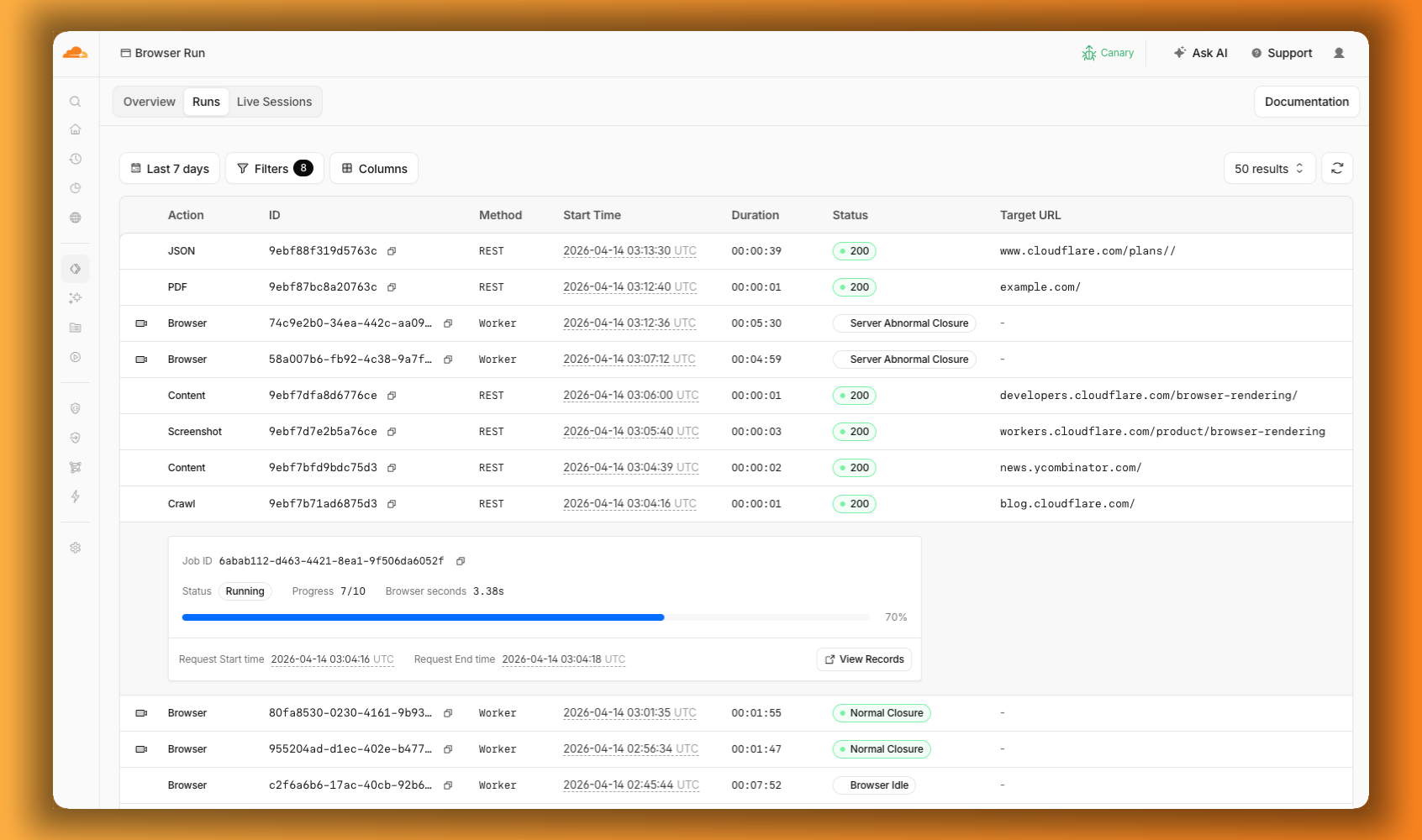
The redesigned dashboard now shows every request in a single Runs tab, not just browser sessions but also quick actions like screenshots, PDFs, markdown, and crawls. Filter by endpoint, view target URLs, status, and duration, and expand any row for more detail.
We are renaming Browser Rendering to Browser Run. The name Browser Rendering never fully captured what the product does. Browser Run lets you run full browser sessions on Cloudflare’s global network, drive them with code or AI, record and replay sessions, crawl pages for content, debug in real time, and let humans intervene when your agent needs help.
Along with the rename, we have increased limits for Workers Paid plans and redesigned the Browser Run dashboard.
We have 4x-ed concurrency limits for Workers Paid plan users:
Concurrent browsers per account: 30 → 120 per account
New browser instances: 30 per minute → 1 per second
Rate limits across the limits page are now expressed in per-second terms, matching how they are enforced. No action is needed to benefit from the higher limits.
The redesigned dashboard now shows every request in a single Runs tab, not just browser sessions but also quick actions like screenshots, PDFs, markdown, and crawls. Filter by endpoint, view target URLs, status, and duration, and expand any row for more detail.
Cloudflare Mesh is now available (blog post). Mesh connects your services and devices with post-quantum encrypted networking, allowing you to route traffic privately between servers, laptops, and phones over TCP, UDP, and ICMP.
What Cloudflare Mesh does
Assigns a private Mesh IP to every enrolled device and node.
Enables any participant to reach any other participant by IP — including client-to-client, without deploying any infrastructure.
Supports CIDR routes for subnet routing through Mesh nodes.
Supports high availability with active-passive replicas for nodes with routes.
WARP Connector is now Cloudflare Mesh. Existing WARP Connectors are now called mesh nodes. All existing deployments continue to work — no migration required.
Peer-to-peer connectivity is now called Mesh connectivity and is part of the Cloudflare Mesh documentation.
Mesh node limit increased from 10 to 50 per account.

New dashboard experience at Networking > Mesh with an interactive network map, node management, route configuration, diagnostics, and a setup wizard.
Containers let you run more workloads on the Workers platform, including resource-intensive applications, different languages, and CLI tools that need full Linux environments.
Since the initial launch of Containers, there have been significant improvements to Containers’ performance, stability, and feature set. Some highlights include:
Higher limits allow you to run thousands of containers concurrently.
Docker Hub support makes it easy to use your existing images and registries.
SSH support helps you access and debug issues in live containers.
The Sandbox SDK provides isolated environments for running untrusted code securely, with a simple TypeScript API for executing commands, managing files, and exposing services. This makes it easier to secure and manage your agents at scale. Some additions since launch include:
Live preview URLs so agents can run long-lived services and verify in-flight changes.
Outbound Workers for Sandboxes and Containers now support zero-trust credential injection, TLS interception, allow/deny lists, and dynamic per-instance egress policies. These features give platforms running agentic workloads full control over what leaves the sandbox, without exposing secrets to untrusted workloads, like user-generated code or coding agents.
Credential injection
Because outbound handlers run in the Workers runtime, outside the sandbox, they can hold secrets the sandbox never sees. A sandboxed workload can make a plain request, and credentials are transparently attached before a request is forwarded upstream.
For instance, you could run an agent in a sandbox and ensure that any requests it makes to Github are authenticated.
But it will never be able to accesss the credentials:
No token is ever passed into the sandbox. You can rotate secrets in the Worker environment
and every request will pick them up immediately.
TLS interception
Outbound Workers now intercept HTTPS traffic. A unique ephemeral certificate authority (CA) and private key are created for each sandbox instance. The CA is placed into the sandbox and trusted by default. The ephemeral private key never leaves the container runtime sidecar process and is never shared across instances.
With TLS interception active, outbound Workers can act as a transparent proxy for both HTTP and HTTPS traffic.
Allow and deny hosts
Easily filter outbound traffic with allowedHosts and deniedHosts. When allowedHosts is set, it becomes a deny-by-default allowlist. Both properties support glob patterns.
exportclassMySandboxextendsSandbox{
allowedHosts = ["github.com","npmjs.org"];
}
Dynamic outbound handlers
Define named outbound handlers then apply or remove them at runtime using setOutboundHandler() or setOutboundByHost(). This lets you change egress policy for a running sandbox without restarting it.
Browser Rendering now exposes the Chrome DevTools Protocol (CDP), the low-level protocol that powers browser automation. The growing ecosystem of CDP-based agent tools, along with existing CDP automation scripts, can now use Browser Rendering directly.
Any CDP-compatible client, including Puppeteer and Playwright, can connect from any environment, whether that is Cloudflare Workers, your local machine, or a cloud environment. All you need is your Cloudflare API key.
For any existing CDP script, switching to Browser Rendering is a one-line change:
Additionally, MCP clients like Claude Desktop, Claude Code, Cursor, and OpenCode can now use Browser Rendering as their remote browser via the chrome-devtools-mcp package.
Here is an example of how to configure Browser Rendering for Claude Desktop: