Category: Uncategorized

  • Workers – Wrangler and the Cloudflare Vite plugin support `.env` files in local development

    Now, you can use .env files to provide secrets and override environment variables on the env object during local development with Wrangler and the Cloudflare Vite plugin.

    Previously in local development, if you wanted to provide secrets or environment variables during local development, you had to use .dev.vars files.
    This is still supported, but you can now also use .env files, which are more familiar to many developers.

    Using .env files in local development

    You can create a .env file in your project root to define environment variables that will be used when running wrangler dev or vite dev. The .env file should be formatted like a dotenv file, such as KEY="VALUE":

    TITLE="My Worker"
    API_TOKEN="dev-token"

    When you run wrangler dev or vite dev, the environment variables defined in the .env file will be available in your Worker code via the env object:

    export default {
    async fetch(request, env) {
    const title = env.TITLE; // "My Worker"
    const apiToken = env.API_TOKEN; // "dev-token"
    const response = await fetch(
    `https://api.example.com/data?token=${apiToken}`,
    );
    return new Response(`Title: ${title} - ` + (await response.text()));
    },
    };

    Multiple environments with .env files

    You may be using Cloudflare Environments to deploy different versions of a Worker with distinct environment variables. For instance, you may have a production and staging environment.

    To set different environment variables for each Cloudflare Environment, create files named .env.<environment-name>.

    When you use wrangler <command> --env <environment-name> or CLOUDFLARE_ENV=<environment-name> vite dev, the corresponding environment-specific file will also be loaded and merged with the .env file.

    For example, if you want to set different environment variables for the staging environment, you can create a file named .env.staging:

    API_TOKEN="staging-token"

    When you run wrangler dev --env staging or CLOUDFLARE_ENV=staging vite dev, the environment variables from .env.staging will be merged onto those from .env.

    export default {
    async fetch(request, env) {
    const title = env.TITLE; // "My Worker" (from `.env`)
    const apiToken = env.API_TOKEN; // "staging-token" (from `.env.staging`, overriding the value from `.env`)
    const response = await fetch(
    `https://api.example.com/data?token=${apiToken}`,
    );
    return new Response(`Title: ${title} - ` + (await response.text()));
    },
    };

    Find out more

    For more information on how to use .env files with Wrangler and the Cloudflare Vite plugin, see the following documentation:
  • Workers – Wrangler and the Cloudflare Vite plugin support `.env` files in local development

    Now, you can use .env files to provide secrets and override environment variables on the env object during local development with Wrangler and the Cloudflare Vite plugin.

    Previously in local development, if you wanted to provide secrets or environment variables during local development, you had to use .dev.vars files.
    This is still supported, but you can now also use .env files, which are more familiar to many developers.

    Using .env files in local development

    You can create a .env file in your project root to define environment variables that will be used when running wrangler dev or vite dev. The .env file should be formatted like a dotenv file, such as KEY="VALUE":

    TITLE="My Worker"
    API_TOKEN="dev-token"

    When you run wrangler dev or vite dev, the environment variables defined in the .env file will be available in your Worker code via the env object:

    export default {
    async fetch(request, env) {
    const title = env.TITLE; // "My Worker"
    const apiToken = env.API_TOKEN; // "dev-token"
    const response = await fetch(
    `https://api.example.com/data?token=${apiToken}`,
    );
    return new Response(`Title: ${title} - ` + (await response.text()));
    },
    };

    Multiple environments with .env files

    You may be using Cloudflare Environments to deploy different versions of a Worker with distinct environment variables. For instance, you may have a production and staging environment.

    To set different environment variables for each Cloudflare Environment, create files named .env.<environment-name>.

    When you use wrangler <command> --env <environment-name> or CLOUDFLARE_ENV=<environment-name> vite dev, the corresponding environment-specific file will also be loaded and merged with the .env file.

    For example, if you want to set different environment variables for the staging environment, you can create a file named .env.staging:

    API_TOKEN="staging-token"

    When you run wrangler dev --env staging or CLOUDFLARE_ENV=staging vite dev, the environment variables from .env.staging will be merged onto those from .env.

    export default {
    async fetch(request, env) {
    const title = env.TITLE; // "My Worker" (from `.env`)
    const apiToken = env.API_TOKEN; // "staging-token" (from `.env.staging`, overriding the value from `.env`)
    const response = await fetch(
    `https://api.example.com/data?token=${apiToken}`,
    );
    return new Response(`Title: ${title} - ` + (await response.text()));
    },
    };

    Find out more

    For more information on how to use .env files with Wrangler and the Cloudflare Vite plugin, see the following documentation:

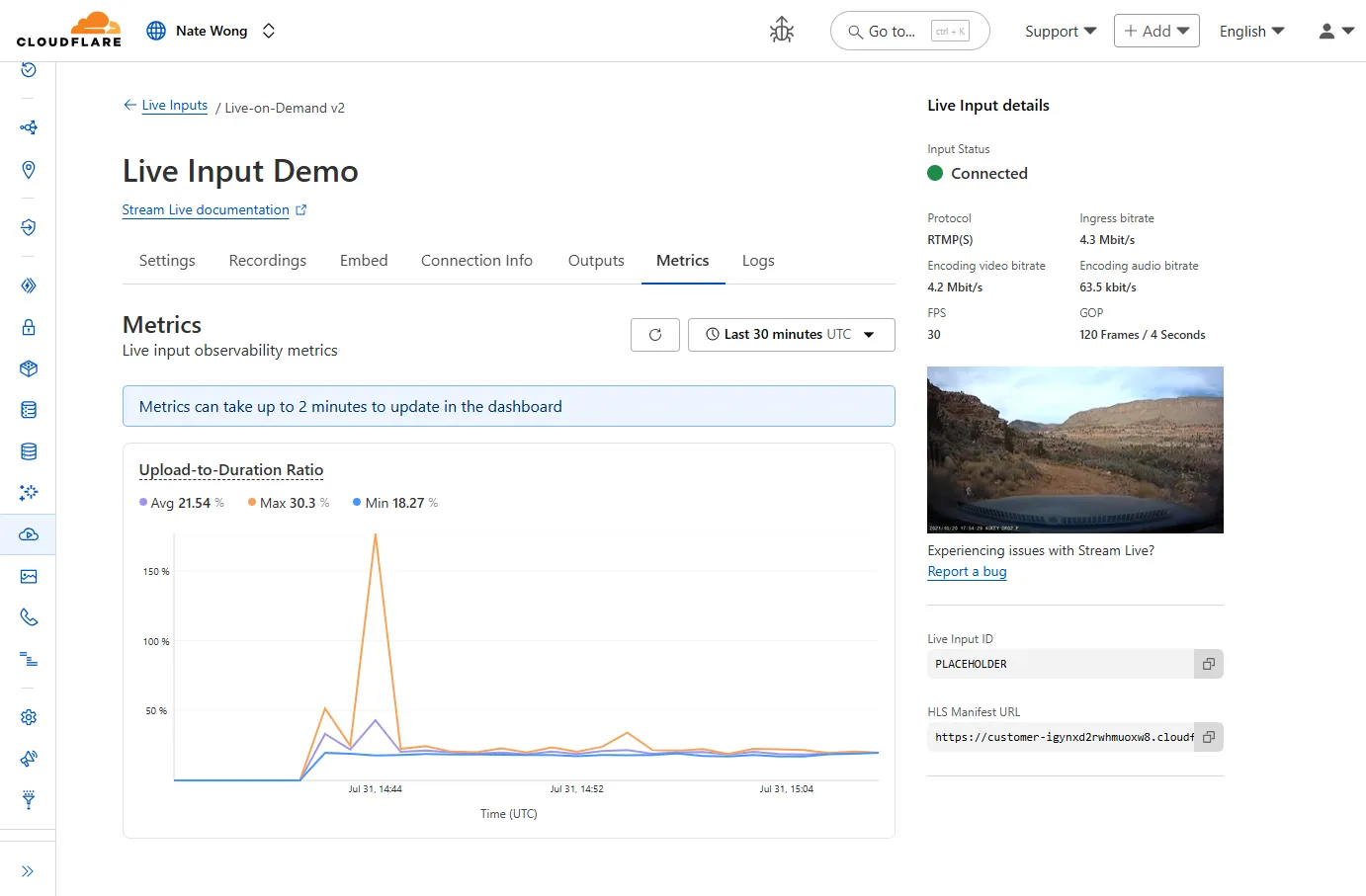
  • Stream – Introducing observability and metrics for Stream Live Inputs

    New information about broadcast metrics and events is now available in
    Cloudflare Stream in the Live Input details of the Dashboard.

    Live Input details showing metrics

    You can now easily understand broadcast-side health and performance with new
    observability, which can help when troubleshooting common issues, particularly
    for new customers who are just getting started, and platform customers who may
    have limited visibility into how their end-users configure their encoders.

    To get started, start a live stream (just getting started?), then visit the Live Input details page in Dash.

    See our new live Troubleshooting guide
    to learn what these metrics mean and how to use them to address common broadcast
    issues.

  • Stream – Introducing observability and metrics for Stream Live Inputs

    New information about broadcast metrics and events is now available in
    Cloudflare Stream in the Live Input details of the Dashboard.

    Live Input details showing metrics

    You can now easily understand broadcast-side health and performance with new
    observability, which can help when troubleshooting common issues, particularly
    for new customers who are just getting started, and platform customers who may
    have limited visibility into how their end-users configure their encoders.

    To get started, start a live stream (just getting started?), then visit the Live Input details page in Dash.

    See our new live Troubleshooting guide
    to learn what these metrics mean and how to use them to address common broadcast
    issues.

  • Stream – Introducing observability and metrics for Stream Live Inputs

    New information about broadcast metrics and events is now available in
    Cloudflare Stream in the Live Input details of the Dashboard.

    Live Input details showing metrics

    You can now easily understand broadcast-side health and performance with new
    observability, which can help when troubleshooting common issues, particularly
    for new customers who are just getting started, and platform customers who may
    have limited visibility into how their end-users configure their encoders.

    To get started, start a live stream (just getting started?), then visit the Live Input details page in Dash.

    See our new live Troubleshooting guide
    to learn what these metrics mean and how to use them to address common broadcast
    issues.

  • WAF – WAF Release – 2025-08-07 – Emergency

    This week’s highlight focuses on two critical vulnerabilities affecting key infrastructure and enterprise content management platforms. Both flaws present significant remote code execution risks that can be exploited with minimal or no user interaction.

    Key Findings

    • Squid (≤6.3) — CVE-2025-54574: A heap buffer overflow occurs when processing Uniform Resource Names (URNs). This vulnerability may allow remote attackers to execute arbitrary code on the server. The issue has been resolved in version 6.4.

    • Adobe AEM (≤6.5.23) — CVE-2025-54253: Due to a misconfiguration, attackers can achieve remote code execution without requiring any user interaction, posing a severe threat to affected deployments.

    Impact

    Both vulnerabilities expose critical attack vectors that can lead to full server compromise. The Squid heap buffer overflow allows remote code execution by crafting malicious URNs, which can lead to server takeover or denial of service. Given Squid’s widespread use as a caching proxy, this flaw could be exploited to disrupt network traffic or gain footholds inside secure environments.

    Adobe AEM’s remote code execution vulnerability enables attackers to run arbitrary code on the content management server without any user involvement. This puts sensitive content, application integrity, and the underlying infrastructure at extreme risk. Exploitation could lead to data theft, defacement, or persistent backdoor installation.

    These findings reinforce the urgency of updating to the patched versions — Squid 6.4 and Adobe AEM 6.5.24 or later — and reviewing configurations to prevent exploitation.

    Ruleset Rule ID Legacy Rule ID Description Previous Action New Action Comments
    Cloudflare Managed Ruleset f61ed7c1e7e24c3380289e41ef7e015b 100844 Adobe Experience Manager Forms – Remote Code Execution – CVE:CVE-2025-54253 N/A Block This is a New Detection
    Cloudflare Managed Ruleset e76e65f5a3aa43f49e0684a6baec057a 100840 Squid – Buffer Overflow – CVE:CVE-2025-54574 N/A Block This is a New Detection
  • Radar – Certificate Transparency Insights in Cloudflare Radar

    Radar now introduces Certificate Transparency (CT) insights, providing visibility into certificate issuance trends based on Certificate Transparency logs currently monitored by Cloudflare.

    The following API endpoints are now available:

    For the summary and timeseries_groups endpoints, the following dimensions are available (and also usable as filters):

    • ca: Certification Authority (certificate issuer)
    • ca_owner: Certification Authority Owner
    • duration: Certificate validity duration (between NotBefore and NotAfter dates)
    • entry_type: Entry type (certificate vs. pre-certificate)
    • expiration_status: Expiration status (valid vs. expired)
    • has_ips: Presence of IP addresses in certificate Subject Alternative Names (SANs)
    • has_wildcards: Presence of wildcard DNS names in certificate SANs
    • log: CT log name
    • log_api: CT log API (RFC6962 vs. Static)
    • log_operator: CT log operator
    • public_key_algorithm: Public key algorithm of certificate’s key
    • signature_algorithm: Signature algorithm used by CA to sign certificate
    • tld: Top-level domain for DNS names found in certificates SANs
    • validation_level: Validation level

    Check out the new Certificate Transparency insights in the new Radar page.

  • Agents, Workers – Agents SDK adds MCP Elicitation support, http-streamable suppport, task queues, email integration and more

    The latest releases of @cloudflare/agents brings major improvements to MCP transport protocols support and agents connectivity. Key updates include:

    MCP elicitation support

    MCP servers can now request user input during tool execution, enabling interactive workflows like confirmations, forms, and multi-step processes. This feature uses durable storage to preserve elicitation state even during agent hibernation, ensuring seamless user interactions across agent lifecycle events.

    // Request user confirmation via elicitation
    const confirmation = await this.elicitInput({
    message: `Are you sure you want to increment the counter by ${amount}?`,
    requestedSchema: {
    type: "object",
    properties: {
    confirmed: {
    type: "boolean",
    title: "Confirm increment",
    description: "Check to confirm the increment",
    },
    },
    required: ["confirmed"],
    },
    });

    Check out our demo to see elicitation in action.

    HTTP streamable transport for MCP

    MCP now supports HTTP streamable transport which is recommended over SSE. This transport type offers:

    • Better performance: More efficient data streaming and reduced overhead
    • Improved reliability: Enhanced connection stability and error recover- Automatic fallback: If streamable transport is not available, it gracefully falls back to SSE
    export default MyMCP.serve("/mcp", {
    binding: "MyMCP",
    });

    The SDK automatically selects the best available transport method, gracefully falling back from streamable-http to SSE when needed.

    Enhanced MCP connectivity

    Significant improvements to MCP server connections and transport reliability:

    • Auto transport selection: Automatically determines the best transport method, falling back from streamable-http to SSE as needed
    • Improved error handling: Better connection state management and error reporting for MCP servers
    • Reliable prop updates: Centralized agent property updates ensure consistency across different contexts

    Lightweight .queue for fast task deferral

    You can use .queue() to enqueue background work — ideal for tasks like processing user messages, sending notifications etc.

    class MyAgent extends Agent {
    doSomethingExpensive(payload) {
    // a long running process that you want to run in the background
    }
    queueSomething() {
    await this.queue("doSomethingExpensive", somePayload); // this will NOT block further execution, and runs in the background
    await this.queue("doSomethingExpensive", someOtherPayload); // the callback will NOT run until the previous callback is complete
    // ... call as many times as you want
    }
    }

    Want to try it yourself? Just define a method like processMessage in your agent, and you’re ready to scale.

    New email adapter

    Want to build an AI agent that can receive and respond to emails automatically? With the new email adapter and onEmail lifecycle method, now you can.

    export class EmailAgent extends Agent {
    async onEmail(email: AgentEmail) {
    const raw = await email.getRaw();
    const parsed = await PostalMime.parse(raw);
    // create a response based on the email contents
    // and then send a reply
    await this.replyToEmail(email, {
    fromName: "Email Agent",
    body: `Thanks for your email! You've sent us "${parsed.subject}". We'll process it shortly.`,
    });
    }
    }

    You route incoming mail like this:

    export default {
    async email(email, env) {
    await routeAgentEmail(email, env, {
    resolver: createAddressBasedEmailResolver("EmailAgent"),
    });
    },
    };

    You can find a full example here.

    Automatic context wrapping for custom methods

    Custom methods are now automatically wrapped with the agent’s context, so calling getCurrentAgent() should work regardless of where in an agent’s lifecycle it’s called. Previously this would not work on RPC calls, but now just works out of the box.

    export class MyAgent extends Agent {
    async suggestReply(message) {
    // getCurrentAgent() now correctly works, even when called inside an RPC method
    const { agent } = getCurrentAgent()!;
    return generateText({
    prompt: `Suggest a reply to: "${message}" from "${agent.name}"`,
    tools: [replyWithEmoji],
    });
    }
    }

    Try it out and tell us what you build!

  • Agents, Workers – Cloudflare Sandbox SDK adds streaming, code interpreter, Git support, process control and more

    We’ve shipped a major release for the @cloudflare/sandbox SDK, turning it into a full-featured, container-based execution platform that runs securely on Cloudflare Workers.

    This update adds live streaming of output, persistent Python and JavaScript code interpreters with rich output support (charts, tables, HTML, JSON), file system access, Git operations, full background process control, and the ability to expose running services via public URLs.

    This makes it ideal for building AI agents, CI runners, cloud REPLs, data analysis pipelines, or full developer tools — all without managing infrastructure.

    Code interpreter (Python, JS, TS)

    Create persistent code contexts with support for rich visual + structured outputs.

    createCodeContext(options)

    Creates a new code execution context with persistent state.

    // Create a Python context
    const pythonCtx = await sandbox.createCodeContext({ language: "python" });
    // Create a JavaScript context
    const jsCtx = await sandbox.createCodeContext({ language: "javascript" });

    Options:

    • language: Programming language (‘python’ | ‘javascript’ | ‘typescript’)
    • cwd: Working directory (default: /workspace)
    • envVars: Environment variables for the context

    runCode(code, options)

    Executes code with optional streaming callbacks.

    // Simple execution
    const execution = await sandbox.runCode('print("Hello World")', {
    context: pythonCtx,
    });
    // With streaming callbacks
    await sandbox.runCode(
    `
    for i in range(5):
    print(f"Step {i}")
    time.sleep(1)
    `,
    {
    context: pythonCtx,
    onStdout: (output) => console.log("Real-time:", output.text),
    onResult: (result) => console.log("Result:", result),
    },
    );

    Options:

    • language: Programming language (‘python’ | ‘javascript’ | ‘typescript’)
    • cwd: Working directory (default: /workspace)
    • envVars: Environment variables for the context

    Real-time streaming output

    Returns a streaming response for real-time processing.

    const stream = await sandbox.runCodeStream(
    "import time; [print(i) for i in range(10)]",
    );
    // Process the stream as needed

    Rich output handling

    Interpreter outputs are auto-formatted and returned in multiple formats:

    • text
    • html (e.g., Pandas tables)
    • png, svg (e.g., Matplotlib charts)
    • json (structured data)
    • chart (parsed visualizations)
    const result = await sandbox.runCode(
    `
    import seaborn as sns
    import matplotlib.pyplot as plt
    data = sns.load_dataset("flights")
    pivot = data.pivot("month", "year", "passengers")
    sns.heatmap(pivot, annot=True, fmt="d")
    plt.title("Flight Passengers")
    plt.show()
    pivot.to_dict()
    `,
    { context: pythonCtx },
    );
    if (result.png) {
    console.log("Chart output:", result.png);
    }

    Preview URLs from Exposed Ports

    Start background processes and expose them with live URLs.

    await sandbox.startProcess("python -m http.server 8000");
    const preview = await sandbox.exposePort(8000);
    console.log("Live preview at:", preview.url);

    Full process lifecycle control

    Start, inspect, and terminate long-running background processes.

    const process = await sandbox.startProcess("node server.js");
    console.log(`Started process ${process.id} with PID ${process.pid}`);
    // Monitor the process
    const logStream = await sandbox.streamProcessLogs(process.id);
    for await (const log of parseSSEStream<LogEvent>(logStream)) {
    console.log(`Server: ${log.data}`);
    }
    • listProcesses() – List all running processes
    • getProcess(id) – Get detailed process status
    • killProcess(id, signal) – Terminate specific processes
    • killAllProcesses() – Kill all processes
    • streamProcessLogs(id, options) – Stream logs from running processes
    • getProcessLogs(id) – Get accumulated process output

    Git integration

    Clone Git repositories directly into the sandbox.

    await sandbox.gitCheckout("https://github.com/user/repo", {
    branch: "main",
    targetDir: "my-project",
    });

    Sandboxes are still experimental. We’re using them to explore how isolated, container-like workloads might scale on Cloudflare — and to help define the developer experience around them.

  • Agents, Workers AI – OpenAI open models now available on Workers AI

    We’re thrilled to be a Day 0 partner with OpenAI to bring their latest open models to Workers AI, including support for Responses API, Code Interpreter, and Web Search (coming soon).

    Get started with the new models at @cf/openai/gpt-oss-120b and @cf/openai/gpt-oss-20b.
    Check out the blog for more details about the new models, and the gpt-oss-120b and gpt-oss-20b model pages for more information about pricing and context windows.

    Responses API

    If you call the model through:

    • Workers Binding, it will accept/return Responses API – env.AI.run(“@cf/openai/gpt-oss-120b”)
    • REST API on /run endpoint, it will accept/return Responses API – https://api.cloudflare.com/client/v4/accounts/<account_id>/ai/run/@cf/openai/gpt-oss-120b
    • REST API on new /responses endpoint, it will accept/return Responses API – https://api.cloudflare.com/client/v4/accounts/<account_id>/ai/v1/responses
    • REST API for OpenAI Compatible endpoint, it will return Chat Completions (coming soon) – https://api.cloudflare.com/client/v4/accounts/<account_id>/ai/v1/chat/completions
    curl https://api.cloudflare.com/client/v4/accounts/<account_id>/ai/v1/responses
    -H "Content-Type: application/json"
    -H "Authorization: Bearer $CLOUDFLARE_API_KEY"
    -d '{
    "model": "@cf/openai/gpt-oss-120b",
    "reasoning": {"effort": "medium"},
    "input": [
    {
    "role": "user",
    "content": "What are the benefits of open-source models?"
    }
    ]
    }'

    Code Interpreter

    The model is natively trained to support stateful code execution, and we’ve implemented support for this feature using our Sandbox SDK and Containers. Cloudflare’s Developer Platform is uniquely positioned to support this feature, so we’re very excited to bring our products together to support this new use case.

    Web Search (coming soon)

    We are working to implement Web Search for the model, where users can bring their own Exa API Key so the model can browse the Internet.