Category: Uncategorized

  • AI Gateway – Call any AI model through AI Gateway’s new REST API

    AI Gateway now uses the AI REST API on api.cloudflare.com. You can call any model — whether from OpenAI, Anthropic, Google, or hosted on Workers AI — through one unified API, using the same endpoints and authentication regardless of provider. Four endpoints are available:

    • POST /ai/run — universal endpoint for all models and modalities
    • POST /ai/v1/chat/completions — OpenAI SDK compatible
    • POST /ai/v1/responses — OpenAI Responses API compatible
    • POST /ai/v1/messages — Anthropic SDK compatible
    curl -X POST "https://api.cloudflare.com/client/v4/accounts/$CLOUDFLARE_ACCOUNT_ID/ai/v1/chat/completions"
    --header "Authorization: Bearer $CLOUDFLARE_API_TOKEN"
    --header "Content-Type: application/json"
    --data '{
    "model": "openai/gpt-5.5",
    "messages": [{"role": "user", "content": "What is Cloudflare?"}]
    }'

    All AI Gateway features — logging, caching, rate limiting, and guardrails — are applied automatically. Third-party models are billed through Unified Billing, so you do not need to manage separate provider API keys.

    Third-party model requests are routed through your account’s default gateway, which is created automatically on first use. To route requests through a specific gateway, add the cf-aig-gateway-id header.

    If you are already calling Workers AI models through the existing REST API, that path (/ai/run/@cf/{model}) continues to work. To call Workers AI models through AI Gateway, use the @cf/ model prefix (for example, @cf/moonshotai/kimi-k2.6) and include the cf-aig-gateway-id header to specify which gateway to route through.

    For more details and examples, refer to the REST API documentation.
  • AI Gateway – Call any AI model through AI Gateway’s new REST API

    AI Gateway now uses the AI REST API on api.cloudflare.com. You can call any model — whether from OpenAI, Anthropic, Google, or hosted on Workers AI — through one unified API, using the same endpoints and authentication regardless of provider. Four endpoints are available:

    • POST /ai/run — universal endpoint for all models and modalities
    • POST /ai/v1/chat/completions — OpenAI SDK compatible
    • POST /ai/v1/responses — OpenAI Responses API compatible
    • POST /ai/v1/messages — Anthropic SDK compatible
    curl -X POST "https://api.cloudflare.com/client/v4/accounts/$CLOUDFLARE_ACCOUNT_ID/ai/v1/chat/completions"
    --header "Authorization: Bearer $CLOUDFLARE_API_TOKEN"
    --header "Content-Type: application/json"
    --data '{
    "model": "openai/gpt-5.5",
    "messages": [{"role": "user", "content": "What is Cloudflare?"}]
    }'

    All AI Gateway features — logging, caching, rate limiting, and guardrails — are applied automatically. Third-party models are billed through Unified Billing, so you do not need to manage separate provider API keys.

    Third-party model requests are routed through your account’s default gateway, which is created automatically on first use. To route requests through a specific gateway, add the cf-aig-gateway-id header.

    If you are already calling Workers AI models through the existing REST API, that path (/ai/run/@cf/{model}) continues to work. To call Workers AI models through AI Gateway, use the @cf/ model prefix (for example, @cf/moonshotai/kimi-k2.6) and include the cf-aig-gateway-id header to specify which gateway to route through.

    For more details and examples, refer to the REST API documentation.
  • Cloudflare Fundamentals, Cloudflare One, Cloudflare Tunnel for SASE, Cloudflare Tunnel, Cloudflare Mesh – Granular permissions for Cloudflare Tunnel and Cloudflare Mesh

    You can now scope Cloudflare permissions to individual Cloudflare Tunnel instances and Cloudflare Mesh nodes. Administrators can delegate access to specific Tunnels or Mesh nodes without granting account-wide control over private networking.

    What is new

    When you add a member or create a permission policy, the resource picker now lists Cloudflare Tunnel instances and Cloudflare Mesh nodes as scopable resource types. You can:

    • Grant a read-only role on a single Cloudflare Tunnel instance to a support operator for log streaming and diagnostics — without exposing other Tunnels or destructive actions.
    • Grant a write role on a specific Cloudflare Mesh node to an application team — without giving them access to the rest of your private network.
    • Scope a single policy to one or many Tunnels and Mesh nodes at once.

    How it works

    Granular permissions are a parallel layer to existing account-level roles — they do not replace them.

    • Existing account-level roles continue to work. A member with Cloudflare Access or Cloudflare Zero Trust retains write access to every Tunnel and Mesh node in the account. This ensures backward compatibility for existing automation and tokens.
    • Granular permissions are additive. For any API request on a specific Tunnel or Mesh node, access is granted if the principal has either the account-level role or a granular permission for that resource.
    • Resource enumeration is authorization-aware. Listing endpoints (GET /accounts/{id}/cfd_tunnel, GET /accounts/{id}/warp_connector) return only the resources the principal has at least read access to.

    Get started

  • Cloudflare Fundamentals, Cloudflare One, Cloudflare Tunnel for SASE, Cloudflare Tunnel, Cloudflare Mesh – Granular permissions for Cloudflare Tunnel and Cloudflare Mesh

    You can now scope Cloudflare permissions to individual Cloudflare Tunnel instances and Cloudflare Mesh nodes. Administrators can delegate access to specific Tunnels or Mesh nodes without granting account-wide control over private networking.

    What is new

    When you add a member or create a permission policy, the resource picker now lists Cloudflare Tunnel instances and Cloudflare Mesh nodes as scopable resource types. You can:

    • Grant a read-only role on a single Cloudflare Tunnel instance to a support operator for log streaming and diagnostics — without exposing other Tunnels or destructive actions.
    • Grant a write role on a specific Cloudflare Mesh node to an application team — without giving them access to the rest of your private network.
    • Scope a single policy to one or many Tunnels and Mesh nodes at once.

    How it works

    Granular permissions are a parallel layer to existing account-level roles — they do not replace them.

    • Existing account-level roles continue to work. A member with Cloudflare Access or Cloudflare Zero Trust retains write access to every Tunnel and Mesh node in the account. This ensures backward compatibility for existing automation and tokens.
    • Granular permissions are additive. For any API request on a specific Tunnel or Mesh node, access is granted if the principal has either the account-level role or a granular permission for that resource.
    • Resource enumeration is authorization-aware. Listing endpoints (GET /accounts/{id}/cfd_tunnel, GET /accounts/{id}/warp_connector) return only the resources the principal has at least read access to.

    Get started

  • Workers VPC – Reach Cloudflare WAN destinations from Workers VPC

    You can now use VPC Network bindings with network_id: "cf1:network" to reach your full private network from Workers, including:

    This means a single VPC Network binding can route Worker requests to private services regardless of how those services are connected to Cloudflare: through a Cloudflare Tunnel from a cloud VPC, a Mesh node on a private subnet, or a Cloudflare WAN on-ramp from your data center or branch site.

    • wrangler.jsonc

      {
      "vpc_networks": [
      {
      "binding": "PRIVATE_NETWORK",
      "network_id": "cf1:network",
      "remote": true,
      },
      ],
      }
    • wrangler.toml

      [[vpc_networks]]
      binding = "PRIVATE_NETWORK"
      network_id = "cf1:network"
      remote = true

    At runtime, the URL you pass to fetch() determines the destination:

    // Reach a service behind a Cloudflare WAN IPsec on-ramp
    const response = await env.PRIVATE_NETWORK.fetch("http://10.50.0.100:8080/api");

    For configuration options, refer to VPC Networks.

  • Workers VPC – Reach Cloudflare WAN destinations from Workers VPC

    You can now use VPC Network bindings with network_id: "cf1:network" to reach your full private network from Workers, including:

    This means a single VPC Network binding can route Worker requests to private services regardless of how those services are connected to Cloudflare: through a Cloudflare Tunnel from a cloud VPC, a Mesh node on a private subnet, or a Cloudflare WAN on-ramp from your data center or branch site.

    • wrangler.jsonc

      {
      "vpc_networks": [
      {
      "binding": "PRIVATE_NETWORK",
      "network_id": "cf1:network",
      "remote": true,
      },
      ],
      }
    • wrangler.toml

      [[vpc_networks]]
      binding = "PRIVATE_NETWORK"
      network_id = "cf1:network"
      remote = true

    At runtime, the URL you pass to fetch() determines the destination:

    // Reach a service behind a Cloudflare WAN IPsec on-ramp
    const response = await env.PRIVATE_NETWORK.fetch("http://10.50.0.100:8080/api");

    For configuration options, refer to VPC Networks.

  • AI Gateway – Call any AI model through AI Gateway’s new REST API

    AI Gateway now uses the AI REST API on api.cloudflare.com. You can call any model — whether from OpenAI, Anthropic, Google, or hosted on Workers AI — through one unified API, using the same endpoints and authentication regardless of provider. Four endpoints are available:

    • POST /ai/run — universal endpoint for all models and modalities
    • POST /ai/v1/chat/completions — OpenAI SDK compatible
    • POST /ai/v1/responses — OpenAI Responses API compatible
    • POST /ai/v1/messages — Anthropic SDK compatible
    curl -X POST "https://api.cloudflare.com/client/v4/accounts/$CLOUDFLARE_ACCOUNT_ID/ai/v1/chat/completions"
    --header "Authorization: Bearer $CLOUDFLARE_API_TOKEN"
    --header "Content-Type: application/json"
    --data '{
    "model": "openai/gpt-5.5",
    "messages": [{"role": "user", "content": "What is Cloudflare?"}]
    }'

    All AI Gateway features — logging, caching, rate limiting, and guardrails — are applied automatically. Third-party models are billed through Unified Billing, so you do not need to manage separate provider API keys.

    Third-party model requests are routed through your account’s default gateway, which is created automatically on first use. To route requests through a specific gateway, add the cf-aig-gateway-id header.

    If you are already calling Workers AI models through the existing REST API, that path (/ai/run/@cf/{model}) continues to work. To call Workers AI models through AI Gateway, use the @cf/ model prefix (for example, @cf/moonshotai/kimi-k2.6) and include the cf-aig-gateway-id header to specify which gateway to route through.

    For more details and examples, refer to the REST API documentation.

  • Cloudflare Fundamentals, Cloudflare One, Cloudflare Tunnel for SASE, Cloudflare Tunnel, Cloudflare Mesh – Granular permissions for Cloudflare Tunnel and Cloudflare Mesh

    You can now scope Cloudflare permissions to individual Cloudflare Tunnel instances and Cloudflare Mesh nodes. Administrators can delegate access to specific Tunnels or Mesh nodes without granting account-wide control over private networking.

    What is new

    When you add a member or create a permission policy, the resource picker now lists Cloudflare Tunnel instances and Cloudflare Mesh nodes as scopable resource types. You can:

    • Grant a read-only role on a single Cloudflare Tunnel instance to a support operator for log streaming and diagnostics — without exposing other Tunnels or destructive actions.
    • Grant a write role on a specific Cloudflare Mesh node to an application team — without giving them access to the rest of your private network.
    • Scope a single policy to one or many Tunnels and Mesh nodes at once.

    How it works

    Granular permissions are a parallel layer to existing account-level roles — they do not replace them.

    • Existing account-level roles continue to work. A member with Cloudflare Access or Cloudflare Zero Trust retains write access to every Tunnel and Mesh node in the account. This ensures backward compatibility for existing automation and tokens.
    • Granular permissions are additive. For any API request on a specific Tunnel or Mesh node, access is granted if the principal has either the account-level role or a granular permission for that resource.
    • Resource enumeration is authorization-aware. Listing endpoints (GET /accounts/{id}/cfd_tunnel, GET /accounts/{id}/warp_connector) return only the resources the principal has at least read access to.

    Get started

  • Workers VPC – Reach Cloudflare WAN destinations from Workers VPC

    You can now use VPC Network bindings with network_id: "cf1:network" to reach your full private network from Workers, including:

    This means a single VPC Network binding can route Worker requests to private services regardless of how those services are connected to Cloudflare: through a Cloudflare Tunnel from a cloud VPC, a Mesh node on a private subnet, or a Cloudflare WAN on-ramp from your data center or branch site.

    • wrangler.jsonc

      {
      "vpc_networks": [
      {
      "binding": "PRIVATE_NETWORK",
      "network_id": "cf1:network",
      "remote": true,
      },
      ],
      }
    • wrangler.toml

      [[vpc_networks]]
      binding = "PRIVATE_NETWORK"
      network_id = "cf1:network"
      remote = true

    At runtime, the URL you pass to fetch() determines the destination:

    // Reach a service behind a Cloudflare WAN IPsec on-ramp
    const response = await env.PRIVATE_NETWORK.fetch("http://10.50.0.100:8080/api");

    For configuration options, refer to VPC Networks.

  • DNS – New DNS records UX is rolling out

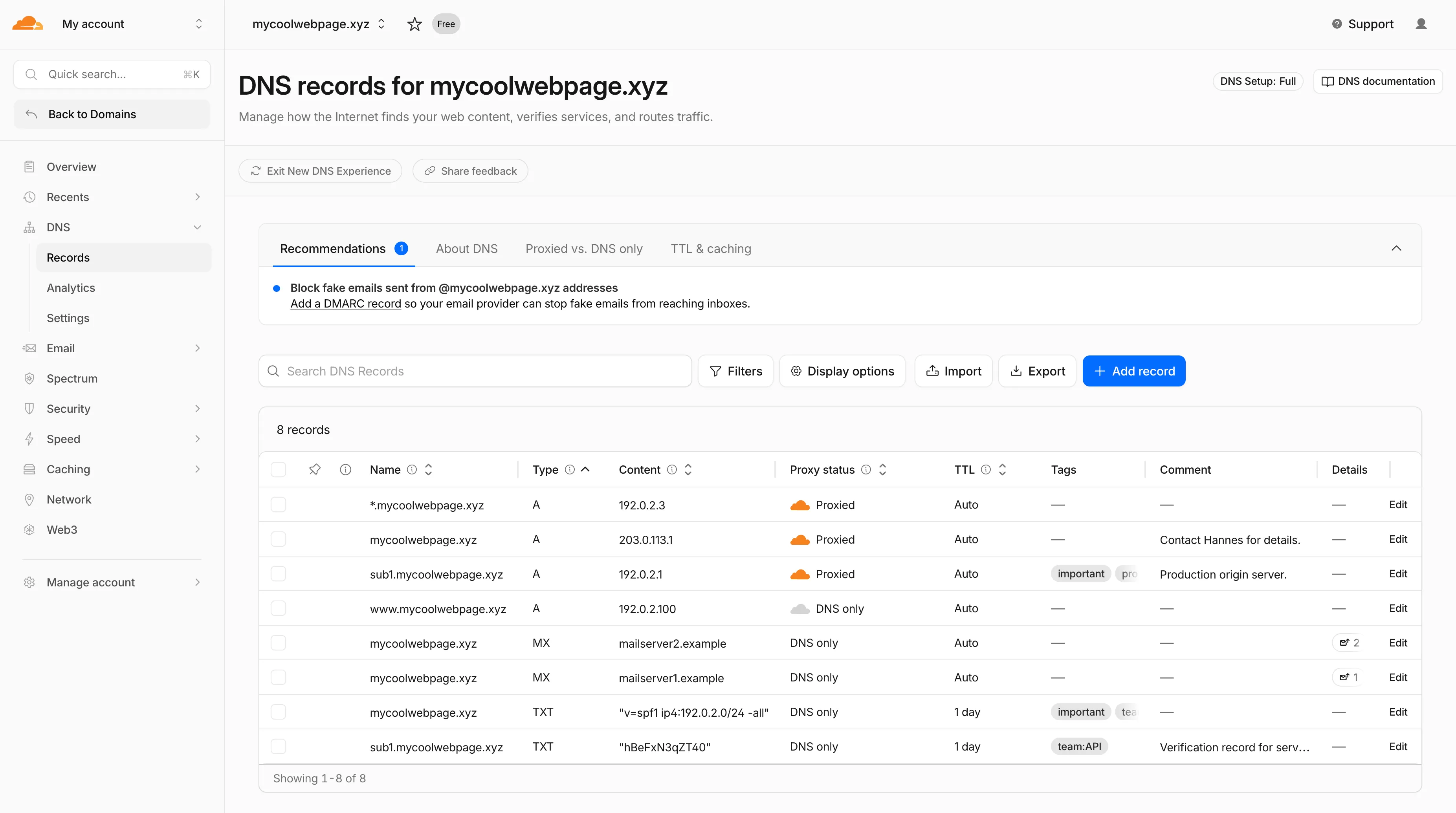
    Starting today, everyone can opt in to a refreshed DNS records page in the Cloudflare dashboard. Over the coming weeks, the new experience will become the default for Free plan users first, followed by paid plans.

    New DNS records UX

    What is new


    • Better table experience: resizable and hideable columns, row pinning, advanced filters with logical operators (AND/OR), configurable pagination, and expanded input fields so long values are no longer cut off.
    • First-class mobile experience: responsive layout with a touch-friendly, card-based UI and compact controls for small screens.
    • DNS quick reference: bite-sized explainers for DNS, proxy status, and TTL, available directly in the product to help users configure records without leaving the page.
    • Modern frontend: a refactor onto Cloudflare’s new UI framework that improves performance and lays the foundation for future improvements.

    New DNS records UX

    Rollout plan

    Dates are subject to change based on feedback received during the rollout.

    • 20 May – 05 June: ramped rollout to Free, then Pro and Business plans.
    • 08 June – 03 July: ramped rollout to Enterprise plans.

    Share your feedback

    Once the new experience is turned on for your account, look for the feedback link at the top of the DNS records page in the Cloudflare dashboard and let us know what you think. Your input helps us prioritize the next round of improvements.