This emergency release introduces a new rule to detect Next.js App Router middleware and proxy bypass attempts via segment-prefetch routes (CVE-2026-44575).
Key Findings
CVE-2026-44575: Next.js Middleware / Proxy Bypass in App Router Applications via Segment-Prefetch Routes
Successful exploitation allows unauthenticated attackers to bypass middleware or proxy-based authorization checks in affected Next.js App Router applications. This leads to unauthorized access to protected content, potential exposure of sensitive application data, and compromise of application security boundaries.
We strongly recommend upgrading to Next.js 15.5.16 or 16.2.5 (or later) immediately to address the underlying vulnerability. If you cannot upgrade immediately, enforce authorization in the underlying route or page logic instead of relying solely on middleware.
Ruleset
Rule ID
Legacy Rule ID
Description
Previous Action
New Action
Comments
Cloudflare Managed Ruleset
1de95bf6d6374e1099854278e77e4a53
N/A
Next.js – Middleware Bypass via Invalid RSC Header – CVE:CVE-2026-44575
You can now interact with your Stream video library using new bindings for Workers! This allows customers to upload content to Stream, provision direct uploads, manage videos, and generate signed URLs from a Worker without making authenticated API calls. We’re excited to bring Stream and Workers closer together to empower more programmatic pipelines, tighter integrations, and support generative AI and inference workloads.
Use the Stream binding when you want to:
Upload videos from URLs or create basic direct upload links for end users
Generate signed playback tokens without managing signing keys
Manage video metadata, captions, downloads, and watermarks
Build video pipelines entirely within Workers
To get started, add the Stream binding to your Wrangler configuration:
For setup instructions and the full API reference, refer to Bind to Workers API.
Get started with your Agent
Add a binding for Cloudflare Stream (env.STREAM). On the watch page, use the
Stream binding to get info based on the ID, and leverage video.meta.name as
the page title.
You can now export your Requests for Information (RFI) history to a CSV document and customize your dashboard view by choosing how many RFI records to load per page.
Why this matters
These quality-of-life updates focus on data portability and dashboard performance, allowing power users to manage high volumes of requests more efficiently:
The new CSV export allows you to move RFI data into external tools for custom reporting, internal auditing, or cross-referencing with other security projects without manual data entry
With adjustable page density, you can now choose to load more records at once (10, 25 or 50) to scan through history faster
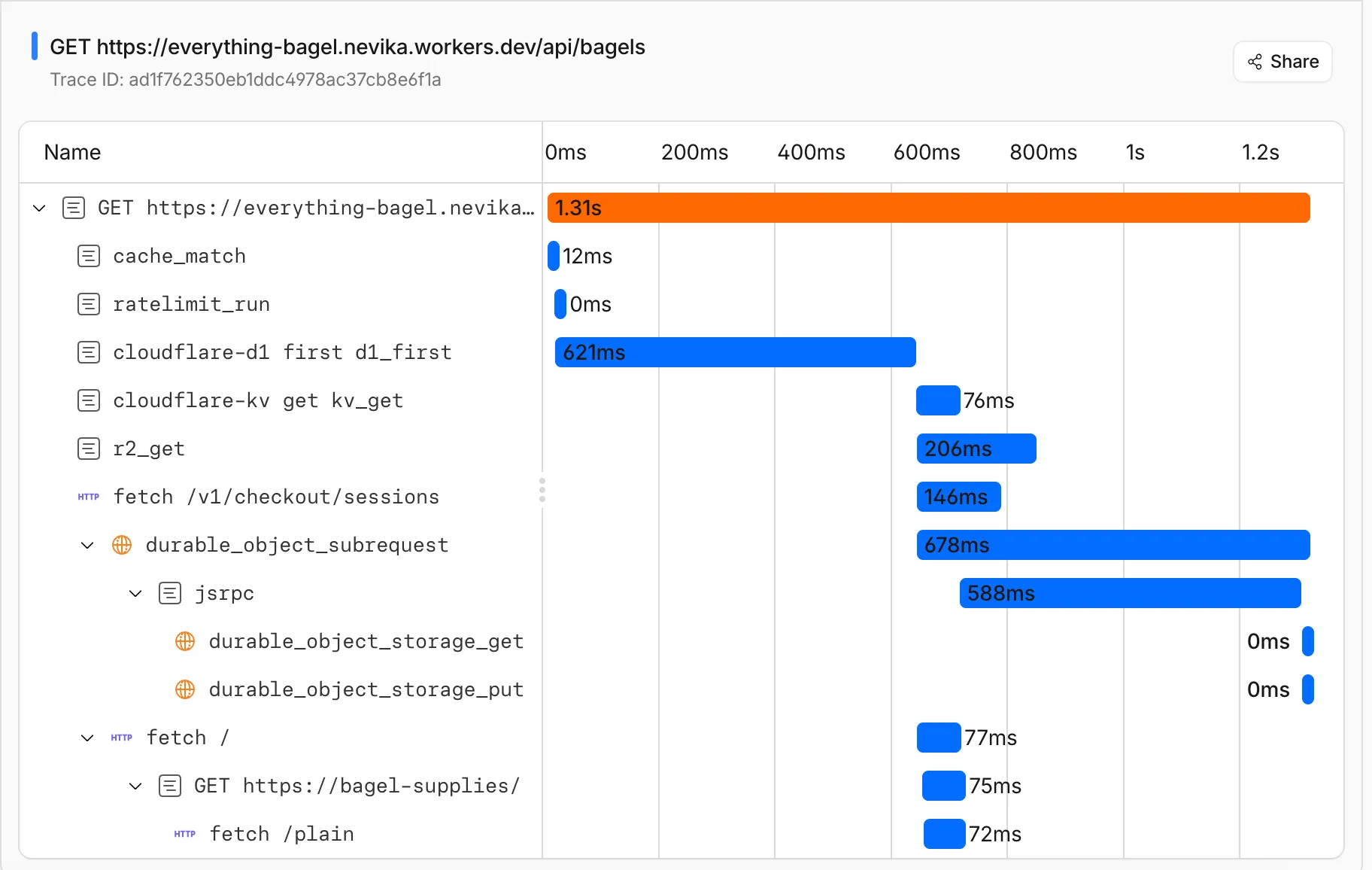
You can now get a single unified trace across Worker-to-Worker subrequests, with trace context propagating automatically. Previously, automatic tracing produced disconnected traces when a Worker called another Worker through a service binding or Durable Object.
This means you can:
Follow a request through your entire Worker architecture in one trace view
See service binding and Durable Object calls as nested child spans instead of separate traces
Debug cross-Worker request flows in the Cloudflare dashboard or in an external observability platform via OpenTelemetry
Up next, we are working on external trace context propagation using W3C Trace Context standards, which will allow traces from your Workers to link with traces from services outside of Cloudflare.
This emergency release introduces a new rule to detect Next.js App Router middleware and proxy bypass attempts via segment-prefetch routes (CVE-2026-44575).
Key Findings
CVE-2026-44575: Next.js Middleware / Proxy Bypass in App Router Applications via Segment-Prefetch Routes
Successful exploitation allows unauthenticated attackers to bypass middleware or proxy-based authorization checks in affected Next.js App Router applications. This leads to unauthorized access to protected content, potential exposure of sensitive application data, and compromise of application security boundaries.
We strongly recommend upgrading to Next.js 15.5.16 or 16.2.5 (or later) immediately to address the underlying vulnerability. If you cannot upgrade immediately, enforce authorization in the underlying route or page logic instead of relying solely on middleware.
Ruleset
Rule ID
Legacy Rule ID
Description
Previous Action
New Action
Comments
Cloudflare Managed Ruleset
1de95bf6d6374e1099854278e77e4a53
N/A
Next.js – Middleware Bypass via Invalid RSC Header – CVE:CVE-2026-44575
You can now interact with your Stream video library using new bindings for Workers! This allows customers to upload content to Stream, provision direct uploads, manage videos, and generate signed URLs from a Worker without making authenticated API calls. We’re excited to bring Stream and Workers closer together to empower more programmatic pipelines, tighter integrations, and support generative AI and inference workloads.
Use the Stream binding when you want to:
Upload videos from URLs or create basic direct upload links for end users
Generate signed playback tokens without managing signing keys
Manage video metadata, captions, downloads, and watermarks
Build video pipelines entirely within Workers
To get started, add the Stream binding to your Wrangler configuration:
For setup instructions and the full API reference, refer to Bind to Workers API.
Get started with your Agent
Add a binding for Cloudflare Stream (env.STREAM). On the watch page, use the
Stream binding to get info based on the ID, and leverage video.meta.name as
the page title.
You can now export your Requests for Information (RFI) history to a CSV document and customize your dashboard view by choosing how many RFI records to load per page.
Why this matters
These quality-of-life updates focus on data portability and dashboard performance, allowing power users to manage high volumes of requests more efficiently:
The new CSV export allows you to move RFI data into external tools for custom reporting, internal auditing, or cross-referencing with other security projects without manual data entry
With adjustable page density, you can now choose to load more records at once (10, 25 or 50) to scan through history faster
You can now export your Requests for Information (RFI) history to a CSV document and customize your dashboard view by choosing how many RFI records to load per page.
Why this matters
These quality-of-life updates focus on data portability and dashboard performance, allowing power users to manage high volumes of requests more efficiently:
The new CSV export allows you to move RFI data into external tools for custom reporting, internal auditing, or cross-referencing with other security projects without manual data entry
With adjustable page density, you can now choose to load more records at once (10, 25 or 50) to scan through history faster
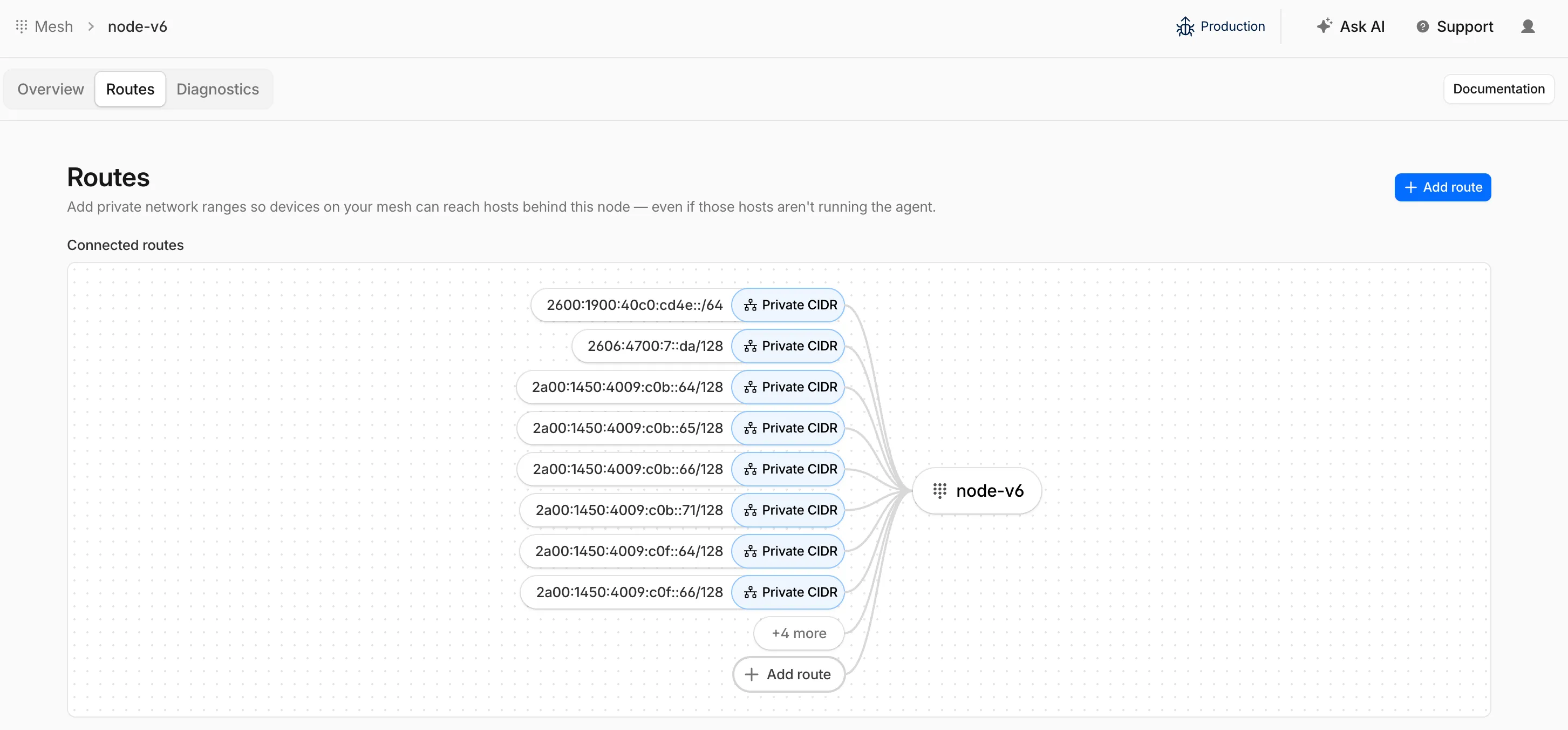
Cloudflare Mesh nodes now support IPv6 CIDR routes. You can advertise both IPv4 and IPv6 subnets through your Mesh nodes, making IPv6-only or dual-stack private networks reachable from any enrolled device.
To add an IPv6 route, follow the same steps as adding an IPv4 route — enter the IPv6 CIDR (for example, fd00::/64) when configuring the route in the dashboard or via the API.
Cloudflare Mesh nodes now support IPv6 CIDR routes. You can advertise both IPv4 and IPv6 subnets through your Mesh nodes, making IPv6-only or dual-stack private networks reachable from any enrolled device.
To add an IPv6 route, follow the same steps as adding an IPv4 route — enter the IPv6 CIDR (for example, fd00::/64) when configuring the route in the dashboard or via the API.