Blog

  • Cloudflare One, Cloudflare WAN – Post-quantum IPsec interoperability with third-party devices

    Cloudflare IPsec now supports post-quantum key agreement with compatible third-party devices. Cisco and Fortinet are the first third-party vendors validated to interoperate with Cloudflare IPsec using ML-KEM (Module-Lattice-Based Key-Encapsulation Mechanism).

    Post-quantum IPsec uses RFC 9370 and draft-ietf-ipsecme-ikev2-mlkem to negotiate hybrid key agreement during the IKEv2 IKE_INTERMEDIATE phase. This combines classical Diffie-Hellman (Group 20) with ML-KEM-768 or ML-KEM-1024 to protect against harvest-now, decrypt-later attacks.

    Key details:

    • Compatible with Cisco 8000 Series Secure Routers with IOS XR Release 26.1.1 and Fortinet FortiOS 7.6.6 and later.
    • Uses ML-KEM-768 or ML-KEM-1024 as an additional Key Exchange to DH Group 20.
    • Follows RFC 9370 and draft-ietf-ipsecme-ikev2-mlkem standards.
    • No additional licensing required.

    Post-quantum IPsec with third-party devices is now generally available with confirmed interoperability for the platforms listed above. Cloudflare intends to support interoperability with more vendors as they build out support for draft-ietf-ipsecme-ikev2-mlkem. Contact your account team to discuss support for additional vendors.

    For supported key exchange methods and the list of validated platforms, refer to GRE and IPsec tunnels.
  • Radar – Dark mode support on Cloudflare Radar

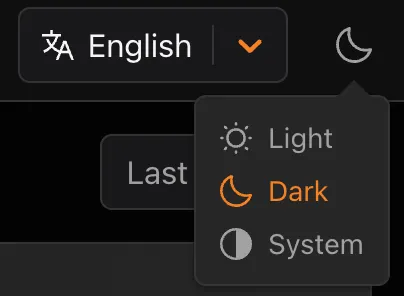
    Radar now supports dark mode. A theme selector in the upper right corner of the page lets users explicitly choose between three display options:

    • Light — standard light theme
    • Dark — full dark theme
    • System — follows the operating system preference

    Screenshot of the theme selector showing Light, Dark, and System options

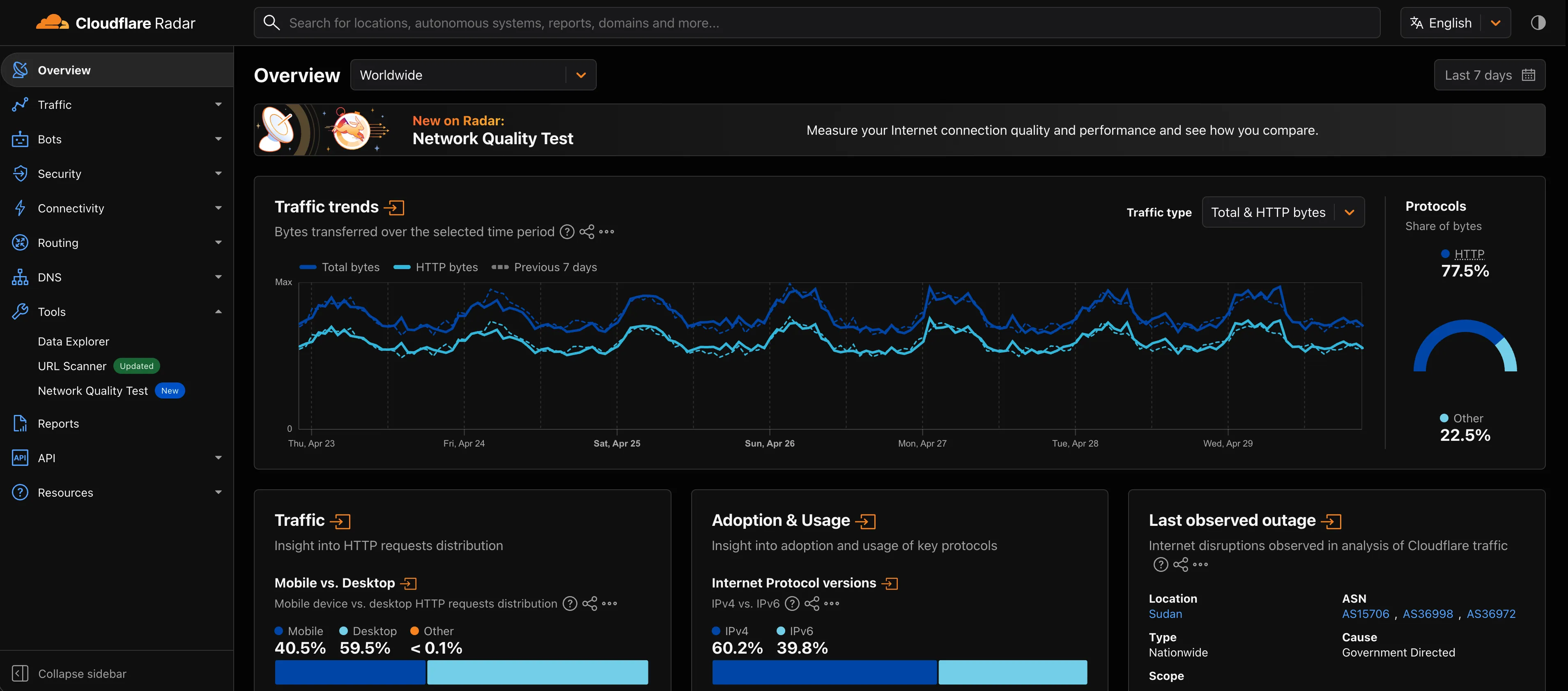
    The selected theme applies consistently across all Radar pages and widgets.

    Screenshot of the Cloudflare Radar overview page in dark mode

    The theme choice also applies to shared and embedded graphs.

    Try it out at Cloudflare Radar.

  • Cloudflare One, Cloudflare WAN – Post-quantum IPsec interoperability with third-party devices

    Cloudflare IPsec now supports post-quantum key agreement with compatible third-party devices. Cisco and Fortinet are the first third-party vendors validated to interoperate with Cloudflare IPsec using ML-KEM (Module-Lattice-Based Key-Encapsulation Mechanism).

    Post-quantum IPsec uses RFC 9370 and draft-ietf-ipsecme-ikev2-mlkem to negotiate hybrid key agreement during the IKEv2 IKE_INTERMEDIATE phase. This combines classical Diffie-Hellman (Group 20) with ML-KEM-768 or ML-KEM-1024 to protect against harvest-now, decrypt-later attacks.

    Key details:

    • Compatible with Cisco 8000 Series Secure Routers with IOS XR Release 26.1.1 and Fortinet FortiOS 7.6.6 and later.
    • Uses ML-KEM-768 or ML-KEM-1024 as an additional Key Exchange to DH Group 20.
    • Follows RFC 9370 and draft-ietf-ipsecme-ikev2-mlkem standards.
    • No additional licensing required.

    Post-quantum IPsec with third-party devices is now generally available with confirmed interoperability for the platforms listed above. Cloudflare intends to support interoperability with more vendors as they build out support for draft-ietf-ipsecme-ikev2-mlkem. Contact your account team to discuss support for additional vendors.

    For supported key exchange methods and the list of validated platforms, refer to GRE and IPsec tunnels.

  • Gateway – Gateway Authorization Proxy and hosted PAC files are now generally available

    The Gateway Authorization Proxy and hosted PAC files are now generally available for all plan types.

    Authorization proxy endpoints add an identity-aware option alongside the existing source IP proxy endpoints, using Cloudflare Access authentication to verify who a user is before applying Gateway filtering — without installing the Cloudflare One Client. Cloudflare-hosted PAC files let you create and distribute PAC files directly from Cloudflare One on Cloudflare’s global network.

    These features are ideal for environments where deploying a device client is not an option, such as virtual desktops (VDI) or compliance-restricted endpoints.

    To get started, refer to the proxy endpoints documentation.

  • Digital Experience Monitoring – Internet outage notifications for devices

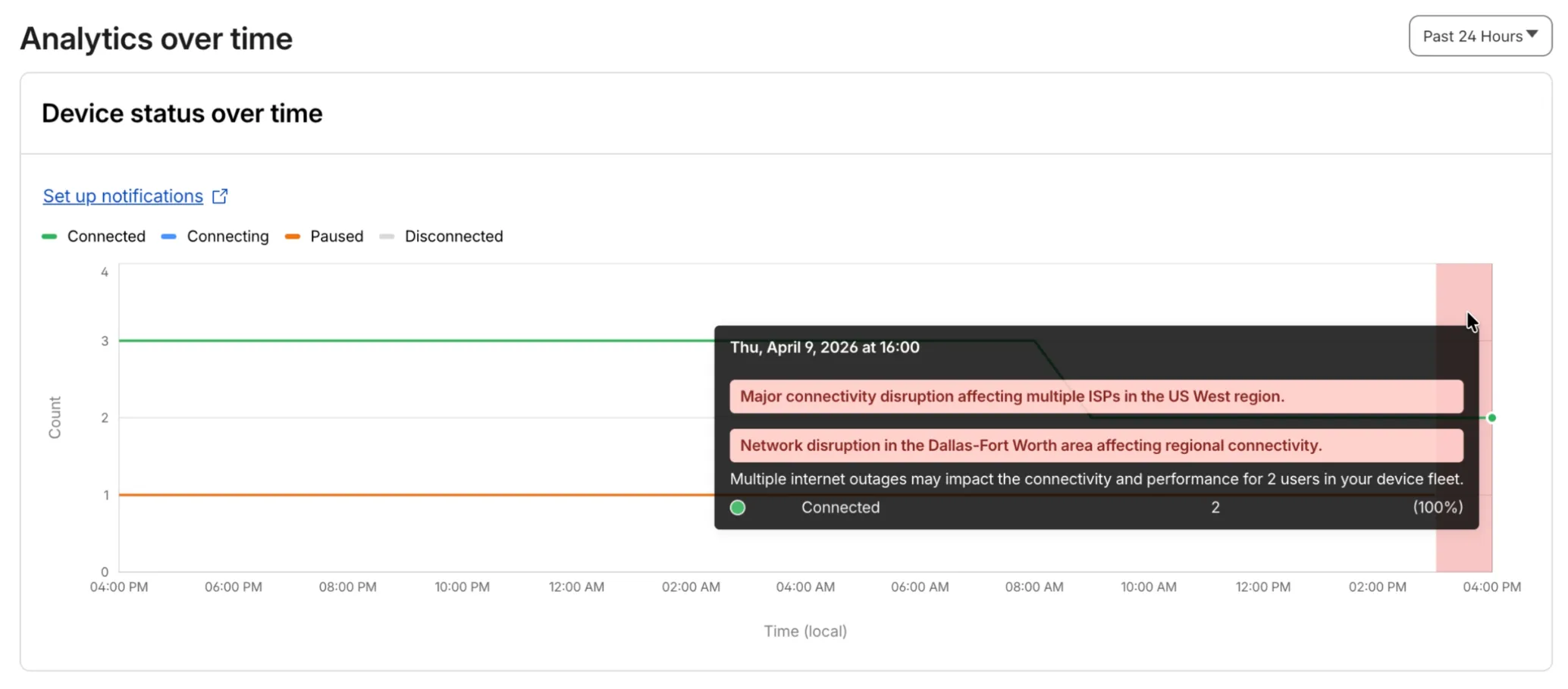
    Digital Experience will display a dashboard notification when an Internet outage or traffic anomaly may impact a Cloudflare One Client device based on its geographic location or network connection.

    This Internet outage and traffic anomaly data is pulled from Cloudflare Radar. All Internet outage and traffic anomaly observations can be viewed in the Radar Outage Center.

    Digital Experience Monitoring dashboard notification for Internet outage impacting Cloudflare One Client devicesDigital Experience Monitoring dashboard analytics for Internet outage impacting Cloudflare One Client devices

  • Digital Experience Monitoring – Internet outage notifications for devices

    Digital Experience will display a dashboard notification when an Internet outage or traffic anomaly may impact a Cloudflare One Client device based on its geographic location or network connection.

    This Internet outage and traffic anomaly data is pulled from Cloudflare Radar. All Internet outage and traffic anomaly observations can be viewed in the Radar Outage Center.

    Digital Experience Monitoring dashboard notification for Internet outage impacting Cloudflare One Client devicesDigital Experience Monitoring dashboard analytics for Internet outage impacting Cloudflare One Client devices

  • Security Center – Unified workspace for Brand Protection

    We have introduced a unified investigation workspace within Brand Protection to help analysts manage complex brand portfolios. Instead of jumping between individual queries, you can now consolidate your workflow into a single, cohesive view.

    What’s new

    • You can now elect multiple saved queries from your dashboard to generate a consolidated “Combined Matches” view. This allows you to triage results from different brand queries in one unified table
    • You can open query extended views in distinct tabs within the Brand Protection dashboard. This enables you to maintain multiple investigation contexts simultaneously and switch between them without losing your place.
    • You can reset your workspace using the new “Clear Selection” action, making it easier to pivot between different investigation sets.

    Key benefits

    • Eliminate fragmented workflows by viewing all matches across different query buckets in a single table, reducing the need to click through dozens of individual query pages
    • Correlate related campaigns by seeing similar domains or infrastructure patterns that appear across multiple saved queries

    Learn more in our Brand Protection documentation.

  • Cloudflare Fundamentals – Structured error responses for Cloudflare 5xx errors

    Cloudflare-generated 5xx error responses now return structured JSON and Markdown when agents request them, matching the format already available for 1xxx errors. Responses follow RFC 9457 (Problem Details for HTTP APIs) and include a Retry-After HTTP header on retryable codes.

    Changes

    5xx coverage. Ten Cloudflare-generated error codes (500, 502, 504, 520-526) now serve structured responses. These are errors Cloudflare itself generates when it cannot reach or understand the origin server. Origin-generated 5xx responses that Cloudflare passes through are not affected.

    Fault attribution. The error_category field tells agents where the fault lies:

    • origin (502, 504, 520-524) — the origin server is responsible. Transient; retry with the backoff in retry_after.
    • cloudflare (500) — Cloudflare’s fault, not the website or the request. Short retry.
    • ssl (525, 526) — the origin’s TLS configuration is broken. Do not retry.

    Retry-After header. Retryable codes (500, 502, 504, 520-524) include a Retry-After HTTP header matching the retry_after body field. Non-retryable codes (525, 526) do not include the header.

    Negotiation behavior

    Request header sent Response format
    Accept: application/json JSON (application/json content type)
    Accept: application/problem+json JSON (application/problem+json content type)
    Accept: application/json, text/markdown;q=0.9 JSON
    Accept: text/markdown Markdown
    Accept: text/markdown, application/json Markdown (equal q, first-listed wins)
    Accept: */* HTML (default)

    Availability

    Available now for all zones on all plans.

    Get started

    Get JSON response for error 522:

    curl -s --compressed -H "Accept: application/json" -A "TestAgent/1.0" -H "Accept-Encoding: gzip, deflate" "<YOUR_DOMAIN>/cdn-cgi/error/522" | jq .

    Check presence of the Retry-After HTTP header associated with the JSON response for error 521:

    curl -s --compressed -D - -o /dev/null -H "Accept: application/json" -A "TestAgent/1.0" -H "Accept-Encoding: gzip, deflate" "<YOUR_DOMAIN>/cdn-cgi/error/521" | grep -i retry-after

    References:

  • Terraform – Automate migration from Cloudflare’s Terraform v4 to v5 provider

    We’re excited to announce tf-migrate, a purpose-built CLI tool that simplifies migrating from Cloudflare Terraform Provider v4 to v5.

    v5 is stable and ready for production

    Terraform Provider v5 is stable and actively receiving updates. We encourage all users to migrate to v5 to take advantage of ongoing enhancements and new capabilities.

    Cloudflare uses tf-migrate to migrate our own infrastructure — the same tool we’re providing to the community — ensuring the best possible migration experience.

    What tf-migrate does

    tf-migrate automates the tedious and error-prone parts of the v4 to v5 migration process:

    • Resource type renames – Automatically updates cloudflare_recordcloudflare_dns_record, cloudflare_access_applicationcloudflare_zero_trust_access_application, and 40+ other renamed resources
    • Attribute transformations – Updates field names (e.g., valuecontent for DNS records) and restructures nested blocks
    • Moved block generation – Creates Terraform 1.8+ moved blocks to prevent resource replacements and ensure zero-downtime migrations
    • Cross-file reference updates – Automatically finds and updates all references to renamed resources across your entire configuration
    • Dry-run mode – Preview all changes before applying them to ensure safety

    Combined with the automatic state upgraders introduced in v5.19+, tf-migrate eliminates the manual work and risk that previously made v5 migrations challenging. Tf-migrate operates directly on the config, and the built-in state upgraders handle the rest.

    Supported resources

    Tf-migrate currently supports the most common Terraform resources our customers use. We are actively working to expand coverage, with the most commonly used resources prioritized first.

    For the complete list of supported resources and their migration status, refer to the v5 Stabilization Tracker. This list is updated regularly as additional resources are stabilized and migration support is added.

    Resources not yet supported by tf-migrate will need to be migrated manually using the version 5 upgrade guide. The upgrade guide provides step-by-step instructions for handling resource renames, attribute changes, and state migrations.

    Get started

    We have been releasing Betas over the past month and a half while testing this tool. See the full changelog of those Betas here: tf-migrate releases.

  • Gateway, Cloudflare One – Network Session Logs now available for all on-ramps

    Zero Trust Network Session Logs are now generated for all traffic proxied through Cloudflare Gateway, regardless of on-ramp type. This includes traffic from proxy endpoints (PAC files) and Browser Isolation egress — on-ramps that previously did not generate session logs.

    Customers who already consume the zero_trust_network_sessions dataset via Logpush or Log Explorer may see increased log volume if they use these on-ramps.

    For field definitions, refer to Zero Trust Network Session Logs. For traffic analysis, refer to Network session analytics.