AI Gateway now supports automatic retries at the gateway level. When an upstream provider returns an error, your gateway retries the request based on the retry policy you configure, without requiring any client-side changes.
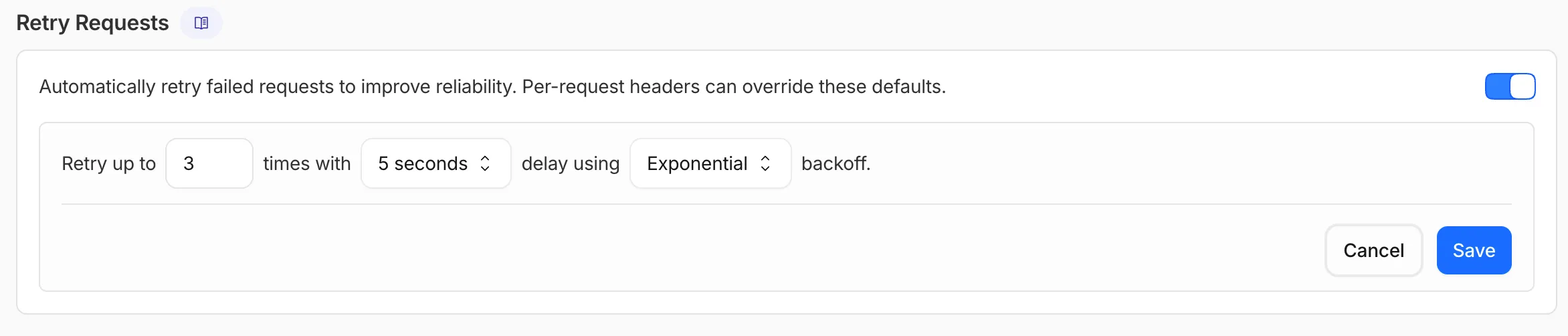
You can configure the retry count (up to 5 attempts), the delay between retries (from 100ms to 5 seconds), and the backoff strategy (Constant, Linear, or Exponential). These defaults apply to all requests through the gateway, and per-request headers can override them.
This is particularly useful when you do not control the client making the request and cannot implement retry logic on the caller side. For more complex failover scenarios — such as failing across different providers — use Dynamic Routing.
AI Gateway now supports automatic retries at the gateway level. When an upstream provider returns an error, your gateway retries the request based on the retry policy you configure, without requiring any client-side changes.
You can configure the retry count (up to 5 attempts), the delay between retries (from 100ms to 5 seconds), and the backoff strategy (Constant, Linear, or Exponential). These defaults apply to all requests through the gateway, and per-request headers can override them.
This is particularly useful when you do not control the client making the request and cannot implement retry logic on the caller side. For more complex failover scenarios — such as failing across different providers — use Dynamic Routing.
AI Gateway now supports automatic retries at the gateway level. When an upstream provider returns an error, your gateway retries the request based on the retry policy you configure, without requiring any client-side changes.
You can configure the retry count (up to 5 attempts), the delay between retries (from 100ms to 5 seconds), and the backoff strategy (Constant, Linear, or Exponential). These defaults apply to all requests through the gateway, and per-request headers can override them.
This is particularly useful when you do not control the client making the request and cannot implement retry logic on the caller side. For more complex failover scenarios — such as failing across different providers — use Dynamic Routing.
All wrangler workflows commands now accept a --local flag to target a Workflow running in a local wrangler dev session instead of the production API.
You can now manage the full Workflow lifecycle locally, including triggering Workflows, listing instances, pausing, resuming, restarting, terminating, and sending events:
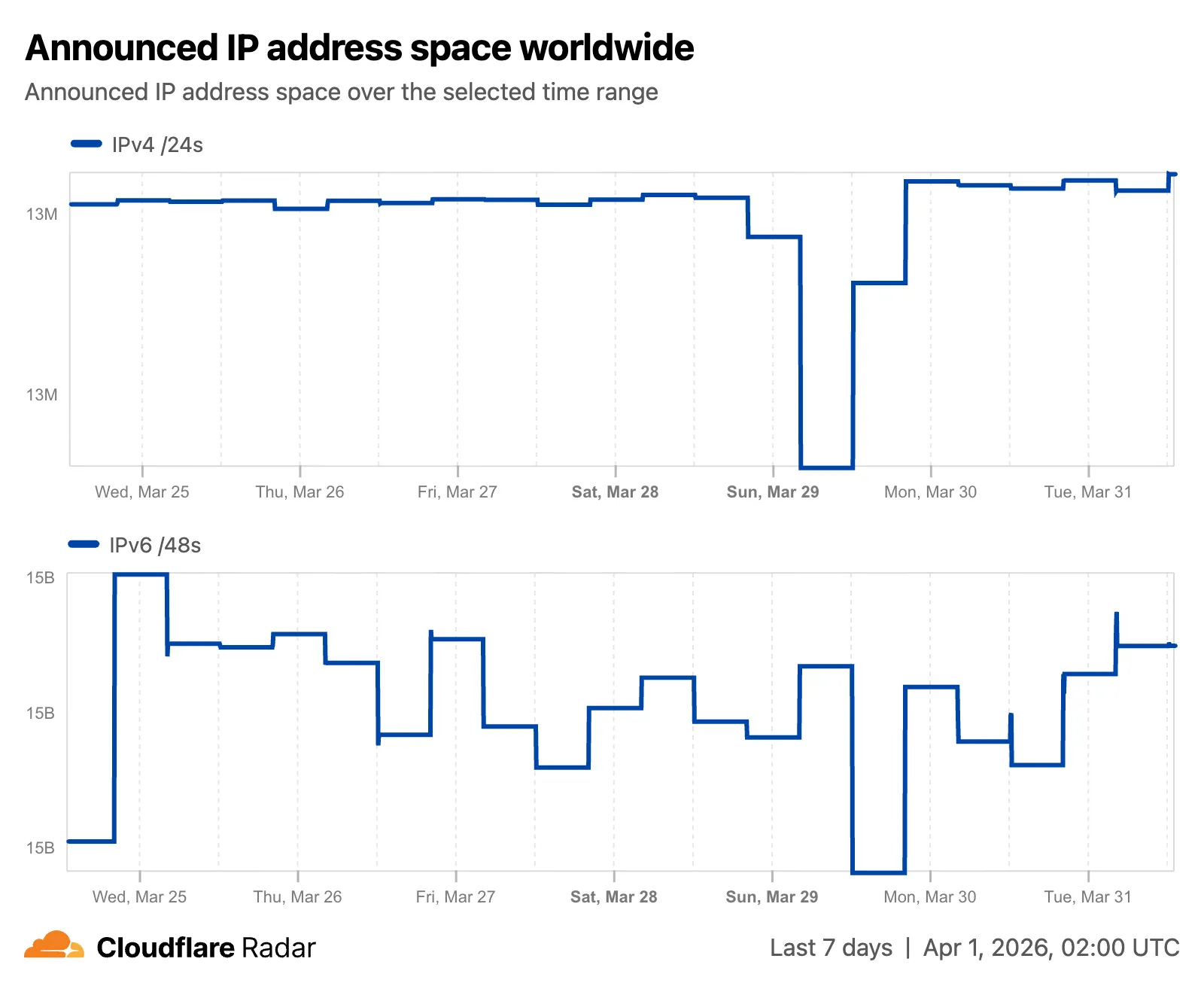
Radar now features an expanded Routing section with dedicated sub-pages, providing a more organized and in-depth view of the global routing ecosystem. This restructuring lays the groundwork for additional routing features and widgets coming in the near future.
Dedicated sub-pages
The single Routing page has been split into three focused sub-pages:
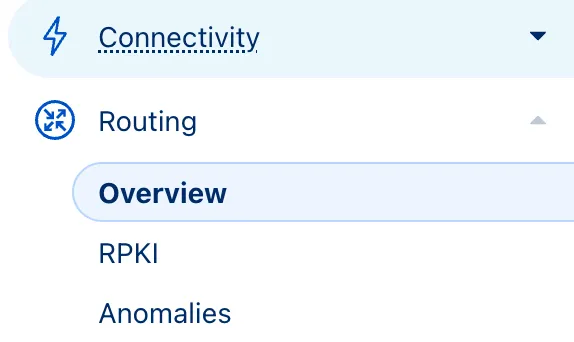
Overview — Routing statistics, IP address space trends, BGP announcements, and the new Top 100 ASes ranking.
Anomalies — BGP route leaks, origin hijacks, and Multi-Origin AS (MOAS) conflicts.
New widgets
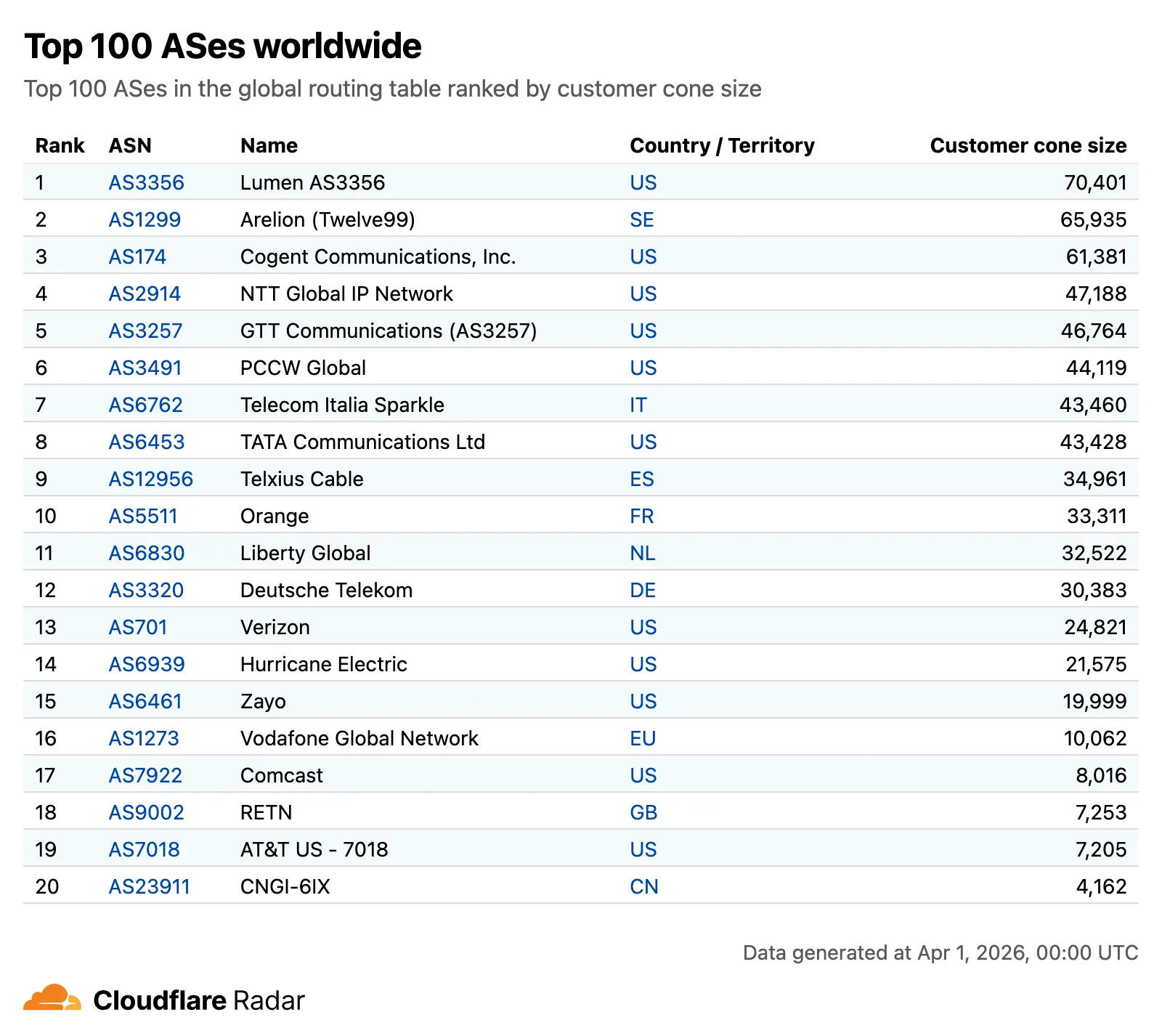
The routing overview now includes a Top 100 ASes table ranking autonomous systems by customer cone size, IPv4 address space, or IPv6 address space. Users can switch between rankings using a segmented control.
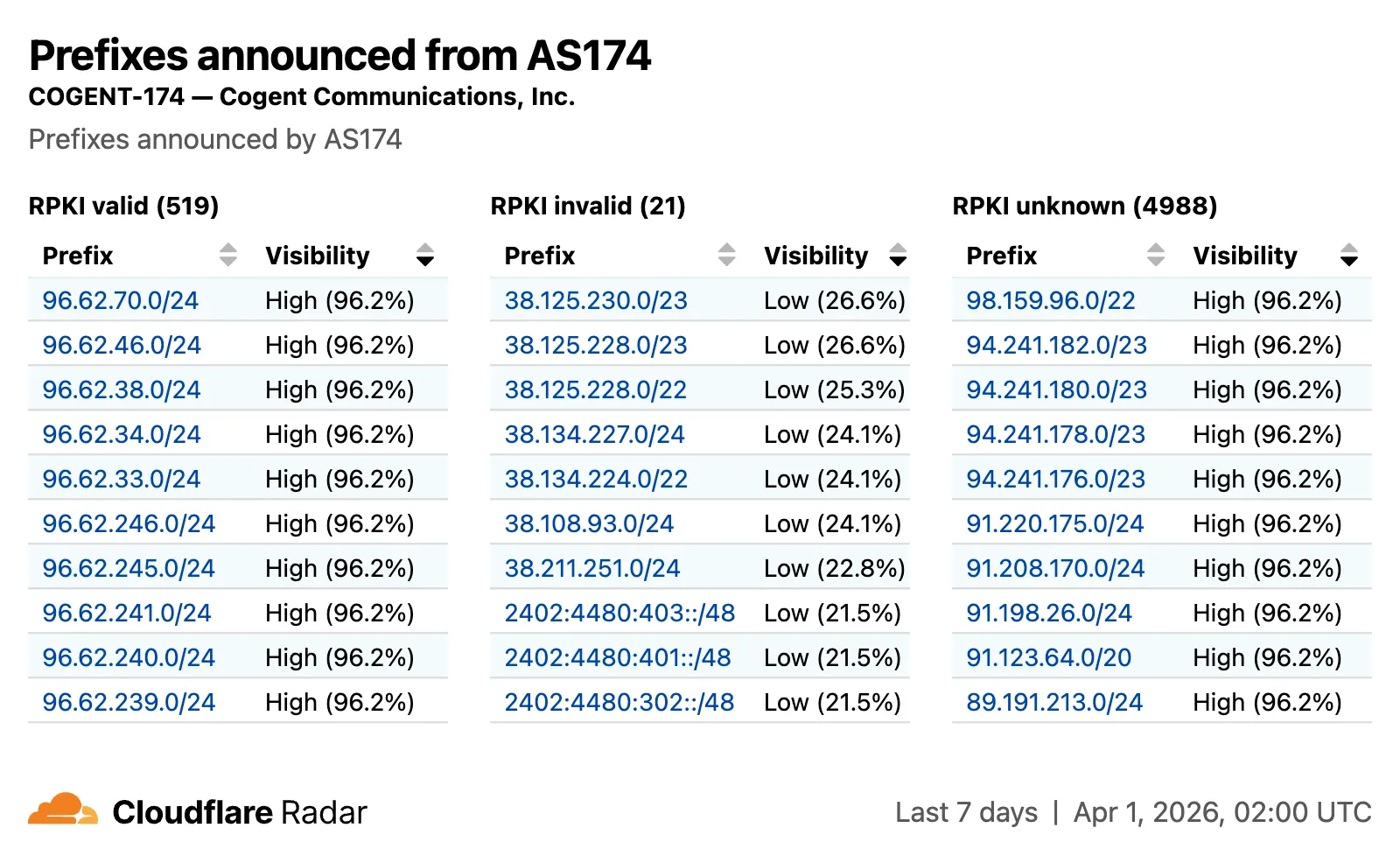
The RPKI sub-page introduces a RPKI validation view for per-ASN pages, showing prefixes grouped by RPKI validation status (Valid, Invalid, Unknown) with visibility scores.
Improved IP address space chart
The IP address space chart now displays both IPv4 and IPv6 trends stacked vertically and is available on global, country, and AS views.
Check out the Radar routing section to explore the data, and stay tuned for more routing insights coming soon.
AI Search supports a wrangler ai-search command namespace. Use it to manage instances from the command line.
The following commands are available:
Command
Description
wrangler ai-search create
Create a new instance with an interactive wizard
wrangler ai-search list
List all instances in your account
wrangler ai-search get
Get details of a specific instance
wrangler ai-search update
Update the configuration of an instance
wrangler ai-search delete
Delete an instance
wrangler ai-search search
Run a search query against an instance
wrangler ai-search stats
Get usage statistics for an instance
The create command guides you through setup, choosing a name, source type (r2 or web), and data source. You can also pass all options as flags for non-interactive use:
This week’s release introduces new detections for a critical authentication bypass vulnerability in Fortinet products (CVE-2025-59718), alongside three new generic detection rules designed to identify and block HTTP Parameter Pollution attempts. Additionally, this release includes targeted protection for a high-impact unrestricted file upload vulnerability in Magento and Adobe Commerce.
Key Findings
CVE-2025-59718: An improper cryptographic signature verification vulnerability in Fortinet FortiOS, FortiProxy, and FortiSwitchManager. This may allow an unauthenticated attacker to bypass the FortiCloud SSO login authentication using a maliciously crafted SAML message, if that feature is enabled on the device.
Magento 2 – Unrestricted File Upload: A critical flaw in Magento and Adobe Commerce allows unauthenticated attackers to bypass security checks and upload malicious files to the server, potentially leading to Remote Code Execution (RCE).
Impact
Successful exploitation of the Fortinet and Magento vulnerabilities could allow unauthenticated attackers to gain administrative control or deploy webshells, leading to complete server compromise and data theft.
Ruleset
Rule ID
Legacy Rule ID
Description
Previous Action
New Action
Comments
Cloudflare Managed Ruleset
4f7d513cea424c2a853881982f7f95e9
N/A
Generic Rules – Parameter Pollution – Body
Log
Disabled
This is a new detection.
Cloudflare Managed Ruleset
60d023f3be414d379428add3319731a4
N/A
Generic Rules – Parameter Pollution – Header – Form
Four new fields are now available on request.cf.tlsClientAuth in Workers for requests that include a mutual TLS (mTLS) client certificate. These fields encode the client certificate and its intermediate chain in RFC 9440 format — the same standard format used by the Client-Cert and Client-Cert-Chain HTTP headers — so your Worker can forward them directly to your origin without any custom parsing or encoding logic.
New fields
Field
Type
Description
certRFC9440
String
The client leaf certificate in RFC 9440 format (:base64-DER:). Empty if no client certificate was presented.
certRFC9440TooLarge
Boolean
true if the leaf certificate exceeded 10 KB and was omitted from certRFC9440.
certChainRFC9440
String
The intermediate certificate chain in RFC 9440 format as a comma-separated list. Empty if no intermediates were sent or if the chain exceeded 16 KB.
certChainRFC9440TooLarge
Boolean
true if the intermediate chain exceeded 16 KB and was omitted from certChainRFC9440.
Example: forwarding client certificate headers to your origin
exportdefault{
asyncfetch(request){
consttls=request.cf.tlsClientAuth;
// Only forward if cert was verified and chain is complete
if (!tls||!tls.certVerified||tls.certRevoked||tls.certChainRFC9440TooLarge) {
Containers and Sandboxes now support connecting directly to Workers over HTTP. This allows you to call Workers
functions and bindings, like KV or R2, from within the container at specific hostnames.
Run Worker code
Define an outbound handler to capture any HTTP request or use outboundByHost to capture requests to individual hostnames and IPs.
exportclassMyAppextendsSandbox{}
MyApp.outbound=async(request,env,ctx)=>{
// you can run arbitrary functions defined in your Worker on any HTTP request
returnawaitsomeWorkersFunction(request.body);
};
MyApp.outboundByHost={
"my.worker":async(request,env,ctx)=>{
returnawaitanotherFunction(request.body);
},
};
In this example, requests from the container to http://my.worker will run the function defined within outboundByHost,
and any other HTTP requests will run the outbound handler. These handlers run entirely inside the Workers runtime,
outside of the container sandbox.
Access Workers bindings
Each handler has access to env, so it can call any binding set in Wrangler config.
Code inside the container makes a standard HTTP request to that hostname and the outbound Worker translates it into a binding call.