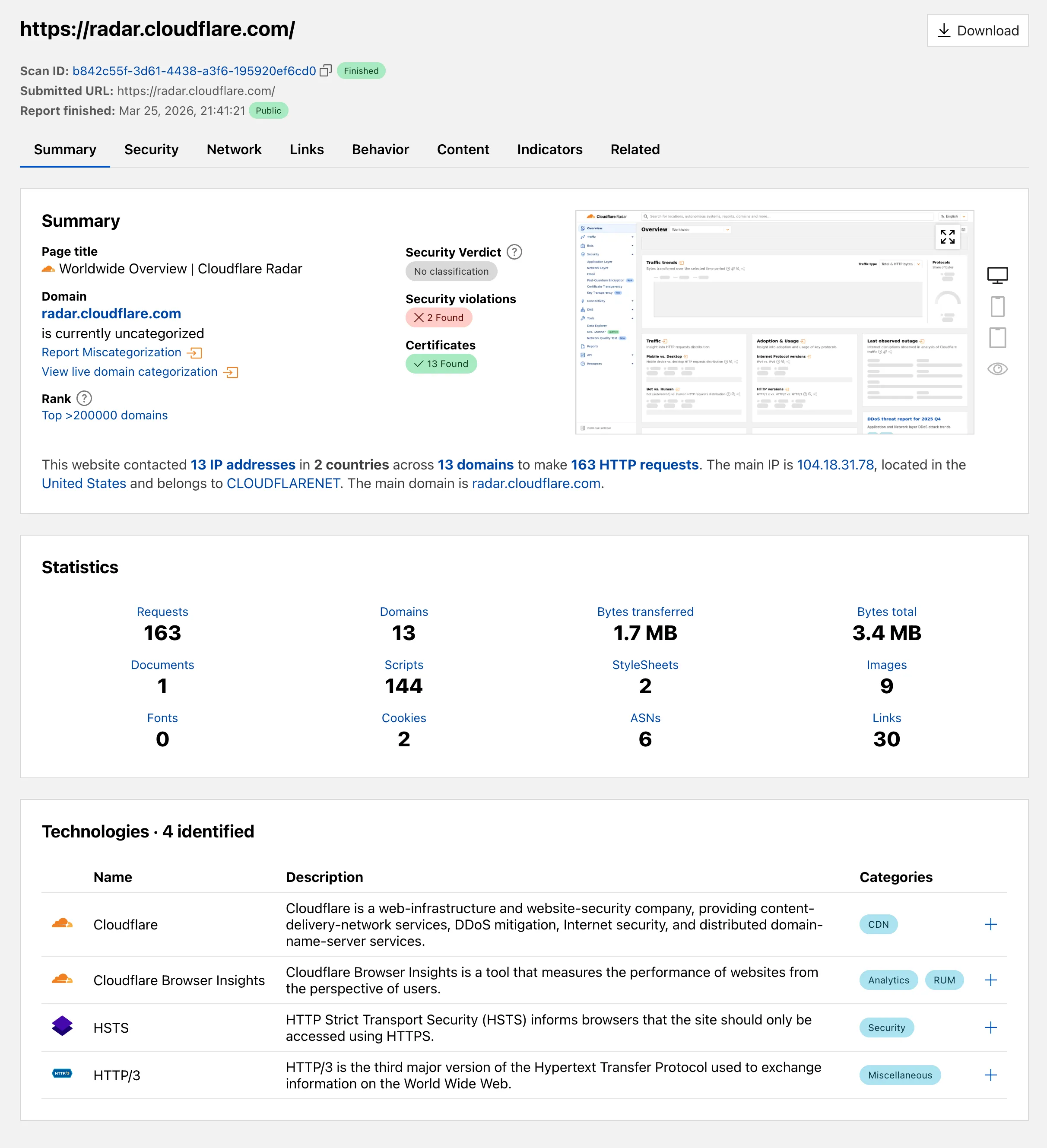
Radar ships several improvements to the URL Scanner that make scan reports more informative and easier to share:
Live screenshots — the summary card now includes an option to capture a live screenshot of the scanned URL on demand using the Browser Rendering API.
Save as PDF — a new button generates a print-optimized document aggregating all tab contents (Summary, Security, Network, Behavior, and Indicators) into a single file.
Download as JSON — raw scan data is available as a JSON download for programmatic use.
Redesigned summary layout — page information and security details are now displayed side by side with the screenshot, with a layout that adapts to narrower viewports.
File downloads — downloads are separated into a dedicated card with expandable rows showing each file’s source URL and SHA256 hash.
Detailed IP address data — the Network tab now includes additional detail per IP address observed during the scan.
Containers and Sandboxes now support connecting directly to Workers over HTTP. This allows you to call Workers
functions and bindings, like KV or R2, from within the container at specific hostnames.
Run Worker code
Define an outbound handler to capture any HTTP request or use outboundByHost to capture requests to individual hostnames and IPs.
exportclassMyAppextendsSandbox{}
MyApp.outbound=async(request,env,ctx)=>{
// you can run arbitrary functions defined in your Worker on any HTTP request
returnawaitsomeWorkersFunction(request.body);
};
MyApp.outboundByHost={
"my.worker":async(request,env,ctx)=>{
returnawaitanotherFunction(request.body);
},
};
In this example, requests from the container to http://my.worker will run the function defined within outboundByHost,
and any other HTTP requests will run the outbound handler. These handlers run entirely inside the Workers runtime,
outside of the container sandbox.
Access Workers bindings
Each handler has access to env, so it can call any binding set in Wrangler config.
Code inside the container makes a standard HTTP request to that hostname and the outbound Worker translates it into a binding call.
Radar ships several improvements to the URL Scanner that make scan reports more informative and easier to share:
Live screenshots — the summary card now includes an option to capture a live screenshot of the scanned URL on demand using the Browser Rendering API.
Save as PDF — a new button generates a print-optimized document aggregating all tab contents (Summary, Security, Network, Behavior, and Indicators) into a single file.
Download as JSON — raw scan data is available as a JSON download for programmatic use.
Redesigned summary layout — page information and security details are now displayed side by side with the screenshot, with a layout that adapts to narrower viewports.
File downloads — downloads are separated into a dedicated card with expandable rows showing each file’s source URL and SHA256 hash.
Detailed IP address data — the Network tab now includes additional detail per IP address observed during the scan.
Containers and Sandboxes now support connecting directly to Workers over HTTP. This allows you to call Workers
functions and bindings, like KV or R2, from within the container at specific hostnames.
Run Worker code
Define an outbound handler to capture any HTTP request or use outboundByHost to capture requests to individual hostnames and IPs.
exportclassMyAppextendsSandbox{}
MyApp.outbound=async(request,env,ctx)=>{
// you can run arbitrary functions defined in your Worker on any HTTP request
returnawaitsomeWorkersFunction(request.body);
};
MyApp.outboundByHost={
"my.worker":async(request,env,ctx)=>{
returnawaitanotherFunction(request.body);
},
};
In this example, requests from the container to http://my.worker will run the function defined within outboundByHost,
and any other HTTP requests will run the outbound handler. These handlers run entirely inside the Workers runtime,
outside of the container sandbox.
Access Workers bindings
Each handler has access to env, so it can call any binding set in Wrangler config.
Code inside the container makes a standard HTTP request to that hostname and the outbound Worker translates it into a binding call.
Radar ships several improvements to the URL Scanner that make scan reports more informative and easier to share:
Live screenshots — the summary card now includes an option to capture a live screenshot of the scanned URL on demand using the Browser Rendering API.
Save as PDF — a new button generates a print-optimized document aggregating all tab contents (Summary, Security, Network, Behavior, and Indicators) into a single file.
Download as JSON — raw scan data is available as a JSON download for programmatic use.
Redesigned summary layout — page information and security details are now displayed side by side with the screenshot, with a layout that adapts to narrower viewports.
File downloads — downloads are separated into a dedicated card with expandable rows showing each file’s source URL and SHA256 hash.
Detailed IP address data — the Network tab now includes additional detail per IP address observed during the scan.
Containers and Sandboxes now support connecting directly to Workers over HTTP. This allows you to call Workers
functions and bindings, like KV or R2, from within the container at specific hostnames.
Run Worker code
Define an outbound handler to capture any HTTP request or use outboundByHost to capture requests to individual hostnames and IPs.
exportclassMyAppextendsSandbox{}
MyApp.outbound=async(request,env,ctx)=>{
// you can run arbitrary functions defined in your Worker on any HTTP request
returnawaitsomeWorkersFunction(request.body);
};
MyApp.outboundByHost={
"my.worker":async(request,env,ctx)=>{
returnawaitanotherFunction(request.body);
},
};
In this example, requests from the container to http://my.worker will run the function defined within outboundByHost,
and any other HTTP requests will run the outbound handler. These handlers run entirely inside the Workers runtime,
outside of the container sandbox.
Access Workers bindings
Each handler has access to env, so it can call any binding set in Wrangler config.
Code inside the container makes a standard HTTP request to that hostname and the outbound Worker translates it into a binding call.
Radar ships several improvements to the URL Scanner that make scan reports more informative and easier to share:
Live screenshots — the summary card now includes an option to capture a live screenshot of the scanned URL on demand using the Browser Rendering API.
Save as PDF — a new button generates a print-optimized document aggregating all tab contents (Summary, Security, Network, Behavior, and Indicators) into a single file.
Download as JSON — raw scan data is available as a JSON download for programmatic use.
Redesigned summary layout — page information and security details are now displayed side by side with the screenshot, with a layout that adapts to narrower viewports.
File downloads — downloads are separated into a dedicated card with expandable rows showing each file’s source URL and SHA256 hash.
Detailed IP address data — the Network tab now includes additional detail per IP address observed during the scan.
Containers and Sandboxes now support connecting directly to Workers over HTTP. This allows you to call Workers
functions and bindings, like KV or R2, from within the container at specific hostnames.
Run Worker code
Define an outbound handler to capture any HTTP request or use outboundByHost to capture requests to individual hostnames and IPs.
exportclassMyAppextendsSandbox{}
MyApp.outbound=async(request,env,ctx)=>{
// you can run arbitrary functions defined in your Worker on any HTTP request
returnawaitsomeWorkersFunction(request.body);
};
MyApp.outboundByHost={
"my.worker":async(request,env,ctx)=>{
returnawaitanotherFunction(request.body);
},
};
In this example, requests from the container to http://my.worker will run the function defined within outboundByHost,
and any other HTTP requests will run the outbound handler. These handlers run entirely inside the Workers runtime,
outside of the container sandbox.
Access Workers bindings
Each handler has access to env, so it can call any binding set in Wrangler config.
Code inside the container makes a standard HTTP request to that hostname and the outbound Worker translates it into a binding call.
Radar ships several improvements to the URL Scanner that make scan reports more informative and easier to share:
Live screenshots — the summary card now includes an option to capture a live screenshot of the scanned URL on demand using the Browser Rendering API.
Save as PDF — a new button generates a print-optimized document aggregating all tab contents (Summary, Security, Network, Behavior, and Indicators) into a single file.
Download as JSON — raw scan data is available as a JSON download for programmatic use.
Redesigned summary layout — page information and security details are now displayed side by side with the screenshot, with a layout that adapts to narrower viewports.
File downloads — downloads are separated into a dedicated card with expandable rows showing each file’s source URL and SHA256 hash.
Detailed IP address data — the Network tab now includes additional detail per IP address observed during the scan.
The new secrets configuration property lets you declare the secret names your Worker requires in your Wrangler configuration file. Required secrets are validated during local development and deploy, and used as the source of truth for type generation.
wrangler.jsonc
{
"secrets":{
"required":["API_KEY","DB_PASSWORD"],
},
}
wrangler.toml
[secrets]
required=["API_KEY","DB_PASSWORD"]
Local development
When secrets is defined, wrangler dev and vite dev load only the keys listed in secrets.required from .dev.vars or .env/process.env. Additional keys in those files are excluded. If any required secrets are missing, a warning is logged listing the missing names.
Type generation
wrangler types generates typed bindings from secrets.required instead of inferring names from .dev.vars or .env. This lets you run type generation in CI or other environments where those files are not present. Per-environment secrets are supported — the aggregated Env type marks secrets that only appear in some environments as optional.
Deploy
wrangler deploy and wrangler versions upload validate that all secrets in secrets.required are configured on the Worker before the operation succeeds. If any required secrets are missing, the command fails with an error listing which secrets need to be set.