Blog

  • Rules – New cryptographic functions — encode_base64() and sha256()

    Cloudflare Rulesets now includes encode_base64() and sha256() functions, enabling you to generate signed request headers directly in rule expressions. These functions support common patterns like constructing a canonical string from request attributes, computing a SHA256 digest, and Base64-encoding the result.


    New functions

    Function Description Availability
    encode_base64(input, flags) Encodes a string to Base64 format. Optional flags parameter: u for URL-safe encoding, p for padding (adds = characters to make the output length a multiple of 4, as required by some systems). By default, output is standard Base64 without padding. All plans (in header transform rules)
    sha256(input) Computes a SHA256 hash of the input string. Requires enablement

    Examples

    Encode a string to Base64 format:

    encode_base64("hello world")

    Returns: aGVsbG8gd29ybGQ

    Encode a string to Base64 format with padding:

    encode_base64("hello world", "p")

    Returns: aGVsbG8gd29ybGQ=

    Perform a URL-safe Base64 encoding of a string:

    encode_base64("hello world", "u")

    Returns: aGVsbG8gd29ybGQ

    Compute the SHA256 hash of a secret token:

    sha256("my-token")

    Returns a hash that your origin can validate to authenticate requests.

    Compute the SHA256 hash of a string and encode the result to Base64 format:

    encode_base64(sha256("my-token"))

    Combines hashing and encoding for systems that expect Base64-encoded signatures.

    For more information, refer to the Functions reference.
  • AI Search – Create AI Search instances programmatically via REST API

    You can now create AI Search instances programmatically using the API. For example, use the API to create instances for each customer in a multi-tenant application or manage AI Search alongside your other infrastructure.

    If you have created an AI Search instance via the dashboard before, you already have a service API token registered and can start creating instances programmatically right away. If not, follow the API guide to set up your first instance.

    For example, you can now create separate search instances for each language on your website:

    for lang in en fr es de; do
    curl -X POST "https://api.cloudflare.com/client/v4/accounts/$ACCOUNT_ID/ai-search/instances"
    -H "Authorization: Bearer $API_TOKEN"
    -H "Content-Type: application/json"
    --data '{
    "id": "docs-'"$lang"'",
    "type": "web-crawler",
    "source": "example.com",
    "source_params": {
    "path_include": ["**/'"$lang"'/**"]
    }
    }'
    done

    Refer to the REST API reference for additional configuration options.

  • AI Search – AI Search path filtering for website and R2 data sources

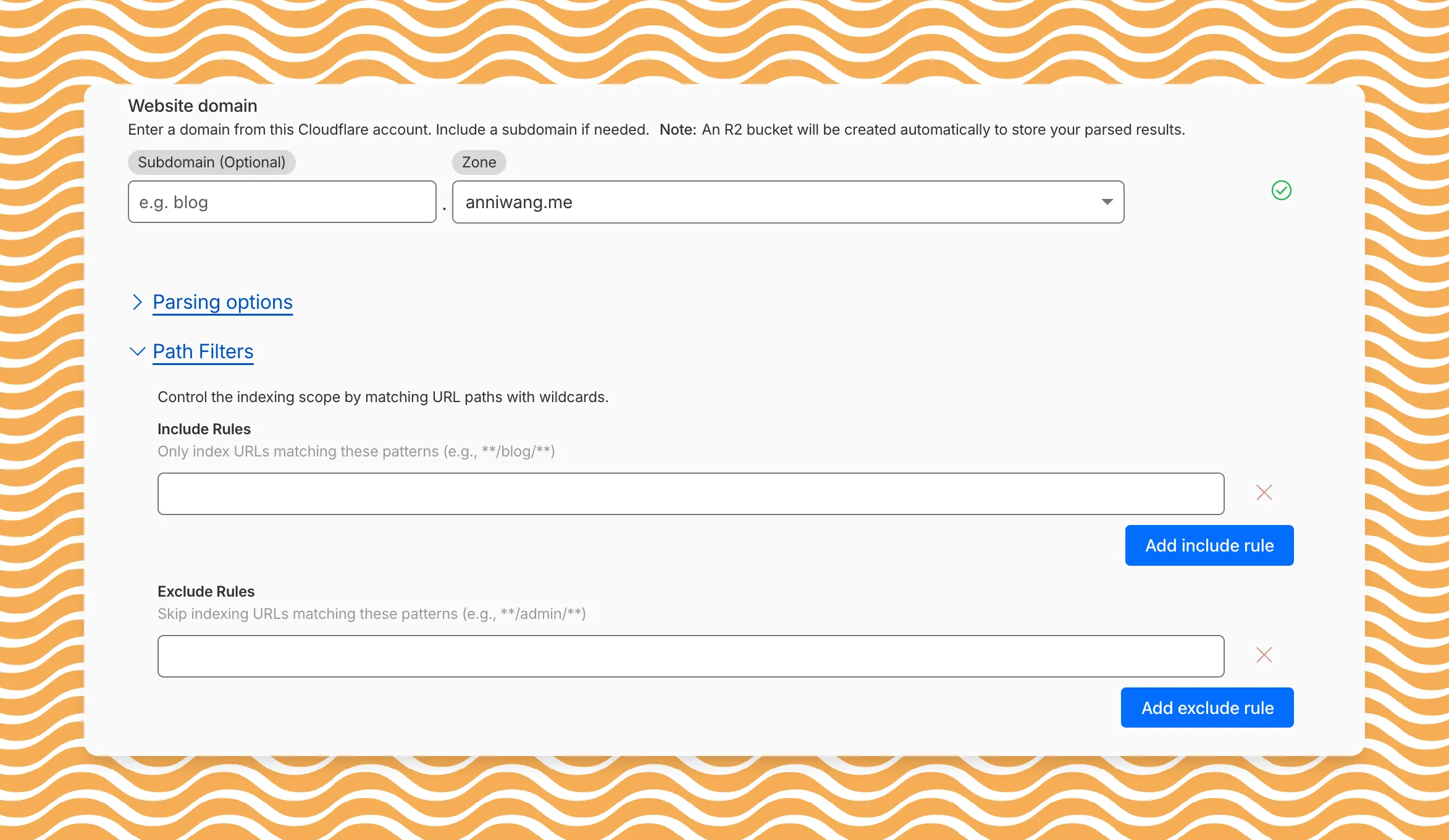
    AI Search now includes path filtering for both website and R2 data sources. You can now control which content gets indexed by defining include and exclude rules for paths.

    By controlling what gets indexed, you can improve the relevance and quality of your search results. You can also use path filtering to split a single data source across multiple AI Search instances for specialized search experiences.

    Path filtering configuration in AI Search

    Path filtering uses micromatch patterns, so you can use * to match within a directory and ** to match across directories.

    Use case Include Exclude
    Index docs but skip drafts **/docs/** **/docs/drafts/**
    Keep admin pages out of results **/admin/**
    Index only English content **/en/**

    Configure path filters when creating a new instance or update them anytime from Settings. Check out path filtering to learn more.

  • AI Search – AI Search path filtering for website and R2 data sources

    AI Search now includes path filtering for both website and R2 data sources. You can now control which content gets indexed by defining include and exclude rules for paths.

    By controlling what gets indexed, you can improve the relevance and quality of your search results. You can also use path filtering to split a single data source across multiple AI Search instances for specialized search experiences.

    Path filtering configuration in AI Search

    Path filtering uses micromatch patterns, so you can use * to match within a directory and ** to match across directories.

    Use case Include Exclude
    Index docs but skip drafts **/docs/** **/docs/drafts/**
    Keep admin pages out of results **/admin/**
    Index only English content **/en/**

    Configure path filters when creating a new instance or update them anytime from Settings. Check out path filtering to learn more.

  • AI Search – AI Search path filtering for website and R2 data sources

    AI Search now includes path filtering for both website and R2 data sources. You can now control which content gets indexed by defining include and exclude rules for paths.

    By controlling what gets indexed, you can improve the relevance and quality of your search results. You can also use path filtering to split a single data source across multiple AI Search instances for specialized search experiences.

    Path filtering configuration in AI Search

    Path filtering uses micromatch patterns, so you can use * to match within a directory and ** to match across directories.

    Use case Include Exclude
    Index docs but skip drafts **/docs/** **/docs/drafts/**
    Keep admin pages out of results **/admin/**
    Index only English content **/en/**

    Configure path filters when creating a new instance or update them anytime from Settings. Check out path filtering to learn more.

  • AI Search – AI Search path filtering for website and R2 data sources

    AI Search now includes path filtering for both website and R2 data sources. You can now control which content gets indexed by defining include and exclude rules for paths.

    By controlling what gets indexed, you can improve the relevance and quality of your search results. You can also use path filtering to split a single data source across multiple AI Search instances for specialized search experiences.

    Path filtering configuration in AI Search

    Path filtering uses micromatch patterns, so you can use * to match within a directory and ** to match across directories.

    Use case Include Exclude
    Index docs but skip drafts **/docs/** **/docs/drafts/**
    Keep admin pages out of results **/admin/**
    Index only English content **/en/**

    Configure path filters when creating a new instance or update them anytime from Settings. Check out path filtering to learn more.

  • AI Search – AI Search path filtering for website and R2 data sources

    AI Search now includes path filtering for both website and R2 data sources. You can now control which content gets indexed by defining include and exclude rules for paths.

    By controlling what gets indexed, you can improve the relevance and quality of your search results. You can also use path filtering to split a single data source across multiple AI Search instances for specialized search experiences.

    Path filtering configuration in AI Search

    Path filtering uses micromatch patterns, so you can use * to match within a directory and ** to match across directories.

    Use case Include Exclude
    Index docs but skip drafts **/docs/** **/docs/drafts/**
    Keep admin pages out of results **/admin/**
    Index only English content **/en/**

    Configure path filters when creating a new instance or update them anytime from Settings. Check out path filtering to learn more.

  • AI Search – AI Search path filtering for website and R2 data sources

    AI Search now includes path filtering for both website and R2 data sources. You can now control which content gets indexed by defining include and exclude rules for paths.

    By controlling what gets indexed, you can improve the relevance and quality of your search results. You can also use path filtering to split a single data source across multiple AI Search instances for specialized search experiences.

    Path filtering configuration in AI Search

    Path filtering uses micromatch patterns, so you can use * to match within a directory and ** to match across directories.

    Use case Include Exclude
    Index docs but skip drafts **/docs/** **/docs/drafts/**
    Keep admin pages out of results **/admin/**
    Index only English content **/en/**

    Configure path filters when creating a new instance or update them anytime from Settings. Check out path filtering to learn more.

  • Magic Transit, Magic Firewall, Magic WAN, Magic Network Monitoring – Network Services Navigation Update

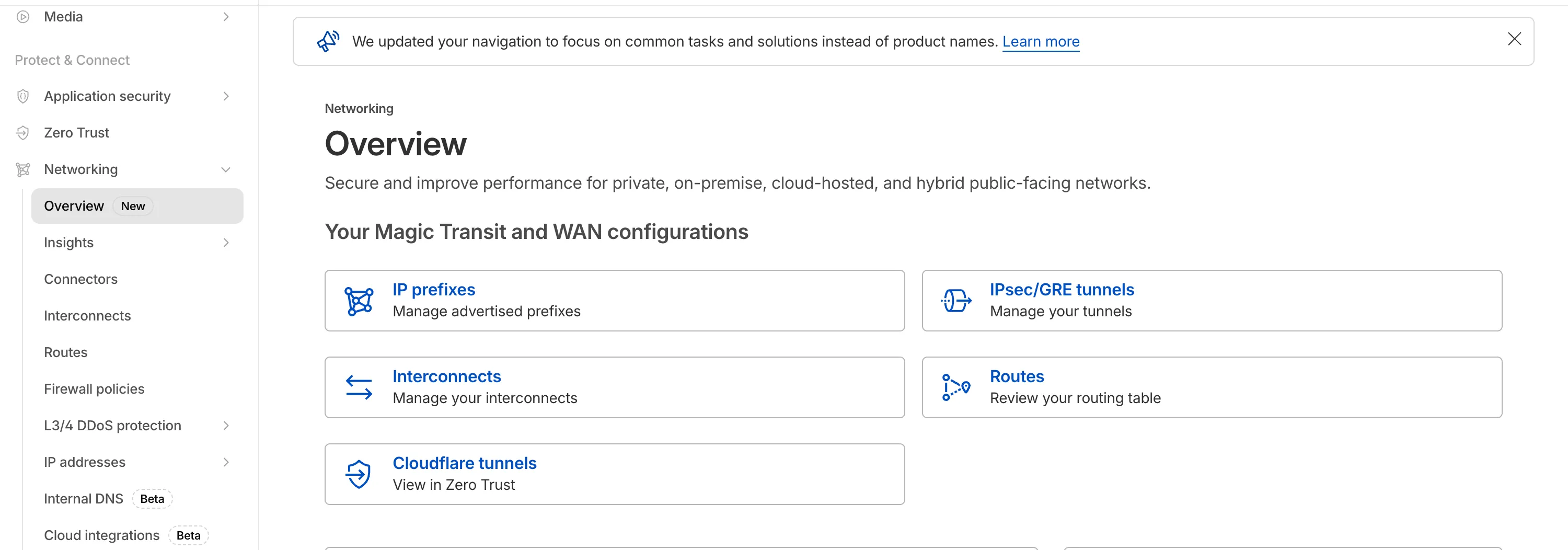
    The Network Services menu structure in Cloudflare’s dashboard has been updated to reflect solutions and capabilities instead of product names. This will make it easier for you to find what you need and better reflects how our services work together.

    Your existing configurations will remain the same, and you will have access to all of the same features and functionality.

    The changes visible in your dashboard may vary based on the products you use. Overall, changes relate to Magic Transit, Magic WAN, and Magic Firewall.

    Summary of changes:

    • A new ‘Overview’ page provides access to the most common tasks across Magic Transit and Magic WAN.
    • Product names have been removed from top-level navigation.
    • Magic Transit and Magic WAN configuration is now organized under ‘Routes’ and ‘Connectors’. For example, you will find IP Prefixes under ‘Routes’, and your GRE/IPsec Tunnels under ‘Connectors.’
    • Magic Firewall policies are now called ‘Firewall Policies.’
    • Magic WAN Connectors and Connector On-Ramps are now referenced in the dashboard as ‘Appliances’ and ‘Appliance profiles.’ They can be found under ‘Connectors > Appliances.’
    • Network analytics, network health, and real-time analytics are now available under ‘Insights.’
    • Packet Captures are found under ‘Insights > Diagnostics.’
    • You can manage your Sites from ‘Insights > Network health.
    • You can find Magic Network Monitoring under ‘Insights > Network flow.’

    If you would like to provide feedback, please use the form in the email sent on January 7th, 2026, titled ‘[FYI] Upcoming Network Services Dashboard Navigation Update.’

    Networking Navigation

  • Cloudflare Tunnel – Verify WARP Connector connectivity with a simple ping

    We have made it easier to validate connectivity when deploying WARP Connector as part of your software-defined private network.

    You can now ping the WARP Connector host directly on its LAN IP address immediately after installation. This provides a fast, familiar way to confirm that the Connector is online and reachable within your network before testing access to downstream services.

    Starting with version 2025.10.186.0, WARP Connector responds to traffic addressed to its own LAN IP, giving you immediate visibility into Connector reachability.

    Learn more about deploying WARP Connector and building private network connectivity with Cloudflare One.