Blog

  • Workers – Increased disk space for Workers Builds

    As part of the ongoing open beta for Workers Builds, we’ve increased the available disk space for builds from 8 GB to 20 GB for both Free and Paid plans.

    This provides more space for larger projects, dependencies, and build artifacts while improving overall build reliability.

    Metric Free Plan Paid Plans
    Disk Space 20 GB 20 GB

    All other build limits — including CPU, memory, build minutes, and timeout remain unchanged.

  • Workers – Develop locally with Containers and the Cloudflare Vite plugin

    You can now configure and run Containers alongside your Worker during local development when using the Cloudflare Vite plugin. Previously, you could only develop locally when using Wrangler as your local development server.

    Configuration

    You can simply configure your Worker and your Container(s) in your Wrangler configuration file:

    • wrangler.jsonc

      {
      "name": "container-starter",
      "main": "src/index.js",
      "containers": [
      {
      "class_name": "MyContainer",
      "image": "./Dockerfile",
      "instances": 5
      }
      ],
      "durable_objects": {
      "bindings": [
      {
      "class_name": "MyContainer",
      "name": "MY_CONTAINER"
      }
      ]
      },
      "migrations": [
      {
      "new_sqlite_classes": [
      "MyContainer"
      ],
      "tag": "v1"
      }
      ],
      }
    • wrangler.toml

      name = "container-starter"
      main = "src/index.js"
      [[containers]]
      class_name = "MyContainer"
      image = "./Dockerfile"
      instances = 5
      [[durable_objects.bindings]]
      class_name = "MyContainer"
      name = "MY_CONTAINER"
      [[migrations]]
      new_sqlite_classes = [ "MyContainer" ]
      tag = "v1"

    Worker Code

    Once your Worker and Containers are configured, you can access the Container instances from your Worker code:

    import { Container, getContainer } from "@cloudflare/containers";
    export class MyContainer extends Container {
    defaultPort = 4000; // Port the container is listening on
    sleepAfter = "10m"; // Stop the instance if requests not sent for 10 minutes
    }
    async fetch(request, env) {
    const { "session-id": sessionId } = await request.json();
    // Get the container instance for the given session ID
    const containerInstance = getContainer(env.MY_CONTAINER, sessionId)
    // Pass the request to the container instance on its default port
    return containerInstance.fetch(request);
    }


    Local development

    To develop your Worker locally, start a local dev server by running

    vite dev

    in your terminal.

    Local Dev video

    Resources

    Learn more about Cloudflare Containers or the Cloudflare Vite plugin in our developer docs.

  • Workers – Deploy to Cloudflare buttons now support Worker environment variables, secrets, and Secrets Store secrets

    Any template which uses Worker environment variables, secrets, or Secrets Store secrets can now be deployed using a Deploy to Cloudflare button.

    Define environment variables and secrets store bindings in your Wrangler configuration file as normal:

    • wrangler.jsonc

      {
      "name": "my-worker",
      "main": "./src/index.ts",
      "compatibility_date": "2025-07-31",
      "vars": {
      "API_HOST": "https://example.com",
      },
      "secrets_store_secrets": [
      {
      "binding": "API_KEY",
      "store_id": "demo",
      "secret_name": "api-key"
      }
      ]
      }
    • wrangler.toml

      name = "my-worker"
      main = "./src/index.ts"
      compatibility_date = "2025-07-31"
      [vars]
      API_HOST = "https://example.com"
      [[secrets_store_secrets]]
      binding = "API_KEY"
      store_id = "demo"
      secret_name = "api-key"

    Add secrets to a .dev.vars.example or .env.example file:

    COOKIE_SIGNING_KEY=my-secret # comment

    And optionally, you can add a description for these bindings in your template’s package.json to help users understand how to configure each value:

    {
    "name": "my-worker",
    "private": true,
    "cloudflare": {
    "bindings": {
    "API_KEY": {
    "description": "Select your company's API key for connecting to the example service."
    },
    "COOKIE_SIGNING_KEY": {
    "description": "Generate a random string using `openssl rand -hex 32`."
    }
    }
    }
    }

    These secrets and environment variables will be presented to users in the dashboard as they deploy this template, allowing them to configure each value. Additional information about creating templates and Deploy to Cloudflare buttons can be found in our documentation.

  • Workers – Deploy to Cloudflare buttons now support Worker environment variables, secrets, and Secrets Store secrets

    Any template which uses Worker environment variables, secrets, or Secrets Store secrets can now be deployed using a Deploy to Cloudflare button.

    Define environment variables and secrets store bindings in your Wrangler configuration file as normal:

    • wrangler.jsonc

      {
      "name": "my-worker",
      "main": "./src/index.ts",
      "compatibility_date": "2025-07-30",
      "vars": {
      "API_HOST": "https://example.com",
      },
      "secrets_store_secrets": [
      {
      "binding": "API_KEY",
      "store_id": "demo",
      "secret_name": "api-key"
      }
      ]
      }
    • wrangler.toml

      name = "my-worker"
      main = "./src/index.ts"
      compatibility_date = "2025-07-30"
      [vars]
      API_HOST = "https://example.com"
      [[secrets_store_secrets]]
      binding = "API_KEY"
      store_id = "demo"
      secret_name = "api-key"

    Add secrets to a .dev.vars.example or .env.example file:

    COOKIE_SIGNING_KEY=my-secret # comment

    And optionally, you can add a description for these bindings in your template’s package.json to help users understand how to configure each value:

    {
    "name": "my-worker",
    "private": true,
    "cloudflare": {
    "bindings": {
    "API_KEY": {
    "description": "Select your company's API key for connecting to the example service."
    },
    "COOKIE_SIGNING_KEY": {
    "description": "Generate a random string using `openssl rand -hex 32`."
    }
    }
    }
    }

    These secrets and environment variables will be presented to users in the dashboard as they deploy this template, allowing them to configure each value. Additional information about creating templates and Deploy to Cloudflare buttons can be found in our documentation.

  • Workers – Deploy to Cloudflare buttons now support Worker environment variables, secrets, and Secrets Store secrets

    Any template which uses Worker environment variables, secrets, or Secrets Store secrets can now be deployed using a Deploy to Cloudflare button.

    Define environment variables and secrets store bindings in your Wrangler configuration file as normal:

    • wrangler.jsonc

      {
      "name": "my-worker",
      "main": "./src/index.ts",
      "compatibility_date": "2025-07-29",
      "vars": {
      "API_HOST": "https://example.com",
      },
      "secrets_store_secrets": [
      {
      "binding": "API_KEY",
      "store_id": "demo",
      "secret_name": "api-key"
      }
      ]
      }
    • wrangler.toml

      name = "my-worker"
      main = "./src/index.ts"
      compatibility_date = "2025-07-29"
      [vars]
      API_HOST = "https://example.com"
      [[secrets_store_secrets]]
      binding = "API_KEY"
      store_id = "demo"
      secret_name = "api-key"

    Add secrets to a .dev.vars.example or .env.example file:

    COOKIE_SIGNING_KEY=my-secret # comment

    And optionally, you can add a description for these bindings in your template’s package.json to help users understand how to configure each value:

    {
    "name": "my-worker",
    "private": true,
    "cloudflare": {
    "bindings": {
    "API_KEY": {
    "description": "Select your company's API key for connecting to the example service."
    },
    "COOKIE_SIGNING_KEY": {
    "description": "Generate a random string using `openssl rand -hex 32`."
    }
    }
    }
    }

    These secrets and environment variables will be presented to users in the dashboard as they deploy this template, allowing them to configure each value. Additional information about creating templates and Deploy to Cloudflare buttons can be found in our documentation.

  • Audit Logs – Audit logs (version 2) – UI Beta Release

    The Audit Logs v2 UI is now available to all Cloudflare customers in Beta. This release builds on the public Beta of the Audit Logs v2 API and introduces a redesigned user interface with powerful new capabilities to make it easier to investigate account activity.

    Enabling the new UI

    To try the new UI, go to Manage Account > Audit Logs in the Cloudflare Dashboard and click “Switch to new Audit Logs” at the top of the page.

    Audit Logs v2 banner

    The previous version of Audit Logs remains available and can be re-enabled at any time using the “Switch back to old Audit Logs” link in the banner at the top of the page.

    New Features:

    • Advanced Filtering: Filter logs by actor, resource, method, and more for faster insights.
    • On-hover filter controls: Easily include or exclude values in queries by hovering over fields within a log entry.
    • Detailed Log Sidebar: View rich context for each log entry without leaving the main view.
    • JSON Log View: Inspect the raw log data in a structured JSON format.
    • Custom Time Ranges: Define your own time windows to view historical activity.
    • Infinite Scroll: Seamlessly browse logs without clicking through pages.
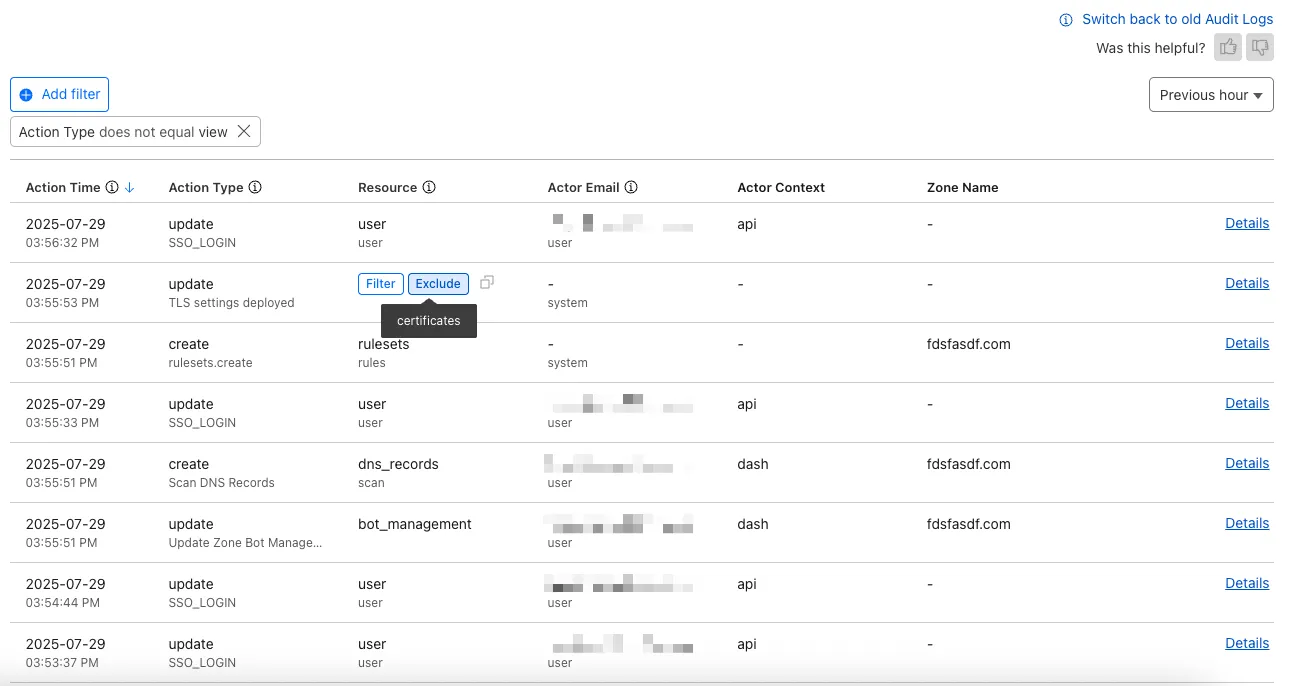
    Audit Logs v2 new UI

    For more details on Audit Logs v2, see the Audit Logs documentation.

    Known issues

    • A small number of audit logs may currently be unavailable in Audit Logs v2. In some cases, certain fields such as actor information may be missing in certain audit logs. We are actively working to improve coverage and completeness for General Availability.
    • Export to CSV is not supported in the new UI.

    We are actively refining the Audit Logs v2 experience and welcome your feedback. You can share overall feedback by clicking the thumbs up or thumbs down icons at the top of the page, or provide feedback on specific audit log entries using the thumbs icons next to each audit log line or by filling out our feedback form.
  • Audit Logs – Audit logs (version 2) – UI Beta Release

    The Audit Logs v2 UI is now available to all Cloudflare customers in Beta. This release builds on the public Beta of the Audit Logs v2 API and introduces a redesigned user interface with powerful new capabilities to make it easier to investigate account activity.

    Enabling the new UI

    To try the new UI, go to Manage Account > Audit Logs in the Cloudflare Dashboard and click “Switch to new Audit Logs” at the top of the page.

    Audit Logs v2 banner

    The previous version of Audit Logs remains available and can be re-enabled at any time using the “Switch back to old Audit Logs” link in the banner at the top of the page.

    New Features:

    • Advanced Filtering: Filter logs by actor, resource, method, and more for faster insights.
    • On-hover filter controls: Easily include or exclude values in queries by hovering over fields within a log entry.
    • Detailed Log Sidebar: View rich context for each log entry without leaving the main view.
    • JSON Log View: Inspect the raw log data in a structured JSON format.
    • Custom Time Ranges: Define your own time windows to view historical activity.
    • Infinite Scroll: Seamlessly browse logs without clicking through pages.

    Audit Logs v2 new UI

    For more details on Audit Logs v2, see the Audit Logs documentation.

    Known issues

    • A small number of audit logs may currently be unavailable in Audit Logs v2. In some cases, certain fields such as actor information may be missing in certain audit logs. We are actively working to improve coverage and completeness for General Availability.
    • Export to CSV is not supported in the new UI.

    We are actively refining the Audit Logs v2 experience and welcome your feedback. You can share overall feedback by clicking the thumbs up or thumbs down icons at the top of the page, or provide feedback on specific audit log entries using the thumbs icons next to each audit log line or by filling out our feedback form.
  • Browser Rendering – Introducing pricing for the Browser Rendering API — $0.09 per browser hour

    We’ve launched pricing for Browser Rendering, including a free tier and a pay-as-you-go model that scales with your needs. Starting August 20, 2025, Cloudflare will begin billing for Browser Rendering.

    There are two ways to use Browser Rendering. Depending on the method you use, here’s how billing will work:

    • REST API: Charged for Duration only ($/browser hour)
    • Workers Bindings: Charged for both Duration and Concurrency ($/browser hour and # of concurrent browsers)

    Included usage and pricing by plan

    Plan Included duration Included concurrency Price (beyond included)
    Workers Free 10 minutes per day 3 concurrent browsers N/A
    Workers Paid 10 hours per month 10 concurrent browsers (averaged monthly) 1. REST API: $0.09 per additional browser hour
    2. Workers Bindings: $0.09 per additional browser hour
    $2.00 per additional concurrent browser

    What you need to know:

    • Workers Free Plan: 10 minutes of browser usage per day with 3 concurrent browsers at no charge.
    • Workers Paid Plan: 10 hours of browser usage per month with 10 concurrent browsers (averaged monthly) at no charge. Additional usage is charged as shown above.

    You can monitor usage via the Cloudflare dashboard. Go to Compute (Workers) > Browser Rendering.

    Browser Rendering dashboard

    If you’ve been using Browser Rendering and do not wish to incur charges, ensure your usage stays within your plan’s included usage. To estimate costs, take a look at these example pricing scenarios.

  • Email Routing – Subaddressing support in Email Routing

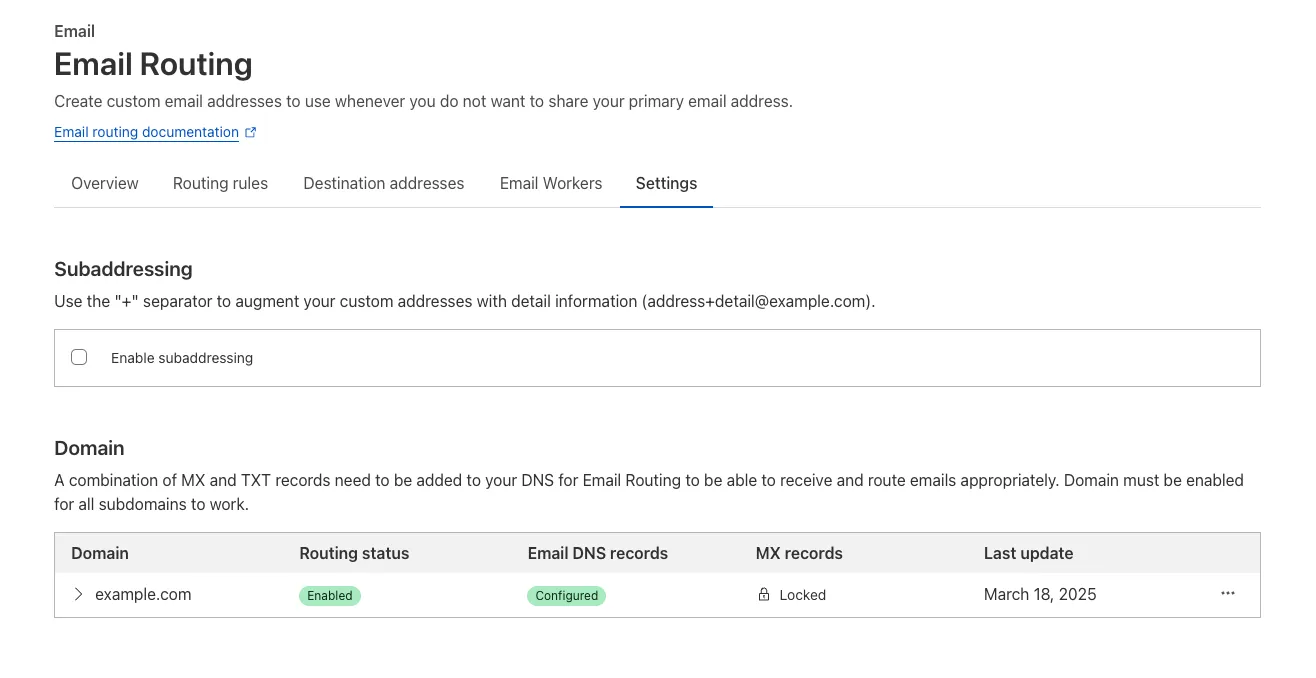
    Subaddressing, as defined in RFC 5233, also known as plus addressing, is now supported in Email Routing. This enables using the “+” separator to augment your custom addresses with arbitrary detail information.

    Now you can send an email to [email protected] and it will be captured by the [email protected] custom address. The +detail part is ignored by Email Routing, but it can be captured next in the processing chain in the logs, an Email Worker or an Agent application.

    Customers can use this feature to dynamically add context to their emails, such as tracking the source of an email or categorizing emails without needing to create multiple custom addresses.

    Subaddressing

    Check our Developer Docs to learn on to enable subaddressing in Email Routing.

  • Hello world!

    Welcome to WordPress. This is your first post. Edit or delete it, then start writing!