Browser Rendering REST API rate limits for Workers Paid plans have been increased from 3 requests per second (180/min) to 10 requests per second (600/min). No action is needed to benefit from the higher limit.
The REST API lets you perform common browser tasks with a single API call, and you can now do it at a higher rate.
Browser Rendering REST API rate limits for Workers Paid plans have been increased from 3 requests per second (180/min) to 10 requests per second (600/min). No action is needed to benefit from the higher limit.
The REST API lets you perform common browser tasks with a single API call, and you can now do it at a higher rate.
You can now use user risk scores in your Access policies. The new User Risk Score selector allows you to create Access policies that respond to user behavior patterns detected by Cloudflare’s risk scoring system, including impossible travel, high DLP policy matches, and more.
Each Workflow on Workers Paid now supports 10,000 steps by default, configurable up to 25,000 steps in your wrangler.jsonc file:
{
"workflows":[
{
"name":"my-workflow",
"binding":"MY_WORKFLOW",
"class_name":"MyWorkflow",
"limits":{
"steps":25000
}
}
]
}
Previously, each instance was limited to 1,024 steps. Now, Workflows can support more complex, long-running executions without the additional complexity of recursive or child workflow calls.
Note that the maximum persisted state limit per Workflow instance remains 100 MB for Workers Free and 1 GB for Workers Paid. Refer to Workflows limits for more information.
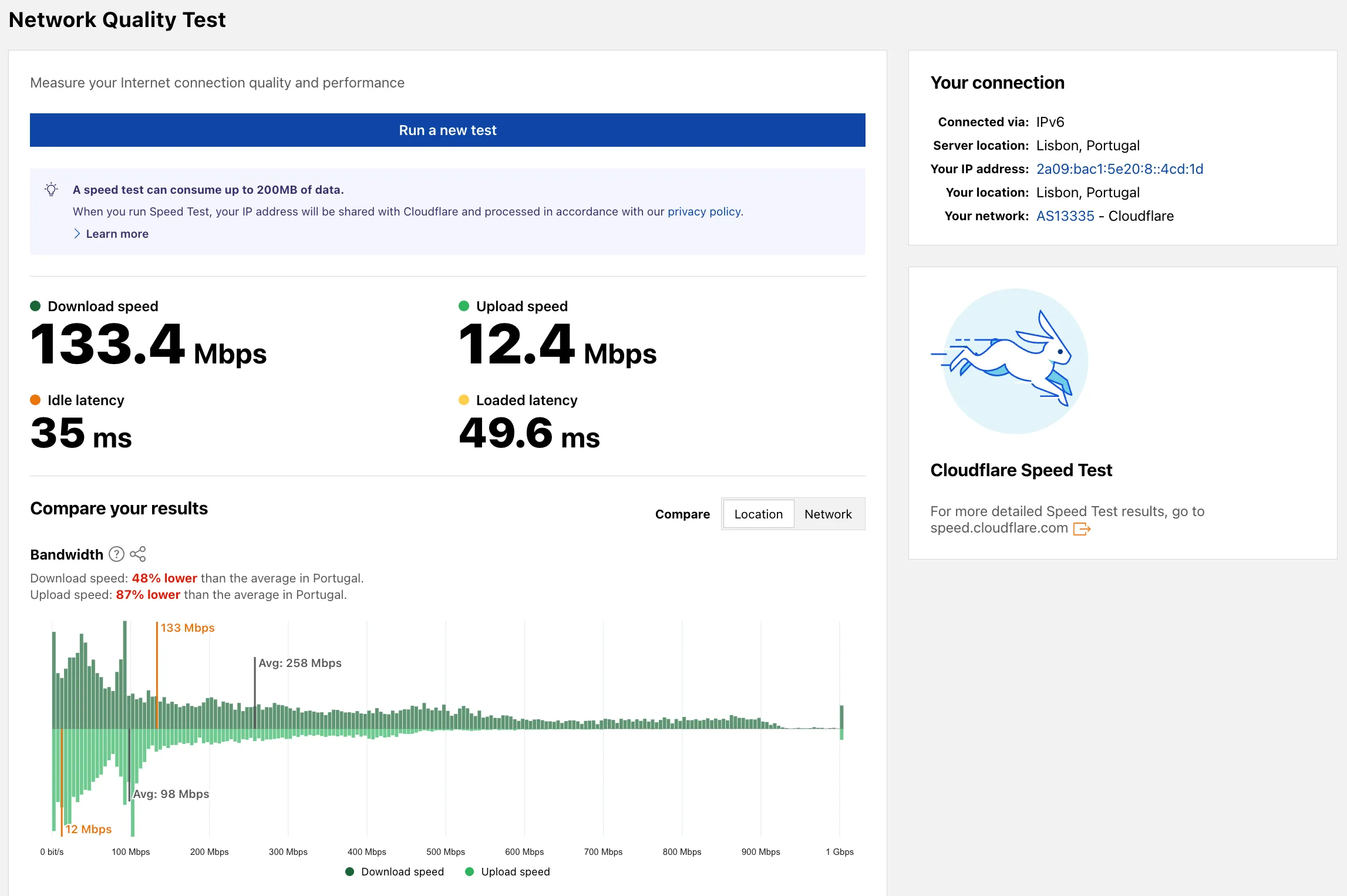
Radar now includes a Network Quality Test page. The tool measures Internet connection quality and performance, showing connection details such as IP address, server location, network (ASN), and IP version. For more detailed speed test results, the page links to speed.cloudflare.com.
Sandboxes now support real-time filesystem watching via sandbox.watch(). The method returns a Server-Sent Events stream backed by native inotify, so your Worker receives create, modify, delete, and move events as they happen inside the container.
sandbox.watch(path, options)
Pass a directory path and optional filters. The returned stream is a standard ReadableStream you can proxy directly to a browser client or consume server-side.
JavaScript
// Stream events to a browser client
conststream=awaitsandbox.watch("/workspace/src",{
recursive: true,
include: ["*.ts","*.js"],
});
returnnewResponse(stream,{
headers:{"Content-Type":"text/event-stream"},
});
TypeScript
// Stream events to a browser client
conststream=awaitsandbox.watch("/workspace/src",{
recursive: true,
include: ["*.ts","*.js"],
});
returnnewResponse(stream,{
headers:{"Content-Type":"text/event-stream"},
});
Server-side consumption with parseSSEStream
Use parseSSEStream to iterate over events inside a Worker without forwarding them to a client.
JavaScript
import {parseSSEStream} from "@cloudflare/sandbox";
Each event includes a type field (create, modify, delete, or move) and the affected path. Move events also include a from field with the original path.
Options
Option
Type
Description
recursive
boolean
Watch subdirectories. Defaults to false.
include
string[]
Glob patterns to filter events. Omit to receive all events.
You can now copy Cloudflare One resources as JSON or as a ready-to-use API POST request directly from the dashboard. This makes it simple to transition workflows into API calls, automation scripts, or infrastructure-as-code pipelines.
To use this feature, click the overflow menu (⋮) on any supported resource and select Copy as JSON or Copy as POST request. The copied output includes only the fields present on your resource, giving you a clean and minimal starting point for your own API calls.
Initially supported resources:
Access applications
Access policies
Gateway policies
Resolver policies
Service tokens
Identity providers
We will continue to add support for more resources throughout 2026.
AI Gateway now automatically creates a gateway for you on your first request. When you use default as a gateway ID, it will be created if it does not already exist — no need to set one up through the dashboard or API first.
The auto-created default gateway has authentication and log collection turned on, with caching and rate limiting turned off.
The latest release of the Agents SDK rewrites observability from scratch with diagnostics_channel, adds keepAlive() to prevent Durable Object eviction during long-running work, and introduces waitForMcpConnections so MCP tools are always available when onChatMessage runs.
Observability rewrite
The previous observability system used console.log() with a custom Observability.emit() interface. v0.7.0 replaces it with structured events published to diagnostics channels — silent by default, zero overhead when nobody is listening.
Every event has a type, payload, and timestamp. Events are routed to seven named channels:
Durable Objects are evicted after a period of inactivity (typically 70-140 seconds with no incoming requests, WebSocket messages, or alarms). During long-running operations — streaming LLM responses, waiting on external APIs, running multi-step computations — the agent can be evicted mid-flight.
keepAlive() prevents this by creating a 30-second heartbeat schedule. The alarm firing resets the inactivity timer. Returns a disposer function that cancels the heartbeat when called.
JavaScript
constdispose=awaitthis.keepAlive();
try{
constresult=awaitlongRunningComputation();
awaitsendResults(result);
}finally{
dispose();
}
TypeScript
constdispose=awaitthis.keepAlive();
try{
constresult=awaitlongRunningComputation();
awaitsendResults(result);
}finally{
dispose();
}
keepAliveWhile() wraps an async function with automatic cleanup — the heartbeat starts before the function runs and stops when it completes:
JavaScript
constresult=awaitthis.keepAliveWhile(async()=>{
constdata=awaitlongRunningComputation();
returndata;
});
TypeScript
constresult=awaitthis.keepAliveWhile(async()=>{
constdata=awaitlongRunningComputation();
returndata;
});
Key details:
Multiple concurrent callers — Each keepAlive() call returns an independent disposer. Disposing one does not affect others.
AIChatAgent built-in — AIChatAgent automatically calls keepAlive() during streaming responses. You do not need to add it yourself.
Uses the scheduling system — The heartbeat does not conflict with your own schedules. It shows up in getSchedules() if you need to inspect it.
AIChatAgent now waits for MCP server connections to settle before calling onChatMessage. This ensures this.mcp.getAITools() returns the full set of tools, especially after Durable Object hibernation when connections are being restored in the background.
JavaScript
exportclassChatAgentextendsAIChatAgent{
// Default — waits up to 10 seconds
// waitForMcpConnections = { timeout: 10_000 };
// Wait forever
waitForMcpConnections =true;
// Disable waiting
waitForMcpConnections =false;
}
TypeScript
exportclassChatAgentextendsAIChatAgent{
// Default — waits up to 10 seconds
// waitForMcpConnections = { timeout: 10_000 };
// Wait forever
waitForMcpConnections =true;
// Disable waiting
waitForMcpConnections =false;
}
Value
Behavior
{ timeout: 10_000 }
Wait up to 10 seconds (default)
{ timeout: N }
Wait up to N milliseconds
true
Wait indefinitely until all connections ready
false
Do not wait (old behavior before 0.2.0)
For lower-level control, call this.mcp.waitForConnections() directly inside onChatMessage instead.
Other improvements
MCP deduplication by name and URL — addMcpServer with HTTP transport now deduplicates on both server name and URL. Calling it with the same name but a different URL creates a new connection. URLs are normalized before comparison (trailing slashes, default ports, hostname case).
callbackHost optional for non-OAuth servers — addMcpServer no longer requires callbackHost when connecting to MCP servers that do not use OAuth.
MCP URL security — Server URLs are validated before connection to prevent SSRF. Private IP ranges, loopback addresses, link-local addresses, and cloud metadata endpoints are blocked.
Custom denial messages — addToolOutput now supports state: "output-error" with errorText for custom denial messages in human-in-the-loop tool approval flows.
requestId in chat options — onChatMessage options now include a requestId for logging and correlating events.
Gateway Protocol Detection now supports seven additional protocols in beta:
Protocol
Notes
IMAP
Internet Message Access Protocol — email retrieval
POP3
Post Office Protocol v3 — email retrieval
SMTP
Simple Mail Transfer Protocol — email sending
MYSQL
MySQL database wire protocol
RSYNC-DAEMON
rsync daemon protocol
LDAP
Lightweight Directory Access Protocol
NTP
Network Time Protocol
These protocols join the existing set of detected protocols (HTTP, HTTP2, SSH, TLS, DCERPC, MQTT, and TPKT) and can be used with the Detected Protocol selector in Network policies to identify and filter traffic based on the application-layer protocol, without relying on port-based identification.
If protocol detection is enabled on your account, these protocols will automatically be logged when detected in your Gateway network traffic.