Blog

  • Containers – Container logs page now includes relevant Worker and Durable Object logs

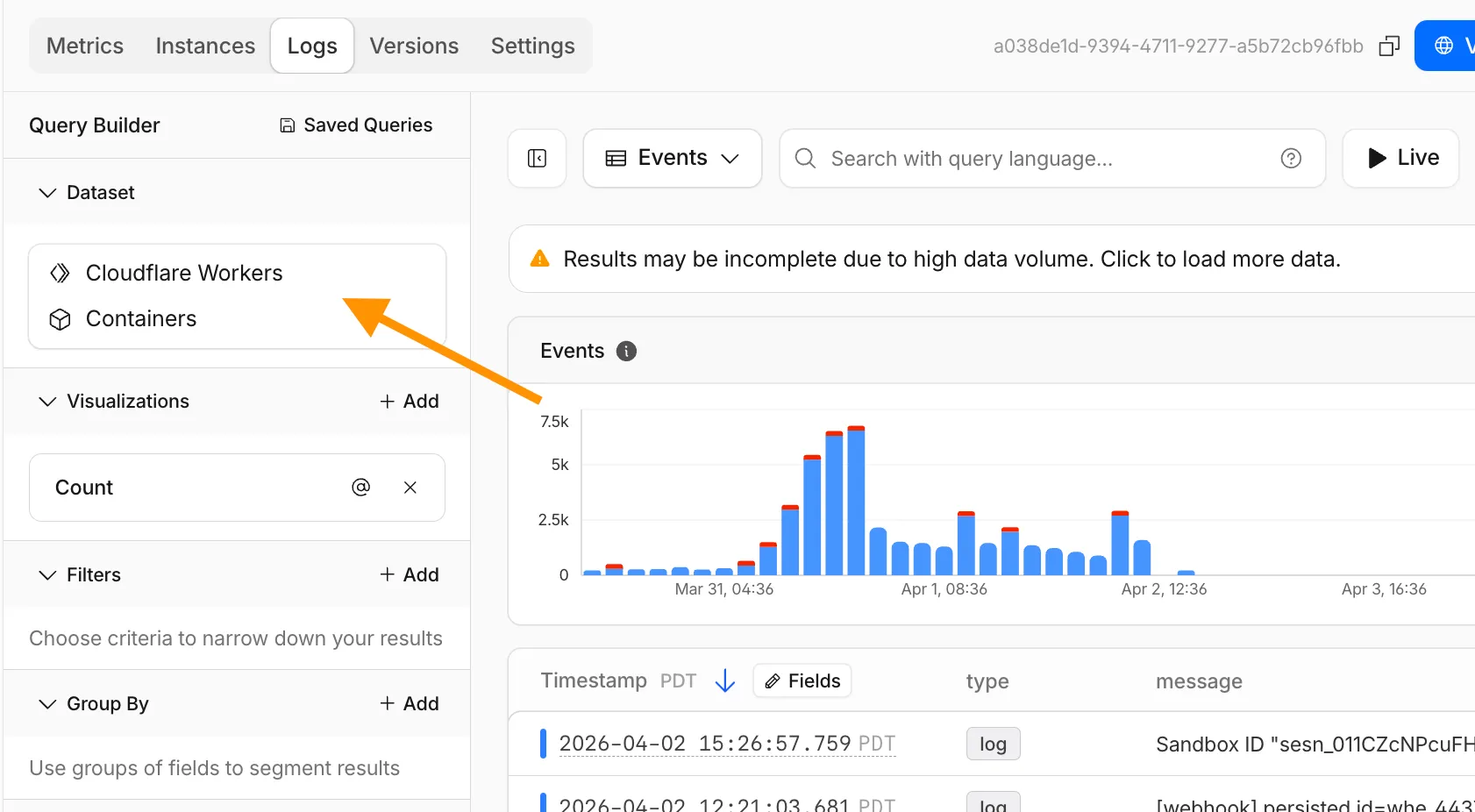
    The Container logs page now displays related Worker and Durable Object logs alongside container logs. This co-locates all relevant log events for a container application in one place, making it easier to trace requests and debug issues.

    Container logs page showing Worker and Durable Object logs alongside container logs

    You can filter to a single source when you need to isolate Container, Worker, or Durable Object output.

    For information on configuring container logging, refer to How do Container logs work?.

  • Containers – Container logs page now includes relevant Worker and Durable Object logs

    The Container logs page now displays related Worker and Durable Object logs alongside container logs. This co-locates all relevant log events for a container application in one place, making it easier to trace requests and debug issues.

    Container logs page showing Worker and Durable Object logs alongside container logs

    You can filter to a single source when you need to isolate Container, Worker, or Durable Object output.

    For information on configuring container logging, refer to How do Container logs work?.

  • Cloudflare One, Gateway – Network session analytics dashboard

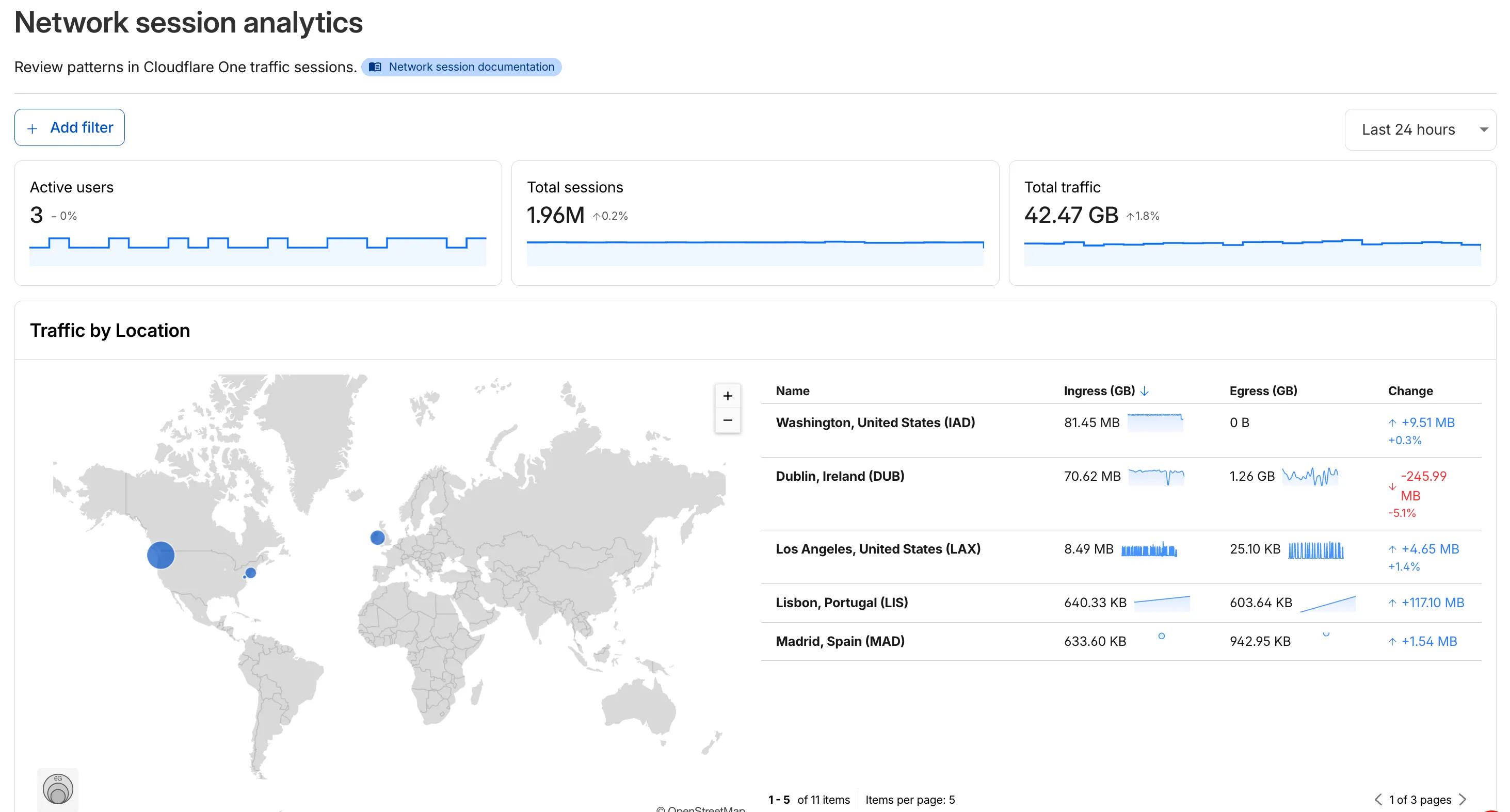
    The new Network session analytics dashboard is now available in Cloudflare One. This dashboard provides visibility into your network traffic patterns, helping you understand how traffic flows through your Cloudflare One infrastructure.

    Cloudflare One Network Session Analytics

    What you can do with Network session analytics

    • Analyze geographic distribution: View a world map showing where your network traffic originates, with a list of top locations by session count.
    • Monitor key metrics: Track session count, total bytes transferred, and unique users.
    • Identify connection issues: Analyze connection close reasons to troubleshoot network problems.
    • Review protocol usage: See which network protocols (TCP, UDP, ICMP) are most used.

    Dashboard features

    • Summary metrics: Session count, bytes total, and unique users
    • Traffic by location: World map visualization and location list with top traffic sources
    • Top protocols: Breakdown of TCP, UDP, ICMP, and ICMPv6 traffic
    • Connection close reasons: Insights into why sessions terminated (client closed, origin closed, timeouts, errors)

    How to access

    1. Log in to Cloudflare One.
    2. Go to Zero Trust > Insights > Dashboards.
    3. Select Network session analytics.

    For more information, refer to the Network session analytics documentation.

  • Radar – AI Insights updates on Cloudflare Radar

    Radar adds three new features to the AI Insights page, expanding visibility into how AI bots, crawlers, and agents interact with the web.

    Adoption of AI agent standards

    The AI Insights page now includes an adoption of AI agent standards widget that tracks how websites adopt agent-facing standards. The data is filterable by domain category and updated weekly on Mondays.
    This data is also available through the Agent Readiness API reference.
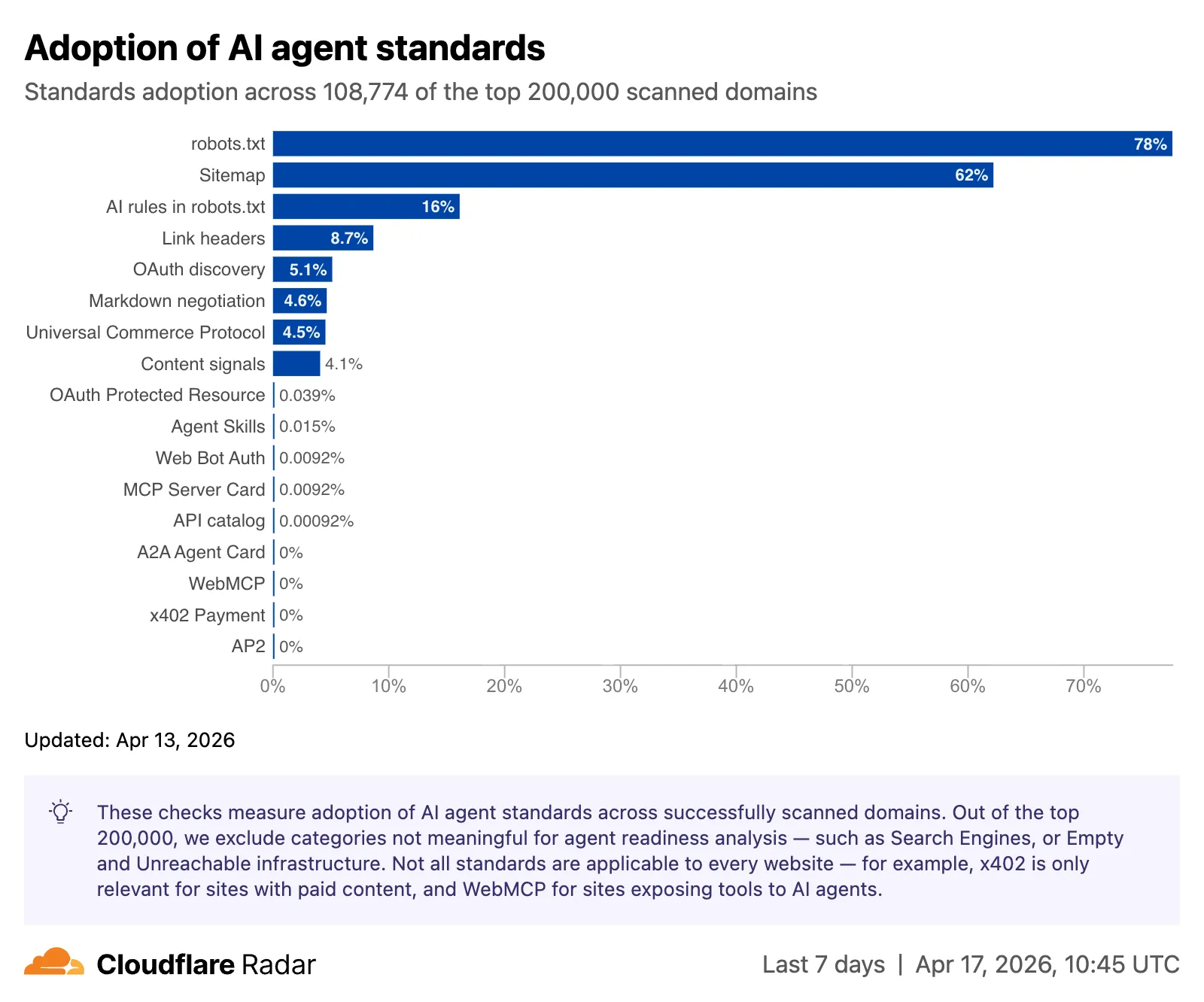
    Screenshot of the adoption of AI agent standards chart

    URL Scanner reports now include an Agent readiness tab that evaluates a scanned URL against the criteria used by the Agent Readiness score tool.
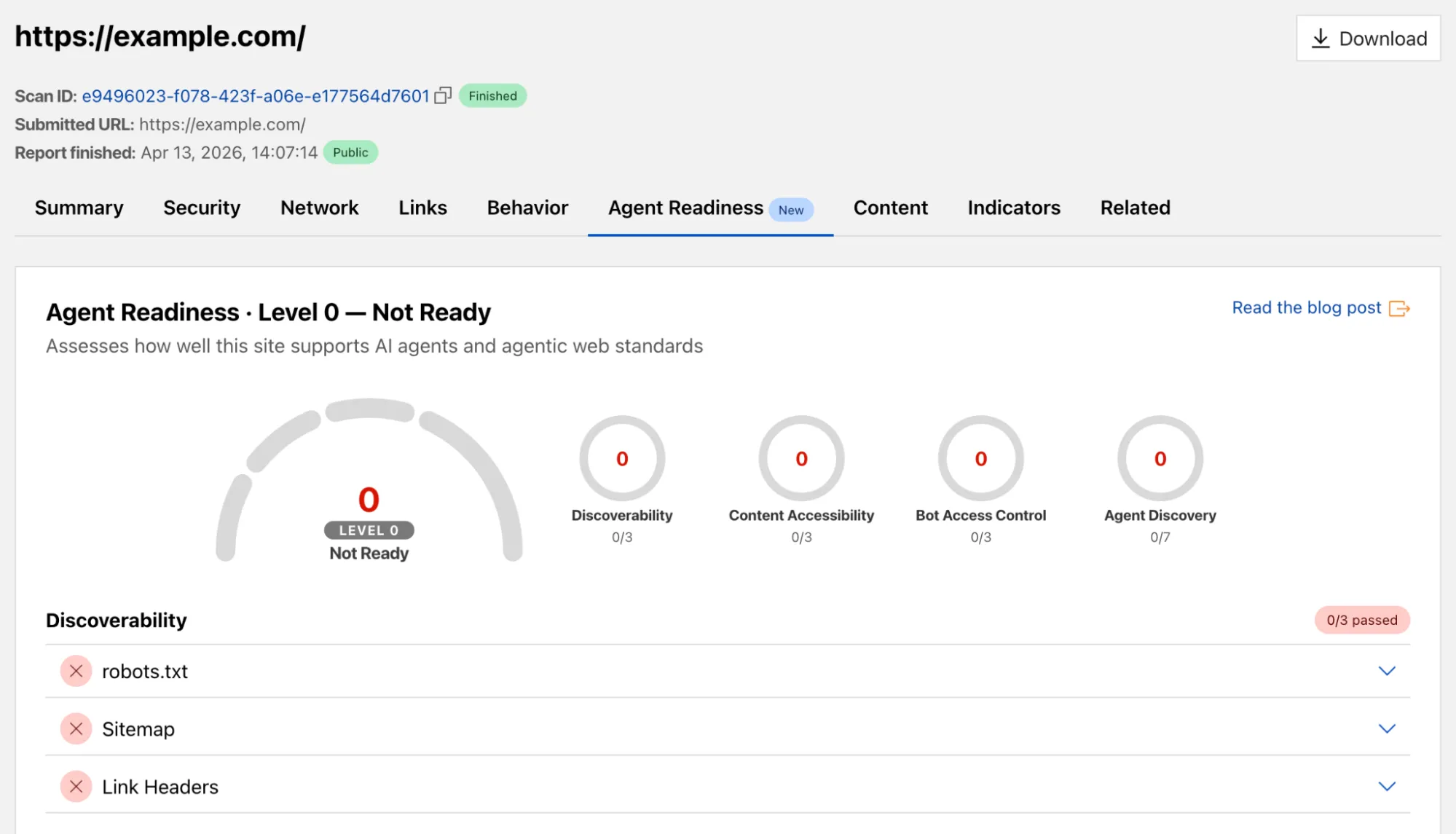
    Screenshot of the URL Scanner agent readiness tab

    For more details, refer to the Agent Readiness blog post.

    Markdown for Agents savings

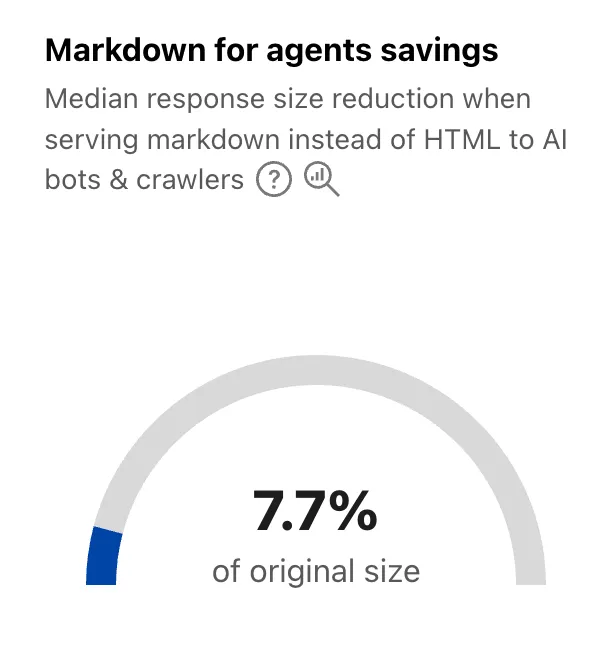
    A new savings gauge shows the median response-size reduction when serving Markdown instead of HTML to AI bots and crawlers. This highlights the bandwidth and token savings that Markdown for Agents provides.

    Screenshot of the Markdown for Agents savings gauge

    For more details, refer to the Markdown for Agents API reference.

    Response status

    The new response status widget displays the distribution of HTTP response status codes returned to AI bots and crawlers. Results are groupable by individual status code (200, 403, 404) or by category (2xx, 3xx, 4xx, 5xx).

    The same widget is available on each verified bot’s detail page (only available for AI bots), for example Google.
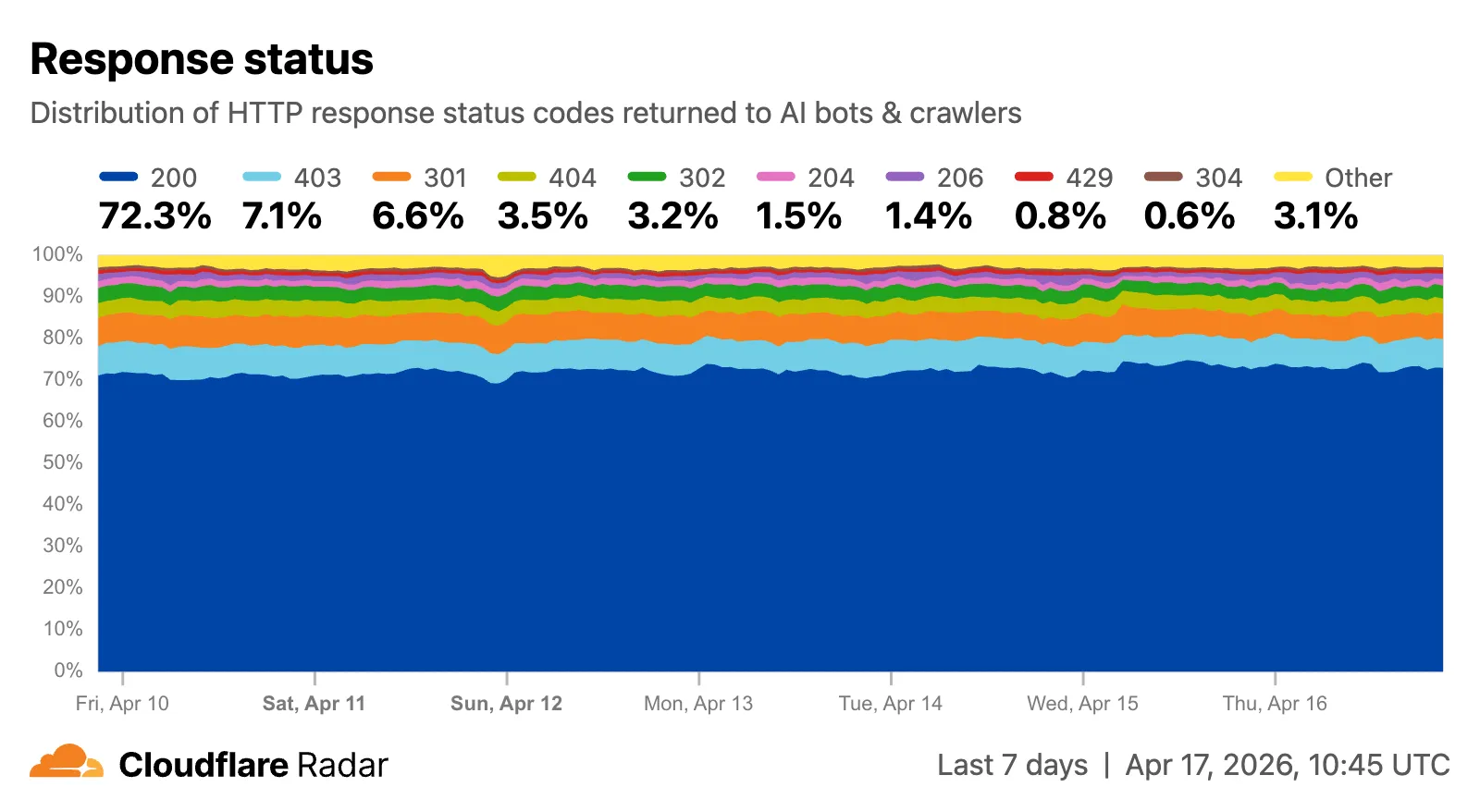
    Screenshot of the response status distribution widget

    Explore all three features on the Cloudflare Radar AI Insights page.
  • AI Crawl Control – Tools to prepare your site for the agentic Internet

    AI Crawl Control now includes new tools to help you prepare your site for the agentic Internet—a web where AI agents are first-class citizens that discover and interact with content differently than human visitors.

    Content Format insights

    The Metrics tab now includes a Content Format chart showing what content types AI systems request versus what your origin serves. Understanding these patterns helps you optimize content delivery for both human and agent consumption.

    Directives tab (formerly Robots.txt)

    The Robots.txt tab has been renamed to Directives and now includes a link to check your site’s Agent Readiness score.

    Refer to our blog post on preparing for the agentic Internet for more on why these capabilities matter.

  • AI Crawl Control – Introducing Redirects for AI Training

    Cloudflare’s network now supports redirecting verified AI training crawlers to canonical URLs when they request deprecated or duplicate pages. When enabled via AI Crawl Control > Quick Actions, AI training crawlers that request a page with a canonical tag pointing elsewhere receive a 301 redirect to the canonical version. Humans, search engine crawlers, and AI Search agents continue to see the original page normally.

    This feature leverages your existing <link rel="canonical"> tags. No additional configuration required beyond enabling the toggle. Available on Pro, Business, and Enterprise plans at no additional cost.

    Refer to the Redirects for AI Training documentation for details.

  • Radar – AI Insights updates on Cloudflare Radar

    Radar adds three new features to the AI Insights page, expanding visibility into how AI bots, crawlers, and agents interact with the web.

    Adoption of AI agent standards

    The AI Insights page now includes an adoption of AI agent standards widget that tracks how websites adopt agent-facing standards. The data is filterable by domain category and updated weekly on Mondays.
    This data is also available through the Agent Readiness API reference.

    Screenshot of the adoption of AI agent standards chart

    URL Scanner reports now include an Agent readiness tab that evaluates a scanned URL against the criteria used by the Agent Readiness score tool.

    Screenshot of the URL Scanner agent readiness tab

    For more details, refer to the Agent Readiness blog post.

    Markdown for Agents savings

    A new savings gauge shows the median response-size reduction when serving Markdown instead of HTML to AI bots and crawlers. This highlights the bandwidth and token savings that Markdown for Agents provides.

    Screenshot of the Markdown for Agents savings gauge

    For more details, refer to the Markdown for Agents API reference.

    Response status

    The new response status widget displays the distribution of HTTP response status codes returned to AI bots and crawlers. Results are groupable by individual status code (200, 403, 404) or by category (2xx, 3xx, 4xx, 5xx).

    The same widget is available on each verified bot’s detail page (only available for AI bots), for example Google.

    Screenshot of the response status distribution widget

    Explore all three features on the Cloudflare Radar AI Insights page.
  • AI Crawl Control – Tools to prepare your site for the agentic Internet

    AI Crawl Control now includes new tools to help you prepare your site for the agentic Internet—a web where AI agents are first-class citizens that discover and interact with content differently than human visitors.

    Content Format insights

    The Metrics tab now includes a Content Format chart showing what content types AI systems request versus what your origin serves. Understanding these patterns helps you optimize content delivery for both human and agent consumption.

    Directives tab (formerly Robots.txt)

    The Robots.txt tab has been renamed to Directives and now includes a link to check your site’s Agent Readiness score.

    Refer to our blog post on preparing for the agentic Internet for more on why these capabilities matter.

  • AI Crawl Control – Introducing Redirects for AI Training

    Cloudflare’s network now supports redirecting verified AI training crawlers to canonical URLs when they request deprecated or duplicate pages. When enabled via AI Crawl Control > Quick Actions, AI training crawlers that request a page with a canonical tag pointing elsewhere receive a 301 redirect to the canonical version. Humans, search engine crawlers, and AI Search agents continue to see the original page normally.

    This feature leverages your existing <link rel="canonical"> tags. No additional configuration required beyond enabling the toggle. Available on Pro, Business, and Enterprise plans at no additional cost.

    Refer to the Redirects for AI Training documentation for details.

  • Radar – AI Insights updates on Cloudflare Radar

    Radar adds three new features to the AI Insights page, expanding visibility into how AI bots, crawlers, and agents interact with the web.

    Adoption of AI agent standards

    The AI Insights page now includes an adoption of AI agent standards widget that tracks how websites adopt agent-facing standards. The data is filterable by domain category and updated weekly on Mondays.
    This data is also available through the Agent Readiness API reference.

    Screenshot of the adoption of AI agent standards chart

    URL Scanner reports now include an Agent readiness tab that evaluates a scanned URL against the criteria used by the Agent Readiness score tool.

    Screenshot of the URL Scanner agent readiness tab

    For more details, refer to the Agent Readiness blog post.

    Markdown for Agents savings

    A new savings gauge shows the median response-size reduction when serving Markdown instead of HTML to AI bots and crawlers. This highlights the bandwidth and token savings that Markdown for Agents provides.

    Screenshot of the Markdown for Agents savings gauge

    For more details, refer to the Markdown for Agents API reference.

    Response status

    The new response status widget displays the distribution of HTTP response status codes returned to AI bots and crawlers. Results are groupable by individual status code (200, 403, 404) or by category (2xx, 3xx, 4xx, 5xx).

    The same widget is available on each verified bot’s detail page (only available for AI bots), for example Google.

    Screenshot of the response status distribution widget

    Explore all three features on the Cloudflare Radar AI Insights page.