Blog

  • Containers, Agents – Secure credential injection and dynamic egress policies for Sandboxes

    Outbound Workers for Sandboxes and Containers now support zero-trust credential injection, TLS interception, allow/deny lists, and dynamic per-instance egress policies. These features give platforms running agentic workloads full control over what leaves the sandbox, without exposing secrets to untrusted workloads, like user-generated code or coding agents.

    Credential injection

    Because outbound handlers run in the Workers runtime, outside the sandbox, they can hold secrets the sandbox never sees. A sandboxed workload can make a plain request, and credentials are transparently attached before a request is forwarded upstream.

    For instance, you could run an agent in a sandbox and ensure that any requests it makes to Github are authenticated.
    But it will never be able to accesss the credentials:

    export class MySandbox extends Sandbox {}
    MySandbox.outboundByHost = {
    "github.com": (request: Request, env: Env, ctx: OutboundHandlerContext) => {
    const requestWithAuth = new Request(request);
    requestWithAuth.headers.set("x-auth-token", env.SECRET);
    return fetch(requestWithAuth);
    },
    };

    You can easily inject unique credentials for different instances
    by using ctx.containerId:

    MySandbox.outboundByHost = {
    "my-internal-vcs.dev": async (
    request: Request,
    env: Env,
    ctx: OutboundHandlerContext,
    ) => {
    const authKey = await env.KEYS.get(ctx.containerId);
    const requestWithAuth = new Request(request);
    requestWithAuth.headers.set("x-auth-token", authKey);
    return fetch(requestWithAuth);
    },
    };

    No token is ever passed into the sandbox. You can rotate secrets in the Worker environment
    and every request will pick them up immediately.

    TLS interception

    Outbound Workers now intercept HTTPS traffic. A unique ephemeral certificate authority (CA) and private key are created for each sandbox instance. The CA is placed into the sandbox and trusted by default. The ephemeral private key never leaves the container runtime sidecar process and is never shared across instances.

    With TLS interception active, outbound Workers can act as a transparent proxy for both HTTP and HTTPS traffic.

    Allow and deny hosts

    Easily filter outbound traffic with allowedHosts and deniedHosts. When allowedHosts is set, it becomes a deny-by-default allowlist. Both properties support glob patterns.

    export class MySandbox extends Sandbox {
    allowedHosts = ["github.com", "npmjs.org"];
    }

    Dynamic outbound handlers

    Define named outbound handlers then apply or remove them at runtime using setOutboundHandler() or setOutboundByHost(). This lets you change egress policy for a running sandbox without restarting it.

    export class MySandbox extends Sandbox {}
    MySandbox.outboundHandlers = {
    allowHosts: async (req: Request, env: Env, ctx: OutboundHandlerContext ) => {
    const url = new URL(req.url);
    if (ctx.params.allowedHostnames.includes(url.hostname)) {
    return fetch(req);
    }
    return new Response(null, { status: 403 });
    },
    noHttp: async () => {
    return new Response(null, { status: 403 });
    },
    };

    Apply handlers programmatically from your Worker:

    const sandbox = getSandbox(env.Sandbox, userId);
    // Open network for setup
    await sandbox.setOutboundHandler("allowHosts", {
    allowedHostnames: ["github.com", "npmjs.org"],
    });
    await sandbox.exec("npm install");
    // Lock down after setup
    await sandbox.setOutboundHandler("noHttp");

    Handlers accept params, so you can customize behavior per instance without defining separate handler functions.

    Get started

    Upgrade to @cloudflare/[email protected] or @cloudflare/[email protected] to use these features.

    For more details, refer to Sandbox outbound traffic and Container outbound traffic.
  • Containers – Containers and Sandboxes are now generally available

    Cloudflare Containers and Sandboxes are now generally available.

    Containers let you run more workloads on the Workers platform, including resource-intensive applications, different languages, and CLI tools that need full Linux environments.

    Since the initial launch of Containers, there have been significant improvements to Containers’ performance, stability, and feature set. Some highlights include:

    The Sandbox SDK provides isolated environments for running untrusted code securely, with a simple TypeScript API for executing commands, managing files, and exposing services. This makes it easier to secure and manage your agents at scale. Some additions since launch include:

    For more information, refer to Containers and Sandbox SDK documentation.

  • Browser Rendering – Browser Rendering adds Chrome DevTools Protocol (CDP) and MCP client support

    Browser Rendering now exposes the Chrome DevTools Protocol (CDP), the low-level protocol that powers browser automation. The growing ecosystem of CDP-based agent tools, along with existing CDP automation scripts, can now use Browser Rendering directly.

    Any CDP-compatible client, including Puppeteer and Playwright, can connect from any environment, whether that is Cloudflare Workers, your local machine, or a cloud environment. All you need is your Cloudflare API key.

    For any existing CDP script, switching to Browser Rendering is a one-line change:

    const puppeteer = require("puppeteer-core");
    const browser = await puppeteer.connect({
    browserWSEndpoint:
    `wss://api.cloudflare.com/client/v4/accounts/${ACCOUNT_ID}/browser-rendering/devtools/browser?keep_alive=600000`,
    headers: { Authorization: `Bearer ${API_TOKEN}` },
    });
    const page = await browser.newPage();
    await page.goto("https://example.com");
    console.log(await page.title());
    await browser.close();

    Additionally, MCP clients like Claude Desktop, Claude Code, Cursor, and OpenCode can now use Browser Rendering as their remote browser via the chrome-devtools-mcp package.

    Here is an example of how to configure Browser Rendering for Claude Desktop:

    {
    "mcpServers": {
    "browser-rendering": {
    "command": "npx",
    "args": [
    "-y",
    "chrome-devtools-mcp@latest",
    "--wsEndpoint=wss://api.cloudflare.com/client/v4/accounts/<ACCOUNT_ID>/browser-rendering/devtools/browser?keep_alive=600000",
    "--wsHeaders={"Authorization":"Bearer <API_TOKEN>"}"
    ]
    }
    }
    }

    To get started, refer to the CDP documentation.

  • Browser Rendering – Browser Rendering adds Chrome DevTools Protocol (CDP) and MCP client support

    Browser Rendering now exposes the Chrome DevTools Protocol (CDP), the low-level protocol that powers browser automation. The growing ecosystem of CDP-based agent tools, along with existing CDP automation scripts, can now use Browser Rendering directly.

    Any CDP-compatible client, including Puppeteer and Playwright, can connect from any environment, whether that is Cloudflare Workers, your local machine, or a cloud environment. All you need is your Cloudflare API key.

    For any existing CDP script, switching to Browser Rendering is a one-line change:

    const puppeteer = require("puppeteer-core");
    const browser = await puppeteer.connect({
    browserWSEndpoint:
    `wss://api.cloudflare.com/client/v4/accounts/${ACCOUNT_ID}/browser-rendering/devtools/browser?keep_alive=600000`,
    headers: { Authorization: `Bearer ${API_TOKEN}` },
    });
    const page = await browser.newPage();
    await page.goto("https://example.com");
    console.log(await page.title());
    await browser.close();

    Additionally, MCP clients like Claude Desktop, Claude Code, Cursor, and OpenCode can now use Browser Rendering as their remote browser via the chrome-devtools-mcp package.

    Here is an example of how to configure Browser Rendering for Claude Desktop:

    {
    "mcpServers": {
    "browser-rendering": {
    "command": "npx",
    "args": [
    "-y",
    "chrome-devtools-mcp@latest",
    "--wsEndpoint=wss://api.cloudflare.com/client/v4/accounts/<ACCOUNT_ID>/browser-rendering/devtools/browser?keep_alive=600000",
    "--wsHeaders={"Authorization":"Bearer <API_TOKEN>"}"
    ]
    }
    }
    }

    To get started, refer to the CDP documentation.

  • Browser Rendering – Browser Rendering adds Chrome DevTools Protocol (CDP) and MCP client support

    Browser Rendering now exposes the Chrome DevTools Protocol (CDP), the low-level protocol that powers browser automation. The growing ecosystem of CDP-based agent tools, along with existing CDP automation scripts, can now use Browser Rendering directly.

    Any CDP-compatible client, including Puppeteer and Playwright, can connect from any environment, whether that is Cloudflare Workers, your local machine, or a cloud environment. All you need is your Cloudflare API key.

    For any existing CDP script, switching to Browser Rendering is a one-line change:

    const puppeteer = require("puppeteer-core");
    const browser = await puppeteer.connect({
    browserWSEndpoint:
    `wss://api.cloudflare.com/client/v4/accounts/${ACCOUNT_ID}/browser-rendering/devtools/browser?keep_alive=600000`,
    headers: { Authorization: `Bearer ${API_TOKEN}` },
    });
    const page = await browser.newPage();
    await page.goto("https://example.com");
    console.log(await page.title());
    await browser.close();

    Additionally, MCP clients like Claude Desktop, Claude Code, Cursor, and OpenCode can now use Browser Rendering as their remote browser via the chrome-devtools-mcp package.

    Here is an example of how to configure Browser Rendering for Claude Desktop:

    {
    "mcpServers": {
    "browser-rendering": {
    "command": "npx",
    "args": [
    "-y",
    "chrome-devtools-mcp@latest",
    "--wsEndpoint=wss://api.cloudflare.com/client/v4/accounts/<ACCOUNT_ID>/browser-rendering/devtools/browser?keep_alive=600000",
    "--wsHeaders={"Authorization":"Bearer <API_TOKEN>"}"
    ]
    }
    }
    }

    To get started, refer to the CDP documentation.

  • Workers – Relaxed simultaneous connection limiting for Workers

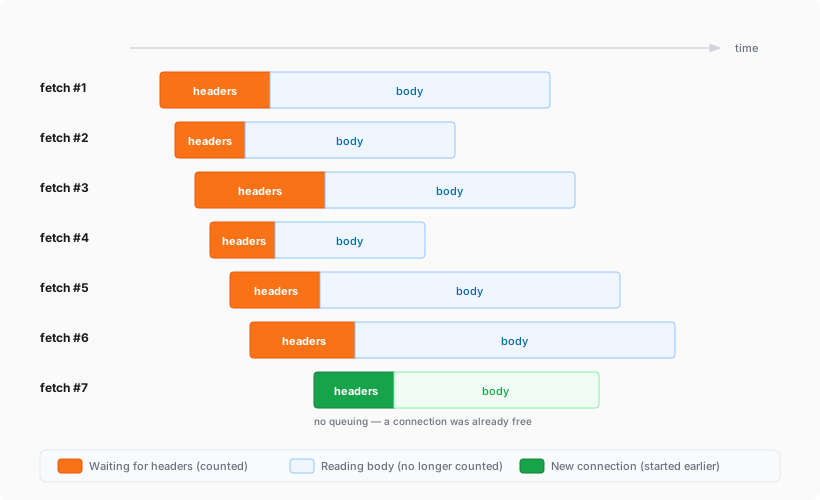
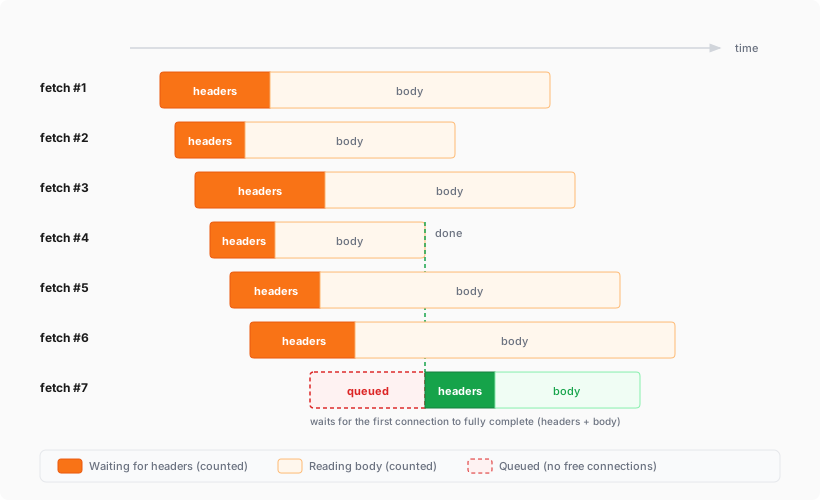
    The simultaneous open connections limit has been relaxed. Previously, each Worker invocation was limited to six open connections at a time for the entire lifetime of each connection, including while reading the response body. Now, a connection is freed as soon as response headers arrive, so the six-connection limit only constrains how many connections can be in the initial “waiting for headers” phase simultaneously.

    Before: New connections are blocked until an earlier connection fully completes

    A 7th fetch is queued until an earlier connection fully completes, including reading its entire response body

    After: New connections can start as soon as response headers arrive

    A 7th fetch starts as soon as any earlier connection receives its response headers

    This means Workers can now have many more connections open at the same time without queueing, as long as no more than six are waiting for their initial response. This eliminates the Response closed due to connection limit exception that could previously occur when the runtime canceled stalled connections to prevent deadlocks.

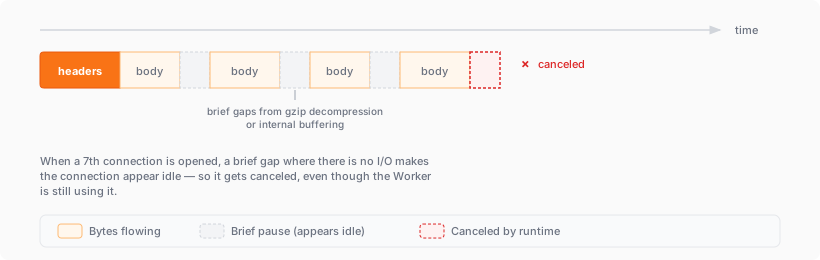
    Previously, the runtime used a deadlock avoidance algorithm that watched each open connection for I/O activity. If all six connections appeared idle — even momentarily — the runtime would cancel the least-recently-used connection to make room for new requests. In practice, this heuristic was fragile. For example, when a response used Content-Encoding: gzip, the runtime’s internal decompression created brief gaps between read and write operations. During these gaps, the connection appeared stalled despite being actively read by the Worker. If multiple connections hit these gaps at the same time, the runtime could spuriously cancel a connection that was working correctly. By only counting connections during the waiting-for-headers phase — where the runtime is fully in control and there is no ambiguity about whether the connection is active — this class of bug is eliminated entirely.

    Before: Connections could be canceled during brief internal pauses

    A connection with gaps from gzip decompression appears idle and is canceled by the runtime

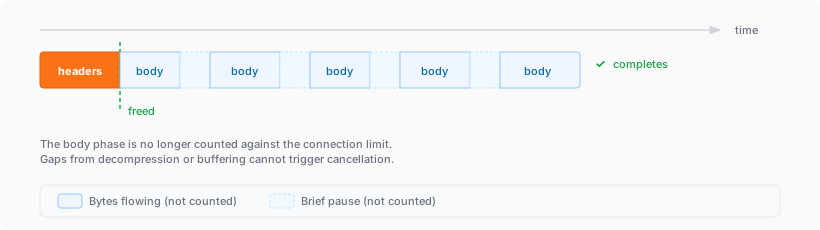
    After: Connections complete normally regardless of internal pauses

    The same connection completes normally because the body phase is no longer counted against the limit

  • CASB – Send CASB posture finding instances with webhooks

    You can now use CASB webhooks in Cloudflare One to send posture finding instances to external systems such as chat platforms, ticketing systems, SIEMs, SOAR tools, and custom automation services.

    This gives security teams a simple way to route CASB posture findings into the tools and workflows they already use for triage and response.

    To get started, go to Integrations > Webhooks in the Cloudflare One dashboard to create a webhook destination. After you configure a webhook, open a posture finding instance and select Send webhook to send it.

    Key capabilities

    • Flexible authentication — Configure destinations using None, Basic Auth, Bearer Auth, Static Headers, or HMAC-Signing.
    • Built-in testing — Use Test delivery to send a test request before sending a live finding instance.
    • Posture finding workflows — Send posture finding instances directly from the finding details workflow in Cloud & SaaS findings.
    • HTTPS destinations — Configure webhook destinations with public https:// URLs.

    Learn more

    CASB webhooks are now available in Cloudflare One.

  • Workers – Relaxed simultaneous connection limiting for Workers

    The simultaneous open connections limit has been relaxed. Previously, each Worker invocation was limited to six open connections at a time for the entire lifetime of each connection, including while reading the response body. Now, a connection is freed as soon as response headers arrive, so the six-connection limit only constrains how many connections can be in the initial “waiting for headers” phase simultaneously.

    Before: New connections are blocked until an earlier connection fully completes

    A 7th fetch is queued until an earlier connection fully completes, including reading its entire response body

    After: New connections can start as soon as response headers arrive

    A 7th fetch starts as soon as any earlier connection receives its response headers

    This means Workers can now have many more connections open at the same time without queueing, as long as no more than six are waiting for their initial response. This eliminates the Response closed due to connection limit exception that could previously occur when the runtime canceled stalled connections to prevent deadlocks.

    Previously, the runtime used a deadlock avoidance algorithm that watched each open connection for I/O activity. If all six connections appeared idle — even momentarily — the runtime would cancel the least-recently-used connection to make room for new requests. In practice, this heuristic was fragile. For example, when a response used Content-Encoding: gzip, the runtime’s internal decompression created brief gaps between read and write operations. During these gaps, the connection appeared stalled despite being actively read by the Worker. If multiple connections hit these gaps at the same time, the runtime could spuriously cancel a connection that was working correctly. By only counting connections during the waiting-for-headers phase — where the runtime is fully in control and there is no ambiguity about whether the connection is active — this class of bug is eliminated entirely.

    Before: Connections could be canceled during brief internal pauses

    A connection with gaps from gzip decompression appears idle and is canceled by the runtime

    After: Connections complete normally regardless of internal pauses

    The same connection completes normally because the body phase is no longer counted against the limit

  • CASB – Send CASB posture finding instances with webhooks

    You can now use CASB webhooks in Cloudflare One to send posture finding instances to external systems such as chat platforms, ticketing systems, SIEMs, SOAR tools, and custom automation services.

    This gives security teams a simple way to route CASB posture findings into the tools and workflows they already use for triage and response.

    To get started, go to Integrations > Webhooks in the Cloudflare One dashboard to create a webhook destination. After you configure a webhook, open a posture finding instance and select Send webhook to send it.

    Key capabilities

    • Flexible authentication — Configure destinations using None, Basic Auth, Bearer Auth, Static Headers, or HMAC-Signing.
    • Built-in testing — Use Test delivery to send a test request before sending a live finding instance.
    • Posture finding workflows — Send posture finding instances directly from the finding details workflow in Cloud & SaaS findings.
    • HTTPS destinations — Configure webhook destinations with public https:// URLs.

    Learn more

    CASB webhooks are now available in Cloudflare One.

  • Workers – Relaxed simultaneous connection limiting for Workers

    The simultaneous open connections limit has been relaxed. Previously, each Worker invocation was limited to six open connections at a time for the entire lifetime of each connection, including while reading the response body. Now, a connection is freed as soon as response headers arrive, so the six-connection limit only constrains how many connections can be in the initial “waiting for headers” phase simultaneously.

    Before: New connections are blocked until an earlier connection fully completes

    A 7th fetch is queued until an earlier connection fully completes, including reading its entire response body

    After: New connections can start as soon as response headers arrive

    A 7th fetch starts as soon as any earlier connection receives its response headers

    This means Workers can now have many more connections open at the same time without queueing, as long as no more than six are waiting for their initial response. This eliminates the Response closed due to connection limit exception that could previously occur when the runtime canceled stalled connections to prevent deadlocks.

    Previously, the runtime used a deadlock avoidance algorithm that watched each open connection for I/O activity. If all six connections appeared idle — even momentarily — the runtime would cancel the least-recently-used connection to make room for new requests. In practice, this heuristic was fragile. For example, when a response used Content-Encoding: gzip, the runtime’s internal decompression created brief gaps between read and write operations. During these gaps, the connection appeared stalled despite being actively read by the Worker. If multiple connections hit these gaps at the same time, the runtime could spuriously cancel a connection that was working correctly. By only counting connections during the waiting-for-headers phase — where the runtime is fully in control and there is no ambiguity about whether the connection is active — this class of bug is eliminated entirely.

    Before: Connections could be canceled during brief internal pauses

    A connection with gaps from gzip decompression appears idle and is canceled by the runtime

    After: Connections complete normally regardless of internal pauses

    The same connection completes normally because the body phase is no longer counted against the limit