Blog

  • Radar – Post-Quantum Encryption and Key Transparency on Cloudflare Radar

    Radar now tracks post-quantum encryption support on origin servers, provides a tool to test any host for post-quantum compatibility, and introduces a Key Transparency dashboard for monitoring end-to-end encrypted messaging audit logs.

    Post-quantum origin support

    The new Post-Quantum API provides the following endpoints:

    The new Post-Quantum Encryption page shows the share of customer origins supporting X25519MLKEM768, derived from daily automated TLS scans of TLS 1.3-compatible origins. The scanner tests for algorithm support rather than the origin server’s configured preference.
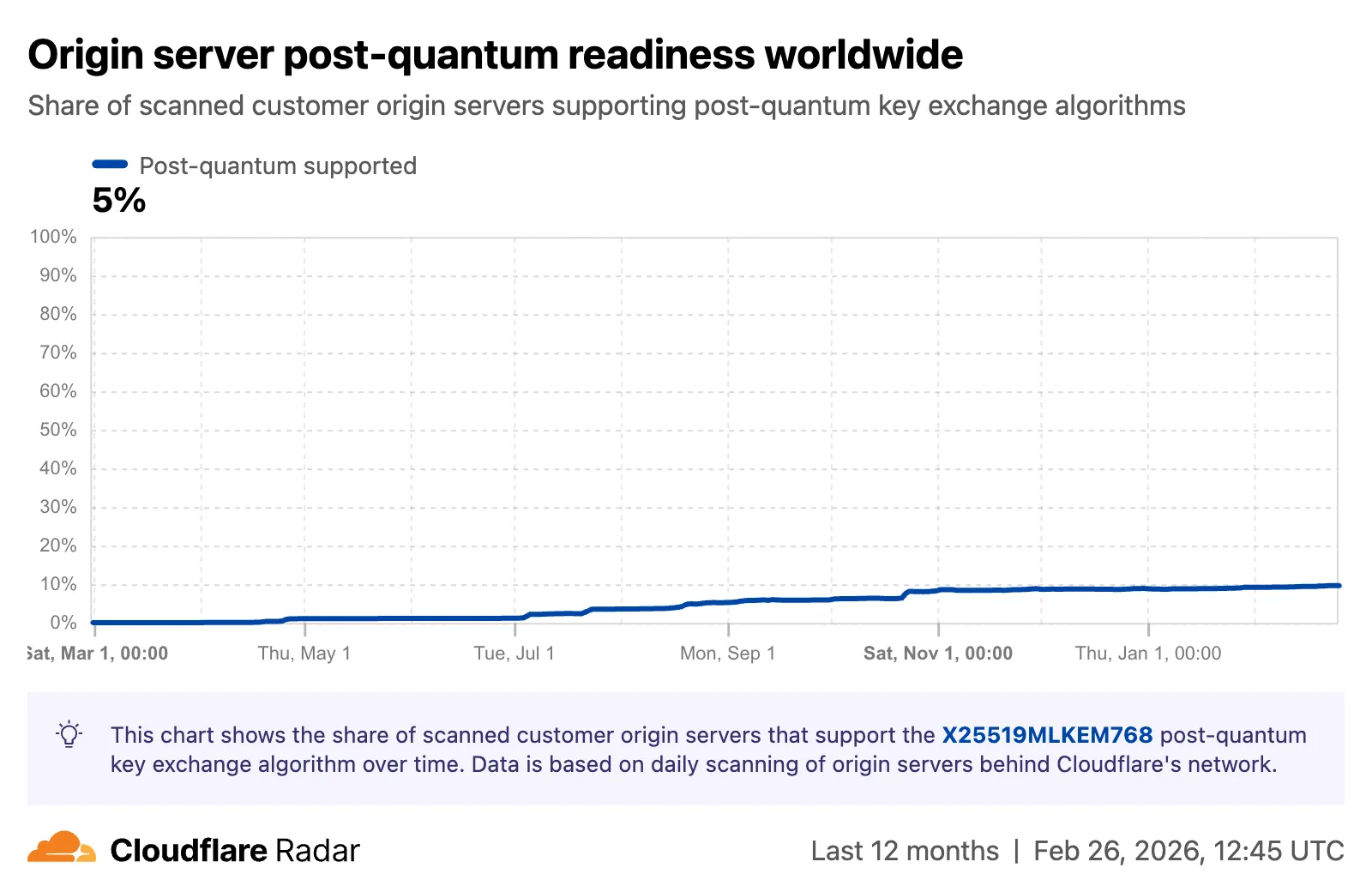
    Screenshot of the origin post-quantum support graph on Radar

    A host test tool allows checking any publicly accessible website for post-quantum encryption compatibility. Enter a hostname and optional port to see whether the server negotiates a post-quantum key exchange algorithm.
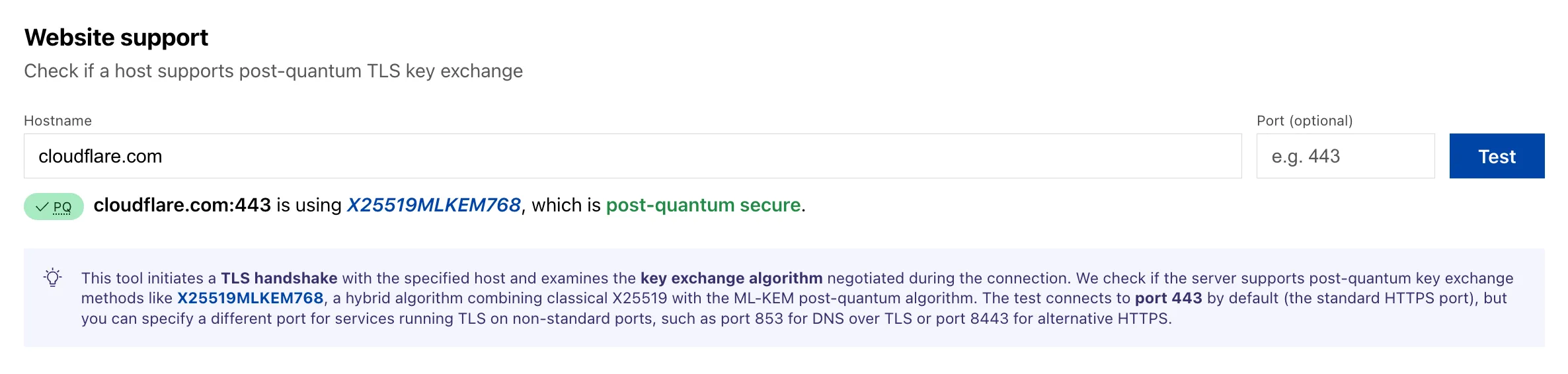
    Screenshot of the post-quantum host test tool on Radar

    Key Transparency

    A new Key Transparency section displays the audit status of Key Transparency logs for end-to-end encrypted messaging services. The page launches with two monitored logs: WhatsApp and Facebook Messenger Transport.

    Each log card shows the current status, last signed epoch, last verified epoch, and the root hash of the Auditable Key Directory tree. The data is also available through the Key Transparency Auditor API.
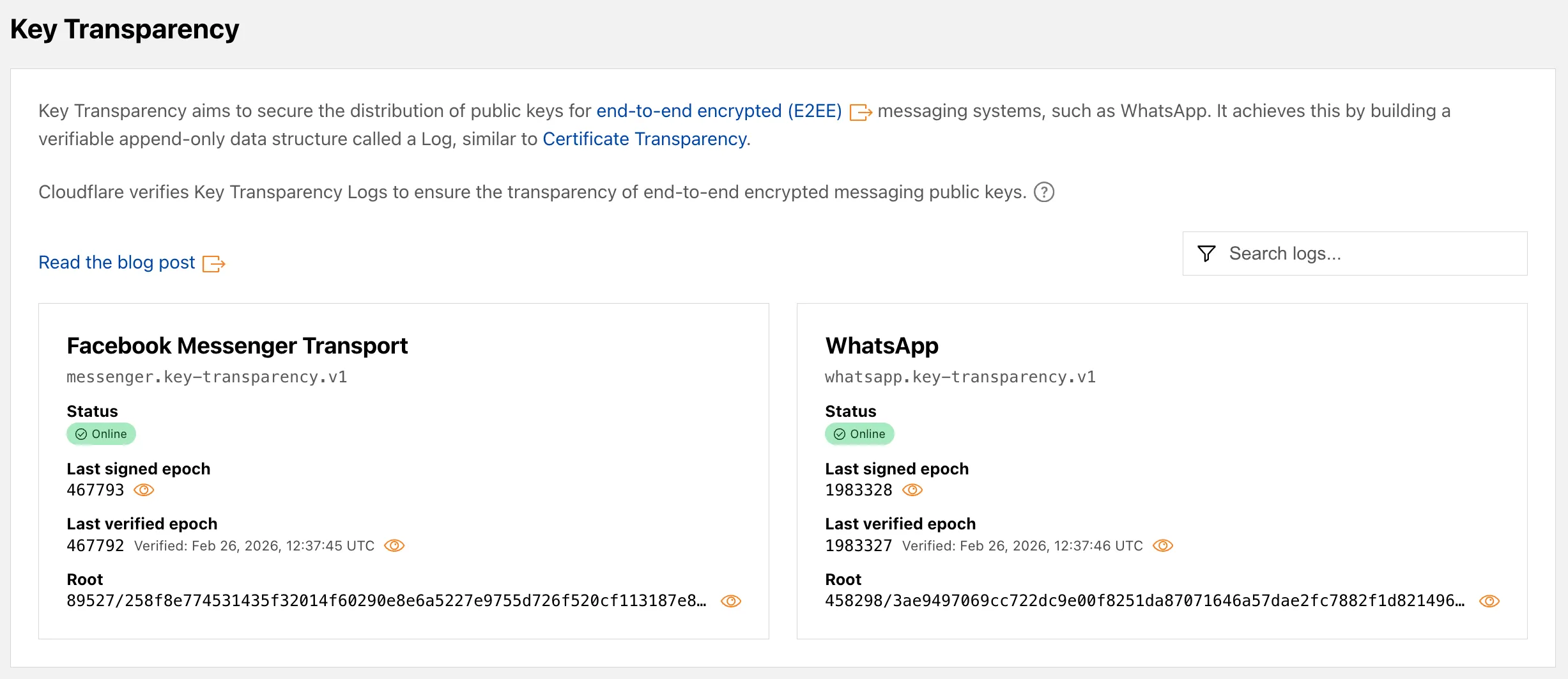
    Screenshot of the Key Transparency dashboard on Radar

    Learn more about these features in our blog post and check out the Post-Quantum Encryption and Key Transparency pages to explore the data.
  • Cache – Asynchronous stale-while-revalidate

    Cloudflare’s stale-while-revalidate support is now fully asynchronous. Revalidation begins at expiry rather than waiting for the next visitor request. Stale content is served immediately while Cloudflare refreshes the asset in the background, and no visitor has to wait for an origin round-trip.

    stale-while-revalidate is a Cache-Control directive that allows Cloudflare to serve an expired cached asset while a fresh copy is fetched from the origin.

    Asynchronous revalidation brings:

    • Lower latency: The first visitor is no longer blocked while the asset is updated from the origin, providing a faster experience.
    • Fresher content: Assets are revalidated sooner, and visitors are more likely to receive up-to-date content.

    Note that your origin may see an increase in traffic due to revalidation on expiry. In addition, all revalidation cache statuses are now UPDATING or HIT instead of MISS or REVALIDATED.

    Availability

    This change is live for all Free, Pro, and Business zones. Approximately 75% of Enterprise zones have been migrated, with the remaining zones rolling out throughout the quarter.

    Get started

    To use this feature, make sure your origin includes the stale-while-revalidate directive in the Cache-Control header. Refer to the Cache-Control documentation for details.

  • Radar – RPKI ASPA Deployment Insights on Cloudflare Radar

    Radar now includes Autonomous System Provider Authorization (ASPA) deployment insights, providing visibility into the adoption and verification of ASPA objects across the global routing ecosystem.

    New API endpoints

    The new ASPA API provides the following endpoints:

    New Radar widgets

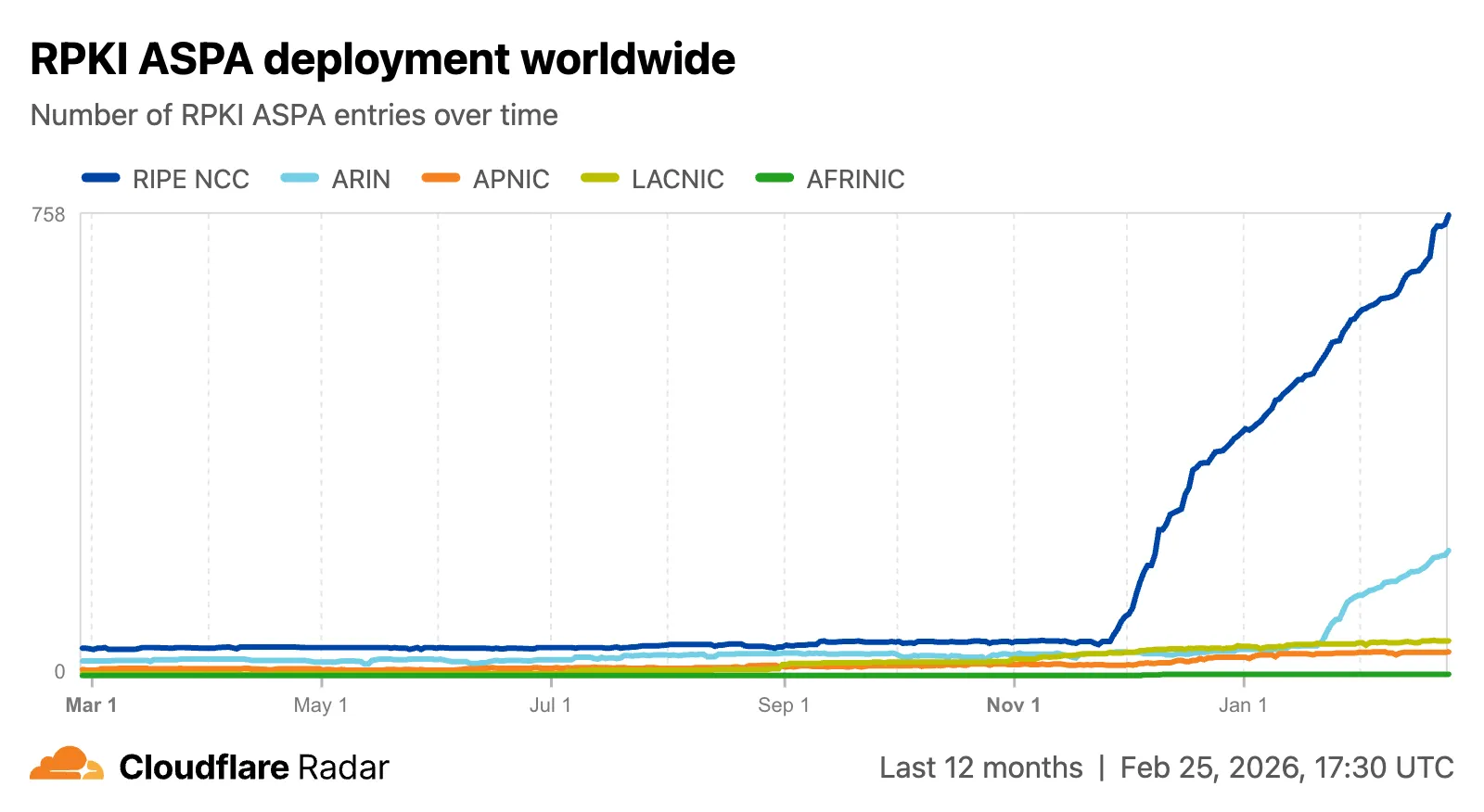
    The global routing page now shows the ASPA deployment trend over time by counting daily ASPA objects.

    Screenshot of the ASPA deployment trend chart

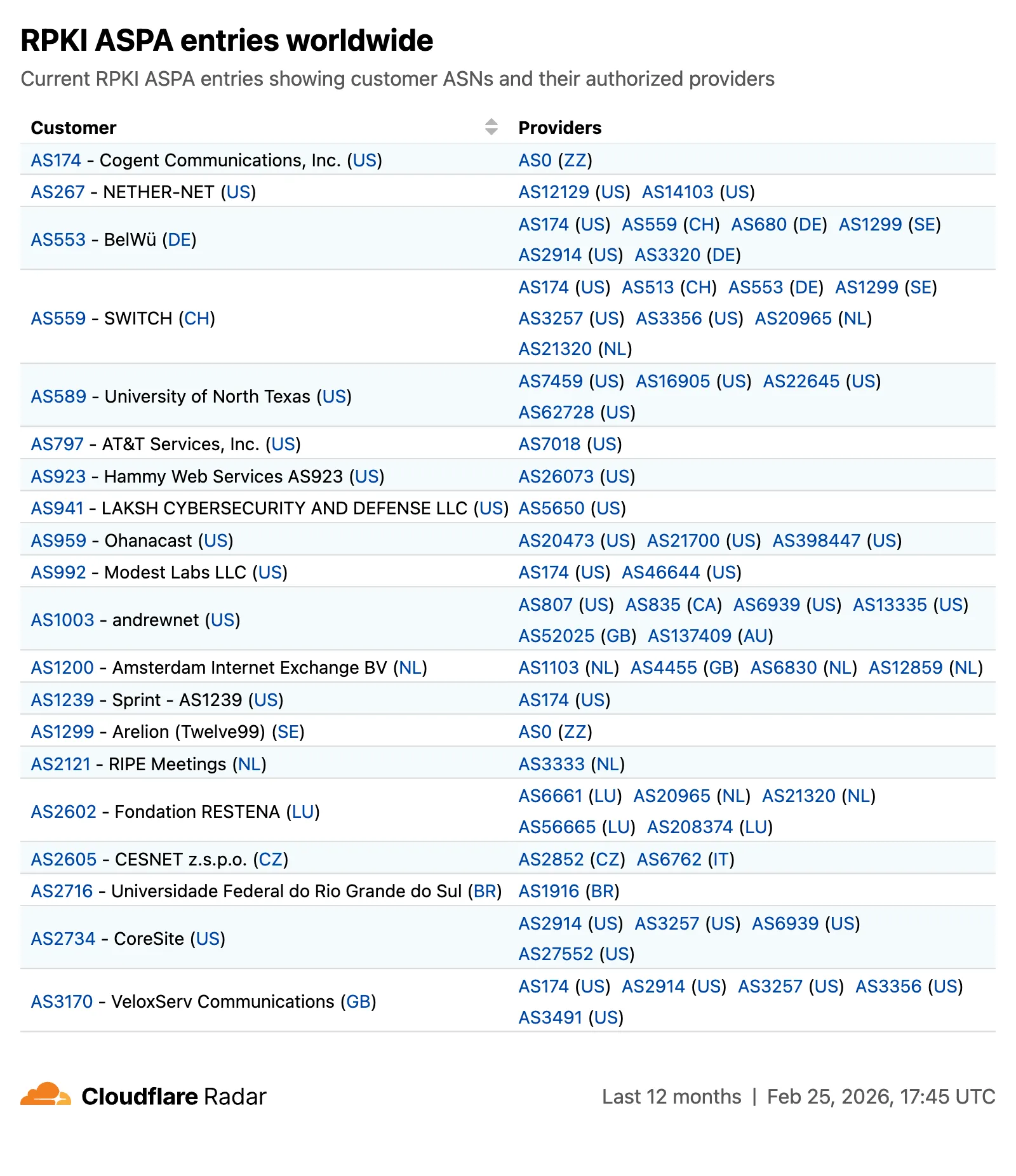
    The global routing page also displays the most recent ASPA objects, searchable by ASN or AS name.

    Screenshot of the ASPA objects table

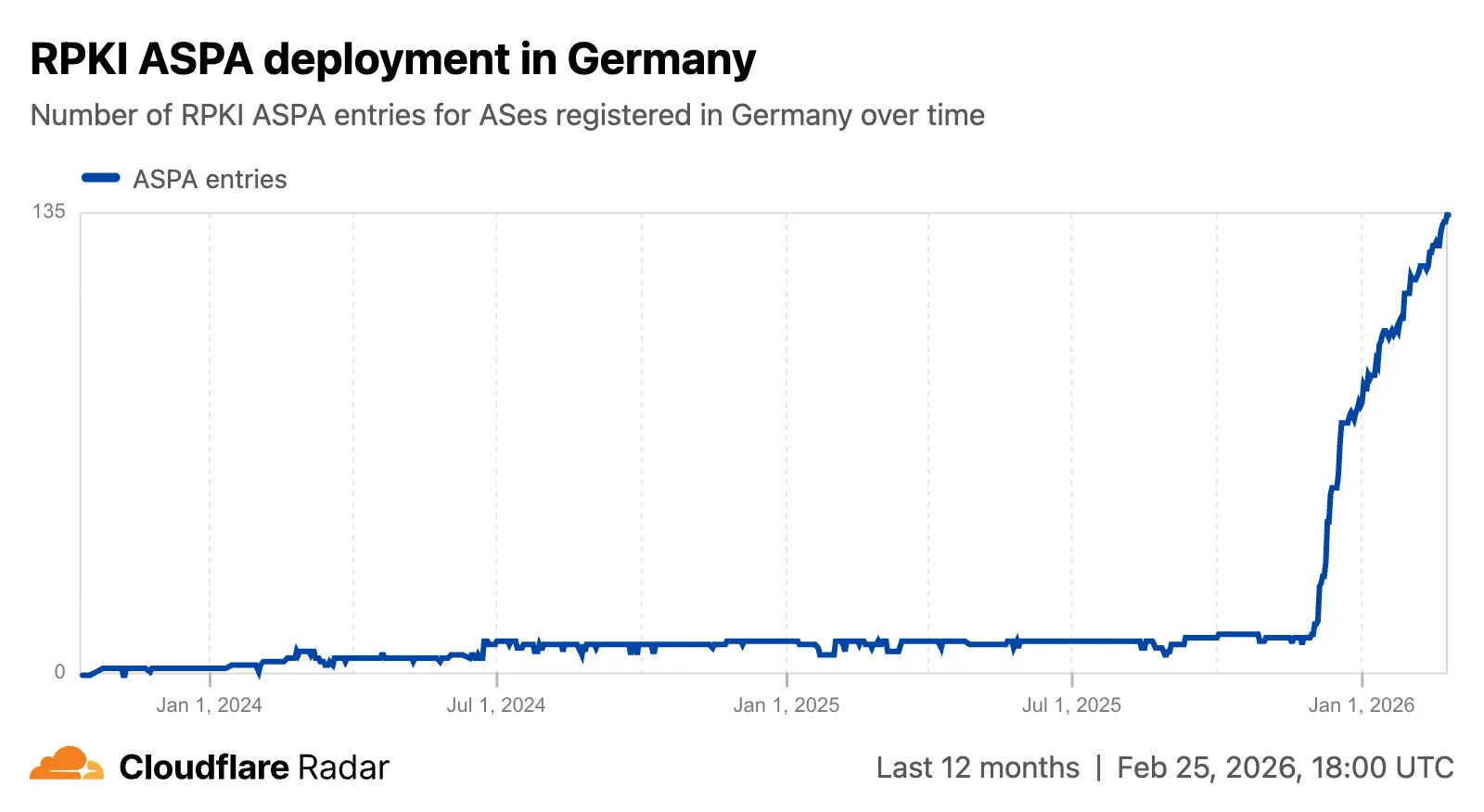
    On country and region routing pages, a new widget shows the ASPA deployment rate for ASNs registered in the selected country or region.

    Screenshot of the ASPA deployment trent chart for Germany

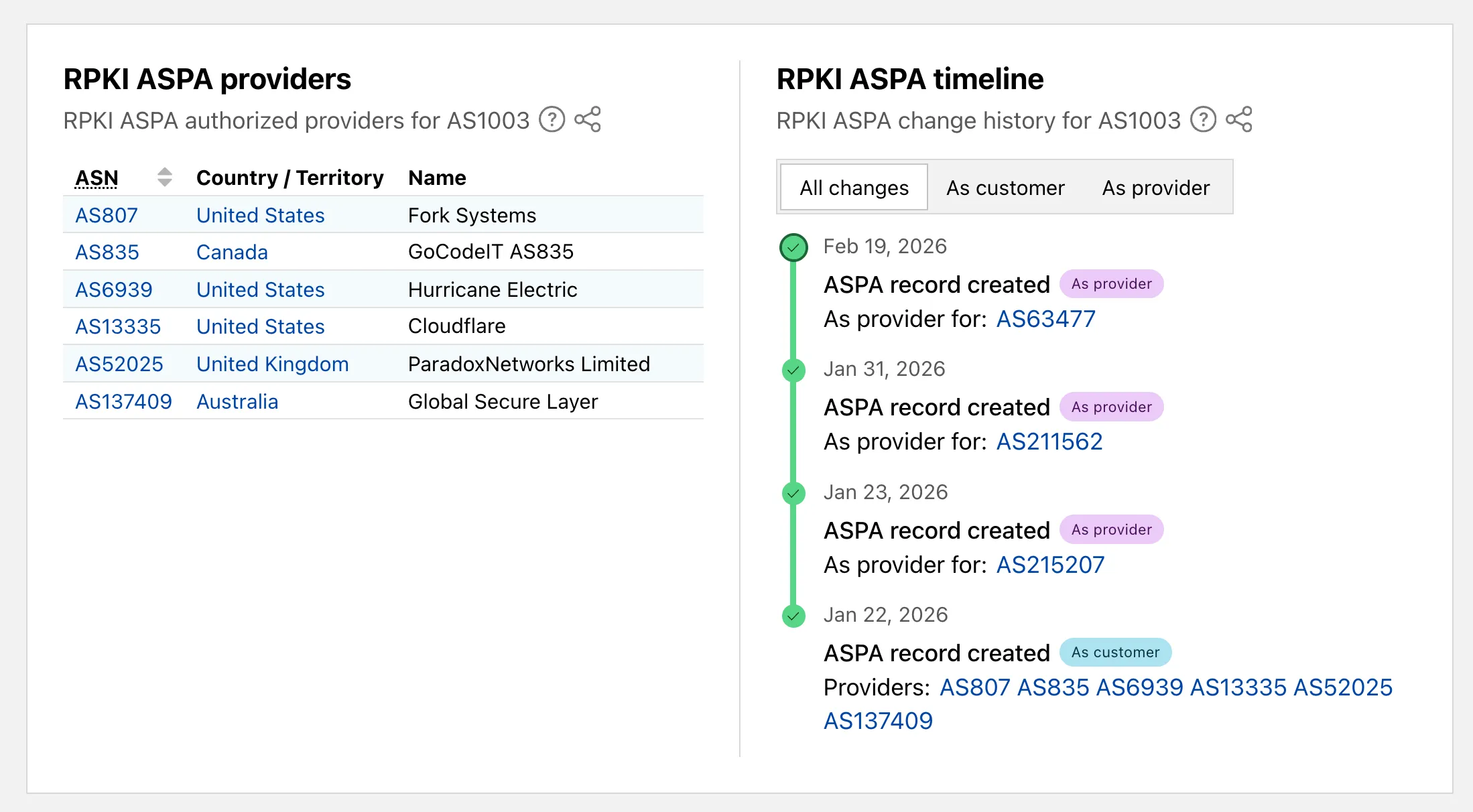
    On AS routing pages, the connectivity table now includes checkmarks for ASPA-verified upstreams. All ASPA upstreams are listed in a dedicated table, and a timeline shows ASPA changes at daily granularity.

    Screenshot of the ASPA changes timeline on an AS routing page

    Check out the Radar routing page to explore the data.

  • Workers – Better Windows support for Python Workers

    Pywrangler, the CLI tool for managing Python Workers and packages,
    now supports Windows, allowing you to develop and deploy Python Workers from Windows environments.
    Previously, Pywrangler was only available on macOS and Linux.

    You can install and use Pywrangler on Windows the same way you would on other platforms.
    Specify your Worker’s Python dependencies in your pyproject.toml file,
    then use the following commands to develop and deploy:

    uvx --from workers-py pywrangler dev
    uvx --from workers-py pywrangler deploy

    All existing Pywrangler functionality, including package management, local development, and deployment, works on Windows without any additional configuration.

    Requirements

    This feature requires the following minimum versions:

    • wrangler >= 4.64.0
    • workers-py >= 1.72.0
    • uv >= 0.29.8

    To upgrade workers-py (which includes Pywrangler) in your project, run:

    uv tool upgrade workers-py

    To upgrade wrangler, run:

    npm install -g wrangler@latest

    To upgrade uv, run:

    uv self update

    To get started with Python Workers on Windows, refer to the Python packages documentation for full details on Pywrangler.

  • WAF – WAF Release – Scheduled changes for 2026-03-02

    Announcement Date Release Date Release Behavior Legacy Rule ID Rule ID Description Comments
    2026-02-25 2026-03-02 Log N/A 0f282f3c89614779966faf52966ec6b1 SmarterMail – Arbitrary File Upload – CVE-2025-52691 This is a new detection.
    2026-02-25 2026-03-02 Log N/A 35978af68e374a059e397bf5ee964a8c SmarterMail – Authentication Bypass – CVE-2026-23760 This is a new detection.
    2026-02-25 2026-03-02 Log N/A 4bb099bcd71141d4a35c1aa675b64d99 Command Injection – Nslookup – Beta This rule will be merged into the original rule “Command Injection – Nslookup” (ID: f4a310393c564d50bd585601b090ba9a )
  • Containers – Run 15x more Containers with higher resource limits

    You can now run more Containers concurrently with significantly higher limits on memory, vCPU, and disk.

    Limit Previous Limit New Limit
    Memory for concurrent live Container instances 400GiB 6TiB
    vCPU for concurrent live Container instances 100 1,500
    Disk for concurrent live Container instances 2TB 30TB

    This 15x increase enables larger-scale workloads on Containers. You can now run 15,000 instances of the lite instance type, 6,000 instances of basic, over 1,500 instances of standard-1, or over 1,000 instances of standard-2 concurrently.

    Refer to Limits for more details on the available instance types and limits.

  • Agents, Workers – Agents SDK v0.6.0: RPC transport for MCP, optional OAuth, hardened schema conversion, and @cloudflare/ai-chat fixes

    The latest release of the Agents SDK lets you define an Agent and an McpAgent in the same Worker and connect them over RPC — no HTTP, no network overhead. It also makes OAuth opt-in for simple MCP connections, hardens the schema converter for production workloads, and ships a batch of @cloudflare/ai-chat reliability fixes.

    RPC transport for MCP

    You can now connect an Agent to an McpAgent in the same Worker using a Durable Object binding instead of an HTTP URL. The connection stays entirely within the Cloudflare runtime — no network round-trips, no serialization overhead.

    Pass the Durable Object namespace directly to addMcpServer:

    • JavaScript

      import { Agent } from "agents";
      export class MyAgent extends Agent {
      async onStart() {
      // Connect via DO binding — no HTTP, no network overhead
      await this.addMcpServer("counter", env.MY_MCP);
      // With props for per-user context
      await this.addMcpServer("counter", env.MY_MCP, {
      props: { userId: "user-123", role: "admin" },
      });
      }
      }
    • TypeScript

      import { Agent } from "agents";
      export class MyAgent extends Agent {
      async onStart() {
      // Connect via DO binding — no HTTP, no network overhead
      await this.addMcpServer("counter", env.MY_MCP);
      // With props for per-user context
      await this.addMcpServer("counter", env.MY_MCP, {
      props: { userId: "user-123", role: "admin" },
      });
      }
      }

    The addMcpServer method now accepts string | DurableObjectNamespace as the second parameter with full TypeScript overloads, so HTTP and RPC paths are type-safe and cannot be mixed.

    Key capabilities:

    • Hibernation support — RPC connections survive Durable Object hibernation automatically. The binding name and props are persisted to storage and restored on wake-up, matching the behavior of HTTP MCP connections.
    • Deduplication — Calling addMcpServer with the same server name returns the existing connection instead of creating duplicates. Connection IDs are stable across hibernation restore.
    • Smaller surface area — The RPC transport internals have been rewritten and reduced from 609 lines to 245 lines. RPCServerTransport now uses JSONRPCMessageSchema from the MCP SDK for validation instead of hand-written checks.

    Optional OAuth for MCP connections

    addMcpServer() no longer eagerly creates an OAuth provider for every connection. For servers that do not require authentication, a simple call is all you need:

    • JavaScript

      // No callbackHost, no OAuth config — just works
      await this.addMcpServer("my-server", "https://mcp.example.com");
    • TypeScript

      // No callbackHost, no OAuth config — just works
      await this.addMcpServer("my-server", "https://mcp.example.com");

    If the server responds with a 401, the SDK throws a clear error: "This MCP server requires OAuth authentication. Provide callbackHost in addMcpServer options to enable the OAuth flow." The restore-from-storage flow also handles missing callback URLs gracefully, skipping auth provider creation for non-OAuth servers.

    Hardened JSON Schema to TypeScript converter

    The schema converter used by generateTypes() and getAITools() now handles edge cases that previously caused crashes in production:

    • Depth and circular reference guards — Prevents stack overflows on recursive or deeply nested schemas
    • $ref resolution — Supports internal JSON Pointers (#/definitions/..., #/$defs/..., #)
    • Tuple supportprefixItems (JSON Schema 2020-12) and array items (draft-07)
    • OpenAPI 3.0 nullable: true — Supported across all schema branches
    • Per-tool error isolation — One malformed schema cannot crash the full pipeline in generateTypes() or getAITools()
    • Missing inputSchema fallbackgetAITools() falls back to { type: "object" } instead of throwing

    @cloudflare/ai-chat fixes

    • Tool denial flow — Denied tool approvals (approved: false) now transition to output-denied with a tool_result, fixing Anthropic provider compatibility. Custom denial messages are supported via state: "output-error" and errorText.
    • Abort/cancel support — Streaming responses now properly cancel the reader loop when the abort signal fires and send a done signal to the client.
    • Duplicate message persistencepersistMessages() now reconciles assistant messages by content and order, preventing duplicate rows when clients resend full history.
    • requestId in OnChatMessageOptions — Handlers can now send properly-tagged error responses for pre-stream failures.
    • redacted_thinking preservation — The message sanitizer no longer strips Anthropic redacted_thinking blocks.
    • /get-messages reliability — Endpoint handling moved from a prototype onRequest() override to a constructor wrapper, so it works even when users override onRequest without calling super.onRequest().
    • Client tool APIs undeprecatedcreateToolsFromClientSchemas, clientTools, AITool, extractClientToolSchemas, and the tools option on useAgentChat are restored for SDK use cases where tools are defined dynamically at runtime.
    • jsonSchema initialization — Fixed jsonSchema not initialized error when calling getAITools() in onChatMessage.

    Upgrade

    To update to the latest version:

    npm i agents@latest @cloudflare/ai-chat@latest
  • Zero Trust WARP Client – WARP client for Windows (version 2026.1.150.0)

    A new GA release for the Windows WARP client is now available on the stable releases downloads page.

    This release contains minor fixes, improvements, and new features.

    Changes and improvements

    • Improvements to multi-user mode. Fixed an issue where when switching from a pre-login registration to a user registration, Mobile Device Management (MDM) configuration association could be lost.
    • Added a new feature to manage NetBIOS over TCP/IP functionality on the Windows client. NetBIOS over TCP/IP on the Windows client is now disabled by default and can be enabled in device profile settings.
    • Fixed an issue causing failure of the local network exclusion feature when configured with a timeout of 0.
    • Improvement for the Windows client certificate posture check to ensure logged results are from checks that run once users log in.
    • Improvement for more accurate reporting of device colocation information in the Cloudflare One dashboard.
    • Fixed an issue where misconfigured DEX HTTP tests prevented new registrations.
    • Fixed an issue causing DNS requests to fail with clients in Traffic and DNS mode.
    • Improved service shutdown behavior in cases where the daemon is unresponsive.

    Known issues

    • For Windows 11 24H2 users, Microsoft has confirmed a regression that may lead to performance issues like mouse lag, audio cracking, or other slowdowns. Cloudflare recommends users experiencing these issues upgrade to a minimum Windows 11 24H2 KB5062553 or higher for resolution.

    • Devices with KB5055523 installed may receive a warning about Win32/ClickFix.ABA being present in the installer. To resolve this false positive, update Microsoft Security Intelligence to version 1.429.19.0 or later.

    • DNS resolution may be broken when the following conditions are all true:

      • WARP is in Secure Web Gateway without DNS filtering (tunnel-only) mode.
      • A custom DNS server address is configured on the primary network adapter.
      • The custom DNS server address on the primary network adapter is changed while WARP is connected.

      To work around this issue, reconnect the WARP client by toggling off and back on.

  • Pipelines, Workers – Dropped event metrics, typed Pipelines bindings, and improved setup

    Cloudflare Pipelines ingests streaming data via Workers or HTTP endpoints, transforms it with SQL, and writes it to R2 as Apache Iceberg tables. Today we’re shipping three improvements to help you understand why streaming events get dropped, catch data quality issues early, and set up Pipelines faster.

    Dropped event metrics

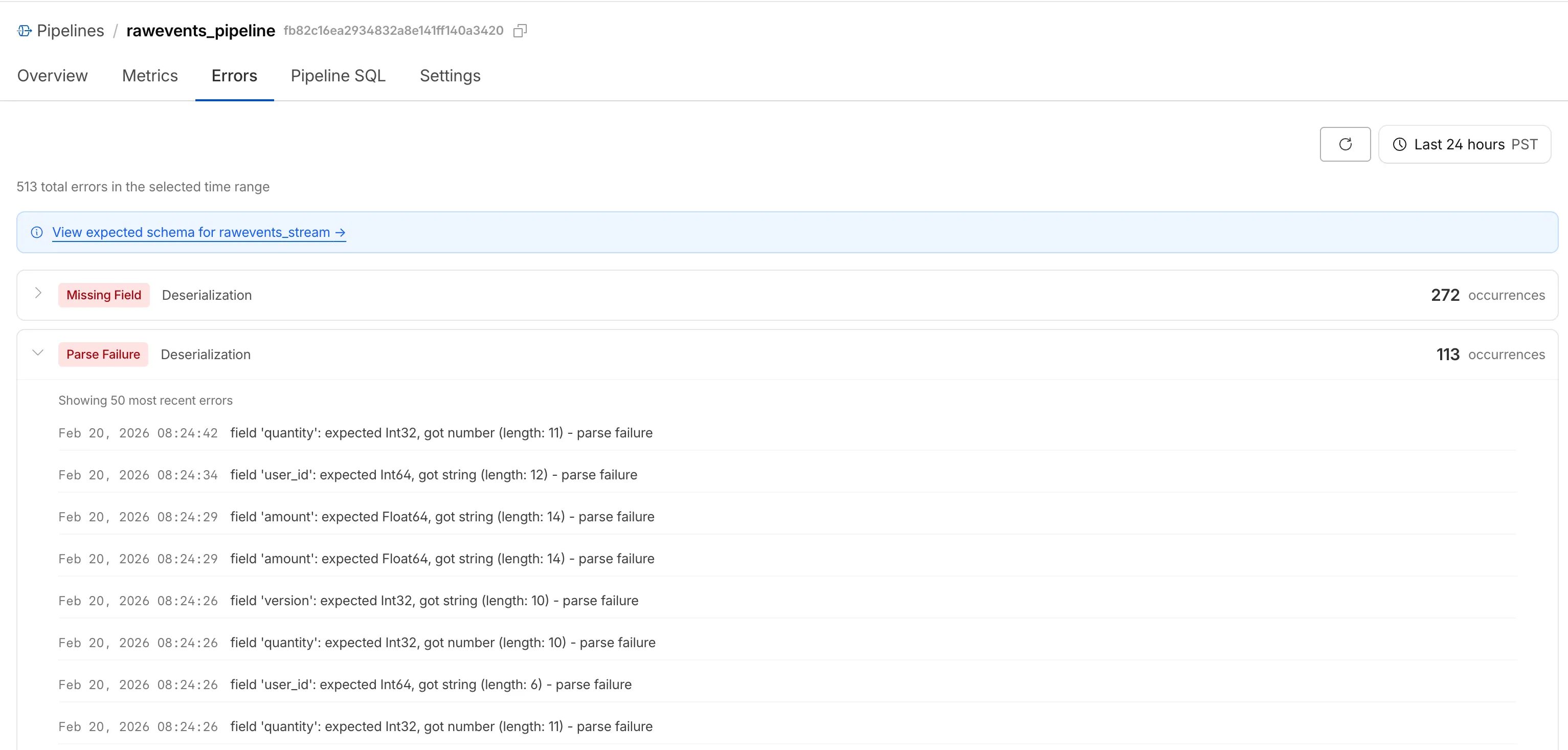
    When stream events don’t match the expected schema, Pipelines accepts them during ingestion but drops them when attempting to deliver them to the sink. To help you identify the root cause of these issues, we are introducing a new dashboard and metrics that surface dropped events with detailed error messages.

    The Errors tab in the Cloudflare dashboard showing deserialization errors grouped by type with individual error details

    Dropped events can also be queried programmatically via the new pipelinesUserErrorsAdaptiveGroups GraphQL dataset. The dataset breaks down failures by specific error type (missing_field, type_mismatch, parse_failure, or null_value) so you can trace issues back to the source.

    query GetPipelineUserErrors(
    $accountTag: String!
    $pipelineId: String!
    $datetimeStart: Time!
    $datetimeEnd: Time!
    ) {
    viewer {
    accounts(filter: { accountTag: $accountTag }) {
    pipelinesUserErrorsAdaptiveGroups(
    limit: 100
    filter: {
    pipelineId: $pipelineId
    datetime_geq: $datetimeStart
    datetime_leq: $datetimeEnd
    }
    orderBy: [count_DESC]
    ) {
    count
    dimensions {
    errorFamily
    errorType
    }
    }
    }
    }
    }

    For the full list of dimensions, error types, and additional query examples, refer to User error metrics.

    Typed Pipelines bindings

    Sending data to a Pipeline from a Worker previously used a generic Pipeline<PipelineRecord> type, which meant schema mismatches (wrong field names, incorrect types) were only caught at runtime as dropped events.

    Running wrangler types now generates schema-specific TypeScript types for your Pipeline bindings. TypeScript catches missing required fields and incorrect field types at compile time, before your code is deployed.

    declare namespace Cloudflare {
    type EcommerceStreamRecord = {
    user_id: string;
    event_type: string;
    product_id?: string;
    amount?: number;
    };
    interface Env {
    STREAM: import("cloudflare:pipelines").Pipeline<Cloudflare.EcommerceStreamRecord>;
    }
    }

    For more information, refer to Typed Pipeline bindings.

    Improved Pipelines setup

    Setting up a new Pipeline previously required multiple manual steps: creating an R2 bucket, enabling R2 Data Catalog, generating an API token, and configuring format, compression, and rolling policies individually.

    The wrangler pipelines setup command now offers a Simple setup mode that applies recommended defaults and automatically creates the R2 bucket and enables R2 Data Catalog if they do not already exist. Validation errors during setup prompt you to retry inline rather than restarting the entire process.

    For a full walkthrough, refer to the Getting started guide.

  • Durable Objects, Workers – deleteAll() now deletes Durable Object alarm

    deleteAll() now deletes a Durable Object alarm in addition to stored data for Workers with a compatibility date of 2026-02-24 or later. This change simplifies clearing a Durable Object’s storage with a single API call.

    Previously, deleteAll() only deleted user-stored data for an object. Alarm usage stores metadata in an object’s storage, which required a separate deleteAlarm() call to fully clean up all storage for an object. The deleteAll() change applies to both KV-backed and SQLite-backed Durable Objects.

    // Before: two API calls required to clear all storage
    await this.ctx.storage.deleteAlarm();
    await this.ctx.storage.deleteAll();
    // Now: a single call clears both data and the alarm
    await this.ctx.storage.deleteAll();

    For more information, refer to the Storage API documentation.