Blog

  • Workers AI – Launching FLUX.2 [dev] on Workers AI

    We’ve partnered with Black Forest Labs (BFL) to bring their latest FLUX.2 [dev] model to Workers AI! This model excels in generating high-fidelity images with physical world grounding, multi-language support, and digital asset creation. You can also create specific super images with granular controls like JSON prompting.

    Read the BFL blog to learn more about the model itself. Read our Cloudflare blog to see the model in action, or try it out yourself on our multi modal playground.

    Pricing documentation is available on the model page or pricing page. Note, we expect to drop pricing in the next few days after iterating on the model performance.

    Workers AI Platform specifics

    The model hosted on Workers AI is able to support up to 4 image inputs (512×512 per input image). Note, this image model is one of the most powerful in the catalog and is expected to be slower than the other image models we currently support. One catch to look out for is that this model takes multipart form data inputs, even if you just have a prompt.

    With the REST API, the multipart form data input looks like this:

    curl --request POST
    --url 'https://api.cloudflare.com/client/v4/accounts/{ACCOUNT}/ai/run/@cf/black-forest-labs/flux-2-dev'
    --header 'Authorization: Bearer {TOKEN}'
    --header 'Content-Type: multipart/form-data'
    --form 'prompt=a sunset at the alps'
    --form steps=25
    --form width=1024
    --form height=1024

    With the Workers AI binding, you can use it as such:

    const form = new FormData();
    form.append('prompt', 'a sunset with a dog');
    form.append('width', '1024');
    form.append('height', '1024');
    //this dummy request is temporary hack
    //we're pushing a change to address this soon
    const formRequest = new Request('http://dummy', {
    method: 'POST',
    body: form
    });
    const formStream = formRequest.body;
    const formContentType = formRequest.headers.get('content-type') || 'multipart/form-data';
    const resp = await env.AI.run("@cf/black-forest-labs/flux-2-dev", {
    multipart: {
    body: formStream,
    contentType: formContentType
    }
    });

    The parameters you can send to the model are detailed here:

    JSON Schema for Model

    Required Parameters

    • prompt (string) – Text description of the image to generate

    Optional Parameters

    • input_image_0 (string) – Binary image
    • input_image_1 (string) – Binary image
    • input_image_2 (string) – Binary image
    • input_image_3 (string) – Binary image
    • steps (integer) – Number of inference steps. Higher values may improve quality but increase generation time
    • guidance (float) – Guidance scale for generation. Higher values follow the prompt more closely
    • width (integer) – Width of the image, default 1024 Range: 256-1920
    • height (integer) – Height of the image, default 768 Range: 256-1920
    • seed (integer) – Seed for reproducibility
    ## Multi-Reference Images
    The FLUX.2 model is great at generating images based on reference images. You can use this feature to apply the style of one image to another, add a new character to an image, or iterate on past generate images. You would use it with the same multipart form data structure, with the input images in binary.
    For the prompt, you can reference the images based on the index, like `take the subject of image 1 and style it like image 0` or even use natural language like `place the dog beside the woman`.
    Note: you have to name the input parameter as `input_image_0`, `input_image_1`, `input_image_2` for it to work correctly. All input images must be smaller than 512x512.
    ```bash
    curl --request POST
    --url 'https://api.cloudflare.com/client/v4/accounts/{ACCOUNT}/ai/run/@cf/black-forest-labs/flux-2-dev'
    --header 'Authorization: Bearer {TOKEN}'
    --header 'Content-Type: multipart/form-data'
    --form 'prompt=take the subject of image 1 and style it like image 0'
    --form input_image_0=@/Users/johndoe/Desktop/icedoutkeanu.png
    --form input_image_1=@/Users/johndoe/Desktop/me.png
    --form steps=25
    --form width=1024
    --form height=1024

    Through Workers AI Binding:

    //helper function to convert ReadableStream to Blob
    async function streamToBlob(stream: ReadableStream, contentType: string): Promise<Blob> {
    const reader = stream.getReader();
    const chunks = [];
    while (true) {
    const { done, value } = await reader.read();
    if (done) break;
    chunks.push(value);
    }
    return new Blob(chunks, { type: contentType });
    }
    const image0 = await fetch("http://image-url");
    const image1 = await fetch("http://image-url");
    const form = new FormData();
    const image_blob0 = await streamToBlob(image0.body, "image/png");
    const image_blob1 = await streamToBlob(image1.body, "image/png");
    form.append('input_image_0', image_blob0)
    form.append('input_image_1', image_blob1)
    form.append('prompt', 'take the subject of image 1and style it like image 0')
    //this dummy request is temporary hack
    //we're pushing a change to address this soon
    const formRequest = new Request('http://dummy', {
    method: 'POST',
    body: form
    });
    const formStream = formRequest.body;
    const formContentType = formRequest.headers.get('content-type') || 'multipart/form-data';
    const resp = await env.AI.run("@cf/black-forest-labs/flux-2-dev", {
    multipart: {
    body: form,
    contentType: "multipart/form-data"
    }
    })

    JSON Prompting

    The model supports prompting in JSON to get more granular control over images. You would pass the JSON as the value of the ‘prompt’ field in the multipart form data. See the JSON schema below on the base parameters you can pass to the model.

    JSON Prompting Schema
    {
    "type": "object",
    "properties": {
    "scene": {
    "type": "string",
    "description": "Overall scene setting or location"
    },
    "subjects": {
    "type": "array",
    "items": {
    "type": "object",
    "properties": {
    "type": {
    "type": "string",
    "description": "Type of subject (e.g., desert nomad, blacksmith, DJ, falcon)"
    },
    "description": {
    "type": "string",
    "description": "Physical attributes, clothing, accessories"
    },
    "pose": {
    "type": "string",
    "description": "Action or stance"
    },
    "position": {
    "type": "string",
    "enum": ["foreground", "midground", "background"],
    "description": "Depth placement in scene"
    }
    },
    "required": ["type", "description", "pose", "position"]
    }
    },
    "style": {
    "type": "string",
    "description": "Artistic rendering style (e.g., digital painting, photorealistic, pixel art, noir sci-fi, lifestyle photo, wabi-sabi photo)"
    },
    "color_palette": {
    "type": "array",
    "items": { "type": "string" },
    "minItems": 3,
    "maxItems": 3,
    "description": "Exactly 3 main colors for the scene (e.g., ['navy', 'neon yellow', 'magenta'])"
    },
    "lighting": {
    "type": "string",
    "description": "Lighting condition and direction (e.g., fog-filtered sun, moonlight with star glints, dappled sunlight)"
    },
    "mood": {
    "type": "string",
    "description": "Emotional atmosphere (e.g., harsh and determined, playful and modern, peaceful and dreamy)"
    },
    "background": {
    "type": "string",
    "description": "Background environment details"
    },
    "composition": {
    "type": "string",
    "enum": [
    "rule of thirds",
    "circular arrangement",
    "framed by foreground",
    "minimalist negative space",
    "S-curve",
    "vanishing point center",
    "dynamic off-center",
    "leading leads",
    "golden spiral",
    "diagonal energy",
    "strong verticals",
    "triangular arrangement"
    ],
    "description": "Compositional technique"
    },
    "camera": {
    "type": "object",
    "properties": {
    "angle": {
    "type": "string",
    "enum": ["eye level", "low angle", "slightly low", "bird's-eye", "worm's-eye", "over-the-shoulder", "isometric"],
    "description": "Camera perspective"
    },
    "distance": {
    "type": "string",
    "enum": ["close-up", "medium close-up", "medium shot", "medium wide", "wide shot", "extreme wide"],
    "description": "Framing distance"
    },
    "focus": {
    "type": "string",
    "enum": ["deep focus", "macro focus", "selective focus", "sharp on subject", "soft background"],
    "description": "Focus type"
    },
    "lens": {
    "type": "string",
    "enum": ["14mm", "24mm", "35mm", "50mm", "70mm", "85mm"],
    "description": "Focal length (wide to telephoto)"
    },
    "f-number": {
    "type": "string",
    "description": "Aperture (e.g., f/2.8, the smaller the number the more blurry the background)"
    },
    "ISO": {
    "type": "number",
    "description": "Light sensitivity value (comfortable range between 100 & 6400, lower = less sensitivity)"
    }
    }
    },
    "effects": {
    "type": "array",
    "items": { "type": "string" },
    "description": "Post-processing effects (e.g., 'lens flare small', 'subtle film grain', 'soft bloom', 'god rays', 'chromatic aberration mild')"
    }
    },
    "required": ["scene", "subjects"]
    }

    Other features to try

    • The model also supports the most common latin and non-latin character languages
    • You can prompt the model with specific hex codes like #2ECC71
    • Try creating digital assets like landing pages, comic strips, infographics too!
  • Workers AI – Launching FLUX.2 [dev] on Workers AI

    We’ve partnered with Black Forest Labs (BFL) to bring their latest FLUX.2 [dev] model to Workers AI! This model excels in generating high-fidelity images with physical world grounding, multi-language support, and digital asset creation. You can also create specific super images with granular controls like JSON prompting.

    Read the BFL blog to learn more about the model itself. Read our Cloudflare blog to see the model in action, or try it out yourself on our multi modal playground.

    Pricing documentation is available on the model page or pricing page. Note, we expect to drop pricing in the next few days after iterating on the model performance.

    Workers AI Platform specifics

    The model hosted on Workers AI is able to support up to 4 image inputs (512×512 per input image). Note, this image model is one of the most powerful in the catalog and is expected to be slower than the other image models we currently support. One catch to look out for is that this model takes multipart form data inputs, even if you just have a prompt.

    With the REST API, the multipart form data input looks like this:

    curl --request POST
    --url 'https://api.cloudflare.com/client/v4/accounts/{ACCOUNT}/ai/run/@cf/black-forest-labs/flux-2-dev'
    --header 'Authorization: Bearer {TOKEN}'
    --header 'Content-Type: multipart/form-data'
    --form 'prompt=a sunset at the alps'
    --form steps=25
    --form width=1024
    --form height=1024

    With the Workers AI binding, you can use it as such:

    const form = new FormData();
    form.append('prompt', 'a sunset with a dog');
    form.append('width', '1024');
    form.append('height', '1024');
    //this dummy request is temporary hack
    //we're pushing a change to address this soon
    const formRequest = new Request('http://dummy', {
    method: 'POST',
    body: form
    });
    const formStream = formRequest.body;
    const formContentType = formRequest.headers.get('content-type') || 'multipart/form-data';
    const resp = await env.AI.run("@cf/black-forest-labs/flux-2-dev", {
    multipart: {
    body: formStream,
    contentType: formContentType
    }
    });

    The parameters you can send to the model are detailed here:

    JSON Schema for Model

    Required Parameters

    • prompt (string) – Text description of the image to generate

    Optional Parameters

    • input_image_0 (string) – Binary image
    • input_image_1 (string) – Binary image
    • input_image_2 (string) – Binary image
    • input_image_3 (string) – Binary image
    • steps (integer) – Number of inference steps. Higher values may improve quality but increase generation time
    • guidance (float) – Guidance scale for generation. Higher values follow the prompt more closely
    • width (integer) – Width of the image, default 1024 Range: 256-1920
    • height (integer) – Height of the image, default 768 Range: 256-1920
    • seed (integer) – Seed for reproducibility
    ## Multi-Reference Images
    The FLUX.2 model is great at generating images based on reference images. You can use this feature to apply the style of one image to another, add a new character to an image, or iterate on past generate images. You would use it with the same multipart form data structure, with the input images in binary.
    For the prompt, you can reference the images based on the index, like `take the subject of image 1 and style it like image 0` or even use natural language like `place the dog beside the woman`.
    Note: you have to name the input parameter as `input_image_0`, `input_image_1`, `input_image_2` for it to work correctly. All input images must be smaller than 512x512.
    ```bash
    curl --request POST
    --url 'https://api.cloudflare.com/client/v4/accounts/{ACCOUNT}/ai/run/@cf/black-forest-labs/flux-2-dev'
    --header 'Authorization: Bearer {TOKEN}'
    --header 'Content-Type: multipart/form-data'
    --form 'prompt=take the subject of image 1 and style it like image 0'
    --form input_image_0=@/Users/johndoe/Desktop/icedoutkeanu.png
    --form input_image_1=@/Users/johndoe/Desktop/me.png
    --form steps=25
    --form width=1024
    --form height=1024

    Through Workers AI Binding:

    //helper function to convert ReadableStream to Blob
    async function streamToBlob(stream: ReadableStream, contentType: string): Promise<Blob> {
    const reader = stream.getReader();
    const chunks = [];
    while (true) {
    const { done, value } = await reader.read();
    if (done) break;
    chunks.push(value);
    }
    return new Blob(chunks, { type: contentType });
    }
    const image0 = await fetch("http://image-url");
    const image1 = await fetch("http://image-url");
    const form = new FormData();
    const image_blob0 = await streamToBlob(image0.body, "image/png");
    const image_blob1 = await streamToBlob(image1.body, "image/png");
    form.append('input_image_0', image_blob0)
    form.append('input_image_1', image_blob1)
    form.append('prompt', 'take the subject of image 1and style it like image 0')
    //this dummy request is temporary hack
    //we're pushing a change to address this soon
    const formRequest = new Request('http://dummy', {
    method: 'POST',
    body: form
    });
    const formStream = formRequest.body;
    const formContentType = formRequest.headers.get('content-type') || 'multipart/form-data';
    const resp = await env.AI.run("@cf/black-forest-labs/flux-2-dev", {
    multipart: {
    body: form,
    contentType: "multipart/form-data"
    }
    })

    JSON Prompting

    The model supports prompting in JSON to get more granular control over images. You would pass the JSON as the value of the ‘prompt’ field in the multipart form data. See the JSON schema below on the base parameters you can pass to the model.

    JSON Prompting Schema
    {
    "type": "object",
    "properties": {
    "scene": {
    "type": "string",
    "description": "Overall scene setting or location"
    },
    "subjects": {
    "type": "array",
    "items": {
    "type": "object",
    "properties": {
    "type": {
    "type": "string",
    "description": "Type of subject (e.g., desert nomad, blacksmith, DJ, falcon)"
    },
    "description": {
    "type": "string",
    "description": "Physical attributes, clothing, accessories"
    },
    "pose": {
    "type": "string",
    "description": "Action or stance"
    },
    "position": {
    "type": "string",
    "enum": ["foreground", "midground", "background"],
    "description": "Depth placement in scene"
    }
    },
    "required": ["type", "description", "pose", "position"]
    }
    },
    "style": {
    "type": "string",
    "description": "Artistic rendering style (e.g., digital painting, photorealistic, pixel art, noir sci-fi, lifestyle photo, wabi-sabi photo)"
    },
    "color_palette": {
    "type": "array",
    "items": { "type": "string" },
    "minItems": 3,
    "maxItems": 3,
    "description": "Exactly 3 main colors for the scene (e.g., ['navy', 'neon yellow', 'magenta'])"
    },
    "lighting": {
    "type": "string",
    "description": "Lighting condition and direction (e.g., fog-filtered sun, moonlight with star glints, dappled sunlight)"
    },
    "mood": {
    "type": "string",
    "description": "Emotional atmosphere (e.g., harsh and determined, playful and modern, peaceful and dreamy)"
    },
    "background": {
    "type": "string",
    "description": "Background environment details"
    },
    "composition": {
    "type": "string",
    "enum": [
    "rule of thirds",
    "circular arrangement",
    "framed by foreground",
    "minimalist negative space",
    "S-curve",
    "vanishing point center",
    "dynamic off-center",
    "leading leads",
    "golden spiral",
    "diagonal energy",
    "strong verticals",
    "triangular arrangement"
    ],
    "description": "Compositional technique"
    },
    "camera": {
    "type": "object",
    "properties": {
    "angle": {
    "type": "string",
    "enum": ["eye level", "low angle", "slightly low", "bird's-eye", "worm's-eye", "over-the-shoulder", "isometric"],
    "description": "Camera perspective"
    },
    "distance": {
    "type": "string",
    "enum": ["close-up", "medium close-up", "medium shot", "medium wide", "wide shot", "extreme wide"],
    "description": "Framing distance"
    },
    "focus": {
    "type": "string",
    "enum": ["deep focus", "macro focus", "selective focus", "sharp on subject", "soft background"],
    "description": "Focus type"
    },
    "lens": {
    "type": "string",
    "enum": ["14mm", "24mm", "35mm", "50mm", "70mm", "85mm"],
    "description": "Focal length (wide to telephoto)"
    },
    "f-number": {
    "type": "string",
    "description": "Aperture (e.g., f/2.8, the smaller the number the more blurry the background)"
    },
    "ISO": {
    "type": "number",
    "description": "Light sensitivity value (comfortable range between 100 & 6400, lower = less sensitivity)"
    }
    }
    },
    "effects": {
    "type": "array",
    "items": { "type": "string" },
    "description": "Post-processing effects (e.g., 'lens flare small', 'subtle film grain', 'soft bloom', 'god rays', 'chromatic aberration mild')"
    }
    },
    "required": ["scene", "subjects"]
    }

    Other features to try

    • The model also supports the most common latin and non-latin character languages
    • You can prompt the model with specific hex codes like #2ECC71
    • Try creating digital assets like landing pages, comic strips, infographics too!
  • Workers AI – Launching FLUX.2 [dev] on Workers AI

    We’ve partnered with Black Forest Labs (BFL) to bring their latest FLUX.2 [dev] model to Workers AI! This model excels in generating high-fidelity images with physical world grounding, multi-language support, and digital asset creation. You can also create specific super images with granular controls like JSON prompting.

    Read the BFL blog to learn more about the model itself. Read our Cloudflare blog to see the model in action, or try it out yourself on our multi modal playground.

    Pricing documentation is available on the model page or pricing page. Note, we expect to drop pricing in the next few days after iterating on the model performance.

    Workers AI Platform specifics

    The model hosted on Workers AI is able to support up to 4 image inputs (512×512 per input image). Note, this image model is one of the most powerful in the catalog and is expected to be slower than the other image models we currently support. One catch to look out for is that this model takes multipart form data inputs, even if you just have a prompt.

    With the REST API, the multipart form data input looks like this:

    curl --request POST
    --url 'https://api.cloudflare.com/client/v4/accounts/{ACCOUNT}/ai/run/@cf/black-forest-labs/flux-2-dev'
    --header 'Authorization: Bearer {TOKEN}'
    --header 'Content-Type: multipart/form-data'
    --form 'prompt=a sunset at the alps'
    --form steps=25
    --form width=1024
    --form height=1024

    With the Workers AI binding, you can use it as such:

    const form = new FormData();
    form.append('prompt', 'a sunset with a dog');
    form.append('width', '1024');
    form.append('height', '1024');
    //this dummy request is temporary hack
    //we're pushing a change to address this soon
    const formRequest = new Request('http://dummy', {
    method: 'POST',
    body: form
    });
    const formStream = formRequest.body;
    const formContentType = formRequest.headers.get('content-type') || 'multipart/form-data';
    const resp = await env.AI.run("@cf/black-forest-labs/flux-2-dev", {
    multipart: {
    body: formStream,
    contentType: formContentType
    }
    });

    The parameters you can send to the model are detailed here:

    JSON Schema for Model

    Required Parameters

    • prompt (string) – Text description of the image to generate

    Optional Parameters

    • input_image_0 (string) – Binary image
    • input_image_1 (string) – Binary image
    • input_image_2 (string) – Binary image
    • input_image_3 (string) – Binary image
    • steps (integer) – Number of inference steps. Higher values may improve quality but increase generation time
    • guidance (float) – Guidance scale for generation. Higher values follow the prompt more closely
    • width (integer) – Width of the image, default 1024 Range: 256-1920
    • height (integer) – Height of the image, default 768 Range: 256-1920
    • seed (integer) – Seed for reproducibility
    ## Multi-Reference Images
    The FLUX.2 model is great at generating images based on reference images. You can use this feature to apply the style of one image to another, add a new character to an image, or iterate on past generate images. You would use it with the same multipart form data structure, with the input images in binary.
    For the prompt, you can reference the images based on the index, like `take the subject of image 1 and style it like image 0` or even use natural language like `place the dog beside the woman`.
    Note: you have to name the input parameter as `input_image_0`, `input_image_1`, `input_image_2` for it to work correctly. All input images must be smaller than 512x512.
    ```bash
    curl --request POST
    --url 'https://api.cloudflare.com/client/v4/accounts/{ACCOUNT}/ai/run/@cf/black-forest-labs/flux-2-dev'
    --header 'Authorization: Bearer {TOKEN}'
    --header 'Content-Type: multipart/form-data'
    --form 'prompt=take the subject of image 1 and style it like image 0'
    --form input_image_0=@/Users/johndoe/Desktop/icedoutkeanu.png
    --form input_image_1=@/Users/johndoe/Desktop/me.png
    --form steps=25
    --form width=1024
    --form height=1024

    Through Workers AI Binding:

    //helper function to convert ReadableStream to Blob
    async function streamToBlob(stream: ReadableStream, contentType: string): Promise<Blob> {
    const reader = stream.getReader();
    const chunks = [];
    while (true) {
    const { done, value } = await reader.read();
    if (done) break;
    chunks.push(value);
    }
    return new Blob(chunks, { type: contentType });
    }
    const image0 = await fetch("http://image-url");
    const image1 = await fetch("http://image-url");
    const form = new FormData();
    const image_blob0 = await streamToBlob(image0.body, "image/png");
    const image_blob1 = await streamToBlob(image1.body, "image/png");
    form.append('input_image_0', image_blob0)
    form.append('input_image_1', image_blob1)
    form.append('prompt', 'take the subject of image 1and style it like image 0')
    //this dummy request is temporary hack
    //we're pushing a change to address this soon
    const formRequest = new Request('http://dummy', {
    method: 'POST',
    body: form
    });
    const formStream = formRequest.body;
    const formContentType = formRequest.headers.get('content-type') || 'multipart/form-data';
    const resp = await env.AI.run("@cf/black-forest-labs/flux-2-dev", {
    multipart: {
    body: form,
    contentType: "multipart/form-data"
    }
    })

    JSON Prompting

    The model supports prompting in JSON to get more granular control over images. You would pass the JSON as the value of the ‘prompt’ field in the multipart form data. See the JSON schema below on the base parameters you can pass to the model.

    JSON Prompting Schema
    {
    "type": "object",
    "properties": {
    "scene": {
    "type": "string",
    "description": "Overall scene setting or location"
    },
    "subjects": {
    "type": "array",
    "items": {
    "type": "object",
    "properties": {
    "type": {
    "type": "string",
    "description": "Type of subject (e.g., desert nomad, blacksmith, DJ, falcon)"
    },
    "description": {
    "type": "string",
    "description": "Physical attributes, clothing, accessories"
    },
    "pose": {
    "type": "string",
    "description": "Action or stance"
    },
    "position": {
    "type": "string",
    "enum": ["foreground", "midground", "background"],
    "description": "Depth placement in scene"
    }
    },
    "required": ["type", "description", "pose", "position"]
    }
    },
    "style": {
    "type": "string",
    "description": "Artistic rendering style (e.g., digital painting, photorealistic, pixel art, noir sci-fi, lifestyle photo, wabi-sabi photo)"
    },
    "color_palette": {
    "type": "array",
    "items": { "type": "string" },
    "minItems": 3,
    "maxItems": 3,
    "description": "Exactly 3 main colors for the scene (e.g., ['navy', 'neon yellow', 'magenta'])"
    },
    "lighting": {
    "type": "string",
    "description": "Lighting condition and direction (e.g., fog-filtered sun, moonlight with star glints, dappled sunlight)"
    },
    "mood": {
    "type": "string",
    "description": "Emotional atmosphere (e.g., harsh and determined, playful and modern, peaceful and dreamy)"
    },
    "background": {
    "type": "string",
    "description": "Background environment details"
    },
    "composition": {
    "type": "string",
    "enum": [
    "rule of thirds",
    "circular arrangement",
    "framed by foreground",
    "minimalist negative space",
    "S-curve",
    "vanishing point center",
    "dynamic off-center",
    "leading leads",
    "golden spiral",
    "diagonal energy",
    "strong verticals",
    "triangular arrangement"
    ],
    "description": "Compositional technique"
    },
    "camera": {
    "type": "object",
    "properties": {
    "angle": {
    "type": "string",
    "enum": ["eye level", "low angle", "slightly low", "bird's-eye", "worm's-eye", "over-the-shoulder", "isometric"],
    "description": "Camera perspective"
    },
    "distance": {
    "type": "string",
    "enum": ["close-up", "medium close-up", "medium shot", "medium wide", "wide shot", "extreme wide"],
    "description": "Framing distance"
    },
    "focus": {
    "type": "string",
    "enum": ["deep focus", "macro focus", "selective focus", "sharp on subject", "soft background"],
    "description": "Focus type"
    },
    "lens": {
    "type": "string",
    "enum": ["14mm", "24mm", "35mm", "50mm", "70mm", "85mm"],
    "description": "Focal length (wide to telephoto)"
    },
    "f-number": {
    "type": "string",
    "description": "Aperture (e.g., f/2.8, the smaller the number the more blurry the background)"
    },
    "ISO": {
    "type": "number",
    "description": "Light sensitivity value (comfortable range between 100 & 6400, lower = less sensitivity)"
    }
    }
    },
    "effects": {
    "type": "array",
    "items": { "type": "string" },
    "description": "Post-processing effects (e.g., 'lens flare small', 'subtle film grain', 'soft bloom', 'god rays', 'chromatic aberration mild')"
    }
    },
    "required": ["scene", "subjects"]
    }

    Other features to try

    • The model also supports the most common latin and non-latin character languages
    • You can prompt the model with specific hex codes like #2ECC71
    • Try creating digital assets like landing pages, comic strips, infographics too!
  • Workers AI – Launching FLUX.2 [dev] on Workers AI

    We’ve partnered with Black Forest Labs (BFL) to bring their latest FLUX.2 [dev] model to Workers AI! This model excels in generating high-fidelity images with physical world grounding, multi-language support, and digital asset creation. You can also create specific super images with granular controls like JSON prompting.

    Read the BFL blog to learn more about the model itself. Read our Cloudflare blog to see the model in action, or try it out yourself on our multi modal playground.

    Pricing documentation is available on the model page or pricing page. Note, we expect to drop pricing in the next few days after iterating on the model performance.

    Workers AI Platform specifics

    The model hosted on Workers AI is able to support up to 4 image inputs (512×512 per input image). Note, this image model is one of the most powerful in the catalog and is expected to be slower than the other image models we currently support. One catch to look out for is that this model takes multipart form data inputs, even if you just have a prompt.

    With the REST API, the multipart form data input looks like this:

    curl --request POST
    --url 'https://api.cloudflare.com/client/v4/accounts/{ACCOUNT}/ai/run/@cf/black-forest-labs/flux-2-dev'
    --header 'Authorization: Bearer {TOKEN}'
    --header 'Content-Type: multipart/form-data'
    --form 'prompt=a sunset at the alps'
    --form steps=25
    --form width=1024
    --form height=1024

    With the Workers AI binding, you can use it as such:

    const form = new FormData();
    form.append('prompt', 'a sunset with a dog');
    form.append('width', '1024');
    form.append('height', '1024');
    //this dummy request is temporary hack
    //we're pushing a change to address this soon
    const formRequest = new Request('http://dummy', {
    method: 'POST',
    body: form
    });
    const formStream = formRequest.body;
    const formContentType = formRequest.headers.get('content-type') || 'multipart/form-data';
    const resp = await env.AI.run("@cf/black-forest-labs/flux-2-dev", {
    multipart: {
    body: formStream,
    contentType: formContentType
    }
    });

    The parameters you can send to the model are detailed here:

    JSON Schema for Model

    Required Parameters

    • prompt (string) – Text description of the image to generate

    Optional Parameters

    • input_image_0 (string) – Binary image
    • input_image_1 (string) – Binary image
    • input_image_2 (string) – Binary image
    • input_image_3 (string) – Binary image
    • steps (integer) – Number of inference steps. Higher values may improve quality but increase generation time
    • guidance (float) – Guidance scale for generation. Higher values follow the prompt more closely
    • width (integer) – Width of the image, default 1024 Range: 256-1920
    • height (integer) – Height of the image, default 768 Range: 256-1920
    • seed (integer) – Seed for reproducibility
    ## Multi-Reference Images
    The FLUX.2 model is great at generating images based on reference images. You can use this feature to apply the style of one image to another, add a new character to an image, or iterate on past generate images. You would use it with the same multipart form data structure, with the input images in binary.
    For the prompt, you can reference the images based on the index, like `take the subject of image 1 and style it like image 0` or even use natural language like `place the dog beside the woman`.
    Note: you have to name the input parameter as `input_image_0`, `input_image_1`, `input_image_2` for it to work correctly. All input images must be smaller than 512x512.
    ```bash
    curl --request POST
    --url 'https://api.cloudflare.com/client/v4/accounts/{ACCOUNT}/ai/run/@cf/black-forest-labs/flux-2-dev'
    --header 'Authorization: Bearer {TOKEN}'
    --header 'Content-Type: multipart/form-data'
    --form 'prompt=take the subject of image 1 and style it like image 0'
    --form input_image_0=@/Users/johndoe/Desktop/icedoutkeanu.png
    --form input_image_1=@/Users/johndoe/Desktop/me.png
    --form steps=25
    --form width=1024
    --form height=1024

    Through Workers AI Binding:

    //helper function to convert ReadableStream to Blob
    async function streamToBlob(stream: ReadableStream, contentType: string): Promise<Blob> {
    const reader = stream.getReader();
    const chunks = [];
    while (true) {
    const { done, value } = await reader.read();
    if (done) break;
    chunks.push(value);
    }
    return new Blob(chunks, { type: contentType });
    }
    const image0 = await fetch("http://image-url");
    const image1 = await fetch("http://image-url");
    const form = new FormData();
    const image_blob0 = await streamToBlob(image0.body, "image/png");
    const image_blob1 = await streamToBlob(image1.body, "image/png");
    form.append('input_image_0', image_blob0)
    form.append('input_image_1', image_blob1)
    form.append('prompt', 'take the subject of image 1and style it like image 0')
    //this dummy request is temporary hack
    //we're pushing a change to address this soon
    const formRequest = new Request('http://dummy', {
    method: 'POST',
    body: form
    });
    const formStream = formRequest.body;
    const formContentType = formRequest.headers.get('content-type') || 'multipart/form-data';
    const resp = await env.AI.run("@cf/black-forest-labs/flux-2-dev", {
    multipart: {
    body: form,
    contentType: "multipart/form-data"
    }
    })

    JSON Prompting

    The model supports prompting in JSON to get more granular control over images. You would pass the JSON as the value of the ‘prompt’ field in the multipart form data. See the JSON schema below on the base parameters you can pass to the model.

    JSON Prompting Schema
    {
    "type": "object",
    "properties": {
    "scene": {
    "type": "string",
    "description": "Overall scene setting or location"
    },
    "subjects": {
    "type": "array",
    "items": {
    "type": "object",
    "properties": {
    "type": {
    "type": "string",
    "description": "Type of subject (e.g., desert nomad, blacksmith, DJ, falcon)"
    },
    "description": {
    "type": "string",
    "description": "Physical attributes, clothing, accessories"
    },
    "pose": {
    "type": "string",
    "description": "Action or stance"
    },
    "position": {
    "type": "string",
    "enum": ["foreground", "midground", "background"],
    "description": "Depth placement in scene"
    }
    },
    "required": ["type", "description", "pose", "position"]
    }
    },
    "style": {
    "type": "string",
    "description": "Artistic rendering style (e.g., digital painting, photorealistic, pixel art, noir sci-fi, lifestyle photo, wabi-sabi photo)"
    },
    "color_palette": {
    "type": "array",
    "items": { "type": "string" },
    "minItems": 3,
    "maxItems": 3,
    "description": "Exactly 3 main colors for the scene (e.g., ['navy', 'neon yellow', 'magenta'])"
    },
    "lighting": {
    "type": "string",
    "description": "Lighting condition and direction (e.g., fog-filtered sun, moonlight with star glints, dappled sunlight)"
    },
    "mood": {
    "type": "string",
    "description": "Emotional atmosphere (e.g., harsh and determined, playful and modern, peaceful and dreamy)"
    },
    "background": {
    "type": "string",
    "description": "Background environment details"
    },
    "composition": {
    "type": "string",
    "enum": [
    "rule of thirds",
    "circular arrangement",
    "framed by foreground",
    "minimalist negative space",
    "S-curve",
    "vanishing point center",
    "dynamic off-center",
    "leading leads",
    "golden spiral",
    "diagonal energy",
    "strong verticals",
    "triangular arrangement"
    ],
    "description": "Compositional technique"
    },
    "camera": {
    "type": "object",
    "properties": {
    "angle": {
    "type": "string",
    "enum": ["eye level", "low angle", "slightly low", "bird's-eye", "worm's-eye", "over-the-shoulder", "isometric"],
    "description": "Camera perspective"
    },
    "distance": {
    "type": "string",
    "enum": ["close-up", "medium close-up", "medium shot", "medium wide", "wide shot", "extreme wide"],
    "description": "Framing distance"
    },
    "focus": {
    "type": "string",
    "enum": ["deep focus", "macro focus", "selective focus", "sharp on subject", "soft background"],
    "description": "Focus type"
    },
    "lens": {
    "type": "string",
    "enum": ["14mm", "24mm", "35mm", "50mm", "70mm", "85mm"],
    "description": "Focal length (wide to telephoto)"
    },
    "f-number": {
    "type": "string",
    "description": "Aperture (e.g., f/2.8, the smaller the number the more blurry the background)"
    },
    "ISO": {
    "type": "number",
    "description": "Light sensitivity value (comfortable range between 100 & 6400, lower = less sensitivity)"
    }
    }
    },
    "effects": {
    "type": "array",
    "items": { "type": "string" },
    "description": "Post-processing effects (e.g., 'lens flare small', 'subtle film grain', 'soft bloom', 'god rays', 'chromatic aberration mild')"
    }
    },
    "required": ["scene", "subjects"]
    }

    Other features to try

    • The model also supports the most common latin and non-latin character languages
    • You can prompt the model with specific hex codes like #2ECC71
    • Try creating digital assets like landing pages, comic strips, infographics too!
  • Workers AI – Launching FLUX.2 [dev] on Workers AI

    We’ve partnered with Black Forest Labs (BFL) to bring their latest FLUX.2 [dev] model to Workers AI! This model excels in generating high-fidelity images with physical world grounding, multi-language support, and digital asset creation. You can also create specific super images with granular controls like JSON prompting.

    Read the BFL blog to learn more about the model itself. Read our Cloudflare blog to see the model in action, or try it out yourself on our multi modal playground.

    Pricing documentation is available on the model page or pricing page. Note, we expect to drop pricing in the next few days after iterating on the model performance.

    Workers AI Platform specifics

    The model hosted on Workers AI is able to support up to 4 image inputs (512×512 per input image). Note, this image model is one of the most powerful in the catalog and is expected to be slower than the other image models we currently support. One catch to look out for is that this model takes multipart form data inputs, even if you just have a prompt.

    With the REST API, the multipart form data input looks like this:

    curl --request POST
    --url 'https://api.cloudflare.com/client/v4/accounts/{ACCOUNT}/ai/run/@cf/black-forest-labs/flux-2-dev'
    --header 'Authorization: Bearer {TOKEN}'
    --header 'Content-Type: multipart/form-data'
    --form 'prompt=a sunset at the alps'
    --form steps=25
    --form width=1024
    --form height=1024

    With the Workers AI binding, you can use it as such:

    const form = new FormData();
    form.append('prompt', 'a sunset with a dog');
    form.append('width', '1024');
    form.append('height', '1024');
    //this dummy request is temporary hack
    //we're pushing a change to address this soon
    const formRequest = new Request('http://dummy', {
    method: 'POST',
    body: form
    });
    const formStream = formRequest.body;
    const formContentType = formRequest.headers.get('content-type') || 'multipart/form-data';
    const resp = await env.AI.run("@cf/black-forest-labs/flux-2-dev", {
    multipart: {
    body: formStream,
    contentType: formContentType
    }
    });

    The parameters you can send to the model are detailed here:

    JSON Schema for Model

    Required Parameters

    • prompt (string) – Text description of the image to generate

    Optional Parameters

    • input_image_0 (string) – Binary image
    • input_image_1 (string) – Binary image
    • input_image_2 (string) – Binary image
    • input_image_3 (string) – Binary image
    • steps (integer) – Number of inference steps. Higher values may improve quality but increase generation time
    • guidance (float) – Guidance scale for generation. Higher values follow the prompt more closely
    • width (integer) – Width of the image, default 1024 Range: 256-1920
    • height (integer) – Height of the image, default 768 Range: 256-1920
    • seed (integer) – Seed for reproducibility
    ## Multi-Reference Images
    The FLUX.2 model is great at generating images based on reference images. You can use this feature to apply the style of one image to another, add a new character to an image, or iterate on past generate images. You would use it with the same multipart form data structure, with the input images in binary.
    For the prompt, you can reference the images based on the index, like `take the subject of image 1 and style it like image 0` or even use natural language like `place the dog beside the woman`.
    Note: you have to name the input parameter as `input_image_0`, `input_image_1`, `input_image_2` for it to work correctly. All input images must be smaller than 512x512.
    ```bash
    curl --request POST
    --url 'https://api.cloudflare.com/client/v4/accounts/{ACCOUNT}/ai/run/@cf/black-forest-labs/flux-2-dev'
    --header 'Authorization: Bearer {TOKEN}'
    --header 'Content-Type: multipart/form-data'
    --form 'prompt=take the subject of image 1 and style it like image 0'
    --form input_image_0=@/Users/johndoe/Desktop/icedoutkeanu.png
    --form input_image_1=@/Users/johndoe/Desktop/me.png
    --form steps=25
    --form width=1024
    --form height=1024

    Through Workers AI Binding:

    //helper function to convert ReadableStream to Blob
    async function streamToBlob(stream: ReadableStream, contentType: string): Promise<Blob> {
    const reader = stream.getReader();
    const chunks = [];
    while (true) {
    const { done, value } = await reader.read();
    if (done) break;
    chunks.push(value);
    }
    return new Blob(chunks, { type: contentType });
    }
    const image0 = await fetch("http://image-url");
    const image1 = await fetch("http://image-url");
    const form = new FormData();
    const image_blob0 = await streamToBlob(image0.body, "image/png");
    const image_blob1 = await streamToBlob(image1.body, "image/png");
    form.append('input_image_0', image_blob0)
    form.append('input_image_1', image_blob1)
    form.append('prompt', 'take the subject of image 1and style it like image 0')
    //this dummy request is temporary hack
    //we're pushing a change to address this soon
    const formRequest = new Request('http://dummy', {
    method: 'POST',
    body: form
    });
    const formStream = formRequest.body;
    const formContentType = formRequest.headers.get('content-type') || 'multipart/form-data';
    const resp = await env.AI.run("@cf/black-forest-labs/flux-2-dev", {
    multipart: {
    body: form,
    contentType: "multipart/form-data"
    }
    })

    JSON Prompting

    The model supports prompting in JSON to get more granular control over images. You would pass the JSON as the value of the ‘prompt’ field in the multipart form data. See the JSON schema below on the base parameters you can pass to the model.

    JSON Prompting Schema
    {
    "type": "object",
    "properties": {
    "scene": {
    "type": "string",
    "description": "Overall scene setting or location"
    },
    "subjects": {
    "type": "array",
    "items": {
    "type": "object",
    "properties": {
    "type": {
    "type": "string",
    "description": "Type of subject (e.g., desert nomad, blacksmith, DJ, falcon)"
    },
    "description": {
    "type": "string",
    "description": "Physical attributes, clothing, accessories"
    },
    "pose": {
    "type": "string",
    "description": "Action or stance"
    },
    "position": {
    "type": "string",
    "enum": ["foreground", "midground", "background"],
    "description": "Depth placement in scene"
    }
    },
    "required": ["type", "description", "pose", "position"]
    }
    },
    "style": {
    "type": "string",
    "description": "Artistic rendering style (e.g., digital painting, photorealistic, pixel art, noir sci-fi, lifestyle photo, wabi-sabi photo)"
    },
    "color_palette": {
    "type": "array",
    "items": { "type": "string" },
    "minItems": 3,
    "maxItems": 3,
    "description": "Exactly 3 main colors for the scene (e.g., ['navy', 'neon yellow', 'magenta'])"
    },
    "lighting": {
    "type": "string",
    "description": "Lighting condition and direction (e.g., fog-filtered sun, moonlight with star glints, dappled sunlight)"
    },
    "mood": {
    "type": "string",
    "description": "Emotional atmosphere (e.g., harsh and determined, playful and modern, peaceful and dreamy)"
    },
    "background": {
    "type": "string",
    "description": "Background environment details"
    },
    "composition": {
    "type": "string",
    "enum": [
    "rule of thirds",
    "circular arrangement",
    "framed by foreground",
    "minimalist negative space",
    "S-curve",
    "vanishing point center",
    "dynamic off-center",
    "leading leads",
    "golden spiral",
    "diagonal energy",
    "strong verticals",
    "triangular arrangement"
    ],
    "description": "Compositional technique"
    },
    "camera": {
    "type": "object",
    "properties": {
    "angle": {
    "type": "string",
    "enum": ["eye level", "low angle", "slightly low", "bird's-eye", "worm's-eye", "over-the-shoulder", "isometric"],
    "description": "Camera perspective"
    },
    "distance": {
    "type": "string",
    "enum": ["close-up", "medium close-up", "medium shot", "medium wide", "wide shot", "extreme wide"],
    "description": "Framing distance"
    },
    "focus": {
    "type": "string",
    "enum": ["deep focus", "macro focus", "selective focus", "sharp on subject", "soft background"],
    "description": "Focus type"
    },
    "lens": {
    "type": "string",
    "enum": ["14mm", "24mm", "35mm", "50mm", "70mm", "85mm"],
    "description": "Focal length (wide to telephoto)"
    },
    "f-number": {
    "type": "string",
    "description": "Aperture (e.g., f/2.8, the smaller the number the more blurry the background)"
    },
    "ISO": {
    "type": "number",
    "description": "Light sensitivity value (comfortable range between 100 & 6400, lower = less sensitivity)"
    }
    }
    },
    "effects": {
    "type": "array",
    "items": { "type": "string" },
    "description": "Post-processing effects (e.g., 'lens flare small', 'subtle film grain', 'soft bloom', 'god rays', 'chromatic aberration mild')"
    }
    },
    "required": ["scene", "subjects"]
    }

    Other features to try

    • The model also supports the most common latin and non-latin character languages
    • You can prompt the model with specific hex codes like #2ECC71
    • Try creating digital assets like landing pages, comic strips, infographics too!
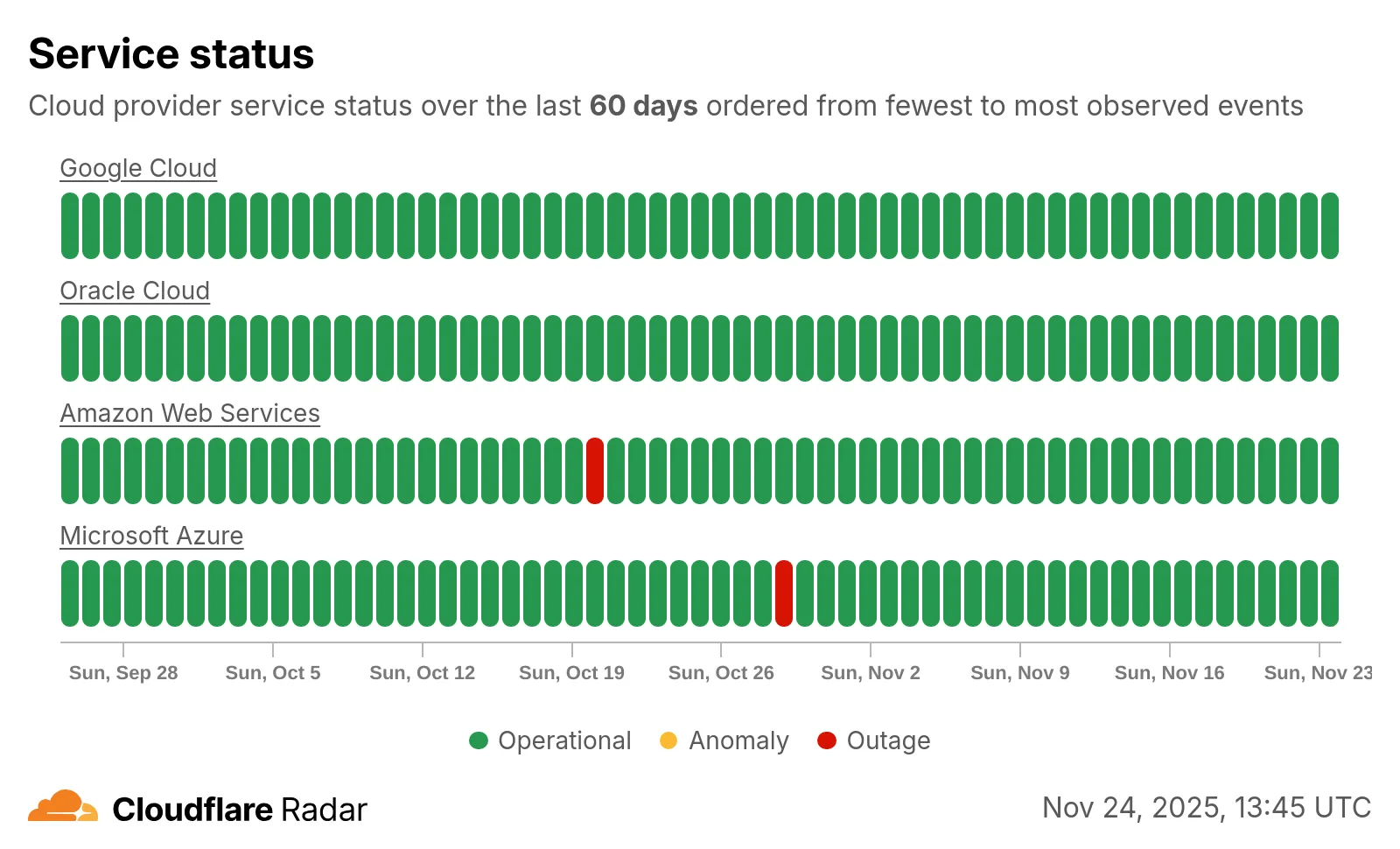
  • Radar – Cloud Services Observability in Cloudflare Radar

    Radar introduces HTTP Origins insights, providing visibility into the status of traffic between Cloudflare’s global network and cloud-based origin infrastructure.

    The new Origins API provides provides the following endpoints:

    • /origins – Lists all origins (cloud providers and associated regions).
    • /origins/{origin} – Retrieves information about a specific origin (cloud provider).
    • /origins/timeseries – Retrieves normalized time series data for a specific origin, including the following metrics:
      • REQUESTS: Number of requests
      • CONNECTION_FAILURES: Number of connection failures
      • RESPONSE_HEADER_RECEIVE_DURATION: Duration of the response header receive
      • TCP_HANDSHAKE_DURATION: Duration of the TCP handshake
      • TCP_RTT: TCP round trip time
      • TLS_HANDSHAKE_DURATION: Duration of the TLS handshake
    • /origins/summary – Retrieves HTTP requests to origins summarized by a dimension.
    • /origins/timeseries_groups – Retrieves timeseries data for HTTP requests to origins grouped by a dimension.

    The following dimensions are available for the summary and timeseries_groups endpoints:

    • region: Origin region
    • success_rate: Success rate of requests (2XX versus 5XX response codes)
    • percentile: Percentiles of metrics listed above

    Additionally, the Annotations and Traffic Anomalies APIs have been extended to support origin outages and anomalies, enabling automated detection and alerting for origin infrastructure issues.

    Screenshot of the cloud service status heatmap

    Check out the new Radar page.

  • Radar – Cloud Services Observability in Cloudflare Radar

    Radar introduces HTTP Origins insights, providing visibility into the status of traffic between Cloudflare’s global network and cloud-based origin infrastructure.

    The new Origins API provides provides the following endpoints:

    • /origins – Lists all origins (cloud providers and associated regions).
    • /origins/{origin} – Retrieves information about a specific origin (cloud provider).
    • /origins/timeseries – Retrieves normalized time series data for a specific origin, including the following metrics:
      • REQUESTS: Number of requests
      • CONNECTION_FAILURES: Number of connection failures
      • RESPONSE_HEADER_RECEIVE_DURATION: Duration of the response header receive
      • TCP_HANDSHAKE_DURATION: Duration of the TCP handshake
      • TCP_RTT: TCP round trip time
      • TLS_HANDSHAKE_DURATION: Duration of the TLS handshake
    • /origins/summary – Retrieves HTTP requests to origins summarized by a dimension.
    • /origins/timeseries_groups – Retrieves timeseries data for HTTP requests to origins grouped by a dimension.

    The following dimensions are available for the summary and timeseries_groups endpoints:

    • region: Origin region
    • success_rate: Success rate of requests (2XX versus 5XX response codes)
    • percentile: Percentiles of metrics listed above

    Additionally, the Annotations and Traffic Anomalies APIs have been extended to support origin outages and anomalies, enabling automated detection and alerting for origin infrastructure issues.

    Screenshot of the cloud service status heatmap

    Check out the new Radar page.

  • Radar – Cloud Services Observability in Cloudflare Radar

    Radar introduces HTTP Origins insights, providing visibility into the status of traffic between Cloudflare’s global network and cloud-based origin infrastructure.

    The new Origins API provides provides the following endpoints:

    • /origins – Lists all origins (cloud providers and associated regions).
    • /origins/{origin} – Retrieves information about a specific origin (cloud provider).
    • /origins/timeseries – Retrieves normalized time series data for a specific origin, including the following metrics:
      • REQUESTS: Number of requests
      • CONNECTION_FAILURES: Number of connection failures
      • RESPONSE_HEADER_RECEIVE_DURATION: Duration of the response header receive
      • TCP_HANDSHAKE_DURATION: Duration of the TCP handshake
      • TCP_RTT: TCP round trip time
      • TLS_HANDSHAKE_DURATION: Duration of the TLS handshake
    • /origins/summary – Retrieves HTTP requests to origins summarized by a dimension.
    • /origins/timeseries_groups – Retrieves timeseries data for HTTP requests to origins grouped by a dimension.

    The following dimensions are available for the summary and timeseries_groups endpoints:

    • region: Origin region
    • success_rate: Success rate of requests (2XX versus 5XX response codes)
    • percentile: Percentiles of metrics listed above

    Additionally, the Annotations and Traffic Anomalies APIs have been extended to support origin outages and anomalies, enabling automated detection and alerting for origin infrastructure issues.

    Screenshot of the cloud service status heatmap

    Check out the new Radar page.

  • Radar – Cloud Services Observability in Cloudflare Radar

    Radar introduces HTTP Origins insights, providing visibility into the status of traffic between Cloudflare’s global network and cloud-based origin infrastructure.

    The new Origins API provides provides the following endpoints:

    • /origins – Lists all origins (cloud providers and associated regions).
    • /origins/{origin} – Retrieves information about a specific origin (cloud provider).
    • /origins/timeseries – Retrieves normalized time series data for a specific origin, including the following metrics:
      • REQUESTS: Number of requests
      • CONNECTION_FAILURES: Number of connection failures
      • RESPONSE_HEADER_RECEIVE_DURATION: Duration of the response header receive
      • TCP_HANDSHAKE_DURATION: Duration of the TCP handshake
      • TCP_RTT: TCP round trip time
      • TLS_HANDSHAKE_DURATION: Duration of the TLS handshake
    • /origins/summary – Retrieves HTTP requests to origins summarized by a dimension.
    • /origins/timeseries_groups – Retrieves timeseries data for HTTP requests to origins grouped by a dimension.

    The following dimensions are available for the summary and timeseries_groups endpoints:

    • region: Origin region
    • success_rate: Success rate of requests (2XX versus 5XX response codes)
    • percentile: Percentiles of metrics listed above

    Additionally, the Annotations and Traffic Anomalies APIs have been extended to support origin outages and anomalies, enabling automated detection and alerting for origin infrastructure issues.

    Screenshot of the cloud service status heatmap

    Check out the new Radar page.

  • Radar – Cloud Services Observability in Cloudflare Radar

    Radar introduces HTTP Origins insights, providing visibility into the status of traffic between Cloudflare’s global network and cloud-based origin infrastructure.

    The new Origins API provides provides the following endpoints:

    • /origins – Lists all origins (cloud providers and associated regions).
    • /origins/{origin} – Retrieves information about a specific origin (cloud provider).
    • /origins/timeseries – Retrieves normalized time series data for a specific origin, including the following metrics:
      • REQUESTS: Number of requests
      • CONNECTION_FAILURES: Number of connection failures
      • RESPONSE_HEADER_RECEIVE_DURATION: Duration of the response header receive
      • TCP_HANDSHAKE_DURATION: Duration of the TCP handshake
      • TCP_RTT: TCP round trip time
      • TLS_HANDSHAKE_DURATION: Duration of the TLS handshake
    • /origins/summary – Retrieves HTTP requests to origins summarized by a dimension.
    • /origins/timeseries_groups – Retrieves timeseries data for HTTP requests to origins grouped by a dimension.

    The following dimensions are available for the summary and timeseries_groups endpoints:

    • region: Origin region
    • success_rate: Success rate of requests (2XX versus 5XX response codes)
    • percentile: Percentiles of metrics listed above

    Additionally, the Annotations and Traffic Anomalies APIs have been extended to support origin outages and anomalies, enabling automated detection and alerting for origin infrastructure issues.

    Screenshot of the cloud service status heatmap

    Check out the new Radar page.