Blog

  • Radar – Cloud Services Observability in Cloudflare Radar

    Radar introduces HTTP Origins insights, providing visibility into the status of traffic between Cloudflare’s global network and cloud-based origin infrastructure.

    The new Origins API provides provides the following endpoints:

    • /origins – Lists all origins (cloud providers and associated regions).
    • /origins/{origin} – Retrieves information about a specific origin (cloud provider).
    • /origins/timeseries – Retrieves normalized time series data for a specific origin, including the following metrics:
      • REQUESTS: Number of requests
      • CONNECTION_FAILURES: Number of connection failures
      • RESPONSE_HEADER_RECEIVE_DURATION: Duration of the response header receive
      • TCP_HANDSHAKE_DURATION: Duration of the TCP handshake
      • TCP_RTT: TCP round trip time
      • TLS_HANDSHAKE_DURATION: Duration of the TLS handshake
    • /origins/summary – Retrieves HTTP requests to origins summarized by a dimension.
    • /origins/timeseries_groups – Retrieves timeseries data for HTTP requests to origins grouped by a dimension.

    The following dimensions are available for the summary and timeseries_groups endpoints:

    • region: Origin region
    • success_rate: Success rate of requests (2XX versus 5XX response codes)
    • percentile: Percentiles of metrics listed above

    Additionally, the Annotations and Traffic Anomalies APIs have been extended to support origin outages and anomalies, enabling automated detection and alerting for origin infrastructure issues.
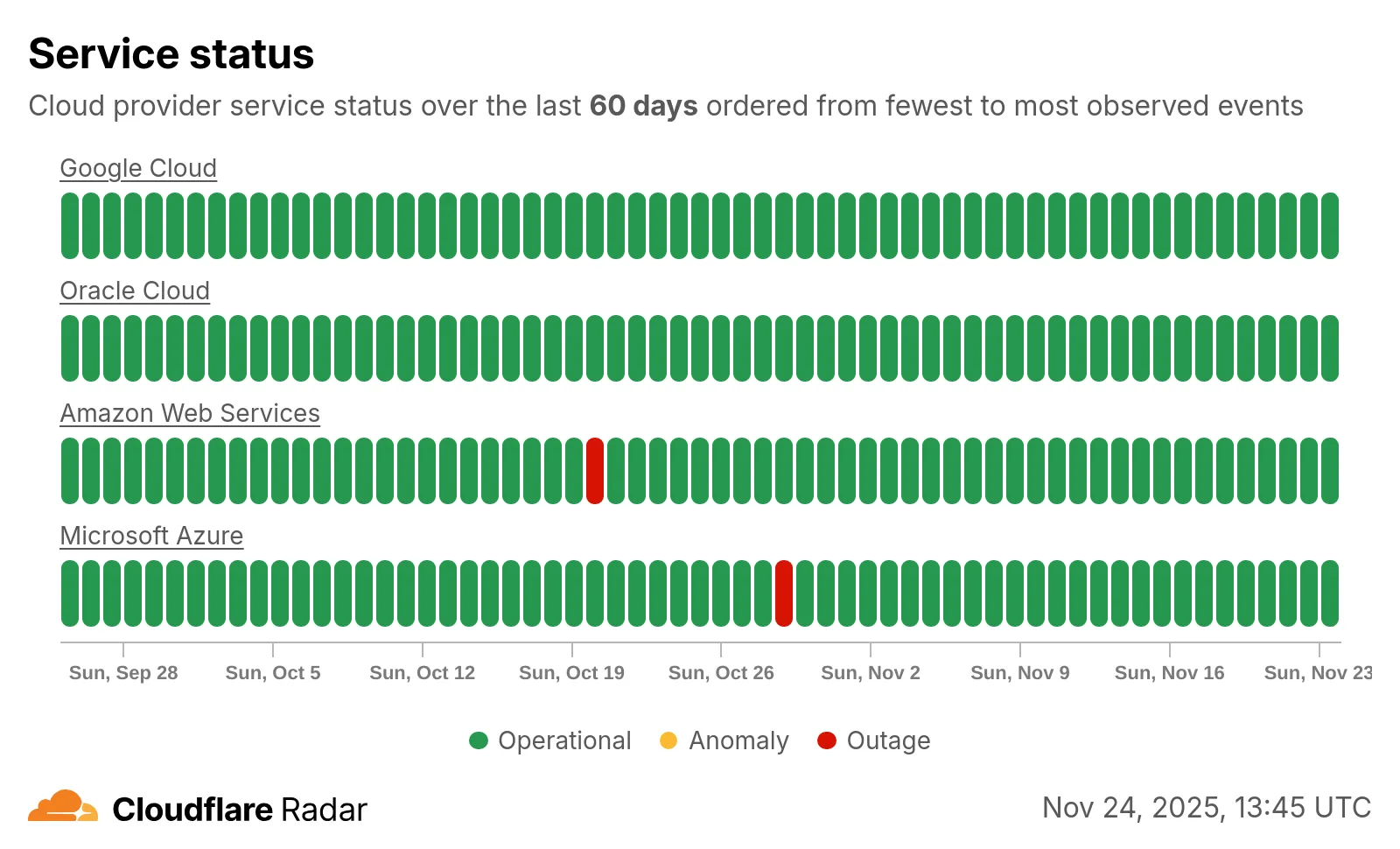
    Screenshot of the cloud service status heatmap

    Check out the new Radar page.

  • Radar – Cloud Services Observability in Cloudflare Radar

    Radar introduces HTTP Origins insights, providing visibility into the status of traffic between Cloudflare’s global network and cloud-based origin infrastructure.

    The new Origins API provides provides the following endpoints:

    • /origins – Lists all origins (cloud providers and associated regions).
    • /origins/{origin} – Retrieves information about a specific origin (cloud provider).
    • /origins/timeseries – Retrieves normalized time series data for a specific origin, including the following metrics:
      • REQUESTS: Number of requests
      • CONNECTION_FAILURES: Number of connection failures
      • RESPONSE_HEADER_RECEIVE_DURATION: Duration of the response header receive
      • TCP_HANDSHAKE_DURATION: Duration of the TCP handshake
      • TCP_RTT: TCP round trip time
      • TLS_HANDSHAKE_DURATION: Duration of the TLS handshake
    • /origins/summary – Retrieves HTTP requests to origins summarized by a dimension.
    • /origins/timeseries_groups – Retrieves timeseries data for HTTP requests to origins grouped by a dimension.

    The following dimensions are available for the summary and timeseries_groups endpoints:

    • region: Origin region
    • success_rate: Success rate of requests (2XX versus 5XX response codes)
    • percentile: Percentiles of metrics listed above

    Additionally, the Annotations and Traffic Anomalies APIs have been extended to support origin outages and anomalies, enabling automated detection and alerting for origin infrastructure issues.

    Screenshot of the cloud service status heatmap

    Check out the new Radar page.

  • Radar – Cloud Services Observability in Cloudflare Radar

    Radar introduces HTTP Origins insights, providing visibility into the status of traffic between Cloudflare’s global network and cloud-based origin infrastructure.

    The new Origins API provides provides the following endpoints:

    • /origins – Lists all origins (cloud providers and associated regions).
    • /origins/{origin} – Retrieves information about a specific origin (cloud provider).
    • /origins/timeseries – Retrieves normalized time series data for a specific origin, including the following metrics:
      • REQUESTS: Number of requests
      • CONNECTION_FAILURES: Number of connection failures
      • RESPONSE_HEADER_RECEIVE_DURATION: Duration of the response header receive
      • TCP_HANDSHAKE_DURATION: Duration of the TCP handshake
      • TCP_RTT: TCP round trip time
      • TLS_HANDSHAKE_DURATION: Duration of the TLS handshake
    • /origins/summary – Retrieves HTTP requests to origins summarized by a dimension.
    • /origins/timeseries_groups – Retrieves timeseries data for HTTP requests to origins grouped by a dimension.

    The following dimensions are available for the summary and timeseries_groups endpoints:

    • region: Origin region
    • success_rate: Success rate of requests (2XX versus 5XX response codes)
    • percentile: Percentiles of metrics listed above

    Additionally, the Annotations and Traffic Anomalies APIs have been extended to support origin outages and anomalies, enabling automated detection and alerting for origin infrastructure issues.

    Screenshot of the cloud service status heatmap

    Check out the new Radar page.

  • Workers – Wrangler and the Cloudflare Vite plugin support `.env` files in local development

    Now, you can use .env files to provide secrets and override environment variables on the env object during local development with Wrangler and the Cloudflare Vite plugin.

    Previously in local development, if you wanted to provide secrets or environment variables during local development, you had to use .dev.vars files.
    This is still supported, but you can now also use .env files, which are more familiar to many developers.

    Using .env files in local development

    You can create a .env file in your project root to define environment variables that will be used when running wrangler dev or vite dev. The .env file should be formatted like a dotenv file, such as KEY="VALUE":

    TITLE="My Worker"
    API_TOKEN="dev-token"

    When you run wrangler dev or vite dev, the environment variables defined in the .env file will be available in your Worker code via the env object:

    export default {
    async fetch(request, env) {
    const title = env.TITLE; // "My Worker"
    const apiToken = env.API_TOKEN; // "dev-token"
    const response = await fetch(
    `https://api.example.com/data?token=${apiToken}`,
    );
    return new Response(`Title: ${title} - ` + (await response.text()));
    },
    };

    Multiple environments with .env files

    You may be using Cloudflare Environments to deploy different versions of a Worker with distinct environment variables. For instance, you may have a production and staging environment.

    To set different environment variables for each Cloudflare Environment, create files named .env.<environment-name>.

    When you use wrangler <command> --env <environment-name> or CLOUDFLARE_ENV=<environment-name> vite dev, the corresponding environment-specific file will also be loaded and merged with the .env file.

    For example, if you want to set different environment variables for the staging environment, you can create a file named .env.staging:

    API_TOKEN="staging-token"

    When you run wrangler dev --env staging or CLOUDFLARE_ENV=staging vite dev, the environment variables from .env.staging will be merged onto those from .env.

    export default {
    async fetch(request, env) {
    const title = env.TITLE; // "My Worker" (from `.env`)
    const apiToken = env.API_TOKEN; // "staging-token" (from `.env.staging`, overriding the value from `.env`)
    const response = await fetch(
    `https://api.example.com/data?token=${apiToken}`,
    );
    return new Response(`Title: ${title} - ` + (await response.text()));
    },
    };

    Find out more

    For more information on how to use .env files with Wrangler and the Cloudflare Vite plugin, see the following documentation:

  • Workers – Wrangler and the Cloudflare Vite plugin support `.env` files in local development

    Now, you can use .env files to provide secrets and override environment variables on the env object during local development with Wrangler and the Cloudflare Vite plugin.

    Previously in local development, if you wanted to provide secrets or environment variables during local development, you had to use .dev.vars files.
    This is still supported, but you can now also use .env files, which are more familiar to many developers.

    Using .env files in local development

    You can create a .env file in your project root to define environment variables that will be used when running wrangler dev or vite dev. The .env file should be formatted like a dotenv file, such as KEY="VALUE":

    TITLE="My Worker"
    API_TOKEN="dev-token"

    When you run wrangler dev or vite dev, the environment variables defined in the .env file will be available in your Worker code via the env object:

    export default {
    async fetch(request, env) {
    const title = env.TITLE; // "My Worker"
    const apiToken = env.API_TOKEN; // "dev-token"
    const response = await fetch(
    `https://api.example.com/data?token=${apiToken}`,
    );
    return new Response(`Title: ${title} - ` + (await response.text()));
    },
    };

    Multiple environments with .env files

    You may be using Cloudflare Environments to deploy different versions of a Worker with distinct environment variables. For instance, you may have a production and staging environment.

    To set different environment variables for each Cloudflare Environment, create files named .env.<environment-name>.

    When you use wrangler <command> --env <environment-name> or CLOUDFLARE_ENV=<environment-name> vite dev, the corresponding environment-specific file will also be loaded and merged with the .env file.

    For example, if you want to set different environment variables for the staging environment, you can create a file named .env.staging:

    API_TOKEN="staging-token"

    When you run wrangler dev --env staging or CLOUDFLARE_ENV=staging vite dev, the environment variables from .env.staging will be merged onto those from .env.

    export default {
    async fetch(request, env) {
    const title = env.TITLE; // "My Worker" (from `.env`)
    const apiToken = env.API_TOKEN; // "staging-token" (from `.env.staging`, overriding the value from `.env`)
    const response = await fetch(
    `https://api.example.com/data?token=${apiToken}`,
    );
    return new Response(`Title: ${title} - ` + (await response.text()));
    },
    };

    Find out more

    For more information on how to use .env files with Wrangler and the Cloudflare Vite plugin, see the following documentation:

  • Stream – Introducing observability and metrics for Stream Live Inputs

    New information about broadcast metrics and events is now available in
    Cloudflare Stream in the Live Input details of the Dashboard.

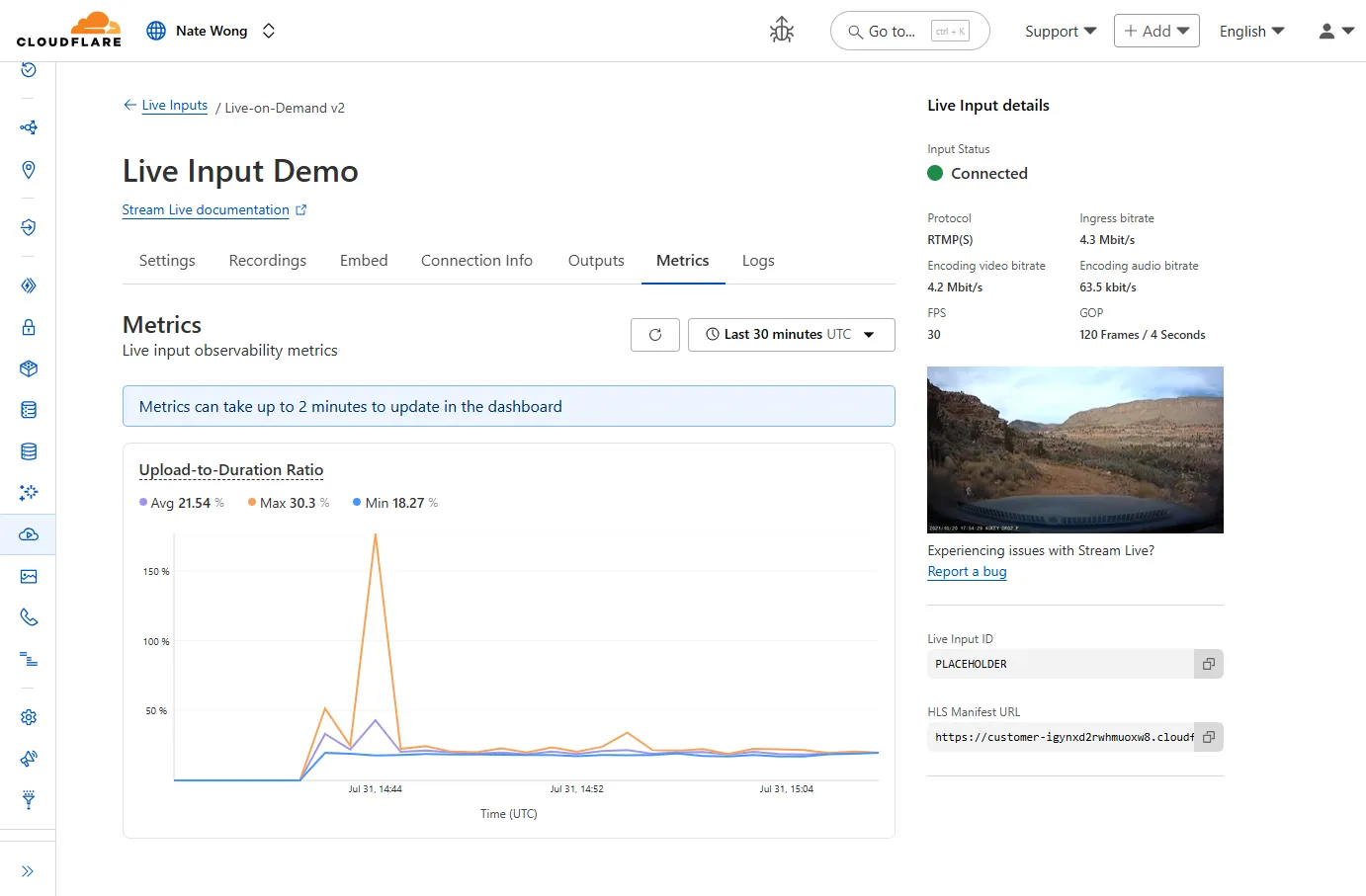
    Live Input details showing metrics

    You can now easily understand broadcast-side health and performance with new
    observability, which can help when troubleshooting common issues, particularly
    for new customers who are just getting started, and platform customers who may
    have limited visibility into how their end-users configure their encoders.

    To get started, start a live stream (just getting started?), then visit the Live Input details page in Dash.

    See our new live Troubleshooting guide
    to learn what these metrics mean and how to use them to address common broadcast
    issues.

  • Stream – Introducing observability and metrics for Stream Live Inputs

    New information about broadcast metrics and events is now available in
    Cloudflare Stream in the Live Input details of the Dashboard.

    Live Input details showing metrics

    You can now easily understand broadcast-side health and performance with new
    observability, which can help when troubleshooting common issues, particularly
    for new customers who are just getting started, and platform customers who may
    have limited visibility into how their end-users configure their encoders.

    To get started, start a live stream (just getting started?), then visit the Live Input details page in Dash.

    See our new live Troubleshooting guide
    to learn what these metrics mean and how to use them to address common broadcast
    issues.

  • Stream – Introducing observability and metrics for Stream Live Inputs

    New information about broadcast metrics and events is now available in
    Cloudflare Stream in the Live Input details of the Dashboard.

    Live Input details showing metrics

    You can now easily understand broadcast-side health and performance with new
    observability, which can help when troubleshooting common issues, particularly
    for new customers who are just getting started, and platform customers who may
    have limited visibility into how their end-users configure their encoders.

    To get started, start a live stream (just getting started?), then visit the Live Input details page in Dash.

    See our new live Troubleshooting guide
    to learn what these metrics mean and how to use them to address common broadcast
    issues.

  • WAF – WAF Release – 2025-08-07 – Emergency

    This week’s highlight focuses on two critical vulnerabilities affecting key infrastructure and enterprise content management platforms. Both flaws present significant remote code execution risks that can be exploited with minimal or no user interaction.

    Key Findings

    • Squid (≤6.3) — CVE-2025-54574: A heap buffer overflow occurs when processing Uniform Resource Names (URNs). This vulnerability may allow remote attackers to execute arbitrary code on the server. The issue has been resolved in version 6.4.

    • Adobe AEM (≤6.5.23) — CVE-2025-54253: Due to a misconfiguration, attackers can achieve remote code execution without requiring any user interaction, posing a severe threat to affected deployments.

    Impact

    Both vulnerabilities expose critical attack vectors that can lead to full server compromise. The Squid heap buffer overflow allows remote code execution by crafting malicious URNs, which can lead to server takeover or denial of service. Given Squid’s widespread use as a caching proxy, this flaw could be exploited to disrupt network traffic or gain footholds inside secure environments.

    Adobe AEM’s remote code execution vulnerability enables attackers to run arbitrary code on the content management server without any user involvement. This puts sensitive content, application integrity, and the underlying infrastructure at extreme risk. Exploitation could lead to data theft, defacement, or persistent backdoor installation.

    These findings reinforce the urgency of updating to the patched versions — Squid 6.4 and Adobe AEM 6.5.24 or later — and reviewing configurations to prevent exploitation.

    Ruleset Rule ID Legacy Rule ID Description Previous Action New Action Comments
    Cloudflare Managed Ruleset f61ed7c1e7e24c3380289e41ef7e015b 100844 Adobe Experience Manager Forms – Remote Code Execution – CVE:CVE-2025-54253 N/A Block This is a New Detection
    Cloudflare Managed Ruleset e76e65f5a3aa43f49e0684a6baec057a 100840 Squid – Buffer Overflow – CVE:CVE-2025-54574 N/A Block This is a New Detection
  • Radar – Certificate Transparency Insights in Cloudflare Radar

    Radar now introduces Certificate Transparency (CT) insights, providing visibility into certificate issuance trends based on Certificate Transparency logs currently monitored by Cloudflare.

    The following API endpoints are now available:

    For the summary and timeseries_groups endpoints, the following dimensions are available (and also usable as filters):

    • ca: Certification Authority (certificate issuer)
    • ca_owner: Certification Authority Owner
    • duration: Certificate validity duration (between NotBefore and NotAfter dates)
    • entry_type: Entry type (certificate vs. pre-certificate)
    • expiration_status: Expiration status (valid vs. expired)
    • has_ips: Presence of IP addresses in certificate Subject Alternative Names (SANs)
    • has_wildcards: Presence of wildcard DNS names in certificate SANs
    • log: CT log name
    • log_api: CT log API (RFC6962 vs. Static)
    • log_operator: CT log operator
    • public_key_algorithm: Public key algorithm of certificate’s key
    • signature_algorithm: Signature algorithm used by CA to sign certificate
    • tld: Top-level domain for DNS names found in certificates SANs
    • validation_level: Validation level

    Check out the new Certificate Transparency insights in the new Radar page.